
 ChatGPT
 Perplexity

Your first enterprise deal will test the tenancy model you picked at launch. This multi-tenant architecture guide helps CTOs choose isolation and identity setups, and plan a path to dedicated stacks.
Highlights
- Choose the tenancy model per layer and per tenant, and keep it changeable.
- Put the tenant into data, keys and every request from the first release.
- Enterprise contracts and new regions are the usual reasons to move a tenant.
Multi-tenant SaaS architecture serves many customer organizations, called tenants, from shared code and infrastructure while keeping each tenant's data, settings and access separate. Multitenancy lets those tenants share resources, and the isolation controls you build decide how reliably the product keeps them apart.
The model chosen at launch usually holds until the first enterprise prospect sends a security questionnaire or a new market asks where its data lives. Then the question gets specific: Can you isolate one customer, enforce their SSO policy and host them in their region without rewriting the product?
We've worked through these decisions on B2B products, including the FITR platform for coaches who work across gyms and fitness brands, and the Wise Up module for WKO, the Austrian Chamber of Commerce.
Our architecture advisory work starts where this guide does: what your current model can carry and what changing it will take.
If your next deal depends on proving tenant separation, we can map with you what your current tenancy model already guarantees and where an enterprise contract would ask for more.
What multi-tenancy means in a B2B SaaS product
A tenant is the customer boundary in your product: an organization, account or workspace where a group of users does its work. Multi-tenant software shares some components across tenants, such as code, compute or databases, and controls access so each tenant reaches only its own data and configuration.
Tip: Large customers sometimes need several tenants, for example one per division or region.
Microsoft's tenancy models guide separates logical tenants from deployments and treats isolation as a spectrum that can differ by component. In a multi-tenant architecture, that split lets you move a tenant to another deployment while its identity and access rules stay put. The guide separates three decisions:
- Tenant: the customer organization that owns tenant-specific data and manages user memberships.
- Deployment: the infrastructure a tenant runs on, shared or dedicated.
- Isolation level: how strictly each layer (compute, storage, network, keys) separates tenants.
The same guide notes that when tenants share a deployment, you typically rely on application code and a tenant identifier in the database to keep data apart. That's why isolation in a multi-tenant application has to hold in every code path that touches data.
Product strategy, billing and SaaS metrics belong to the wider SaaS application development process; this guide covers the tenancy layer underneath.
Single-tenant vs multi-tenant: cost, security and sales trade-offs
A single-tenant setup gives each customer dedicated resources. Isolation is easier to show and per-customer configuration easier to grant, but infrastructure and operations grow with every account. A multi-tenant setup shares resources, which can lower cost per customer and lets one release process serve every tenant, provided code, configuration and tests keep isolation in place.
| Aspect | Single-tenant | Multi-tenant |
|---|---|---|
| Data isolation | Separate deployment, simple to show auditors | Enforced by code, database policies and tests |
| Customization | Per-customer configuration, even separate versions | Tenant settings and feature flags in one codebase |
| Scaling | A new stack for each customer | Shared pools scaled by total load |
| Cost per customer | Each stack paid separately | Shared capacity can lower it, depending on load |
| Maintenance | Many stacks to update, needs automation | Common release process across deployments, staged rollout advised |
| Performance | Other tenants' load rarely reaches it | Needs per-tenant quotas against noisy neighbors |
| Failure scope | An incident usually stays in one stack | A shared component failure can reach every tenant |
Microsoft's guide puts the cost directly: if one tenant needs a given infrastructure cost, 100 tenants probably need 100 times that cost.
Pros and cons of each model
Dedicated stacks pay off when the customer count stays small or isolation requirements justify the cost, infrastructure as code keeps every stack on the same version, and fleet-wide reporting is planned, because data now lives in many deployments.
A shared platform pays off when isolation is tested in every data path (beyond the main screens), per-tenant quotas keep one heavy customer within its allocation, and releases roll out in stages, since one bad change can affect many tenants at once.
What the choice means for enterprise deals
For a founder, the tenancy model shows up on both the P&L and the pipeline. Gross margin per customer depends on how much infrastructure each account consumes, and onboarding speed depends on whether a new customer is a database row or a provisioning job.
Enterprise procurement also asks, in writing, how its data is kept apart from other customers' data. A common answer is a multi-tenant architecture for most accounts plus a dedicated option at a higher price, which Microsoft's guide also describes as a way to recover the cost of isolated deployments.
Three tenancy models: pool, bridge and silo
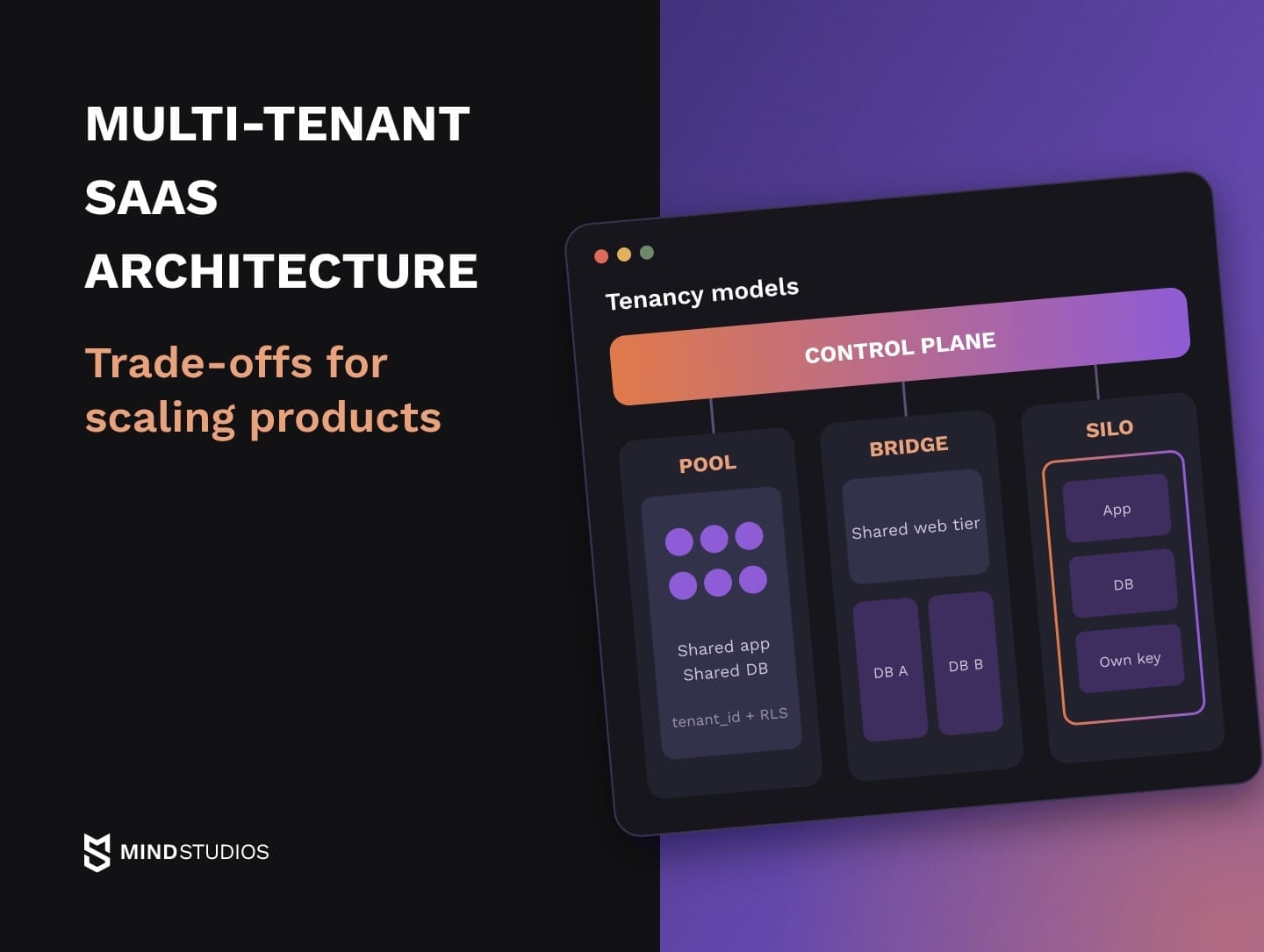
The AWS SaaS Lens defines three models. In a silo, a tenant gets dedicated resources. In a pool, tenants share resources. A bridge mixes the two, for example a shared web tier with a dedicated database.
Tenant isolation gets stronger toward silo and cost efficiency gets better toward pool, and many products use different models in different layers. In the AWS definition, even a silo shares identity, onboarding and operations through one control plane, which keeps a dedicated stack inside your SaaS product.
| Model | Shared vs dedicated | Fits |
|---|---|---|
| Pool | Compute, storage and messaging shared | Most accounts, trials, self-service tiers |
| Bridge | Some layers shared, others per tenant | Mixed customer base, regulated data in one service |
| Silo | Whole stack dedicated, control plane shared | Strict isolation, residency, enterprise contracts |
Bridge is common because, as AWS explains, a service's regulatory profile and noisy-neighbor behavior can push it toward silo while another service's access patterns and cost profile push it toward pool.
Moving tenants along the spectrum
A pooled deployment suits customers with similar requirements, which is why many B2B products begin there. If early contracts already require dedicated resources, starting with a bridge or silo option for those accounts can be the cheaper path.
As larger accounts arrive, individual tenants or layers move toward silo: a dedicated database for a regulated customer, a separate deployment for heavy load, a regional stack for a new market. Microsoft's guide calls these vertically partitioned deployments (some tenants on dedicated infrastructure) and horizontally partitioned deployments (a shared application tier with per-tenant databases).
The same guide names the catch: the codebase must support both shared and dedicated deployments. Every multi-tenant architecture that plans a dedicated tier needs routing, deployment automation and data access that behave identically in both modes.
If your platform still runs on-premise, our guide to moving enterprise systems to the cloud covers that step first.
Multi-tenant data architecture: how to isolate tenant data
Multi-tenant data architecture decides where tenant rows live in a multi-tenant database: in shared tables with a tenant identifier, in a schema per tenant or in a database per tenant. Each step toward separation gives a clearer boundary and raises the cost of migrations, operations and cross-tenant reporting.
| Model | Strength | Costly at scale |
|---|---|---|
| Shared schema with RLS | Lower running cost, one migration, simple analytics | Per-tenant restore, proving isolation, hot tables |
| Schema per tenant | Clear boundary, single-schema export | Migrations run once per schema |
| Database per tenant | Separate backups and per-tenant restore | Infrastructure, fleet-wide migrations and reporting |
Because the storage model can be a property of the tenant, one product can keep most customers in a shared schema and give a few enterprise accounts their own databases, with a tenant catalog routing each request to the right database.
Shared schema with row-level security
In the shared model, every tenant-owned table carries a tenant_id. Once row-level security is enabled and PostgreSQL's row security policies compare that column with a verified tenant context, the database can limit each query to that tenant's rows, even when application code misses a filter.
The guardrail has conditions. Superusers and roles with the BYPASSRLS attribute always bypass row security, and table owners do too unless the table is set to FORCE ROW LEVEL SECURITY. So the application should connect through a dedicated role that owns no tables and has no bypass rights, and reset the tenant context whenever a pooled connection is reused.
Schema per tenant
A schema per tenant gives each customer its own tables inside one database. PostgreSQL's pg_dump utility can export a single schema and its objects. Because that export may leave out dependencies outside the schema, restoring it into an empty database needs testing.
The cost shows up in migrations: every schema change runs once per tenant, and a deploy has to track partial failures until all schemas succeed.
Database per tenant
A database per tenant is the silo option at the data layer, with separate backups and a clean per-tenant restore. Its isolation depends on what sits underneath: databases on one shared server still share its compute, storage and failure domain.
Mind Studios' insight: If records belong to a tenant, tenant_id in their primary keys and unique constraints scopes uniqueness per tenant and lets composite foreign keys block links to another tenant's rows. Added after launch, it means rewriting live keys and relationships, which makes moving one tenant into its own database harder. Global entities such as user identities can stay outside tenants.
Tenant identity and access: SSO, roles and switching between accounts
In a multi-tenant SaaS product, the user is a global identity while memberships and roles live inside each tenant. SSO through SAML or OIDC and MFA become policies that each customer's admin controls. On every request, the server checks the active tenant against the user's membership and the owner of the resource.
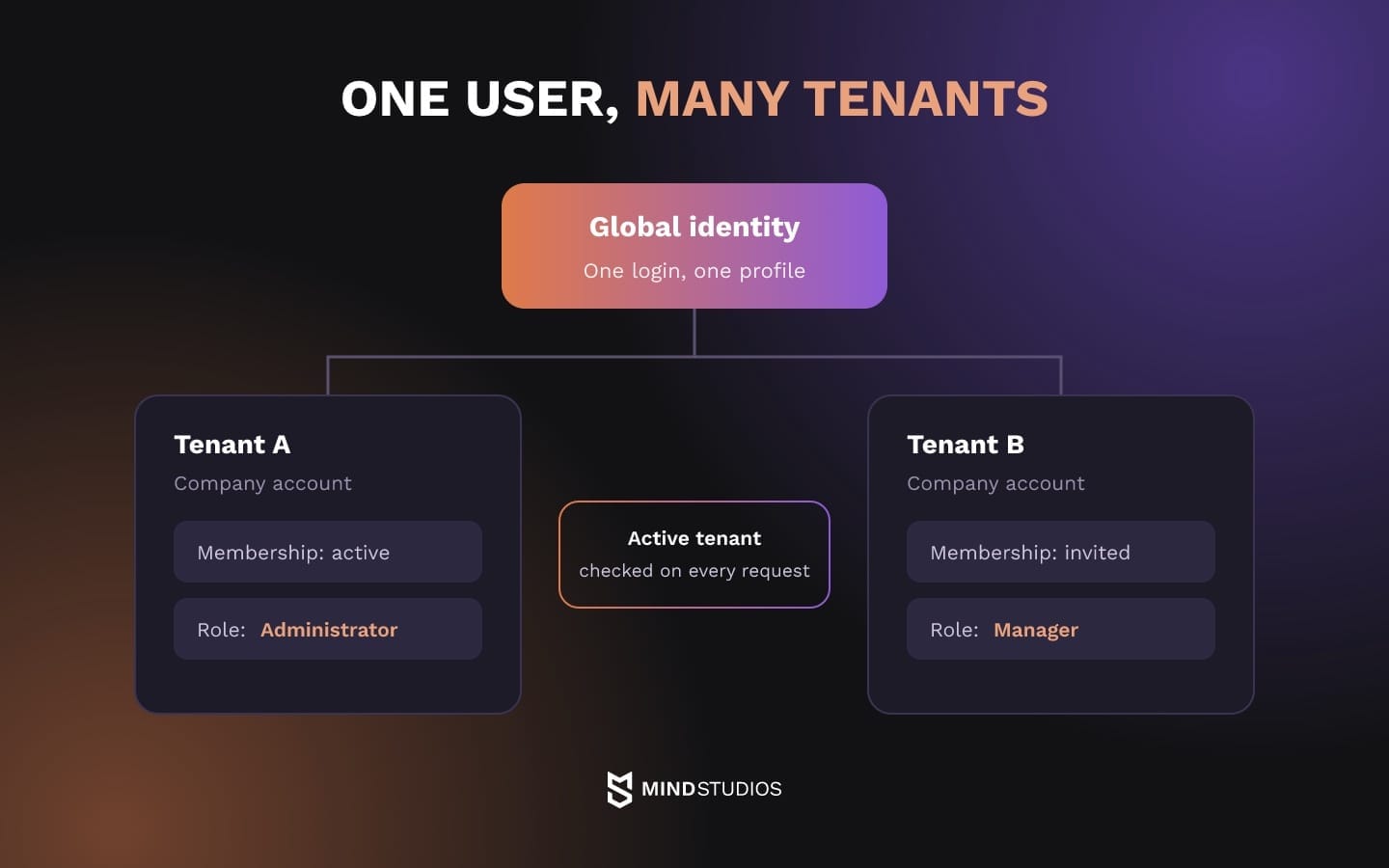
That check answers two separate questions:
- Authentication: who the user is, verified by your identity provider or by the tenant's own SSO.
- Authorization: what this user may do in this tenant, based on membership, role and which tenant owns the resource.
Enterprise SSO and tenant-level policies
Enterprise customers expect their identity provider to control access: their users sign in through company SSO, and their admins decide whether MFA is mandatory. SSO configuration therefore becomes tenant data, stored and audited per customer.
Offboarding takes work on your side too. Disabling a user in the customer's directory blocks new sign-ins, yet sessions your application already issued stay valid until they expire.
Microsoft's access revocation guide notes that the identity provider can't directly revoke those tokens and recommends automated deprovisioning plus applications that revoke their own sessions.
On Wise Up, we applied the single sign-on authentication scheme: users sign in once in the account management module, and SSO handles their registration in the EdCast LMS.
We also built two admin panels, one for company representatives who manage employees inside company accounts and one for WKO staff who handle client interactions and support. Both panels have three roles: owner, administrator and manager.
When internal staff and customer admins share one product, their permission scopes and audit trails need clear boundaries, and separate identity types are one way to draw them.
Users who belong to several tenants
Consultants, agencies and coaches often work with several customers at once, so one login has to reach several tenants without merging their data. On FITR, we implemented functionality that enables trainers to use multiple coach accounts. Coaches join teams and brands with their personal profiles through an invite from the brand or gym owner.
When a coach switches the active team on one device, FITR switches the coach's other logged-in devices automatically. On the server side, the active tenant is verified on every request, because a value cached on a client can be stale or tampered with.
If enterprise buyers are asking for SSO, deprovisioning and admin roles per account, our team can review how your identity model maps users to tenants before the integration work starts.
Noisy neighbors and cost per tenant: keeping shared resources fair
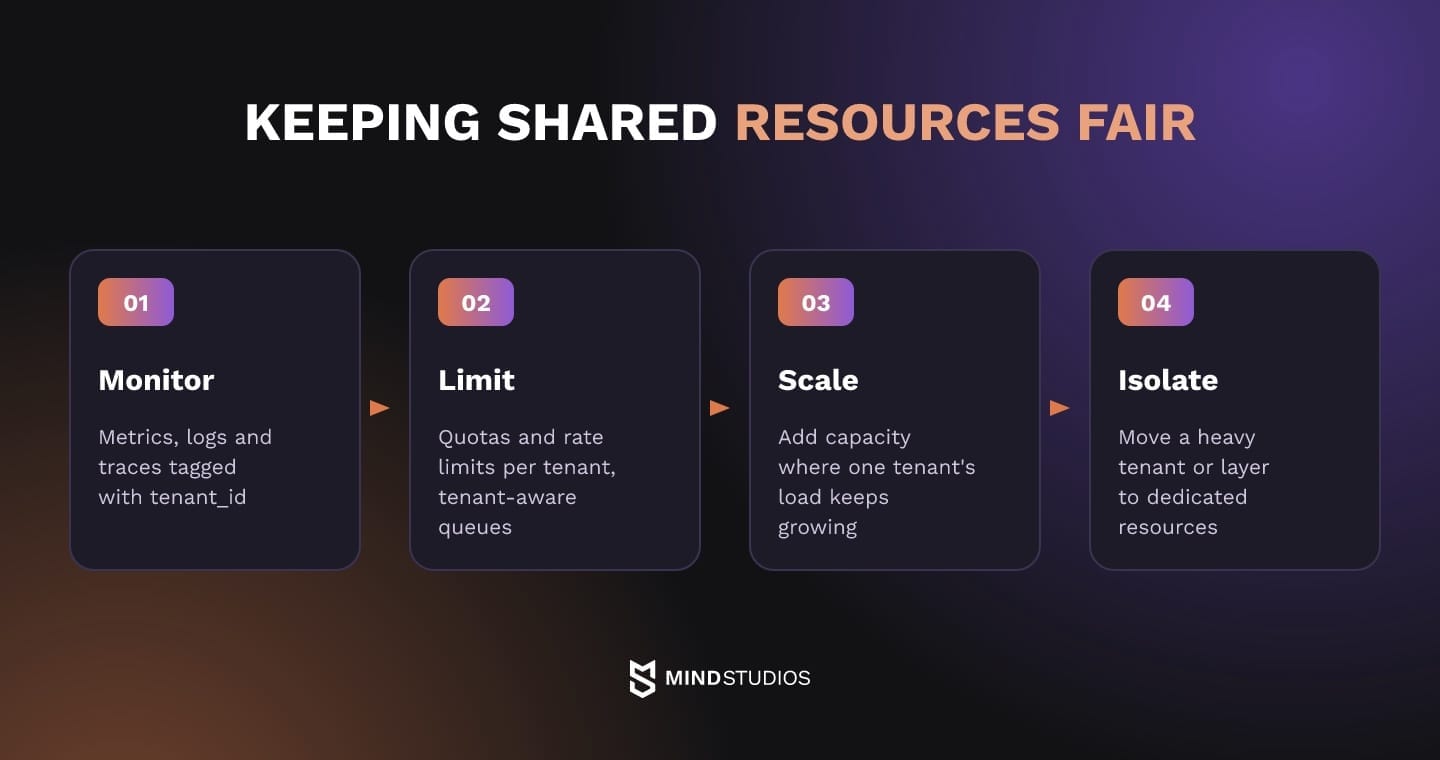
A shared multi-tenant platform splits capacity among tenants, so one tenant running heavy reports, bulk imports or a flood of background jobs can slow everyone else down. Microsoft's noisy neighbor guidance treats this as resource governance: monitor usage per tenant, enforce quotas and rate limits, and keep capacity or isolation available for the tenants who need it.
Runtime isolation
In practice, that means:
- Quotas and rate limits: apply per tenant to API calls, exports and heavy queries.
- Tenant-aware queues: one tenant's backlog can't hold up others.
- Per-tenant telemetry: metrics, logs and traces tagged with tenant_id.
- Tenant kill switch: pauses one tenant's jobs or integrations without a deploy.
Red flag: One global API limit shared by all tenants. When one customer's integration gets stuck in a retry loop, it uses up the limit and every other tenant sees errors.
Seeing cost and load per tenant
Per-tenant telemetry is also how the business sees margin. Microsoft recommends including the tenant identifier in telemetry so usage can be aggregated per tenant, and the same data shows which accounts use more infrastructure than their plan pays for.
For a founder, this is the gap between average margin and margin per customer. Without it, a large account can look like a revenue win while it quietly uses up shared capacity, and pricing gets set from averages.
Our guide to scalable software architecture covers the scaling side of the same system.
White label and per-tenant customization without forking the code
Per-tenant customization belongs in configuration. Theme, logo, domain, feature flags and permissions are read at runtime from the tenant's settings, so one codebase serves everyone. A code fork per customer adds a branch to maintain, because every fix and release has to be repeated and tested on it.
In a SaaS application architecture, the tenant settings layer deserves the same care as the data model. It needs a schema, defaults, validation and versioning, because a broken theme or a flag turned on for the wrong tenant is a production incident with a customer's name on it.
That layer usually holds:
- Branding: colors, logos, email templates and a custom domain.
- Features: feature flags and plan entitlements per tenant.
- Behavior: workflow options, field labels and notification rules.
- Access: roles, SSO settings and data retention preferences.
Branding is often the first request to land here. For FITR, we introduced an accessible white-label solution for premium subscribers, who can apply custom color themes and integrate personal logos across web and mobile platforms. FITR also collaborates with big names in the fitness community, like HWPO Training.
Mind Studios' approach: When branding has to match across web and mobile apps, we prefer each client app to read it from the tenant's settings at runtime. A separate build per customer turns every app store release into a release per customer.
That gives a simple test for any customization request. If other tenants could use it as a setting, it goes into configuration; if not, it needs a pricing and roadmap conversation before anyone writes code.
Security, compliance and data residency in a shared system
SaaS security architecture in a multi-tenant product depends on tenant isolation holding in every path data takes, well beyond the main screens. Each path needs a negative cross-tenant test that tries to read another tenant's data, expects a denial and runs on every release.
Where cross-tenant leaks happen
Cover these paths:
- Search and lists: indexes and list endpoints filter by tenant on the server.
- Cache keys: include the tenant identifier.
- Background jobs: carry the tenant context and restore it before touching data.
- File storage: paths and signed download links are scoped to the tenant.
- Exports, reports and webhooks: are generated per tenant.
- Logs and error reports: keep tenant data behind access control.
- Revoked memberships: stop access on the user's next request.
Mind Studios' recommendation: Build the test matrix around users as well as endpoints. Include a user with different roles in two tenants, a user whose membership was revoked mid-session and a service account, then replay every endpoint with the other tenant's IDs.
Data residency and tenant-level encryption
Residency requirements start with the law, which sets conditions for moving personal data:
- EU: Under GDPR Article 44, transfers to third countries are allowed only when the conditions of Chapter V are met.
- Saudi Arabia: The data protection law sets conditions for transfers outside the Kingdom in Article 29, among them an appropriate level of protection at the destination and transferring only the minimum personal data needed, with exceptions defined by the law and its regulations.
- US healthcare: HIPAA's disclosure rule lets a covered entity share protected health information with a business associate only after obtaining satisfactory assurances that it will be safeguarded.
None of these rules prescribes a hosting topology.
Contracts make the region concrete, and Microsoft's tenant life cycle guidance lists data residency among the requirements to settle during onboarding. Your design then meets those terms with a regional deployment and a tenant catalog that routes requests there, or with lawful transfer safeguards the contract allows.
The AWS KMS documentation describes importing your own key material, known as BYOK, which lets the key owner delete that material and make it available again later. When the customer supplies that key material or holds the key in its own account, a tenant-level key gives it a lever over access to its own data.
Enterprise buyers also assess the team that builds and runs the product.
Mind Studios is ISO 27001 certified.
Multi-tenant SaaS architecture best practices
The practices that cost least to adopt early make the tenant explicit everywhere: in the domain model, in keys, in the context of every request and job, and in cache keys. Add staged schema migrations and a rehearsed way to extract one tenant, and later changes stay incremental.
| Do | Don't |
|---|---|
| Model the tenant as a domain object | Treat the tenant as a column added to some tables |
| Route data access through a layer that requires the tenant | Let ad hoc queries and scripts reach tenant tables directly |
| Run schema changes as expand, backfill, contract | Ship a breaking migration to every tenant in one deploy |
| Rehearse extracting a test tenant | Find out it's missing during an enterprise deal |
As a domain object, the tenant has its own life cycle and settings. The expand, backfill and contract sequence is especially useful when tenants share a schema, because changes to its structure affect all of them at once.
You add the new column or table, write to both, backfill tenant by tenant, switch reads over and only then remove the old structure. Until that last step, rollback means switching reads back; after it, recovery needs its own plan.
Before sales commits to isolation terms in a contract, the team should be able to show:
- an inventory of every store, queue and index that holds tenant data, with how each one is scoped
- a cross-tenant test suite that passed on the current release
- a per-layer description of isolation that matches what is actually deployed
If paying tenants already depend on the product, start by reviewing which of these boundaries are enforced today. When we build and scale B2B products, that review sets the order of changes before the next enterprise rollout.
Tenant lifecycle and moving a tenant to a different model
A tenant moves through a life cycle that starts with a trial or onboarding and ends with offboarding, with plan changes, deactivation and sometimes a merge or split along the way. Microsoft's tenant life cycle guidance also covers moves between infrastructure: rebalancing load, upgrading to a dedicated deployment, switching to a dedicated data store or changing region.
Each event changes the tenant's state in several systems at once, so each one needs a definition of done:
| Event | What changes | Done when |
|---|---|---|
| Trial to paid | Trial data carried over, limits lifted | No manual copying needed |
| Onboarding | Region, compliance and recovery needs recorded, admin and SSO set up | Tenant routes to its region and passes isolation tests |
| Plan change | Entitlements, quotas, possibly the deployment model | Limits and features match the new plan |
| Deactivation | Sign-ins blocked, sessions revoked, jobs paused, data kept | Reactivation restores data and access |
| Offboarding | Export delivered, retention starts, deletion scheduled | Deletion recorded in all stores, backups expire on schedule |
| Merge or split | Data ownership decided, memberships remapped | Tenant-owned records have a destination; memberships and permissions match the approved mapping |
Moving a tenant is one of these events.
Signals that a tenant needs more isolation
Signs that one tenant has outgrown the pool:
| Signal | What may change |
|---|---|
| Contract requires dedicated storage or its own key | Database per tenant or a per-tenant key, depending on the clause |
| New market where contracts name a hosting region | Move to a regional deployment |
| Load that keeps degrading other tenants despite quotas | Dedicated pool or deployment |
| Audit or sector requirement for separate evidence | Isolation for the affected services, audit scope per tenant |
When the pressure comes from the whole system instead of one account, our list of architecture warning signs is a better starting point.
How a tenant move works
Every move copies the tenant's data, and the hard part is the writes that keep arriving during the copy. The approach depends on how long the tenant can go without writing.
| Step | Write freeze | Change capture |
|---|---|---|
| Fix the state | Pause writes, jobs and integrations, take a snapshot | Start change capture, then run the full copy |
| Catch up | Not needed | Apply the tenant's captured changes until lag is small |
| Check consistency | Counts and checksums per table | Counts and checksums in a short final freeze of source writes and jobs |
| Switch routing | Tenant catalog points to the target, jobs resume | Catalog switches, jobs resume once every captured change is applied |
| Roll back | Simple until the target takes its first write | Simple until the target takes its first write |
The AWS DMS documentation describes the second pattern as full load plus change data capture and notes that replication lag depends on source workload, so plan the final freeze around lag you've measured.
After the first write to the target, going back needs reverse sync with a consistency check or a recovery plan agreed in advance. The migration plan should also say how long the source copy stays available and which checks, customer acceptance among them, allow its deletion.
For the founder, price a dedicated option as its own plan, because dedicated infrastructure, a separate maintenance window and a customer-held key all add cost.
A tenant is wider than its tables: on FITR, a coach's access depends on team memberships, owner invites and an active team synced across devices.
Dmytro Dobrytskyi, CEO at Mind Studios, explains the readiness test he applies before agreeing to a move date:
Founders often ask for a move date before anyone has rebuilt the tenant once. We start by restoring it in staging with its data, settings, memberships and integrations, then rehearse the cutover and a rollback after a failed cutover. Until both work, any date in the contract is a guess. Once they do, you can estimate the move honestly and tell sales what it takes.
Choosing a tenancy model you can grow out of
The first enterprise questionnaire tests whether your product can meet a customer's requirements within an agreed delivery plan.
With the tenant carried in every request, key and job, a multi-tenant SaaS architecture keeps those requirements contained: an SSO policy, a dedicated database or a regional stack may still need development, but its scope is clear before sales commits to a date. Without that groundwork, they can turn into a rewrite against a sales deadline.
So choose the model for the stage you're at, with a dedicated option for accounts whose isolation or residency needs justify it. Keep bridge and silo as planned steps you can take one tenant at a time.
If you're weighing pool, bridge and silo for the next stage, we can test those options against your current tenants and pipeline and turn the result into a step-by-step change plan.
FAQ
How do you move an existing single-tenant product to multi-tenant SaaS architecture?
Most teams do it in stages while the product stays live:
- Make the tenant a domain object and add tenant_id to tenant-owned data, keys and indexes.
- Resolve tenant context on every request and job, and route data access through it.
- Move customers onto the shared platform one at a time, testing isolation after each move.
- Keep dedicated stacks for large customers whose contracts require them, so some tenants stay siloed while the rest share the pool.
Is multitenancy in SaaS the same as a multi-tenant cloud?
No. Application tenancy means your product shares code and data stores across customer organizations and keeps them apart inside the product. A multi-tenant cloud means a provider shares hardware and services among its customers. You can run a dedicated deployment per customer on a public cloud, or a shared product on private servers.
Can you restore one tenant's data without affecting the rest of a multi-tenant architecture?
It depends on the storage model. With a database per tenant, you restore that tenant's database. In a shared schema, you restore the backup into an isolated environment, extract the tenant's records by tenant_id and write them back with relationships checked. Design and test that path before a customer asks.
How do you run reporting across tenants in a multi-tenant database?
Keep cross-tenant analytics away from the transactional system:
- Replicate data into a separate analytics store, with tenant_id on every row.
- Keep internal fleet-wide reports separate from the reports each customer sees inside its own tenant.
- Allow cross-tenant queries only for service roles, and log every use.
- Apply each tenant's residency and retention rules to the analytics copy too.
How should a multi-tenant SaaS product store each tenant's integrations and API keys?
Store each tenant's credentials in a secrets manager under a tenant-scoped path, with access rules tied to that tenant. Track webhooks, rate limits and retries for external APIs per tenant, so when one customer's integration starts failing, you can pause it while every other tenant keeps running.