
 ChatGPT
 Perplexity

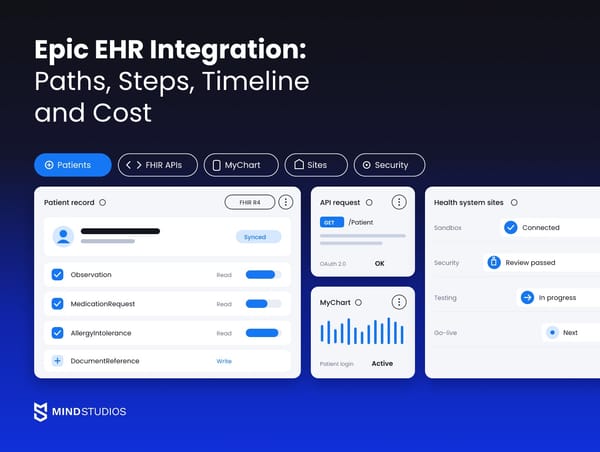
Epic EHR integration (also called Epic EMR integration) connects your product to the hospitals that run Epic. This guide covers the FHIR and HL7 paths, the steps, and what shapes timeline and cost.
Highlights
- For hospital-deployed products, each site's approval cycle sets the go-live date.
- Epic's public APIs are free to developers, and hospitals decide on write access.
- Choose the integration path first, then build the budget around it.
Connecting a product to Epic involves three steps: registering an app on Epic's developer platform, building against FHIR R4 APIs or HL7 v2 interfaces, and having each hospital customer activate the connection in its own environment. Your build plan follows that hospital's approval and testing schedule, not a single universal timeline.
Sales hears "Are you on Epic?" in late-stage deals, and engineering estimates for the same request often land quarters apart, since each one assumes a different path, data set and hospital count. This guide covers products that hospitals deploy, such as clinician tools and write-back flows; read-only patient apps that qualify for automatic distribution take a shorter route, covered below.
Our healthcare software work includes a pre-visit intake app whose data is stored in a clinic's Epic system, and that project taught us to bring an Epic specialist in early. Your product's path is set by two lists: the records your users touch and the hospitals you sell to.
Map the Epic path for your product before you commit a budget to it.
What Epic EHR integration means for a healthcare product
Epic EHR integration is the connection that lets an outside product read patient data from Epic, write approved data back, or open inside Epic's clinician and patient interfaces. It matters commercially because Epic keeps winning hospital decisions: KLAS's market share report for 2026 names Epic and TruBridge as the only vendors with a positive net market share change for 2025.
The same report found that only two health systems with more than 10 hospitals made an enterprise-wide EHR decision in 2025, and both chose Epic. That makes Epic a procurement question as much as an engineering one.
Most products that need Epic systems integration fall into a familiar list:
- Laboratory information systems that receive orders and return results
- Practice management and medical billing software
- Pharmacy management systems
- Telehealth platforms and patient portals
- Analytics and reporting tools that pull population data
- Clinical documentation and clinical decision support tools
- Connected devices, where Epic device integration means getting readings such as vital signs into the patient's chart
A buyer asking about integration with Epic EMR usually means specific data flows, and naming them early gives engineering and the hospital a shared scope to review.
Integration is one layer of a wider product: our healthcare app development guide maps the features that typically sit around it, from scheduling to care team messaging.
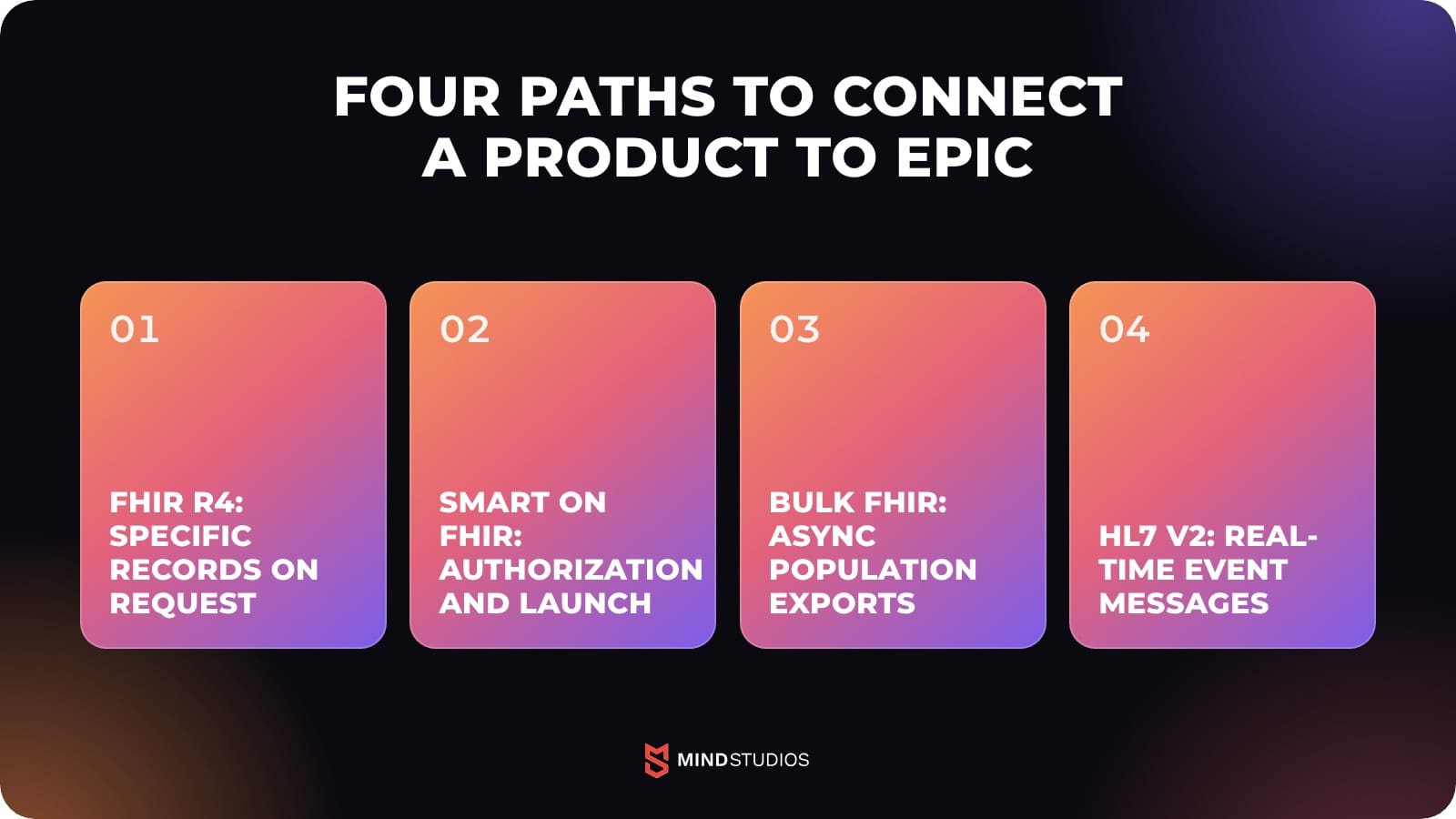
Epic FHIR, SMART on FHIR, Bulk FHIR and HL7 v2: four integration paths
The four approaches below cover data exchange, authorization and launch, and a product can combine them. FHIR R4 APIs, Bulk FHIR and HL7 v2 describe how data moves: on request, as a large export, or as event messages, while SMART on FHIR sits on top of FHIR to define how an app is authorized and launched.
FHIR defines a standard for exchanging healthcare data, including through REST APIs, so the choice depends on the exchange pattern and workflow your product supports, not on treating HL7, FHIR and API as three separate options.
Two decisions narrow it down: whether your product needs a record on request, a population file, or a message each time something changes, and whether a person opens it from a screen or it runs as a backend service. The table below maps those answers to paths, with Epic's private APIs as a fifth row.
| Path | What it does | When to choose it | What the hospital sets up |
|---|---|---|---|
| FHIR R4 APIs (US Core) | Data exchange: reads and searches resources, and creates or updates specific ones, such as clinical notes or vital signs | Your product needs particular records on request | Your client ID activated in its environment, with approved scopes |
| SMART on FHIR | Authorization and launch: adds OAuth 2.0 and launch context to FHIR calls, from inside Epic (EHR launch) or from your app (standalone launch) | Clinicians or patients open your product from a screen | The launch configured in its workflows, or patient sign-in enabled |
| Bulk FHIR | Data exchange: exports large data sets asynchronously through a backend client | Analytics, population health, risk models | Approval of the backend client and of the patient group to export |
| HL7 v2 interfaces | Data exchange: sends and receives event messages such as ADT, orders, results, scheduling and documentation | Real-time events and ancillary systems such as labs | Time from its interface team, usually with an interface engine |
| Private Epic APIs | Data exchange: non-public APIs for developers who hold a paid Vendor Services membership | A workflow the public APIs don't reach | Its agreement to use those APIs in its environment |
Epic's FHIR API catalog lists supported resources and operations, useful for checking data flows for an Epic FHIR integration against the US Core profiles. It recommends the SMART on FHIR profile of OAuth 2.0 and describes Bulk Data Access as a framework for accessing large volumes of data. The SMART launch specification defines the launch patterns, including backend services for clients that run without a user.
Bulk FHIR runs alongside FHIR R4 when you need data for many patients at once, for example a nightly feed into a risk model.
Where HL7 v2 still fits
An Epic EHR interface built on HL7 v2 is still the usual choice when your product reacts to events. The HL7 v2 catalog on open.epic lists incoming and outgoing patient administration, scheduling, orders, results and documentation messages.
Some messages have prerequisites: an orders interface, for example, needs an admissions feed in place first. Our HL7 integration guide breaks down each message type and the interface engines that route them.
EHR interoperability with Epic: USCDI, information blocking and TEFCA
Federal rules set a minimum for EHR interoperability. Under the ONC certification program, USCDI v3 became the baseline data set for certified health IT on January 1, 2026, and information blocking rules limit interference with data access. No federal rule forces a hospital to connect your product, so commercial approval still rests with each customer.
USCDI defines the baseline data set, while Epic's figures describe the breadth and use of its interfaces:
- 1,000+: API and interface specifications Epic's interoperability page says it publishes free on open.epic.
- 337 billion: web service transactions through Epic's public APIs in the last year, per the same page.
For a developer, that means the interfaces are open and already carry heavy production traffic, though each hospital's configuration still needs checking.
What information blocking gives you and where it stops
Under 45 CFR 171.103, information blocking is a practice likely to interfere with access to, exchange of, or use of electronic health information unless required by law or an exception applies, and the rules apply to healthcare providers, certified health IT developers and health information exchanges.
In practice, the rule helps in two situations: when a patient directs their own data to your app, and when a request stalls with no stated reason. It doesn't make a hospital your customer: contracts, security reviews and scope approval remain normal steps.
TEFCA and patient access
TEFCA's framework page describes it as a nationwide framework for health information sharing. Qualified Health Information Networks (QHINs) form its backbone, and individual access services are among its exchange purposes.
Epic's patient app guide names TEFCA individual access services as one of two routes for patient-facing apps that skip coordinating with each health system. If you're building a patient app, evaluate TEFCA alongside Epic on FHIR; clinician tools still follow the hospital route below.
What data your app can read from Epic and what it can write back
Once a hospital activates your app, it can read most USCDI data through Epic's FHIR R4 APIs: demographics, problems, allergies, medications, results, vital signs, scheduling, documents and clinical notes. Writing back is narrower. Epic publishes create operations for specific resources, and each hospital decides which ones it enables for your product.
The "Write back" column names the R4 create operations published in Epic's FHIR catalog. Whether a hospital enables one for you is a separate conversation with that site.
| Data | Read | Write back | What to check with the site |
|---|---|---|---|
| Demographics | Yes | Patient.Create (Demographics) | Whether outside systems may register patients |
| Problems | Yes | Condition.Create (Problems) | Who reviews problems your product adds |
| Allergies | Yes | AllergyIntolerance.Create (Patient Chart) | The clinician review workflow |
| Medications | Yes | No general create; CDS Hooks can suggest unsigned orders | Prescribing stays with clinicians |
| Lab results | Yes | No public FHIR create for results | Outside lab results are often scoped as an HL7 v2 interface |
| Vital signs and flowsheets | Yes | Observation.Create (Vital Signs), Observation.Create (Flowsheets) | Which flowsheet rows your values map to |
| Scheduling | Yes (Appointment.Read, Appointment.Search) | No R4 create operation; the catalog lists Appointment.$book for earlier STU3 use | Which booking method, if any, the site enables |
| Documents | Yes (DocumentReference.Read, DocumentReference.Search) | DocumentReference.Create (Document Information), DocumentReference.Create (Non-Patient Document Information) | Document type, routing and whether it attaches to a specific patient |
| Clinical notes | Yes | DocumentReference.Create (Clinical Notes) | Note type, routing and sign-off rules |
Data from patients' devices follows the vital signs row. For a remote monitoring product, Epic API integration also requires agreement on who reviews incoming readings, a workflow the nursing team and site analysts should define before launch.
Mind Studios' recommendation: Before anyone estimates the build, list every record your product must write and check each one against what the hospital will enable. If a site won't switch on a needed write, you may have to move from FHIR to an HL7 v2 interface, which affects both budget and schedule.
Epic MyChart integration for patient-facing apps
Epic MyChart integration lets a patient-facing app pull a patient's records after the patient signs in with their MyChart account and chooses what to share and for how long. MyChart's help page states that the app never receives the MyChart password and that revoking access stops it from getting new information.
With a SMART standalone launch, the patient starts in your app and signs into the hospital's Epic environment, then returns with a token scoped to their own records.
MyChart remains the hospital's portal, and your app works beside it. That is why Epic MyChart app integration suits companion apps, chronic care tools and pre-visit flows better than features that copy the portal.
Responses also differ between sites. Epic's patient app guide ties the USCDI API version (v1 or v3) an app can use to the hospital's Epic version, so the same request can return more data at one hospital than another. A feature that must work for every customer should be tested against more than one site, with parsing that tolerates missing elements.
The table below compares a typical clinician-facing app with a typical patient-facing app. Epic supports both launch modes for either audience, so treat each row as a common pattern, not a fixed rule.
| Aspect | Typical clinician-facing app | Typical patient-facing app |
|---|---|---|
| Launch | Usually inside Epic (EHR launch) | Usually from your app, with MyChart sign-in (standalone launch) |
| Who authorizes | The hospital, for its users | The patient, for their own records |
| Data scope | Patients the clinician can access, within approved scopes | Mainly the signed-in patient's records |
| Write-back | Possible where the site enables it | Mostly reads; patient-entered data where enabled |
| Activation | Each hospital approves it | Automatic if the app meets Epic's distribution conditions, otherwise per site |
Either way, what the API returns to you depends on who's signed in and which environment they're using, not on a single app-wide default.
How to integrate with Epic EHR in 7 steps
Seven steps take a hospital-deployed product to live Epic connections: define the path, find a sponsoring hospital, register on Epic on FHIR, build in the sandbox, get the client ID activated, test in the hospital's environment and go live site by site. Qualifying read-only patient apps can shorten steps 2 and 5. Each step names a common mistake.
Steps 3 through 5 describe the FHIR route: app registration, sandbox build and client ID activation. An HL7 v2 interface follows a similar shape: interface agreement, connection and mapping, mostly handled by the hospital's interface team, then joint testing before go-live.
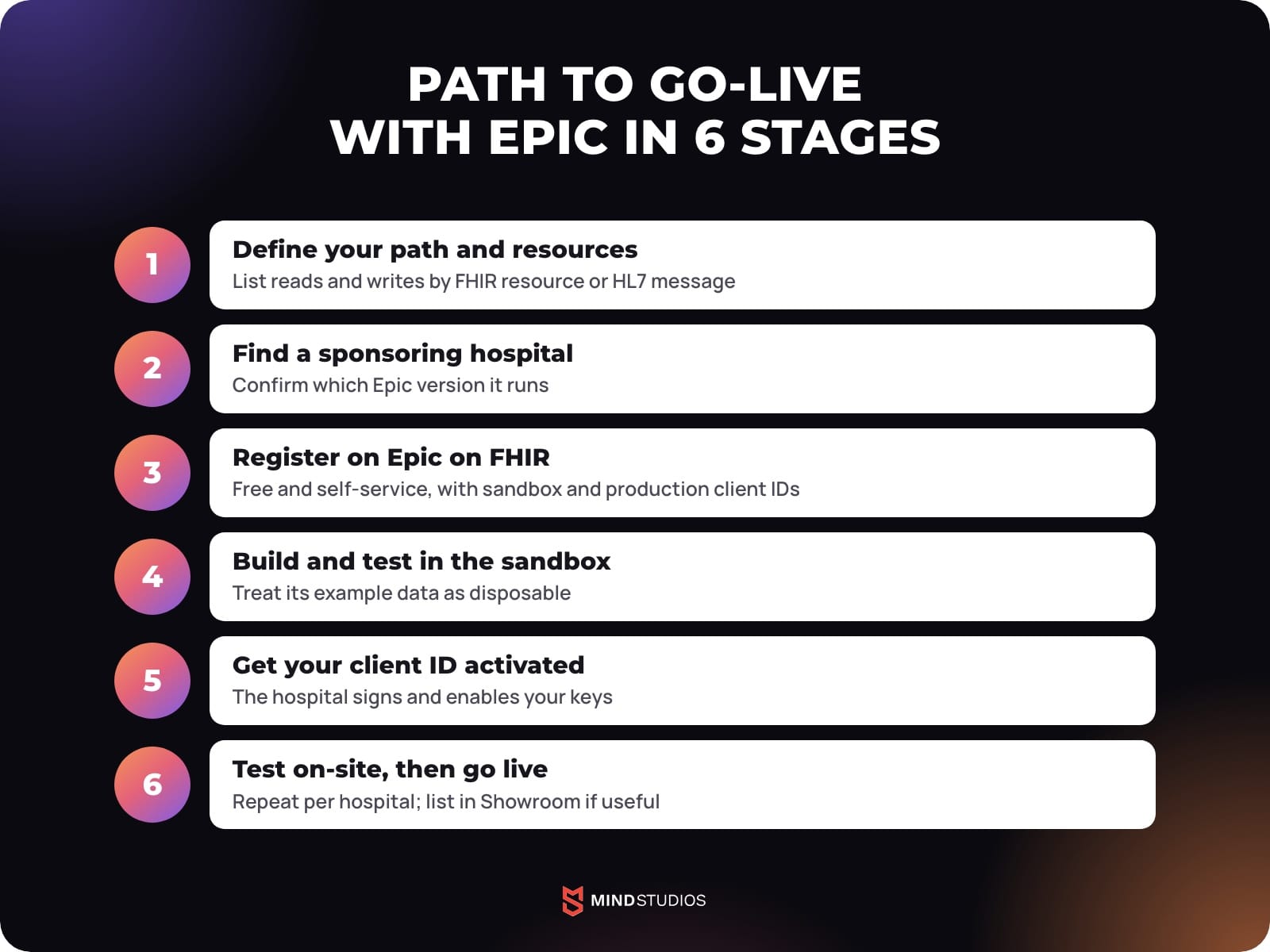
1. Define the path and the resources
Start from your product's workflow. List the exact FHIR resources, HL7 messages or bulk exports it needs, split into reads and writes. That list decides the path, and becomes the scope document for every hospital.
Mistake: asking for "all patient data," which invites a longer security review and a narrower approval.
2. Find a sponsoring hospital and check its Epic version
For a clinician tool or write-back product, a sponsoring hospital gives you a test environment, an analyst and a real workflow to build against. Ask which Epic version it runs, since that decides which USCDI APIs your app can use there.
Mistake: building for months before any hospital commits to a pilot.
3. Register the app on Epic on FHIR
Registration on Epic on FHIR costs nothing, and Epic calls the platform "a free resource for developers." The Epic developer guide describes registration as self-service for most cases, giving you both a production and a non-production client ID.
Mistake: selecting every API "just in case": Epic asks you to include only the APIs you'll use in production, since customers review that list.
4. Build and test in the sandbox
The sandbox gives you test patients and example data for working through authorization, error handling and parsing. Treat it as disposable: Epic's sandbox terms say it "may wipe or otherwise remove data from those sandboxes in its sole discretion."
Mistake: keeping test fixtures in the sandbox and expecting them to still be there next week.
5. Get the client ID activated at the hospital
When the build is ready, mark the app ready for production use. The hospital signs its agreement, requests your client ID for its environment, and you enable keys for that implementation. Developers can approve these requests directly, without Epic's involvement, and qualifying patient apps skip this step at hospitals with auto-downloads enabled.
Mistake: treating your own registration as the hospital's approval.
6. Test in the hospital's non-production environment
The hospital's test environment carries its real configuration, so mapping problems that never appeared in the sandbox show up here. Epic's guide recommends a kickoff with the customer to agree on an implementation plan and timelines.
Mistake: assuming the test environment is free whenever you are. Agree on testing windows at the kickoff, since the site's analysts set their own schedule.
7. Go live site by site and decide on Showroom
Launch at the sponsoring hospital first, watching errors, token refresh and user feedback, then repeat activation and testing at each new hospital. Each site is a small Epic software integration project of its own: same code, different configuration.
A listing in Showroom's Connection Hub is optional. Epic says it adds visibility and that additional customers don't need it to connect.
Mistake: holding back outreach to the next hospital until the listing appears.
Per-site approval, security review and HIPAA: getting cleared to go live
Most Epic integration projects go live only after each hospital approves and configures the connection, which is why per-site approval sets the pace. The exception is a patient-facing app limited to USCDI read APIs: if it meets Epic's automatic distribution conditions, including "Ready for Production" status and read-only scopes, Epic sends the client ID to customers with auto-downloads enabled instead. For hospital-deployed products, planning still covers the site's contract, scope approval and security review.
The security review questions are predictable, so the table pairs each one with what to have ready.
| What the hospital asks | What to prepare |
|---|---|
| Which data do you access and why? | A scope document listing each FHIR resource, scope and HL7 message |
| How do users authenticate? | The OAuth 2.0 flow, token storage and refresh handling |
| Where is PHI stored, and for how long? | A data flow diagram, hosting region, retention and deletion rules |
| Who on your side can see the data? | A role-based access model and an access review process |
| What gets logged? | An audit log design covering reads, writes and admin actions |
| Will you sign a BAA? | Your BAA position and the HIPAA controls behind it |
| Do you hold SOC 2 or HITRUST? | The reports or certifications your target sites require |
Reviewers may also ask how a development partner protects data during the build. Mind Studios, for example, is ISO 27001 certified for information security management, and the certification on our company site gives a hospital's reviewer an audited reference point for a partner's controls.
When a BAA applies
Under the HIPAA definition, a business associate creates, receives, maintains or transmits protected health information on behalf of a covered entity. Whether that applies to you depends on what you do with the data, not on connecting to Epic itself: HHS guidance for software vendors distinguishes software a hospital's own staff run on its own systems from a vendor that hosts, stores or otherwise handles PHI on the hospital's behalf.
A company that stores or processes a hospital's patient data for that hospital, directly or through a hosted service, is typically a business associate and signs a BAA. A consumer app that patients connect for their own use has a different relationship, so confirm your role with counsel rather than assuming either answer. Our guide to HIPAA-compliant software development covers the controls behind that agreement.
Checklist before your first security review
Before your first review, make sure each of these is already in place:
- Scopes trimmed to the resources your product actually uses
- OAuth 2.0 with PKCE for public clients and secure storage for refresh tokens
- Encryption in transit and at rest, with key management documented
- Audit logs for every read, write and admin action
- An incident response plan with named contacts
- A BAA template reviewed by counsel, ready for the roles where it applies
- A data deletion process for when a hospital contract ends
Epic integration timeline and cost: approvals, write-back and sites
Four variables set the timeline and cost: the path, how much you write back, the number of hospitals and how ready your security documentation is. Epic's own developer fees are one part of the budget: Epic on FHIR is free, open.epic has no membership fee, and a Vendor Services membership costs $1,900 a year plus hourly support.
What a hospital pays Epic depends on its own contract, so your agreement should state who covers those charges. The table below shows where the time goes on your side.
| Phase | What takes the time | What it depends on |
|---|---|---|
| Scoping | Mapping resources and confirming write operations | Number of data flows and write-back needs |
| Build and sandbox | Authorization, parsing, error handling | Data exchange method, authorization flow and launch context |
| Agreement and activation | Contract, BAA, client ID request | The hospital's legal and IT queue |
| Security review | Questionnaire, evidence, follow-up questions | The reviewer queue and how ready your documentation is |
| Site testing | Configuration, flowsheet mapping, clinician testing | The site's Epic version and local build |
| Go-live | Monitoring, fixes, user training | Number of users and departments |
| Each new site | Repeat activation, review and testing | How far the site's setup differs from the first |
Beyond the phases above, two items add an ongoing cost the table doesn't show:
- Middleware. A platform replaces some build work and adds an ongoing fee.
- Post-launch support. Site upgrades and new data requirements can require regression testing, mapping changes and updates to the integration.
Mind Studios' tip: Before promising a second site's go-live date, list what might differ from the first: Epic version, USCDI API set, flowsheet and note configuration, and that hospital's own security review cycle. Confirm each item with the site's analysts, and set the date from their answers, not the first site's calendar.
We can scope and build the integration around your first sponsoring hospital, with the write-back list and security evidence ready before the hospital asks for them.
Who builds the integration: your team, middleware or a partner
Three options cover most situations: your own engineers, a middleware platform or interface engine, or a development partner that brings Epic experience. The right one depends on how many EHRs your customers run, whether you need write-back and whether your team has already shipped FHIR or HL7 work.
Three questions narrow the choice:
- Do your customers run only Epic, or several EHRs? Several EHRs make middleware worth considering.
- Do you need to write data back? Write-back raises the stakes of mapping and site review.
- Has your team shipped FHIR or HL7 v2 work? If not, an Epic specialist shortens the learning curve before the first site test.
Two categories recur when teams look outside: a middleware platform such as Redox, connecting one codebase to several EHRs through a single API, and an interface engine such as Mirth Connect, routing HL7 v2 messages between systems. Whether either speeds up your integration depends on whether it already covers the resources and operations your product needs.
| Option | When it fits | Trade-off |
|---|---|---|
| Your own team | FHIR experience in-house, Epic-only customers | Full control, while the team learns hospital processes on the job |
| Middleware platform (e.g., Redox) | Customers on several EHRs, mostly standard data | Replaces part of the build when it already supports your data flows, for an ongoing platform fee and less control over edge cases |
| Interface engine (e.g., Mirth Connect) | Heavy HL7 v2 traffic, labs and ancillary feeds | Flexible routing for HL7 v2 traffic; engine operation and maintenance |
| Partner with an Epic specialist | Write-back, clinician workflows, a first Epic project | Faster ramp-up, with code ownership and documentation set out in the contract |
You can also combine these Epic integration solutions. For example, a product team can own the code while middleware covers the long tail of other EHRs and a specialist supports the first Epic sites.
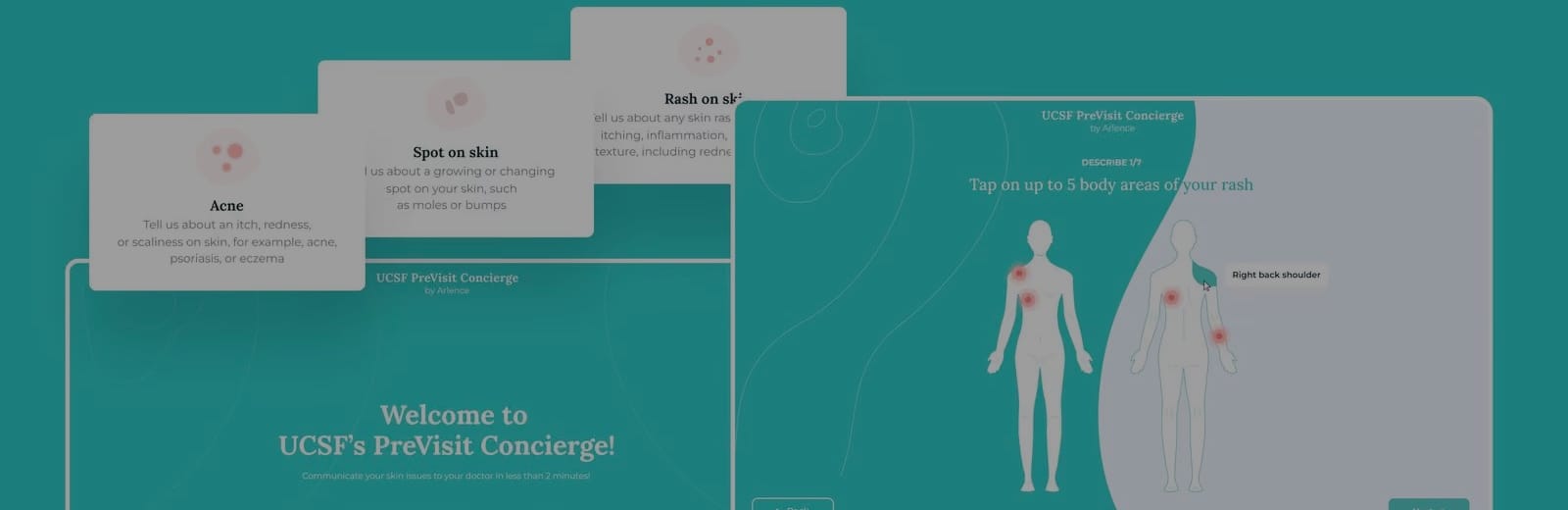
Mind Studios' insight: For Dr. Cho, we built a pre-visit intake web app, and once a patient submits it, their medical information is stored in the clinic's Epic EHR/EMR system. It was the team's first integration with Epic, so we brought in an external Epic integration specialist to bridge our developers and the healthcare software provider. The platform is in beta testing at a US-based clinic.
The screenshot below shows the patient-facing side of that same intake flow.
Dmytro Dobrytskyi, CEO at Mind Studios, names the ownership question he'd settle with the hospital before development starts:
The question I'd settle before any code is who on the hospital side owns each data flow. Someone has to approve what you read and write, and someone has to decide when a mapping is disputed. Without those owners, every open question waits in the analysts' queue. If neither side can name them, bring in an Epic specialist who knows how sites divide that work.
Mistakes that stall an Epic integration and what to do instead
Five mistakes tend to stretch Epic projects: budgeting before choosing a path, betting on write-back the hospital won't enable, treating one site as the template, testing only in the sandbox and leaving the security review for the last month. Each one shows an early sign, and each is cheaper to fix while the project is young.
Budgeting before choosing the path
Don't approve a number before anyone lists the resources and messages your product needs. An estimate based only on the label "Epic integration" leaves data flows undefined, so the team can't tell which build and site-testing tasks it includes.
Do fix the path and the read and write list first, then estimate against that list.
Early sign: two engineers' estimates are quarters apart. Before you argue about the number, compare the data flows each one assumed.
Betting on a write the site won't enable
Don't design a core feature around a write operation just because Epic's catalog lists it. The catalog shows what's possible; the hospital still decides whether your app gets it.
Do confirm each write with the sponsoring site's analysts during scoping, with a fallback such as a document or message a clinician reviews.
Early sign: write questions come back as "we'll check." Treat any unconfirmed write as unapproved.
Treating one hospital as the template for all
Don't assume your second site maps data like the first: Epic versions, flowsheet rows, note types and workflows all vary by site.
Do keep mapping documentation per site and walk the clinical workflow with users there before go-live.
Early sign: the new site runs a different Epic version or flowsheet setup. Plan a mapping pass before you promise sales a date.
Testing only in the sandbox
Don't treat sandbox success as proof of readiness: it holds Epic's example data, while your customer runs a different configuration.
Do plan time in the hospital's non-production environment and include clinicians in acceptance testing.
Early sign: a go-live date is set but no dates are booked in the hospital's test environment. Book those dates first and set the go-live date from them.
Leaving the security review for the last month
Don't open the hospital's questionnaire after the build is done: late questions about encryption, access control and audit trails force rework under deadline.
Do prepare the security package alongside the sandbox build, using the checklist above, so the review runs in parallel with development.
Early sign: nobody on your team has seen the questionnaire yet. Ask for it at the kickoff and give each section an owner.
There's one more trap next to the integration itself: migrating historical records without a plan. If your product needs past data, decide early whether Bulk FHIR exports cover it or whether the hospital's legacy archive needs a separate migration project.
Planning your Epic integration: three decisions to make first
When sales asks whether you're on Epic, the honest answer starts with three decisions. Together they turn Epic EHR integration from an open-ended request into a plan you can defend in a deal:
- The path. The data pattern and launch method, chosen from your read and write list.
- The sponsoring site. One hospital whose version, analysts and test environment you build against.
- Who builds it. Your team, middleware, a partner with Epic experience or a mix of the three.
Once the proposed path is checked with the sponsoring hospital, engineering can estimate against agreed data flows and site requirements, and sales can explain what's supported and what still depends on the next hospital.
We build connections to Epic around those three decisions, from the first sponsoring hospital through the sites that follow.
FAQ
Can you integrate your software with an Epic EMR system?
Yes. For a product the hospital deploys, three conditions need to line up:
- a hospital customer willing to sponsor and activate the connection
- a path that matches your data pattern and launch method
- security documentation ready for that hospital's review
A patient app that meets Epic's automatic distribution conditions, or uses TEFCA individual access services, can reach records without a sponsor at each site.
Who pays for Epic integration: the vendor or the hospital?
Cost and contractual responsibility are separate questions. Build, sandbox testing and your security package typically fall to whoever builds the product, while each new site adds activation, review and testing time for both sides. Epic bills the hospital under its own agreement, so your contract should state whether your implementation and ongoing charges are included, reimbursed, or billed separately.
How long does Epic integration take after the first hospital?
Each later site's schedule depends on how much of the first implementation it can reuse and which approvals have to run again:
- Carries over: your code, the scope document, the security package and the mapping logic.
- Checked again: the site's Epic version and USCDI API set, flowsheet and note configuration, contract and BAA, security review and clinician testing.
A later site can launch sooner if it reuses the existing implementation and clears its remaining approvals quickly, though one unresolved mapping or security requirement can still hold up release.
Is there an API for Epic?
Yes. Epic publishes FHIR R4 and Bulk FHIR specifications on open.epic and fhir.epic.com, readable before any hospital signs, alongside HL7 v2 event interface specifications for real-time messaging. The FHIR route includes self-service registration and a sandbox; an HL7 v2 interface is set up directly with the hospital's interface team. Epic EHR API integration with real patient data begins once a site activates your client ID, approves the interface, or your app qualifies for automatic distribution.
What is EHR interoperability when your customers use Epic and other EHRs?
In that case, it means one integration design that works across vendors: FHIR R4 as the exchange standard, USCDI as the certified data set, information blocking rules limiting interference with access, and TEFCA as a nationwide exchange framework. Vendors still differ in resources, write operations and configuration, so products selling into several EHRs often add middleware.
Is Epic an EMR or EHR?
Both. Epic is one system with EMR functions for charting inside a single organization and EHR functions for sharing records across organizations, through record exchange and patient access. Our custom EHR guide for founders explains the difference and when a company should build its own system.
Does Epic EHR integration work the same way outside the US?
FHIR and HL7 are international standards, so build techniques carry over, but access rules change by country: USCDI, information blocking and TEFCA are all US rules. At Epic sites in Europe and the Middle East, access depends on the site's contract and local law. Under GDPR, health data is a special category of personal data, so the site needs a clear legal basis before your integration can rely on it.
What replaced Epic App Orchard for listing third-party apps?
Showroom now handles third-party listings, alongside two developer programs: open.epic for free public specifications and self-service registration, and Vendor Services for a paid membership with private APIs and access to Epic representatives. A Connection Hub listing in Showroom is available through either program.