
 ChatGPT
 Perplexity

Slow releases and code nobody wants to touch are early signs of software architecture problems, not bad luck. This guide shows how to spot the wall you're hitting and choose between a patch, a refactor, or a rebuild before the decision is made for you.

Highlights:
- Persistent friction across features is a structural signal, not a run of unlucky bugs.
- Architecture hits six distinct walls: change, scale, capability, people, reliability, compliance.
- Most walls need a proportional fix, rarely a full rebuild.
Your product works. Customers are logging in, revenue is coming in, nothing is on fire. And yet shipping anything has started to feel like defusing a bomb. A one-line change takes a week. Every release breaks something unrelated. There's a part of the codebase nobody wants to touch, and everyone already knows which part it is.
None of that is bad luck, and it isn't a sign your engineers are cutting corners. It's your architecture telling you it's approaching a limit. This article is about reading those software architecture issues accurately: telling a real structural problem from an ordinary bug, and deciding what to do about it while the fix is still small.
We've spent 13+ years helping teams read these exact signals and fix them at the right scale. If a few of these already sound familiar, a free consultation is a low-stakes way to get a second opinion before anything turns urgent.
Empower your project
with concrete tech
expertise
Contact Mind Studios

Bug or architecture problem? Run this test first
A bug stays fixed once you fix it. An architecture problem doesn't. Patch it in one place and it resurfaces somewhere else in the product, wearing a different name.
The trouble is that from inside a sprint, both can look identical: something broke, someone fixed it, the ticket closed. The difference only shows up over time, which is exactly why it's easy to miss.
The recurring-signal test
Ask two questions about the pain you're seeing:
- Does fixing one thing quietly create or worsen another, unrelated one?
- Does the same flavor of trouble show up in parts of the codebase that have nothing to do with each other: a sluggish endpoint here, a release that needs three teams to sign off there?
If either is true, you're not chasing isolated defects anymore. You're looking at something load-bearing, and the pattern is usually clearer when laid out side by side:
| A bug | An architecture problem | |
|---|---|---|
| Scope | Contained to one feature or file | Recurs across unrelated features |
| Behavior after a fix | Stays fixed | Reappears in a different form |
| Root cause | A local mistake | A structural constraint |
| Right response | Patch it | Diagnose the wall behind it |
Why this happens: essential vs. accidental complexity
Once you've run the test, it helps to understand why the "architecture problem" column fills up the way it does.
Some difficulty is inherent to what the business is trying to do, and no rewrite makes it disappear. The rest was added along the way: shortcuts, one-off decisions, patches on patches, none of them wrong at the time, all of them now tangled together.
That second kind is where architecture problems actually live, and unlike the first kind, it's the kind you can untangle.
Most teams don't have a bad architecture. They have an architecture that was right for the problem they had two years ago. The accidental complexity is what's left over from decisions that were correct at the time. What I watch for isn't how many workarounds a team has, every system has those, it's whether the number is climbing quarter over quarter. A flat count means the team is keeping up. A rising one means the architecture is losing ground faster than anyone's fixing it, usually well before anyone calls it a crisis.
— Dmytro Dobrytskyi, CEO at Mind Studios.
Once you can name the pattern this way, the pile of "random" bugs stops looking random, and the rest of this article is really about what to do once you've spotted it.
Where the walls actually come from
Before diving into the signs themselves, it's worth pausing on how a system ends up here in the first place, because the answer is rarely negligence.
Most architectural walls trace back to decisions that made sense at the time and simply outlived the conditions that justified them.
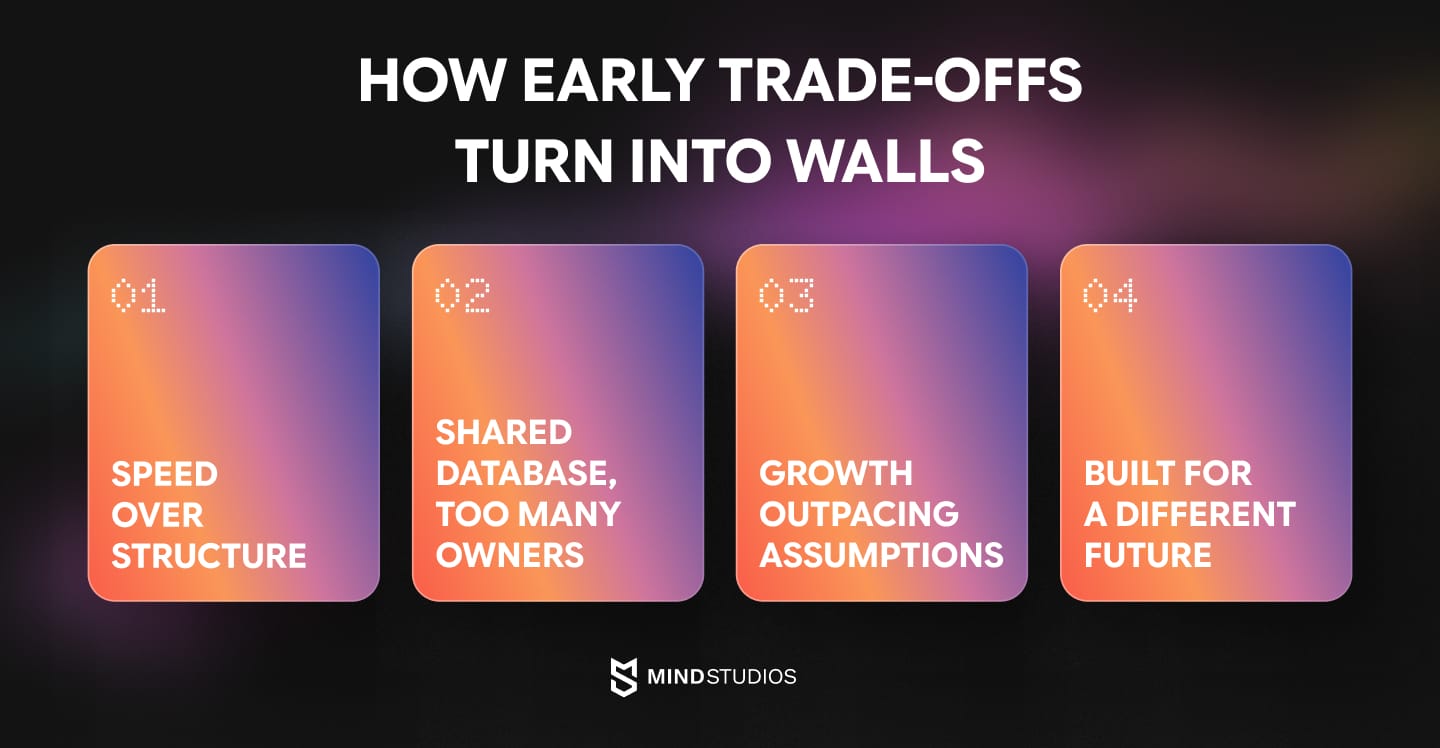
Shipped fast, before boundaries existed
Early on, the goal wasn't a clean system. It was finding out whether anyone would use the thing at all. Module boundaries, if they existed, were more suggestion than enforcement, so features got wired directly to whatever was fastest to ship.
That trade-off is usually the right one at the pre-product-market-fit stage. It just doesn't age well once the product sticks around.
One database, too many jobs
A single shared schema is easy to reason about when three engineers touch it. It becomes a bottleneck once a dozen teams do, each reaching in for their own purposes, each change risking side effects somewhere unrelated.
Built for a business that didn't happen
Plenty of architecture decisions are sound bets, just for a different future than the one that actually happened. A legacy monolith built for one market, one integration model, or one type of customer doesn't bend easily toward a pivot nobody saw coming.
The company outgrew its own assumptions
Sometimes there's no single bad call to point to. The architecture was appropriately sized for the load, team, and scope it launched with. The business grew past all three, and nothing in the system was ever redesigned to match.
None of this means the team got it wrong. It means the architecture and the business are on different clocks, and eventually those clocks stop matching up.
6 walls your architecture can hit
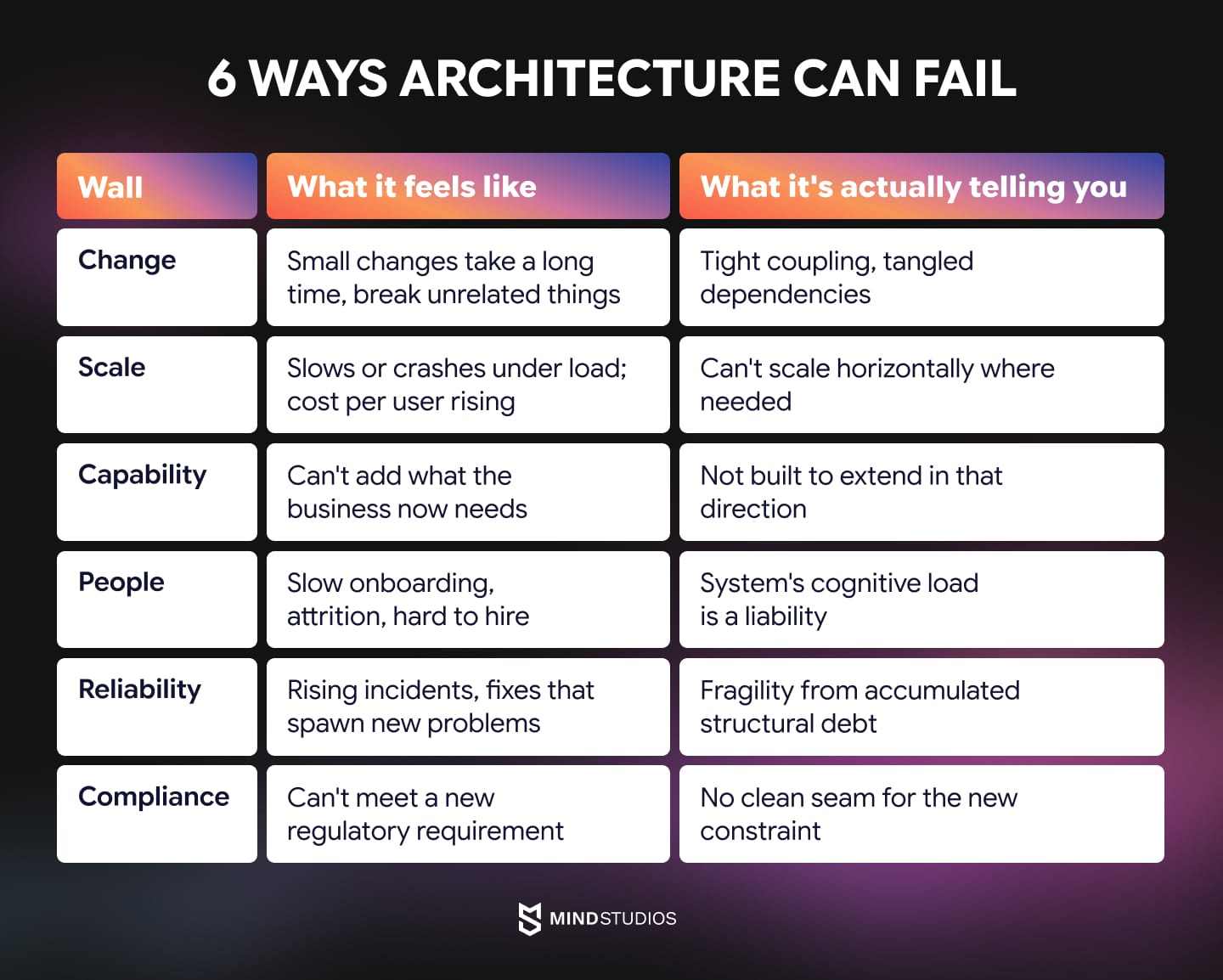
Most conversations about software architecture and scalability for a growing product jump straight to load: the system slows down, so scale must be the issue. That's one wall, but it's rarely the first one teams actually hit, and fixating on it means missing the other five entirely.
Each wall below has its own feel, its own root cause, and its own early tells, worth catching before the wall becomes unmissable.
#1: The change wall
Small changes take exponentially longer than they should. A tweak that looks like an afternoon of work turns into a week, and every release carries the risk of breaking something that had nothing to do with it. Developers start quietly steering around certain modules rather than touching them, and estimates for "simple" tickets stop being trustworthy.
Early signs:
- Code review comments that keep mentioning "unexpected side effects."
- Estimation meetings running longer because nobody's confident anymore.
- A growing list of files that two or more people quietly avoid touching without a ticket assigned first.
What it's telling you: The codebase is coupled tighter than the team realizes, and dependencies that should be isolated aren't.
Mind Studios recommends: Isolate the worst-coupled module first and wrap it behind a clean interface before touching anything else. That alone stops most of the bleeding, though untangling deep coupling is usually faster with a team who has done it before.
#2: The scale wall
Software architecture scalability issues usually show up first as slowdowns or crashes under load, with infrastructure spend climbing faster than the user base or revenue does. Response times that used to be consistent start showing latency spikes depending on time of day or traffic.
Early signs:
- Cloud bills growing faster than active users, month over month.
- Performance that's fine in staging but degrades in ways nobody can reproduce until real traffic hits it.
What it's telling you: The architecture can't scale horizontally where it needs to. Our companion guide on Scalable software architecture covers the specific software architecture patterns that fix this wall in depth, so we won't re-tread that ground here.
Mind Studios recommends: Profile before you provision. Most scale walls trace back to one or two bottlenecked services, not the whole system, and pinpointing which one is easier with a fresh set of eyes than with the team that built it.
#3: The capability wall
The business needs something the system fundamentally can't do without major surgery: a new integration, a new market's requirements, an AI-powered feature customers are asking for. Sales start hearing "we can't do that yet" more often than "let me check."
Early signs:
- Feature requests that keep getting scoped down or deprioritized because engineering flags them as "bigger than they look."
- A competitor shipping something your stack structurally can't match without a rearchitecture first.
What it's telling you: The architecture was never built with the extensibility to grow in that direction, and no amount of clever workaround changes that.
Mind Studios recommends: Run an architecture audit before committing to the next big feature request. It tells you whether you are extending the system or fighting it.
#4: The people wall
Onboarding a new engineer takes months instead of weeks. Your strongest people start angling for other projects, or leave altogether. Hiring gets harder because the stack itself has become a hard sell in interviews.
Early signs:
- New hires are still asking basic "how does this work" questions well past their ramp-up period.
- Senior engineers spending disproportionate time as tribal-knowledge translators instead of building.
What it's telling you: The system's cognitive load has become a liability across engineering, retention, and hiring alike.
For more on the people-side symptoms specifically, our piece on When to extend your team versus hire digs into that wall further.
Mind Studios recommends: Shrink onboarding time by fixing documentation and system boundaries, not by hiring more people into a confusing structure.
#5: The reliability wall
Incidents trend upward instead of down, sometimes tipping into real downtime. One fix spawns two more. On-call stops being a rotation and starts being a source of burnout, with the same names showing up as the ones who "actually understand" the fragile parts.
Early signs:
- Postmortems that keep naming different symptoms but the same underlying subsystem.
- A rising ratio of hotfixes to planned releases.
What it's telling you: Fragility has accumulated from structural debt, and the system's resilience hasn't kept pace, so failures compound rather than resolve.
Mind Studios recommends: Track which subsystem keeps showing up across postmortems. That is your real priority, regardless of what feels loudest this week.
#6: The compliance wall
A new requirement (SOC 2, HIPAA, GDPR, or data residency) turns out to be impossible to meet without significant rework. What looked like a checkbox exercise turns into a multi-quarter project once engineering scopes it.
Early signs: Compliance or legal asking questions engineering can't answer quickly, like where specific data actually lives or how it flows between services.
What it's telling you: The architecture has no clean seam for the constraint that just landed on it, because nobody built one.
Mind Studios recommends: Build the seam before the regulation forces it. Retrofitting compliance under deadline pressure is always the expensive way to do this.
Most straining products are hitting more than one of these at once, which is part of why "just add servers" so rarely solves the actual problem.
Mind Studios’ recommendation: When several walls are straining at once, fix by business impact, not by engineering annoyance. A reliability wall costing you a renewal outranks a change wall that's merely slowing sprints, even if the change wall is the one your team complains about daily. Rank by what's actually costing revenue or retention first.
Not sure which wall you're hitting, or how many of these apply at once? Contact us for a free consultation, and we'll help you pinpoint exactly which one is doing the most damage, and what fixing it would actually take.
Performance, scalability, and reliability aren't the same problem
"It's slow" is the most overused diagnosis in software, and it's often wrong in a way that costs real money.
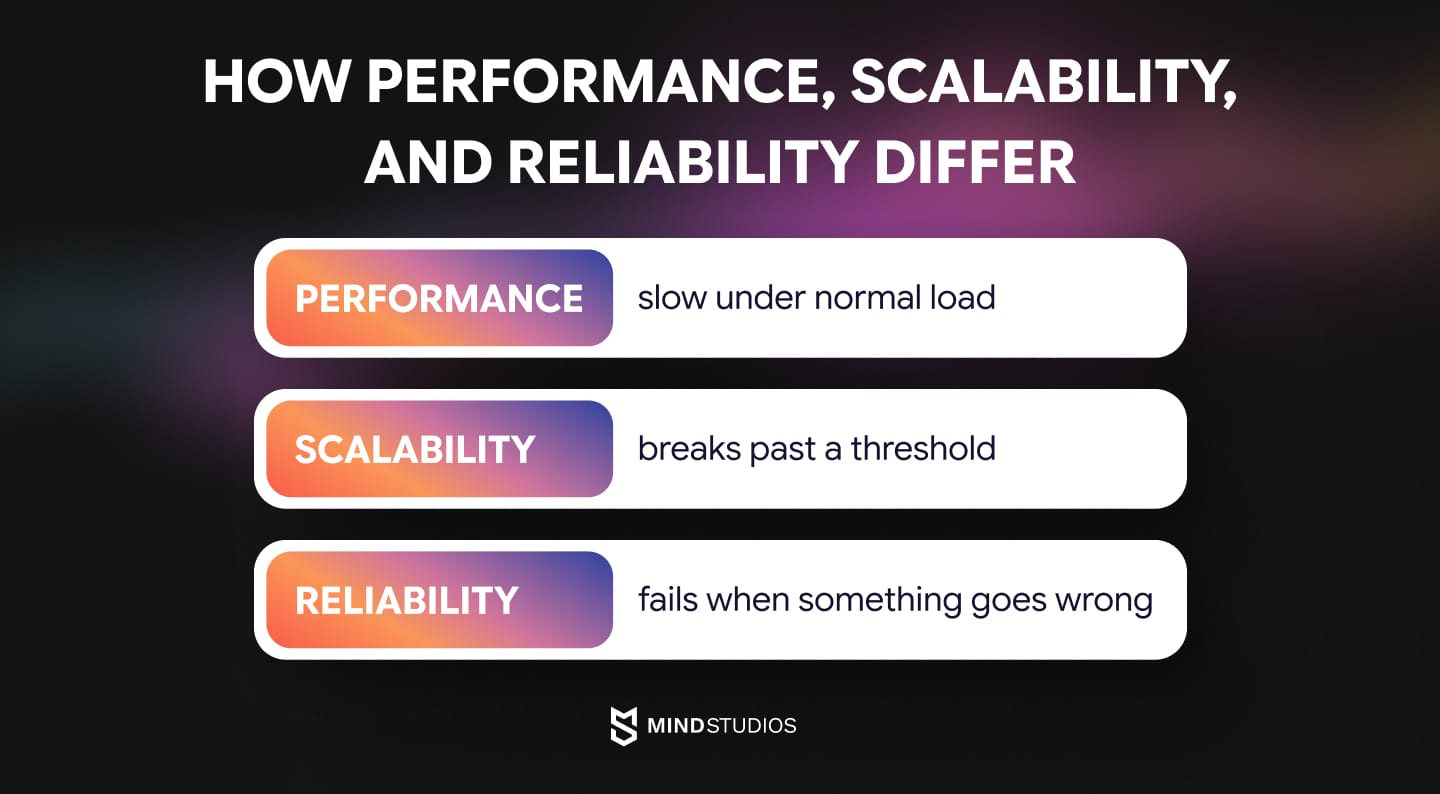
These three things get lumped together constantly, but they fail differently, surface differently, and need different fixes. Treating them as interchangeable usually means spending a sprint solving the wrong one.
Performance
Performance is how fast the system runs under normal and expected conditions.
A performance problem is easy to spot because it's consistent: the same page or endpoint is sluggish, even when traffic is light. It's also easy to fix and verify, because the improvement shows up immediately once you optimize the code path: an unoptimized query, unnecessary computation, a missing cache.
Scalability
Scalability in software architecture is about how the system behaves as load grows, and it doesn't play fair.
Everything can look fine for months, then break the moment concurrent users, data volume, or request rate crosses a threshold nobody marked in advance. The failure feels sudden even though the pressure was building the whole time, which is exactly why scalability problems catch teams off guard.
Reliability
Reliability is how the system behaves when something fails.
This isn't about speed at all, it's about what happens when one component goes down. A reliable system contains the damage. A fragile one lets it cascade, so one failure quietly takes three other things with it.
Why the difference costs real money
The same customer complaint, "it's slow," can come from any of the three, and each demands a completely different response.
- Optimize code for what's actually a scalability problem, and nothing improves once load returns to normal.
- Add more servers for what's actually a performance problem, and you've just paid more money for the same slowness.
Naming which one you're dealing with, before spending a dollar fixing it, is the difference between a targeted fix and a wasted quarter.
What to do once you've found the wall: patch, refactor, rearchitect, or rebuild
Diagnosing the wall tells you what's wrong. Matching software architecture problems and solutions correctly is the harder part, and it's where most teams either freeze or overcorrect straight to 'let's rebuild everything.' Neither is necessary.
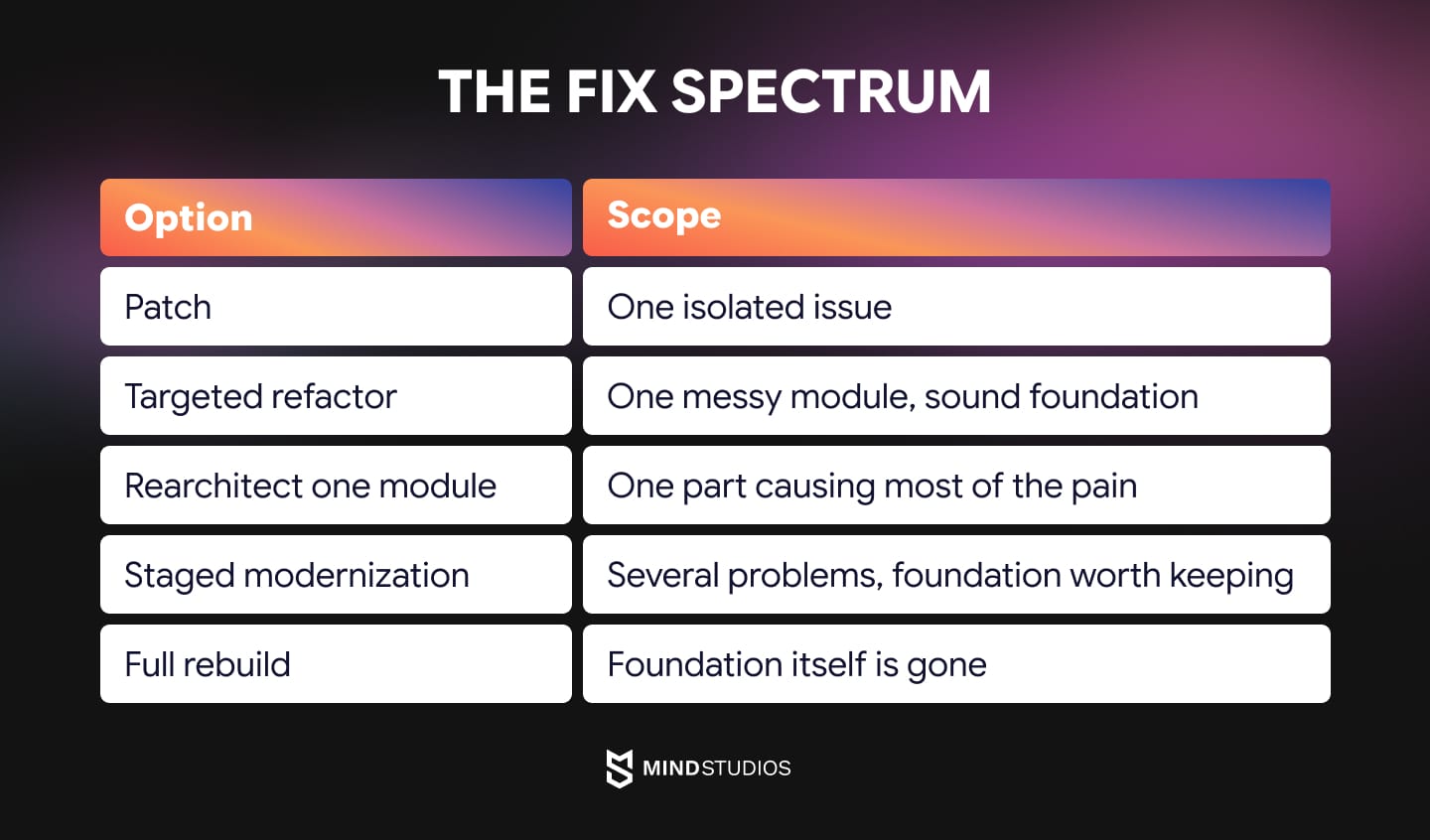
The right response sits somewhere on a spectrum, and the honest answer is usually smaller than it feels in the moment. Across the engagements where we've had to make this call, five points on that spectrum keep showing up, from a contained one-line patch to a genuine ground-up rebuild. It was never a binary between leaving the system alone and starting over.
Here's how that spectrum plays out in practice.
Patch
The problem: The issue is contained to one place and doesn't recur elsewhere.
What to do: Fix it, ship it, move on. If the recurring-signal test from earlier comes back negative, you're probably here, and nothing more elaborate is needed.
Targeted refactor
The problem: The core architecture is sound, but a specific module has gotten messy.
What to do: Clean it in place. This is usually the right call when the system is still reasonably young and the mess is contained rather than systemic, a useful rule of thumb is that it's fitting when well under half the codebase would need fundamental change to fix it.
Rearchitect one module
The problem: One part of the system causes a disproportionate share of the pain, and the rest of the product is fine.
What to do: Lift just that part onto new foundations using the strangler fig approach: build the replacement alongside the original, route traffic to it gradually, and retire the old version once the new one has proven itself. This is, honestly, the correct answer more often than teams expect. It resolves the actual bottleneck without touching what already works.
Staged modernization
The problem: Several structural problems exist, but the foundation underneath them is still worth keeping.
What to do: Modernize incrementally, one piece at a time, while continuing to ship features. This is the path for teams hitting more than one wall at once but who aren't dealing with a fundamentally broken foundation.
Full rebuild
The problem: Reserved for the genuine edge case: the domain boundaries never existed, the stack is obsolete beyond patching, or a regulator has drawn a line the current system structurally can't cross.
What to do: This is the highest-risk, highest-cost option, and it should be the last one considered, not the first one reached for.
Reading the numbers
A few thresholds are worth tracking rather than guessing at:
Metric |
What it measures |
Signal to watch for |
|---|---|---|
Technical debt ratio |
Cost to fix known issues ÷ cost of building the system |
Climbing past roughly 20% signals debt has become systemic, not incidental |
Engineering time on maintenance |
Share of team time spent maintaining vs. building new |
Stripe's Developer Coefficient research puts the industry red-flag line around a third of engineering time |
Neither number alone should trigger a rebuild decision. Together, trending in the wrong direction over consecutive quarters, they're a legitimate signal to start with a software architecture audit, especially where software architecture scalability is the bottleneck, before escalating from refactor toward rearchitect or staged modernization.
Mind Studios’ recommendation: When pitching leadership, don't open with the architecture explanation. Open with the number: delayed features, rising cloud spend, an engineer who just quit. The technical diagnosis is the appendix, not the headline. Boards fund costs, not code quality.
The thesis worth holding onto through all of this: rearchitect the part that's actually broken, refactor what's merely messy, and treat a full rebuild as a last resort rather than a reflex.
Caught early, every option on this list stays manageable. Deferred a few more quarters, the debt compounds and the options quietly narrow until rebuild is the only one left.
Can you modernize while still shipping features?
Yes, if it's approached correctly.
Staged modernization is how most teams work through software architecture challenges without stopping the roadmap; it runs alongside feature work, not instead of it.
With the strangler fig approach, the new module runs next to the old one and gradually takes over, so users experience continuity rather than a frozen product and a risky cutover.
In practice, this starts with a short architecture audit, usually a couple of weeks, to find the actual bottleneck. From there, work ships in small releases that each deliver real value, instead of one long stretch with nothing to show. A separate team typically handles this alongside whoever already owns the product, so day-to-day delivery does not stall.
Mind Studios’ insight: The most common failure in staged modernization isn't technical. It's that the old and new systems both need upkeep during the transition, and teams underestimate that overlap. The plan doesn't fail because the architecture work was wrong; it fails because nobody budgeted for running two systems at once.
Not sure which of these your situation calls for? Talk to us, and we'll tell you exactly which part is straining and what the proportional fix looks like, before you commit to anything.
Let’s explore tech
solutions
Get our expertise
How Mind Studios approaches an architecture at its limit
Diagnosing a wall accurately, and fixing only what's actually broken, sounds obvious until you're the one under pressure to do something dramatic.
Here's how we actually approach it.
The audit comes first
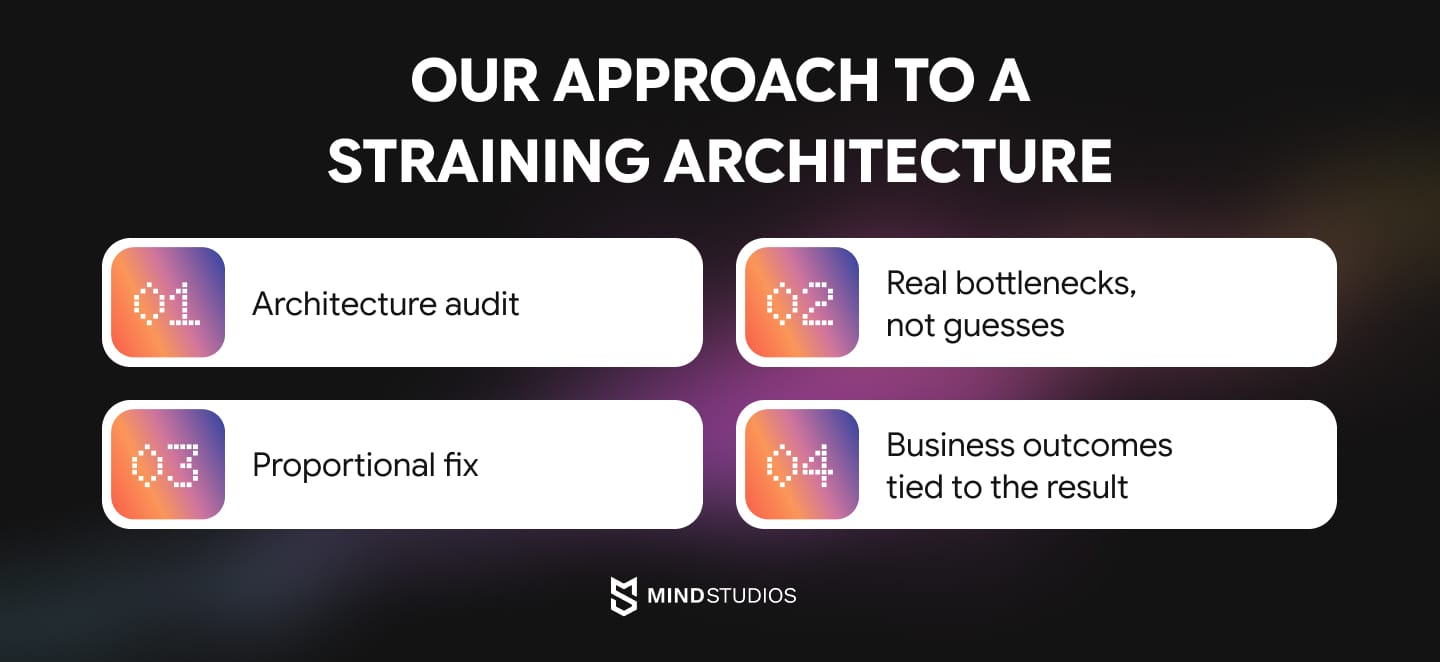
Every engagement starts with an architecture audit: modeling real load, tracing where the actual bottlenecks live, and separating genuine software architecture pitfalls from cosmetic ones that just look scary.
The goal is a clear picture of which wall you're hitting before anyone proposes a fix.
Fix the part that's actually broken
Rearchitect the module that's actually causing the pain. Modernize in stages where several problems exist, but the foundation is sound. Keep the product shipping throughout.
A full rebuild enters the conversation only when the foundation itself is genuinely gone; the decision follows the evidence, never the appeal of a fresh start.
Outcomes, not just cleaner code
Restored feature velocity, lower run cost, reduced incident risk: outcomes the business feels, alongside a cleaner codebase. A fix that doesn't move one of those numbers isn't the right fix yet.
What this looked like for FITR
FITR came to us as an early-stage fitness platform. As it grew and adoption climbed, the infrastructure that had worked for the first wave of users started struggling under real load: slower response times, mounting security concerns, and a setup that couldn't keep pace with where the product was headed.
Rather than a ground-up rewrite, the fix was targeted: migrating the platform to AWS and rebuilding the infrastructure layer to handle the growth.
Seven years later, we're still the team building with FITR, through every architecture decision since. It's a useful example precisely because the honest call wasn't "start over," it was "fix the part that's actually straining."
The instinct when something's straining is to reach for the biggest fix available, because it feels like it proves you're taking the problem seriously. Usually that's the wrong instinct. The audit exists to slow that down for a week or two and find out which twenty percent of the system is actually causing eighty percent of the pain. Most of the time, that's a much smaller and cheaper problem than the one the team walked in believing they had.
— Anton Baryshevskyi, CBDO at Mind Studios.
If your product is starting to fight you, the first step isn't a rebuild, it's a diagnosis. Book a free architecture audit and leave with a clear picture of what's straining and a proportional plan to fix it, whether or not you work with us.
Conclusion
Hitting a wall isn't a failure. It's a predictable stage of growth, and every product that survives long enough to matter eventually runs into one.
The teams that come through it well aren't the ones with the cleanest code. They're the ones who read the signs early and act at the right scale: patching what's local, refactoring what's messy, rearchitecting the one part that's genuinely broken, and reaching for a full rebuild only when there's no foundation left worth saving.
The expensive mistake isn't hitting a wall. It's waiting until the wall makes the decision for you.
If any of these signs sound like your product, the right time to look into it is now, while you still have options. When you're ready, Mind Studios can help you tell exactly which wall you're hitting and what it takes to get past it.