
 ChatGPT
 Perplexity

Your cloud migration strategy gets its real test at cutover, while customers are still paying. Settle what moves, in what order and how you roll back while the old setup still carries the business.
Highlights
- Each system gets its own call: retire, retain, move as-is or modernize.
- Moving as-is suits stable systems. Struggling ones carry their technical debt along.
- Parallel running and a rehearsed rollback give you a way back from cutover.
A cloud migration strategy gives every system a path: it stays, retires, moves as-is or changes along the way. It also sets the order of moves and the way back. In an enterprise cloud migration, dependencies set the order, and the rollback plan sets how the team recovers from a failed switch.
Once paying customers depend on the product, an on-premises to cloud migration has to run while revenue keeps flowing. That makes the sequence and the fallback more important than the choice of provider. We've run moves like this on live platforms. One was a 40TB music library that went from one physical drive to AWS with zero downtime.
If you're not sure which of your systems can move as-is and which need work first, settle that question with the team that will run the migration.
What a cloud migration strategy covers
A cloud migration strategy is a written set of seven decisions: where each system goes, how it gets there, when it moves and who runs it afterward. Every later phase of the plan carries these decisions out. If one is left open, the budget, the schedule or the cutover ends up resting on a guess.
Each decision settles a different part of the move:
- Business goal. What the move must change: release speed, resilience, cost structure or compliance.
- Inventory and dependencies. Every system, database, integration and scheduled job, mapped to what it talks to.
- Treatment per system. One of the 7 Rs for each workload, with the reason written down.
- Target model. Public, private, hybrid or multicloud, chosen per system.
- Waves. Which systems move together and in what order.
- Cutover and rollback criteria. The checks that allow the switch and the trigger that reverses it.
- Operations after the move. Who owns monitoring, cost control and security in the new environment.
The provider isn't on the list because it follows from the target model, your users' regions and the managed services you need. For an owner, these seven lines are the document to ask for before approving the budget.
Mind Studios' recommendation: Write down the condition that would change each system's R, such as a retained system's dependency moving or a hosting contract ending. Review that list at the end of every wave, so retain stays a decision and doesn't quietly become permanent.
Benefits of cloud migration, and when a system should stay on-premises
The benefits of cloud migration come from five fixes: elastic capacity, variable instead of fixed spend, managed recovery, shared data and faster releases. Each fix works only under a condition, and the table below names it. If the condition can't be met, keeping the system where it is (retain) can be the right outcome.
AWS's cloud computing overview lists trading fixed for variable expense and no longer guessing capacity among the core advantages. Both depend on how the workload is set up:
| Problem | Cloud benefit | Blocking condition |
|---|---|---|
| Scaling limits | Capacity follows demand; peaks no longer dictate hardware purchases | The app can't run as more than one instance, or the database is the bottleneck |
| Infrastructure costs | Pay for what you consume, with no upfront hardware | Resources stay sized for peak; nobody owns the monthly bill |
| Disaster recovery | Replication, snapshots and backups as managed services | Backups and failover are never configured or tested |
| Data silos | Shared managed databases, APIs and analytics in one environment | Teams move their tools separately and rebuild the silos |
| Slow releases | Managed services and CI/CD shorten the path to production | Releases stay manual; the architecture stays tightly coupled |
The last column is work the migration needs before it pays off, and it usually joins the plan as a replatform or refactor. When that work can't be justified, retain becomes a candidate. AWS Prescriptive Guidance names common reasons to retain:
- data residency requirements
- dependence on specialized hardware
- a recent upgrade
- low business value, such as an application with only a few internal users
If current costs, foreseeable risks and planned growth together don't justify the move, a founder can keep the system and put the budget into customer-facing work.
Public, private, hybrid or multicloud: pick the target model first
In a cloud migration, the target model is a separate decision from the strategy: the model sets where a system runs, while the R sets how it gets there. Choose the model per system first, because it limits which Rs are realistic. Public, private, hybrid and multicloud each fit a different set of constraints.
Microsoft describes a private cloud environment as one dedicated to a single organization and hosted either on-premises or by a third party. Here is how the four models compare:
| Model | Fits when | Considerations |
|---|---|---|
| Public cloud | Demand varies, you want managed databases and storage, users span regions | Pay-per-use billing needs an owner; regions and services shape the design |
| Private cloud | Regulation or contracts require dedicated infrastructure and control over data location | Self-hosted: capacity and hardware planning stay with your team |
| Hybrid cloud | Sensitive data or hardware-bound systems stay put; the rest moves | Networking, identity and monitoring span two environments |
| Multicloud | Needed services or regions are strongest on different providers, or contracts require several | Each provider adds its own skills, tooling and billing |
Hybrid can also be the permanent setup: a regulated database stays private while the customer-facing app scales in public cloud. The budget then carries both a variable cloud bill and fixed infrastructure costs, and finance should see both before approval.
Types of cloud migration: the 7 Rs compared
AWS defines seven strategies: retire, retain, rehost, relocate, repurchase, replatform and refactor (or re-architect). They range from no change at all to a full redesign. Each workload needs one primary strategy for the current migration wave, and any later modernization can get its own scope and budget.
What each R changes and what it risks
| Strategy | What changes | Main risk |
|---|---|---|
| Retire | The system is shut down or archived | A hidden dependency still calls it |
| Retain | Nothing for now | Nobody revisits the decision |
| Rehost (lift and shift) | Hosting only | Performance and design problems move with it |
| Relocate | A whole platform moves to its cloud version | Few gains beyond the move itself |
| Repurchase | Replaced by another product, usually SaaS | Data migration, retraining and lost customizations |
| Replatform | A few targeted changes, such as a managed database | The changes keep growing until it's a rewrite |
| Refactor or re-architect | Architecture redesigned for cloud-native services | AWS calls it the most complex and costly strategy |
When each R fits and when to avoid it
| Strategy | Fits when | Avoid when |
|---|---|---|
| Retire | Nobody uses it, or its function now lives elsewhere | Its data or reports still feed other systems |
| Retain | A data residency, hardware or recent-upgrade reason applies | It's the bottleneck the migration should fix |
| Rehost | A stable system and a fixed deadline | Existing performance or architecture problems |
| Relocate | A virtualized platform with a direct cloud equivalent | Physical servers or an outdated stack |
| Repurchase | SaaS covers the function with little customization | It's where your product beats competitors |
| Replatform | Running the infrastructure takes up your team's time | The code itself blocks growth |
| Refactor or re-architect | The monolith blocks releases or scaling; the team has time and skills | A hard deadline or large portfolio leaves no room for redesign |
Each R is also a budget line. Retain postpones migration spending but keeps today's operating costs, retirement still needs dependency checks and a data plan, and the effort for replatform or refactor grows with every change made along the way.
How other frameworks count the Rs
Microsoft's Cloud Adoption Framework uses eight options: retire, retain, rehost, replatform, refactor, rearchitect, rebuild and replace. Its replace (switching to SaaS) is close to AWS's repurchase. Its rebuild means redeveloping your own system as cloud-native, so the system stays yours.
Akamai's migration guide lists six Rs: rehost, retire, retain, replatform, refactor and rearchitect. Whichever list you work from, map its terms onto these definitions before you assign an option to a system.
Lift and shift cloud migration: when moving as-is is the right call
Rehosting moves a system unchanged. It's the right call when the system is stable, the deadline is fixed and no modernization is planned soon. If the system already struggles, rehosting carries its performance and design problems into an environment that bills for them every month.
Where AWS and Microsoft agree, and where they differ
For large migrations, AWS recommends rehosting, relocating or replatforming first and modernizing after the move, because refactoring many applications mid-migration is hard to manage and applications are easier to optimize once they run in the cloud.
Microsoft judges each workload separately and warns against rehosting problematic workloads, since rehosting doesn't fix performance, reliability or architecture issues. It treats rehost as suitable only when the workload will stay in its current state for at least two years.
Rehost vs. replatform
Replatforming adds a few targeted changes on the way, such as moving a self-managed database to a managed service:
| Question | Rehost | Replatform |
|---|---|---|
| Code changes | None | Few, limited to the replaced components |
| Operations load after the move | Similar to today, now on cloud servers | Lower for the parts the provider manages |
| Best fit | Stable systems with a fixed deadline | Systems where patching and maintenance take up the team's time |
| Watch for | Technical debt arriving intact | Small changes growing into a rewrite |
Rehosting buys speed now and pushes the cost of modernization to later, which works when the deadline is real, such as a hosting contract about to end. When the system itself holds the business back, the legacy modernization strategies that fix it belong in the plan before the move, even if that means moving the deadline.
How to choose a cloud migration strategy for each workload
Choose the strategy for each workload in four passes: value, required change, constraints and feasibility. The first two passes give you a provisional R, and the last two test it, so a choice enters the plan only after it clears both checks. Microsoft's framework works the same way: it drops options that conflict with constraints and weighs team skills before finalizing.
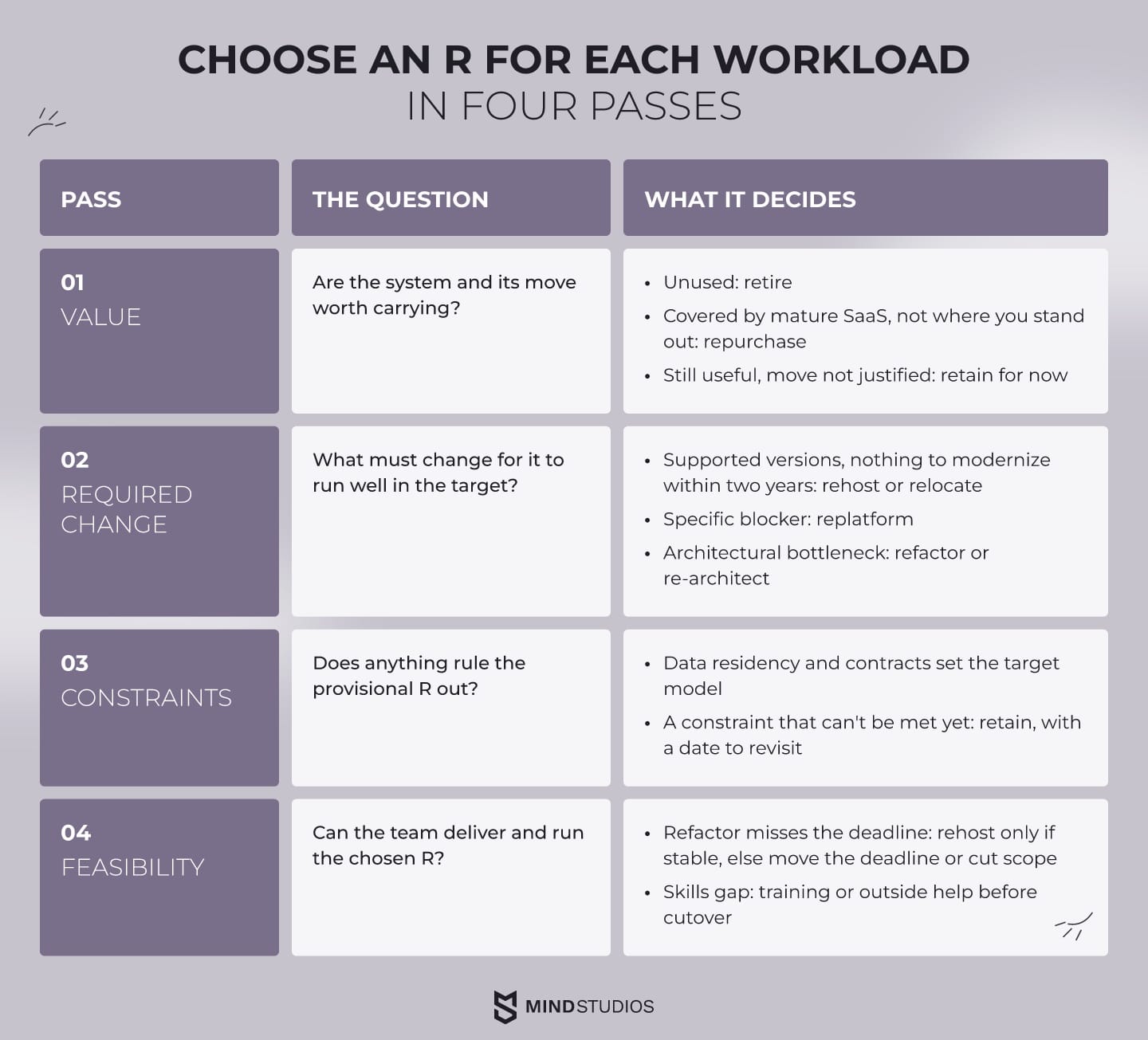
- Value. Are the system and its move worth carrying? An unused system is a retirement candidate. A function that a mature SaaS product covers, where you don't stand out, points to repurchase. A system that still serves the business without justifying a move is provisionally retained.
- Required change. What must change for it to run well in the target? A system on supported versions with nothing to modernize within two years points to rehost or relocate. A specific blocker, such as an unsupported OS, points to replatforming that component. An architectural bottleneck points to refactor or re-architect.
- Constraints. Does anything rule the provisional R out? Data residency and contract terms set the target model, and dependencies can block any option: a retired system may still feed reports, and a SaaS replacement must support your integrations and data export. A constraint that can't be met yet means retain, with a date to revisit.
- Feasibility. Can the team deliver and run the chosen R? If a refactor can't meet a hard deadline, it can drop to a rehost only when the system passed the stability test in pass 2. Otherwise, move the deadline or cut the scope. A skills gap needs training or outside help before cutover, because someone has to operate the managed services.
Dmytro Dobrytskyi, CEO at Mind Studios, explains what evidence he asks for before approving an as-is move. The rule comes from the MyMP3Pool migration:
Before we approve moving a system as-is, we want to see it run in the target environment on real data. With MyMP3Pool, the operating system was too old to update dependencies, so the new environment needed current versions anyway. If a system can't pass that test run, it isn't a rehost yet, and the plan and budget should say so.
If one of your core systems sits between moving as-is and fixing it first, make that call with the engineers who will also do the work.
Cloud migration plan: 5 phases from assessment to optimization
A cloud migration plan runs in five phases, from assessment to optimization. Each phase ends with a decision the owner can review, so problems surface while the old environment still carries the business. Cutover starts only after its success and rollback criteria have been written down.
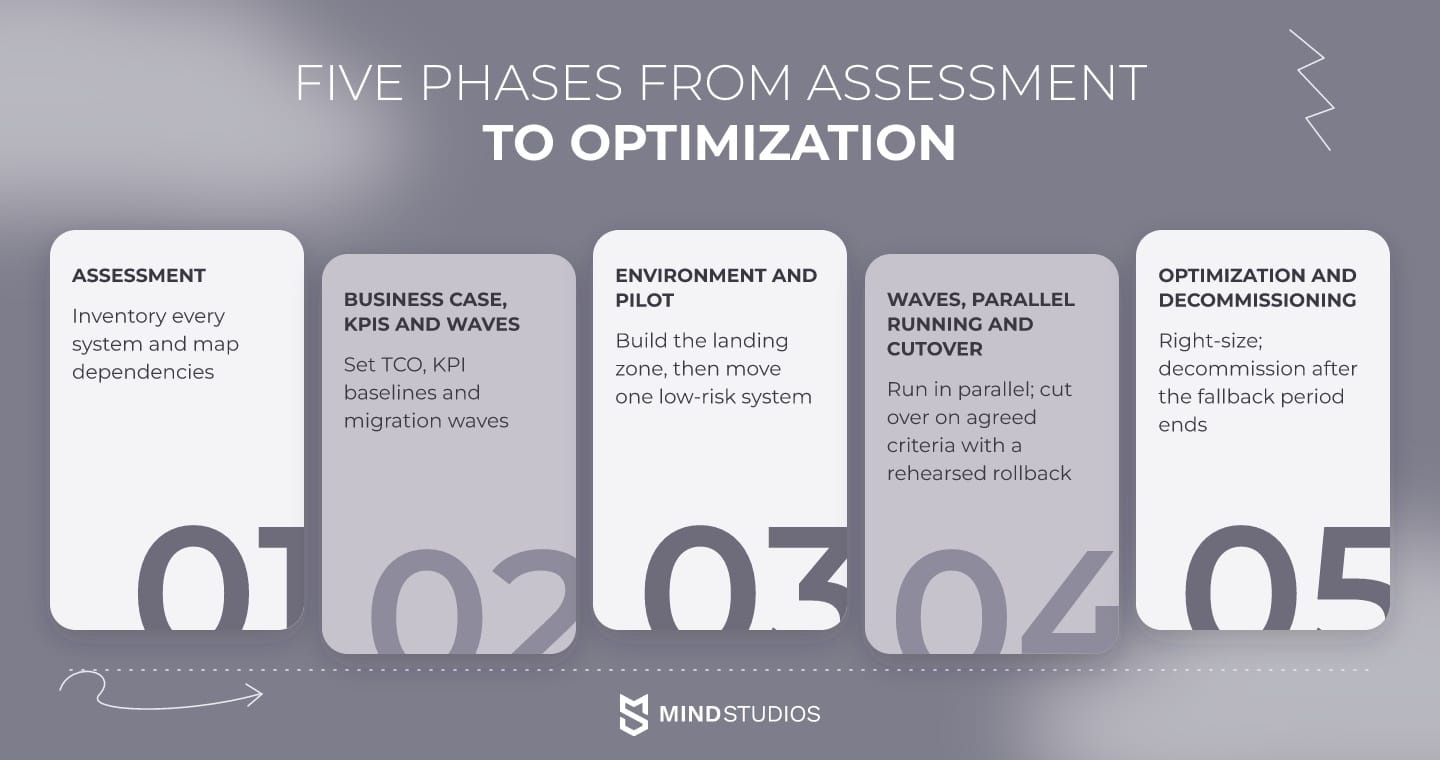
The cloud migration process for a live platform looks like this:
- Assessment. Turn the inventory into a dependency map that shows what must move together. Discovery tools speed this up, but the map still needs people who know the system. A software audit shows which components are stable enough to rehost.
- Business case, KPIs and waves. Calculate total cost of ownership, including both environments during the parallel period, data transfer and training. Record baselines for response time, error rate, release frequency and monthly infrastructure cost, and log each per-system decision in an architecture decision record.
- Environment and pilot. Build the landing zone: accounts, networking, identity and access, logging, backups and cost alerts. Then move one low-risk system end to end and fix whatever the pilot exposes.
- Waves, parallel running and cutover. Run old and new environments side by side on real traffic and data. Only one side triggers side effects such as card charges, emails or partner API calls, while the other runs with those calls stubbed. Switch when the criteria pass, and keep the old environment ready as a fallback.
- Optimization and decommissioning. Right-size against the baseline and add services the move made possible, such as a CDN. Shut down the old environment once the fallback period ends.
Cutover criteria and rollback triggers
Phase 4 is only as safe as its criteria, which have to be measurable and agreed before the first wave. A typical set looks like this:
- Data in the new environment matches the source
- Error rate and response time match or beat the baseline under real traffic
- Integrations, payments and scheduled jobs complete in the new environment
- Monitoring and alerts fire correctly on a test incident
- A rollback has been rehearsed, and a named person is authorized to trigger it
Mind Studios' insight: Set the rollback trigger in numbers before cutover day: an error-rate threshold or a failed data check that reverses the switch without a meeting. If rollback gets negotiated during an incident, the team ends up fixing forward under pressure.
Rolling back after new data is written
Rollback stays simple until the new environment accepts its first real transaction. Before that point, the AWS cutover guidance describes it as resuming the source environment and redirecting traffic through DNS or the load balancer, with the final backup taken at cutover as a safety net.
After new transactions land in the cloud, the source database is stale, and rolling back means bringing current data to the old side. AWS describes three approaches:
- Fail-forward database: cloud writes replicate to a fresh database on the old side
- Dual writes: the application writes to both databases, and writes that land on only one side need reconciling
- Backup and restore: a cloud database backup is restored on the old side, with compatibility and restore time tested beforehand
The recovery point and recovery time objectives agreed with the business decide which fits: loose limits can live with a tested restore, while tighter ones need a fail-forward database or validated dual writes.
Cloud data migration: protecting records through cutover
In cloud data migration, a lost or corrupted record can rule out a safe rollback, because code can be redeployed but records can't. The data plan therefore defines validation, synchronization and recovery before production writes move.
In practice, large volumes move in bulk ahead of time, later changes sync incrementally, and record counts, checksums and samples validate the result. AWS notes that strict consistency may require locking the source database before cutover, which lengthens the downtime window, so decide early which systems need that lock.
During parallel running, each write needs one side named as the source of truth, or the copies drift apart without anyone noticing. For the owner, the parallel period is the line item to protect, because paying for two environments is what keeps rollback possible.
Cloud migration case study: 40TB moved to AWS with zero downtime
MyMP3Pool, a US subscription platform for DJs, moved 40TB of licensed music from a single physical drive to AWS with zero downtime. Cutover came only after the new pipeline had run in parallel on live content and processed real supplier deliveries.
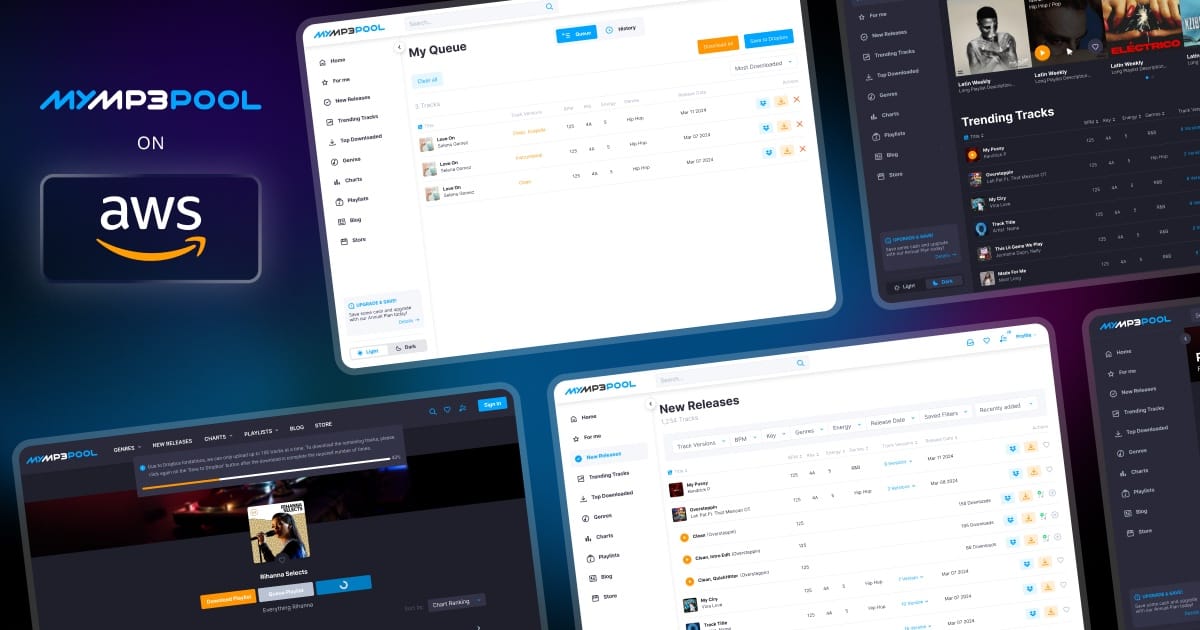
Where the platform stood before the move
All content and user data sat on one 40TB drive at a local US provider, with no redundancy or backup and 38TB already used. The Ubuntu version was too old to update dependencies such as Node.js, which froze development.
When a partnership with The Orchard brought in more content, the disk filled up, registrations failed and uploads were blocked.
How the move was run
We recommended AWS for its US regions, redundancy through S3 object storage and CloudFront as a delivery layer the platform didn't have. Hetzner was ruled out because it offered only European regions.
MyMP3Pool was a long-term client, and our team already knew its pipeline, billing and edge cases, so the migration was planned without a separate discovery phase. A team new to the platform would need one. The move ran in four steps:
- The AWS environment was set up first, with Node.js and other dependencies upgraded
- The FFmpeg-based worker that produces track versions and handles HLS streaming was rebuilt with updated dependencies
- New content went straight to S3 while the Ruby on Rails application kept processing on the old hardware, so the full pipeline was tested on live content and real suppliers
- After cutover, the old server stayed live for one month as a fallback and was then decommissioned
What changed after cutover
The migration ran with zero downtime, the storage risk disappeared and development resumed. Egress costs made CloudFront the next step, and delivery costs fell 30% after it went in. Its edge filtering also blocked scripts pulling 100–500 tracks per minute before they reached the Rails application.
For a founder, the takeaway is timing. The single-drive risk was fixed before a hardware failure could force the move, and the platform stayed available through cutover.
How FITR's AWS migration performed under load
For the AWS migration of FITR's coaching platform, built for personal trainers, we brought in additional external DevOps expertise. Load tests showed an 85.5% improvement in average response, an 82.1% increase in transactions processed and no remaining user-visible errors.
Cloud migration challenges and how to avoid them
The main cloud migration challenges are runaway costs, security gaps, missed dependencies, vendor lock-in and teams that aren't ready for the new environment. Each has a known countermeasure, and building them into the plan before the first wave keeps you from fixing these problems on live traffic.
Cost comes first. In Flexera's 2026 findings, 85% of respondents identify managing cloud spend as a top challenge. Wasted cloud spend rose to 29%, the first increase in five years, driven by AI workloads. In a migration, that means someone has to own cost from the first day in the landing zone.
The table shows how each challenge tends to appear and what prevents it:
| Challenge | What goes wrong | Countermeasure |
|---|---|---|
| "Lift and panic" | Fast moves without a dependency map or a review of SLA commitments | Map dependencies, start with low-risk systems, dry-run each wave |
| Security gaps | Exposed APIs, broad permissions and unencrypted transfers creep in | IAM policies, encryption and audit logging in the landing zone before data moves |
| Cost creep | Idle, duplicated and oversized resources keep running | Tag by owner, set budget alerts, right-size against the baseline |
| Vendor lock-in | Core logic tied to hard-to-replace proprietary services | Choose managed services deliberately, keep data portable, document exit paths |
| Team adoption | The infrastructure is ready, but the team isn't | Train before cutover, write runbooks, give the team ownership |
Moving workloads to a provider doesn't move responsibility for their security. Under the AWS shared responsibility model, AWS protects the infrastructure that runs its services. The customer stays responsible for its data, encryption choices and permissions, and on services like EC2 also for the guest operating system.
The team that gets production credentials for the move deserves the same scrutiny as the landing zone. Mind Studios holds ISO 27001 certification, the standard for managing information security, and ISO 9001 certification for quality management, both listed on our software modernization service page.
Cloud migration checklist before you approve the plan
Before you approve a migration plan, make sure it answers the ten points below in writing. These best practices close the gaps that tend to surface mid-migration. If any line is blank, the plan isn't ready for budget approval, however good the provider choice looks.
- Every system has an R assigned, with the reason recorded
- Dependencies are mapped, including scheduled jobs and third-party integrations
- The target model is chosen per system, with data residency rules checked
- Baseline metrics are captured before the first move
- The business case includes running both environments in parallel, data transfer and training
- Waves are defined, starting with a low-risk pilot
- Cutover criteria are measurable and agreed in advance
- Rollback is rehearsed for both cases, before and after new writes, with a named owner and a set fallback period
- Every database has validation and sync rules, plus agreed recovery point and recovery time objectives
- Ownership of cost, security and monitoring after the move is assigned
A plan that covers these points tells the team when to go ahead, pause or roll back during cutover, while the old setup still carries the business.
Gaps usually point to work that belongs before the move, where software modernization and migration planning overlap.
If the rollback and data sync lines in your plan are still blank, our engineers can design that part and run the migration with you.
FAQ
What is cloud migration, and what does a cloud migration strategy include?
Cloud migration moves applications, data and infrastructure from on-premises servers or another environment onto a cloud platform. The strategy decides what happens to each system, where it lands, in what order it moves and how a failed cutover gets reversed. The plan turns those decisions into phases, a schedule and a budget.
What are the 7 cloud migration strategies?
AWS defines seven options, each describing how much a system changes:
- Retire: shut the system down or archive it
- Retain: keep it where it is for now
- Rehost: move servers unchanged
- Relocate: move a virtualized platform as a whole
- Repurchase: switch to another product, usually SaaS
- Replatform: move with targeted changes
- Refactor or re-architect: redesign for cloud-native services
Why do some guides list 5 or 6 R's of cloud migration?
Each list reflects how its author groups the work: AWS uses seven Rs, Microsoft eight. Microsoft splits refactor, rearchitect and rebuild, while AWS combines refactor and re-architect and adds relocate. Shorter lists leave options out, so compare the definitions behind each name, since the count alone doesn't show which option fits a system.
What are the five phases of cloud migration?
Each phase ends with something the owner can review:
- Assessment: an inventory and a dependency map
- Planning: a business case, KPIs and a wave plan
- Preparation: a working landing zone and a migrated pilot system
- Migration: systems cut over against agreed criteria, with a tested rollback
- Optimization: right-sized costs and a decommissioned old environment
Is lift and shift a good cloud migration strategy?
Yes, for a stable system with a fixed deadline that will stay unchanged for at least two years, as Microsoft's guidance puts it. For a system that already has performance or architecture problems, it's a poor choice: those problems reach the cloud intact and come with a new monthly bill.
Should you refactor during application migration to cloud or after it?
Decide by what blocks the workload today. If nothing does, move first and modernize once it runs in the cloud, which AWS recommends for large programs. An infrastructure blocker may only need replatforming during the move, while an architectural bottleneck can justify refactoring or re-architecting before cutover.
How long does an enterprise cloud migration take?
It depends on the number of systems and how tightly they're coupled, the data volume, the R each system gets and the downtime the business can tolerate. A credible timeline is set per wave and shows dependencies, validation work and the cutover window, so the end date rests on visible work.
How much does a cloud migration cost?
The cost depends on the work assigned to each system, plus several lines that budgets often miss:
- running both environments during the parallel period
- data transfer and storage
- code changes for replatformed or refactored systems
- team training
After the move, cost ownership and right-sizing decide the real total.