
 ChatGPT
 Perplexity

Billing software development builds the system that turns prices, contracts and usage into invoices, payments and accounting records. This guide compares four billing options, the architecture and what drives the cost.
Highlights
- Ready-made billing fits until a real contract needs a rule it can't express.
- A custom layer over your payment provider can cover enterprise pricing rules.
- Pricing models and an append-only ledger shape the architecture before code.
An automated billing system turns prices, contracts and product usage into invoices, collected payments and records your finance team can close the month on. Building your own is worth evaluating once those rules outgrow the billing software you started with.
The pressure usually comes from enterprise deals. They bring negotiated prices and bank transfers, and per-client adjustments move into a finance spreadsheet. We built a billing layer with progressive enterprise pricing and direct invoices for Wise Up, on top of a SaaS platform the client didn't own.
This guide compares four ways to get billing done, then covers the architecture that keeps invoices correct and what drives the cost of a build.
If per-client adjustments already live in a spreadsheet, the first step is to sort out which of them the next system has to own.
What is an automated billing system and what it includes
An automated billing system is software that calculates charges from your price list, contracts and usage, issues invoices on schedule, collects payment through a provider and records every amount for accounting, so nobody rebuilds the numbers each cycle.
In practice it's a set of components, and some vendors sell the same scope as a billing management system. The table lists each component and what breaks when it's missing or weak.
| Component | What it does | Without it |
|---|---|---|
| Product catalog and prices | Holds plans, prices, currencies and versions | Price changes overwrite live contracts |
| Metering | Collects usage events from the product | Usage gets billed from estimates |
| Rating | Turns usage and contract terms into amounts | Tiers and discounts get applied by hand |
| Subscriptions | Tracks plans, terms, renewals and changes | Upgrades and cancellations miss invoices |
| Invoicing | Builds invoices, numbering and credit notes | Corrections edit invoices already sent |
| Payments and dunning | Charges, retries and payment reminders | Declined cards turn into silent churn |
| Tax | Applies rates by region and customer type | Cross-border invoices carry the wrong tax |
| Revenue recognition | Splits billed amounts into earned revenue | Month-end close moves into spreadsheets |
| Reporting | Recurring revenue, aging, collections, usage | Finance and sales report different numbers |
| Customer portal | Invoices, payment methods, plan changes | Support handles every billing request |
| Integrations | Syncs CRM, accounting and payment provider | Deals, invoices and books drift apart |
A single wrong edit spreads through these components. If someone changes a plan price for a renewal instead of adding a new price version, rating, tax and revenue reports all inherit the error, and finance ends up correcting invoices by hand every cycle.
When you audit your current tool against this table, start with rating, revenue recognition and integrations, because gaps in that contract-specific logic are where the build-or-buy question starts.
Automated billing software or your own build: how to decide
Automated billing software from a SaaS vendor is the right choice while your pricing and contract rules fit the platform's models. The documented Stripe pricing models, for example, already cover flat-rate, per-seat, tiered and usage-based plans. Custom billing software is justified when a real contract needs a rule none of the ready options can hold.
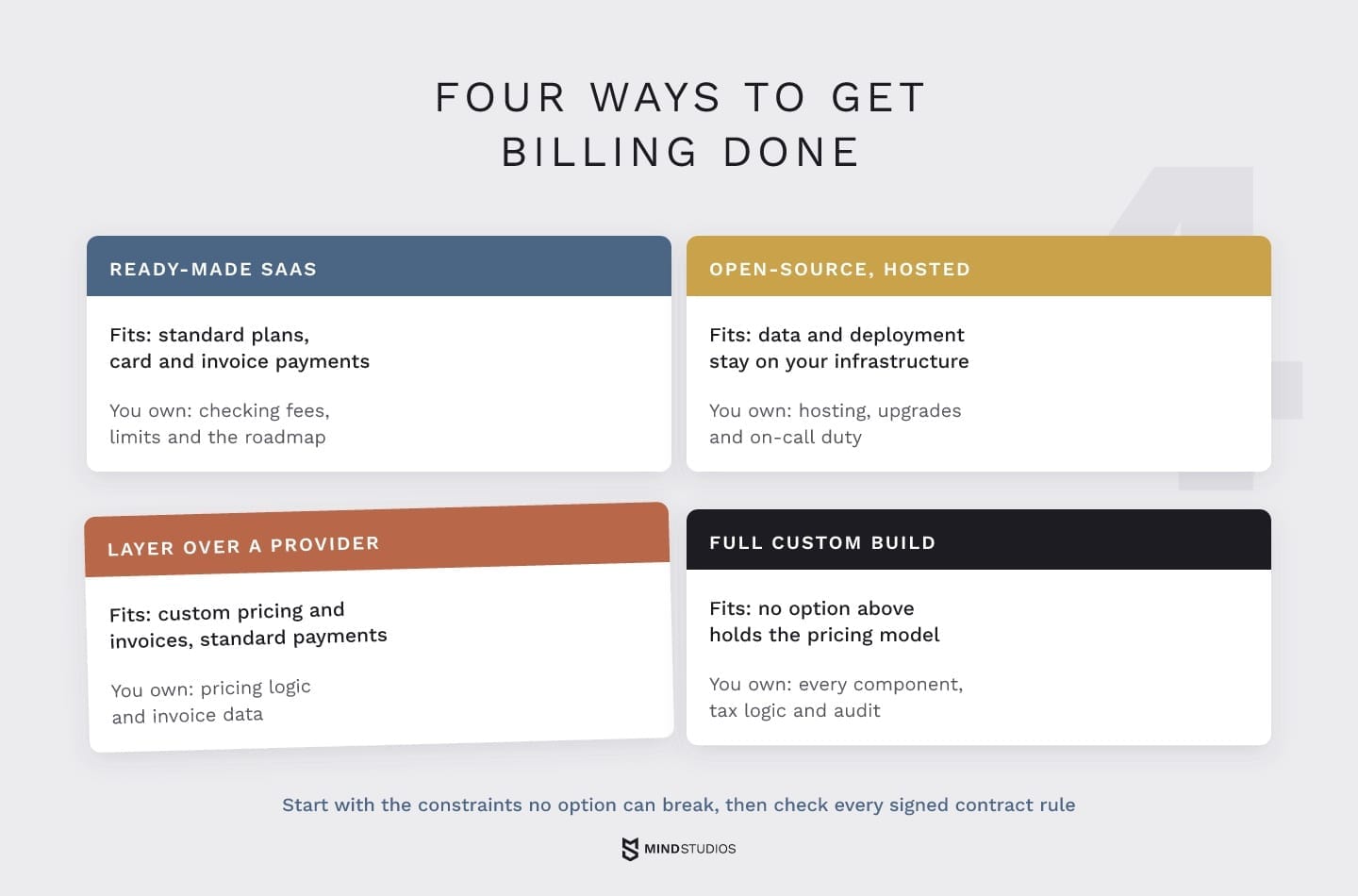
Between those two ends sit two more options. The table below compares all four.
| Option | When it fits | Your responsibilities |
|---|---|---|
| Ready-made SaaS billing | Standard plans, card and invoice payments | Check fees and limits; follow the vendor's pricing roadmap |
| Open-source billing engine you host | Billing data and deployment stay on your infrastructure | Hosting, upgrades and on-call duty |
| Your own layer over a payment provider | Non-standard pricing and invoices, standard payment acceptance | Pricing logic and invoice data |
| Custom billing software built in full | No option above holds the pricing model | Every component, its correctness, tax logic and audit |
Each option also comes with a condition. Ready-made billing works while pricing stays inside the platform's models, so its fee model and limits need checking against your contracts. A self-hosted engine fits when its pricing logic covers yours.
With a layer, the provider still processes cards, while a full build fits when billing is part of the product and leaves you maintaining every component you build.
Four questions that point to the right option
Work through the checks in order, starting with the constraints no option can break, and carry each answer into the next question:
-
Constraints. What can't change? List where billing data and deployment must live, which countries and payment methods you serve and which signed contract terms apply.
-
Infrastructure. Must billing run on your own infrastructure? If yes, hosted SaaS drops out and an open-source engine becomes the first candidate. If its pricing model can't hold your contracts, you're choosing between a layer and a full build, both self-hosted.
-
Pricing fit. Can the remaining ready-made option express every signed rule once it's configured properly? If yes, stay with it and invest in configuration. If the gap is in how money moves, such as payouts or local payment methods, compare providers first.
Our payment provider comparison covers that choice.
-
Scope. How many components does the gap touch? If it sits in pricing and invoice documents, build a layer. The provider keeps card processing, standard subscriptions and retries, and your layer owns contract pricing, invoice generation and the accounting sync. If the gap also runs through subscriptions, rating and the ledger, for example because usage rules depend on product logic, a full build is worth scoping, with card processing still left to the provider.
When billing is one module next to planning, inventory and HR, the decision belongs in a custom ERP conversation.
Who this isn't for: If your plans are standard, customers pay by card and nobody adjusts invoices by hand, a full build adds cost without adding control.
Billing automation: what to automate first
Start where money currently leaks or waits: invoices that go out late, failed payments nobody retries and month-end reconciliation with accounting done by hand. These three hurt cash flow every cycle, and advanced pricing logic can follow once the basics run reliably.
When you compare billing automation software, test this first wave against your own invoices, starting at the top of the list:
- Invoice generation: on schedule, with numbering and due dates set per contract
- Recurring charges: scheduled charges plus retries for failed card payments
- Payment reminders: before and after the due date
- Transfer matching: incoming bank transfers matched to open invoices
- Accounting sync: paid invoices and credit notes sent to the accounting system
- Usage collection: from the product, if any plan charges for consumption
- Invoice total alerts: a warning when an invoice total moves far from the previous cycle
Automated billing earns trust in stages. For the first cycles, finance approves each batch, and then the approval step drops away for invoice types that matched every time.
Automated recurring billing and dunning
Recurring charges are where revenue slips away quietly, because a declined card can have a routine cause, such as an expiry date or a temporary bank decline. Dunning closes that gap with retries, reminders and a clear rule for what happens when recovery fails.
On new accounts, Stripe Smart Retries are on by default with up to eight retries within two weeks, timed by a model that picks the moments a charge is more likely to succeed. Your system still decides what the customer sees in that window: full access, a warning or a paused account.
When you automate subscription billing end to end, dunning rules belong in the catalog next to each plan. That way, an enterprise account on invoice terms gets a different recovery path from a team paying by card.
Pricing models your billing system has to support
Your pricing model decides the billing architecture, because each model needs different data. A flat plan needs a price and a date, while usage pricing needs a stream of events and a rating engine. Map every model you sell today and the ones sales is already promising, then design the catalog around that list.
The table covers six common B2B pricing models, and the examples under it show how the calculations differ.
| Model | How it's calculated | System needs |
|---|---|---|
| Flat rate | One price per plan per period | Catalog with price versions and billing dates |
| Per-seat | Seat price times active users | Seat counts synced from the product; proration on changes |
| Tiered (graduated) | Each unit priced by the tier it falls in | Tier tables and line-level detail on invoices |
| Volume | All units priced at the tier the total reaches | The same tier tables, a different calculation, clear invoice wording |
| Usage-based | Charges from measured consumption | Metering, aggregation, rating and usage the customer can see |
| Hybrid and credits | Platform fee plus usage, or prepaid credits drawn down | Balances, expiry rules, top-ups and low-balance alerts |
A Business plan on a flat rate, for example, might cost $500 a month, a per-seat plan might bill 40 seats on an annual term, and usage pricing might count API calls or processed documents.
With tiered pricing, the first 100 units go at one rate and the next 400 at a lower one. With volume pricing, 600 units all go at the 501+ rate. The two look almost the same in a sales deck, and they produce disputed invoices when the system applies the wrong one.
Kept in the catalog as data, both turn a new contract into a configuration change instead of a code release.
Usage-based billing: metering and rating
Usage-based billing software has two jobs before any invoice exists. Metering collects events from your product (an API call, a processed file, a seat-day) with a timestamp, a customer ID and a unique event ID. Rating then applies the contract to the totals: allowances, tiers, minimum commitments and negotiated discounts.
For the CTO, the key decision is where metering lives. The product should persist each billable event with a stable ID before delivery, while billing owns aggregation. If delivery is retried, that ID lets billing count the event once, and engineering can change a feature without breaking how it's charged.
How to automate usage-based billing
The pipeline runs from the product event to a reconciled invoice:
- Emit an event for every billable action, with a unique ID, customer, quantity and timestamp.
- Aggregate events per customer, meter and billing period, dropping duplicates by event ID.
- Price the totals against each customer's contract: allowances, tiers and commitments.
- Generate invoice lines with enough usage detail for the customer to check them.
- Reconcile in two passes before invoices go out: aggregated quantities against the raw events, then each invoice total against a calculation agreed for that contract.
Billing system architecture: the layers that keep invoices correct
For planning, billing system architecture can be mapped into eight logical components: catalog, subscriptions, metering, rating, invoicing, payments, ledger and reporting. Each owns its data and reacts to events from the others, such as a plan change or a failed payment. These are logical boundaries, so a first version can run them in one deployment.
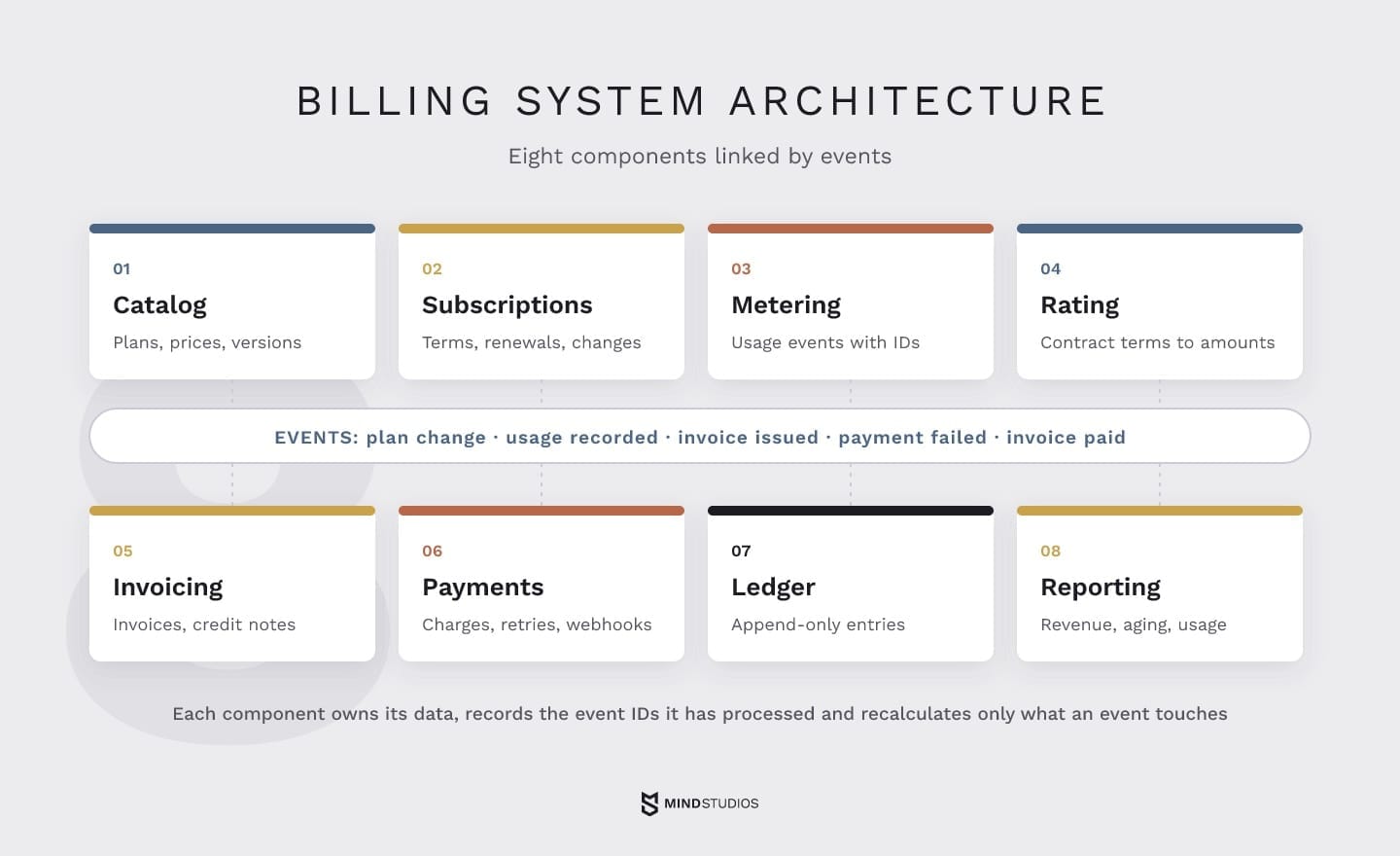
Clear boundaries make ownership visible before the team decides which components, if any, need separate deployment.
They also make one risk explicit: events between components can arrive twice or out of order. Stripe's webhook documentation states that it doesn't guarantee delivery in the order events are generated and that an endpoint may receive the same event more than once.
Each component therefore records the event IDs it has processed and checks current state before acting. If the payment provider times out after charging the card, billing confirms the charge with the provider and records it once, without charging again.
Watch out: Three design mistakes are expensive to undo later: sizing the system for today's invoice volume with no headroom, putting usage limits inside the billing engine so every check slows the product, and retrying charges without idempotency keys, which can bill a customer twice.
If you serve many client companies from one deployment, tenant isolation shapes these components too, and our guide to multi-tenant architecture covers that decision.
Events, ledger and idempotency
An append-only ledger preserves charges, credits and payments as separate entries. Nothing gets edited and every correction is a new entry, which gives finance a traceable record of each change.
Rebuilding an old invoice takes more than the ledger, though. The price version, contract terms and usage totals behind each calculation have to be stored with it, so the same inputs produce the same invoice months later.
Idempotency protects the ledger from retries. Stripe's API accepts an idempotency key, so a request repeated after a connection error doesn't create a second object. Your own billing endpoints need the same property, especially the ones that create invoices and charges.
Entitlements (what a customer can use right now) should be readable without a synchronous call to billing, whether through a separate service or an access table the product keeps in sync.
The product checks access without waiting on billing, and billing stays the source of truth for what was sold. The same split helps when AI features are sold as credits.
Integrations: CRM, accounting and payment providers
Billing sits between systems your company already runs: the CRM where deals close (Salesforce, HubSpot), the accounting system that keeps the books (NetSuite, QuickBooks) and the payment provider that moves money. A REST API carries commands, such as creating a billing account from a closed deal, while webhooks report what happened elsewhere.
Among Stripe's event types, invoice.paid and invoice.payment_failed tell your system to mark an invoice as settled or to start dunning. Other providers use different names, so they get mapped into your own internal events once.
Billing then posts journal entries to the accounting system, which stays the official record of the books.
Enterprise billing system: contracts, volume pricing and direct invoices
An enterprise billing system applies each customer's contract terms: negotiated prices, volume discounts, invoice recipients, payment deadlines and the documents procurement needs to approve payment. For B2B SaaS billing, this is often the first gap: if your checkout is configured for card payments at published prices, enterprise contracts need a separate invoicing route.
Card fees also grow with the deal. At Stripe's published standard card rate of 2.9% plus 30 cents per successful domestic card charge, a large contract turns that percentage into a cost worth weighing against a bank transfer.
An invoicing system for these accounts also has to carry purchase order numbers, payment terms set per contract and partial payments against a single invoice. Stripe's partial invoice payments cover one of these needs, so the real test is the full combination with contract pricing and reconciliation with your books.
How we built enterprise billing for Wise Up
For Wise Up, the learning platform of WKO (the Austrian Chamber of Commerce), the starting point was EdCast, a SaaS LMS that couldn't generate invoices. We built an account management module on top of it.
The module covers billing and client management, single sign-on into EdCast and two admin panels with owner, administrator and manager roles. WKO staff work from a financial dashboard with invoice history and payment details.
Stripe worked well for individuals and smaller companies on fixed prices. For large corporations with workforces in the thousands, though, prices varied with the terms of each purchase, and card billing stopped making economic sense. So we designed a new pricing plan with its own billing logic.
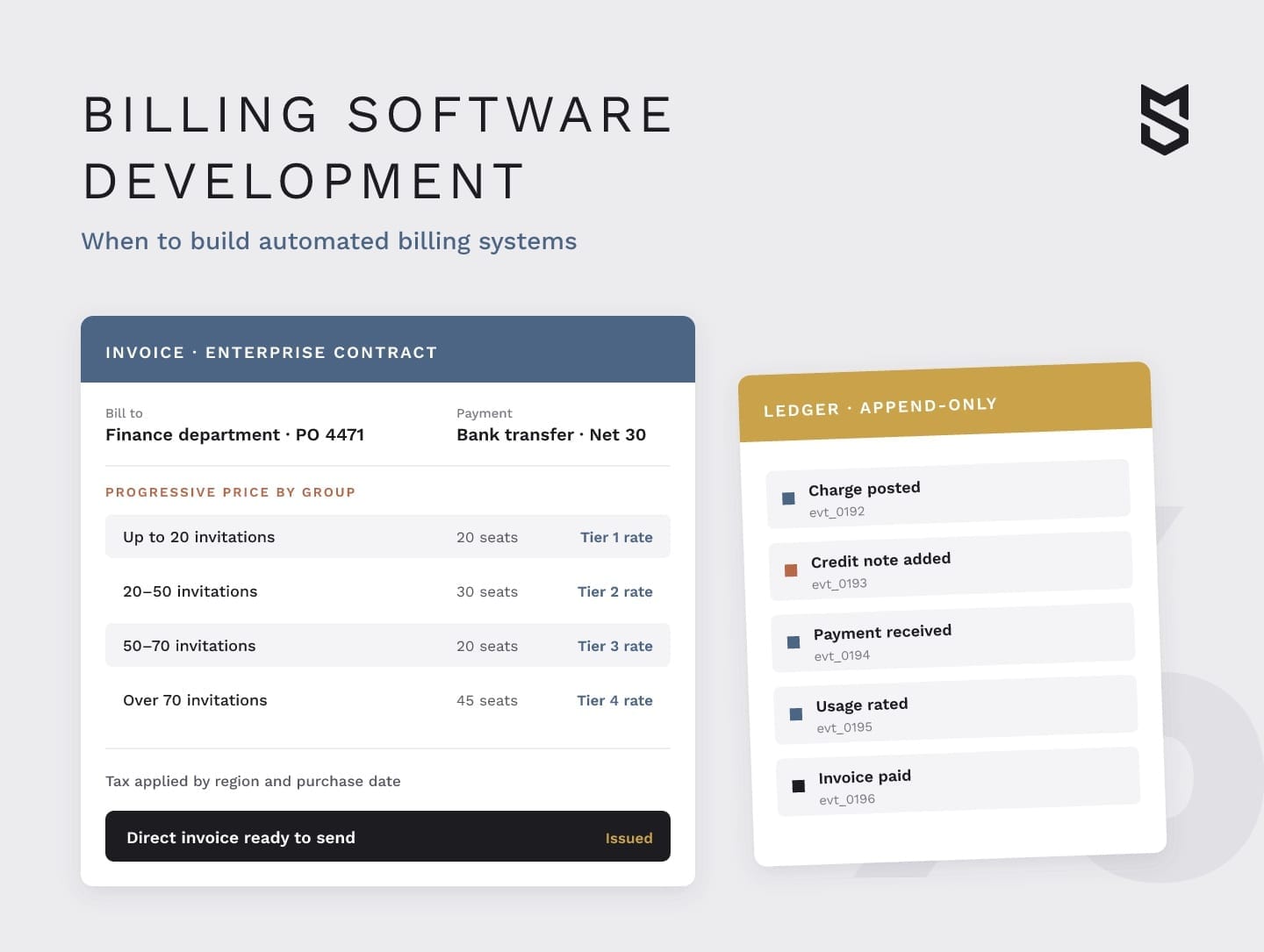
The price is calculated progressively by invitation group (up to 20, 20–50, 50–70 and so on), with variable tax and the purchase date taken into account. The system then generates a direct invoice for the calculated amount and sends it to the company to pay by bank transfer.
Anton Baryshevskyi, Head of Business Development and Co-Founder at Mind Studios, explains how to tell when enterprise invoice requirements are ready to build on:
Before we model an enterprise invoice, we want four answers from the buyer's finance team: who pays, which document the invoice references, the payment term and the currency. We treat those requirements as settled only when that team has reviewed a sample invoice built from real contract numbers and confirmed it would pass their approval. Until then, every field on it is our assumption.
If enterprise contracts are already bending your current billing, a sample invoice built from one real contract is a quick way to see which calculation and document rules your setup is missing.
Billing system for SaaS: trials, plan changes and payment providers
A billing system for SaaS has to handle every moment a subscription changes: trials that convert or lapse, upgrades and downgrades mid-cycle, seat changes and cancellations. Each change has to produce the right credit or charge and update what the customer can access, while the payment provider behind it brings limits of its own.
Proration is where the arithmetic gets specific. In Stripe's proration logic, a customer who moves from a $10 to a $20 monthly plan halfway through the period pays an extra $5. That's a credit for unused time on the old plan set against a charge for the rest of the period on the new one.
Usage charges aren't prorated, so hybrid plans need both rules. A SaaS billing system also decides whether a downgrade applies now or at renewal, and whether access changes before or after the payment clears.
If billing is one piece of a wider product build, our guide to SaaS application development puts it alongside the other architecture decisions.
Provider limits are harder to change late in a project, because they can differ in every launch country.
Mind Studios' insight: On the James Butler project in Denmark, half a month before launch it turned out that Stripe didn't support instant payments there at the time. We moved payouts to SEPA instant payments through Danske Bank, adapted a Ruby tool that converts payment files into the XML format SEPA requires, and kept Stripe for accepting payments. The rule we took from it: check each provider's limits in every launch country before designing the payment layer.
Security, tax and revenue recognition
Billing security starts with a split of responsibility. The payment provider stores and processes card data, which narrows your PCI DSS scope. Your own billing software owns tax, currency, audit trails, access roles and revenue recognition. A narrower scope still leaves you with obligations, so treat compliance as a shared job.
The PCI SSC FAQ on outsourced processing states that a merchant who outsources all payment processing still has duties. These include:
- Confirming the provider's compliance
- Keeping a written agreement on responsibilities
- Checking the provider's status every year
- Validating its own compliance, typically with a self-assessment questionnaire
Tax and currency rules live in billing because they change the invoice itself. A multi-currency setup needs a fixed invoice currency per contract, the exchange rate and its source recorded on each invoice, and one rounding rule applied consistently.
Revenue recognition and audit
Revenue recognition is where billing meets the auditors. IFRS 15, introduced together with FASB's Topic 606 (ASC 606), ties revenue to satisfying performance obligations, at a point in time or over time.
For a subscription delivered evenly throughout the year, finance may recognize revenue over the service period on a schedule it approves. Billing needs to preserve the contract data that supports that schedule: service dates, billed amounts and how the price splits across what was sold.
Watch out: Decide from the start who can issue a credit note, who can change a price and how each change gets logged. Adding roles and audit trails after launch can require changes across billing workflows, so access rules belong in the initial design.
How billing software development works, step by step
A billing build runs in seven steps, from pricing rules to ongoing support. The order matters more than speed, because an error in the data model reaches every invoice. Each step below ends with a result you can check, so the next one starts on verified ground.
- Discovery and pricing rules. Collect every price, contract term and manual adjustment finance makes today. Done when finance signs off worked calculation examples for each rule.
- Data model and catalog. Model products, prices, contracts and the ledger, and choose the tech stack. Done when every signed-off example fits the model without exceptions.
- First version of the core. Ship every pricing model and invoice type current contracts use, rare terms included, either automated or covered by a documented manual procedure. Future scenarios go to later phases. Done when the core reproduces the signed-off examples to the cent.
- Integrations. Connect the payment provider, accounting and CRM, with provider webhooks mapped to internal events. Done when a test deal flows from the CRM to a paid invoice in accounting.
- Testing and parallel run. Simulate rare calendar events in a sandbox, then run both systems on live data. The new one only calculates while the old one keeps charging and invoicing, so no customer is billed twice. Done when finance has reconciled every invoice of a full cycle.
- Cutover and training. Move customers and subscriptions over, then train finance and support on credits, disputes and reports. Cutover goes ahead once the parallel run shows no unexplained differences and a rollback path is tested.
- Support. Monitor invoice anomalies and failed webhooks, and add pricing models as sales needs them.
What drives billing software development cost
The cost of a billing build depends on the scope your team will own: the pricing models in the first version, the systems billing connects to, the history that moves over, tax regions and currencies, reporting for finance and auditors and the option you pick. A project price only makes sense once those are scoped.
The table shows why each factor adds cost and how to keep it in check.
| Factor | Cost impact | Cost control |
|---|---|---|
| Pricing models | Each model adds rating logic and test cases | Launch with the models current contracts use |
| Integrations | Each system adds mapping, error handling and monitoring | Connect payments and accounting first, CRM next |
| Data migration | Old subscriptions, balances and invoices need cleanup and mapping | Move active subscriptions; keep closed history read-only |
| Tax regions and currencies | Rates, exemptions, exchange rates and rounding rules | Use a tax calculation service for the rates |
| Reporting and audit | Revenue schedules, audit logs and role permissions | Agree report formats with finance during discovery |
| Scope of the option | Owning payments and dunning widens the build | Pick the option through the four questions above |
Any team offering billing software development services should show where each part of its estimate comes from and which contract rules it includes, so proposals compare on the same scope.
For a sense of how we approach scoped builds that keep growing with the product, see our build and scale work.
Choosing a billing software development company
These criteria are easy to check in a first conversation:
- Production experience: billing systems running in production, with a clear account of what happened at the first invoice run after launch
- Discovery before the estimate: built on your actual contracts and manual adjustments
- Core safeguards: a ledger, idempotency and audit trails named in the proposal
- Migration plan: the parallel run and moving live subscriptions
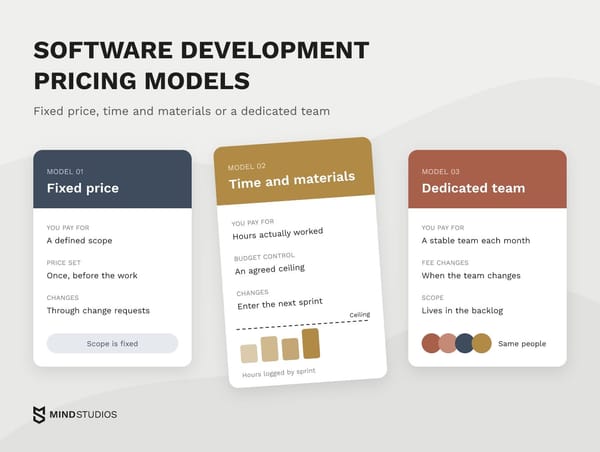
- Neutral engagement options: fixed price for a scoped first version, time and materials for phases where rules are still moving, a dedicated team for billing that keeps growing with the product
- Ownership: code, documentation and system access owned by you
Build the billing your pricing needs
The finance spreadsheet from the opening is a useful input for this decision, because it records the adjustments your team makes each cycle. Reviewed with finance, those adjustments can reveal configuration gaps, upstream data errors or pricing rules the platform can't express.
Some companies close a few real platform limits with a layer over their provider, while others find their pricing has become part of the product. That's the point to scope billing software built around your contracts, weighing what it costs to maintain against the manual work it removes and the alternatives still open.
If you're deciding how much of your billing to build yourself, a review of your current billing flow and pricing rules is the place to start.
FAQ
How long does it take to build a billing system?
Timing depends on the number of pricing models and integrations and on whether live subscriptions move over. For Wise Up, the first version of the billing layer launched three months after the project started. A full system with usage rating, several tax regions and migration usually ships in phases, with current contracts covered first.
How should a billing system handle refunds, credits and disputed invoices?
A correction leaves the issued invoice intact. The system adds a credit note or an adjusting ledger entry linked to the original invoice, so revenue reporting stays traceable, and the refund goes back through the payment provider. A disputed invoice gets its own status, an owner and a deadline until it's resolved.
How do you test automated recurring billing before launch?
Test it against simulated time, because renewals and failures happen on the calendar. Stripe's test clocks move time forward in a sandbox. Cover these cases:
- Monthly and annual renewals
- Trial conversion and expiry
- Mid-cycle plan changes with proration
- Declined cards and retries
- Time zones and month-end
Finance then checks the test invoices against its own calculations.
How do you move existing subscribers to a new billing system?
Move them without a second charge and without changing renewal dates. On the MP3Pool platform rebuild, we launched the new version on a new server, synced users and active subscriptions through a dedicated API, then switched the main domain and kept the old site on a hidden subdomain. Users saw the switch as a routine interface update.
What is the best payment gateway for SaaS?
The best gateway for SaaS is the one that covers your markets and invoice types. Compare providers on:
- Countries and local payment methods your customers use
- Payout speed and supported currencies
- Recurring charges and retry tools
- Webhook coverage and API stability
- Bank transfer payment of invoices for enterprise accounts
Our provider selection guide goes deeper.
Who should own billing inside the company?
Billing works best with four owners and one approval rule:
- Finance: pricing rules, tax and revenue recognition
- Product: the catalog and plans
- Engineering: the system, integrations and reliability
- Support: disputes and refunds
A price change goes to release only after finance and product both approve it, so a new tier reaches invoices only after it has been tested.
What tech stack works for a custom billing system?
Choose a stack your team can maintain for years, with a transactional database that stores money in exact decimal types. Add a background job queue for scheduled invoices and retries, plus an event log for audit. The Wise Up billing layer, for example, runs on Ruby on Rails, Sidekiq, Redis, PostgreSQL and Vue.js.