
 ChatGPT
 Perplexity

Web app vs mobile app vs PWA for products with paying users: PWA limits, ownership cost and what to build first.
Highlights
- Name the constraint of your next stage, then the role it depends on.
- PWAs can cover install, offline and push, under iOS and Android conditions.
- Different user roles can justify different platforms on one shared API.
For a product with paying users, the platform choice is made per user role. Desk roles and search visitors fit a web app. A mobile group that needs installation and built-in offline access can often use a PWA, and native covers hardware or background work its browsers don't support.
Founders usually reach this question when the data pushes them: mobile sessions keep climbing, a field team asks for offline access, or a key account wants an app its people can open from the home screen. Each signal points to a different build, so the order of releases matters.
Our product engineering teams build web and mobile products for companies with product-market fit, sometimes with a different platform for each user role. Below, we compare the three options, show what a PWA can do on iOS and Android today and set out a decision order based on your own data.
If your team is split between web, native and a PWA for the next release, the quickest way to settle it is to look at who uses the product and from where.
Web app vs mobile app vs PWA at a glance
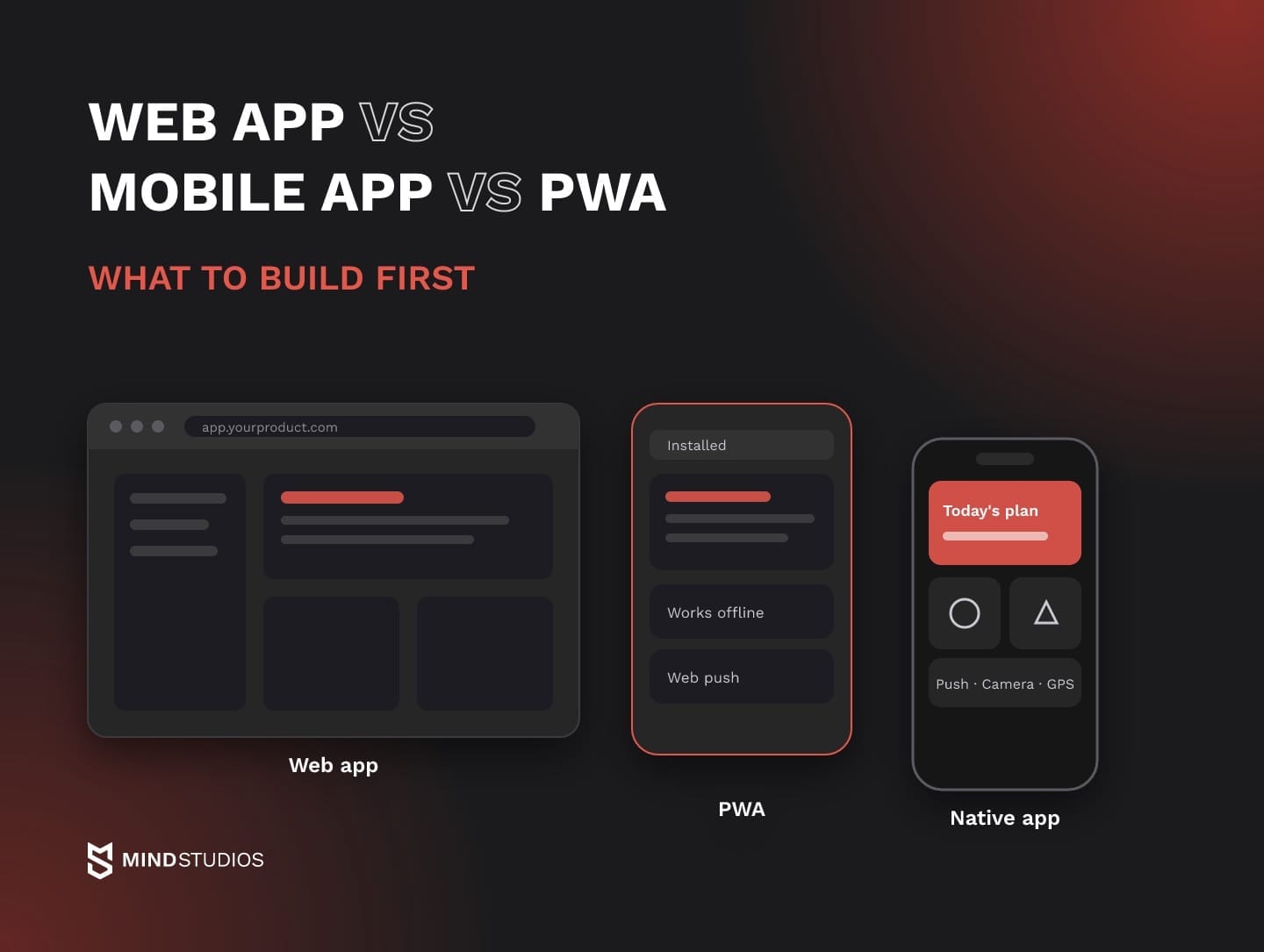
A web app gives you reach through a link and one codebase. A native app calls platform APIs directly and gets a store listing, within the permissions and limits each operating system sets. A PWA sits between the two: users can install it, it works offline when your team builds that in, and its install conditions differ on iOS and Android.
The table compares them factor by factor.
| Factor | Web app | PWA | Native app |
|---|---|---|---|
| Access | Any browser, via a link | A link, then optional install | Store download |
| Installation | None | Varies by browser; iOS Share menu | App Store, Google Play |
| Device features | APIs the browser exposes | Same, uneven across browsers | Platform APIs, under OS permissions |
| Offline | Built with a service worker | Service worker cache, built per app | Local storage, built per app |
| Push | Browser-dependent; not iOS tabs | iOS: install, then permission | Both platforms, permission rules apply |
| Updates | Server deploy, no review | No review; service worker update cycle | Store review per release |
| Acquisition channel | Search, links | Search, links, Google Play | Store search, site links |
| Cost of ownership | One client | One client, more device testing | iOS and Android builds |
Device access and distribution help narrow the choice once you know which tasks the priority role must complete. If a user group needs a device API its browsers don't support, work that continues after the app closes, or App Store discovery, the native column wins. Notifications alone don't decide it, because a PWA can send them on both platforms, on iOS under Apple's web push rules.
If users find you through search and work at a desk, the web column covers most of what they need. The PWA column fits when one group needs installation and offline access while the rest of the product stays in the browser.
What a web app, a native app and a PWA mean for your product
The native app vs web app difference comes down to where the code runs and who controls distribution. A web app runs in the browser and changes when you deploy. A native app is built for one operating system, uses that system's APIs directly and reaches users after store review.
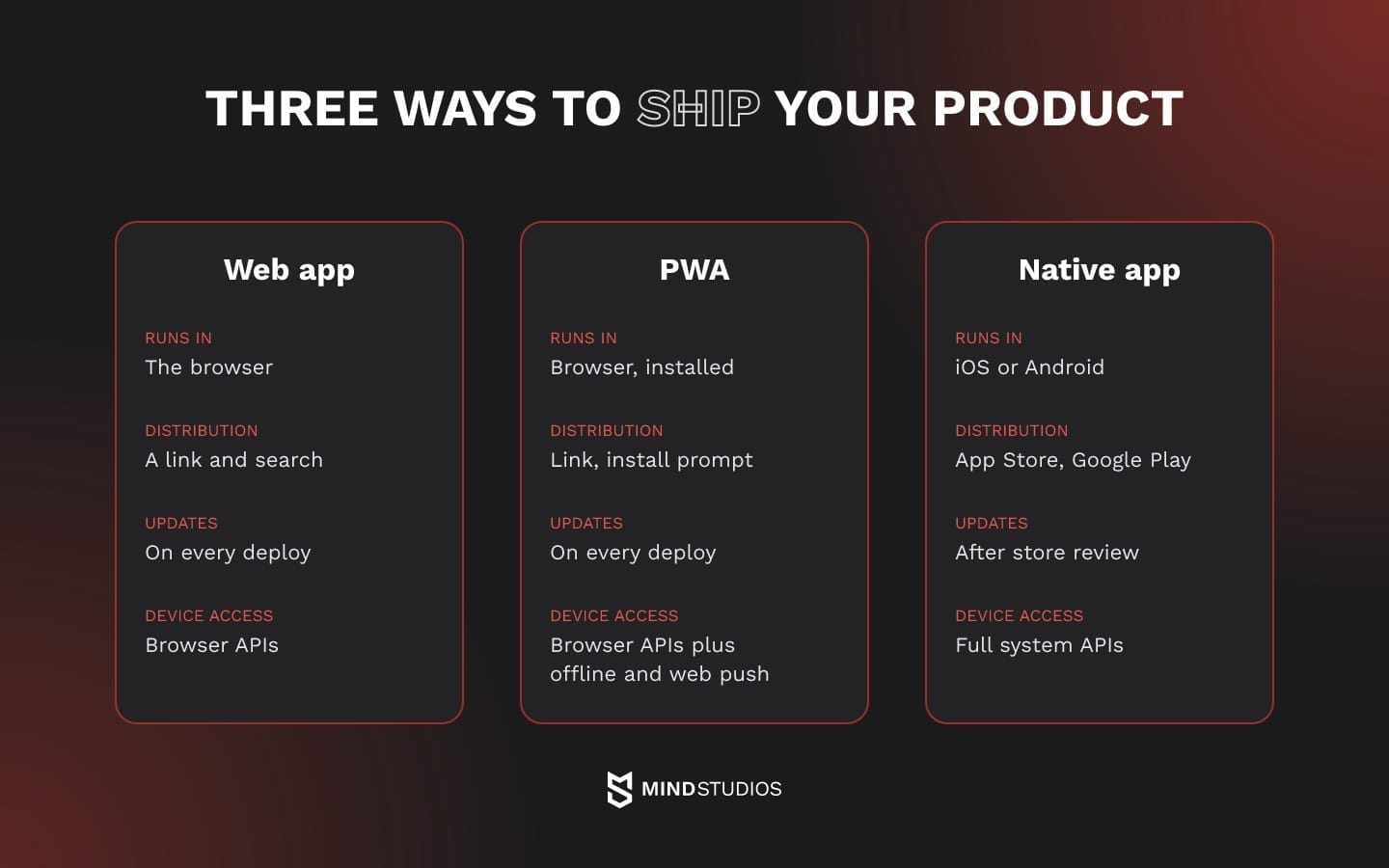
A web team therefore ships one codebase on its own schedule, within the device features the browser exposes. Native clients are written in platform languages. Apple's Swift language page presents Swift as its language for all Apple platforms, and Google's Android Kotlin page describes Kotlin as fully supported for Android. With separate native builds, you maintain two clients, and every release waits for review.
MDN describes a progressive web app as an app built with web platform technologies that can feel like a platform-specific app while running from a single codebase. In practice, it's a web app with a Web App Manifest for installation and a service worker for caching and push.
Installation alone doesn't make it work offline: MDN's offline operation guide shows that offline screens exist only where the service worker is built to cache them.
Hybrid and cross-platform builds both produce store apps from shared code. A hybrid app packages your web code in a native container. One such runtime for web-first teams is Capacitor, whose plugin API gives the app access to native SDKs. An app built with React Native renders shared components using native platform UI.
Both routes ship through the stores and pass review, so they belong in the native column. A hybrid build still has to offer more than a wrapped site to pass App Store review (the FAQ covers this). Distribution and device access come first, and the choice of framework follows from them.

Web app vs native app pros and cons for a product with users
A web app wins on reach, release speed and discoverability in search. A native app earns its cost once a mobile role needs something a PWA can't deliver on that role's browsers: an unsupported device API, work that continues after the app closes, or App Store discovery. A product that serves several roles may need both, one per group.
Where a web app wins and where it stops
A web app serves desk roles with no install step and no store between your team and the user. Buyers comparing plans, admins configuring accounts and managers reading reports get the full product from a laptop, and the same build still works on their phones.
The second advantage is release speed: a fix ships when you deploy, so the team can test a pricing change and roll it back the same day. Search is the third. Google's AI features guide says that to appear as a link in AI Overviews, a page must be indexed and eligible for a snippet.
Public pages can therefore bring in buyers who are still researching the problem. Frequent mobile use makes installation, notifications and offline access worth evaluating, and a PWA may cover these needs if its browser and onboarding conditions fit the audience.
Hardware is the firmer ceiling. Browsers expose only some device APIs, and MDN marks the Web Bluetooth API as experimental, so scanners, wearables or background tracking on your roadmap need checking against the browsers your users actually run.
Mind Studios' insight: Before adding a native app, look at where mobile users drop off in the web product. If they leave at login or on slow screens, fix the responsive flow first. Notifications are worth testing when they support a recurring task that users value.
Where a native app earns its cost
A native app pays off for mobile roles whose work runs into a PWA limit. A technician who pairs a scanner in a browser without Bluetooth support, or a driver whose route is tracked in the background, needs an app that keeps working after the user switches away.
A crew that edits records offline all shift is a different case: an open PWA can save changes locally, so test storage and sync on its devices first.
The stores work both as a channel and as a filter. Users search the App Store and Google Play for tools by name, so a listing gives them another way to find you. Every release passes review first. Apple's App Review page says it typically reviews at least 50% of submissions in under 24 hours and 90% in under 48 hours.
For your release process, this means a critical fix can sit in a queue while web users already have it. That's why teams rely on feature flags and server-driven settings that change behavior without a new build.

PWA vs native app: what a progressive web app can and can't do in 2026
In the progressive web app vs native app comparison, a PWA now covers installation, offline work and push on both platforms, with conditions. On iOS, push reaches only Home Screen web apps whose users granted permission. A PWA has no App Store listing by default, offline work has to be built, and several device APIs have limited browser support.
The table pairs each capability with its conditions:
| Capability | PWA conditions | Product impact |
|---|---|---|
| Installation | Android: browser-dependent; iOS 16.4+: Share menu | Teach the install step in onboarding, per platform |
| Push | Android: browser-dependent; iOS 16.4+: Home Screen apps, permission on tap | Reach depends on installs and opt-ins |
| Offline reading | Service worker serves cached screens and data | Users read schedules, catalogs and records without signal |
| Offline writes and sync | Background Sync API: limited availability | Queue changes locally; don't count on background sync |
| Device APIs | Varies by API and browser; Web Bluetooth experimental | Check required devices against browser support |
| Store presence | Google Play via Trusted Web Activity; no App Store by default | App Store discovery needs a native or hybrid app passing review |
Installation and push on Android and iOS
The installation path deserves an early test, because users must complete it before they can use the home-screen app. MDN's installation guide says that on Android, only Chrome on devices with Google Mobile Services and Samsung Internet on Samsung devices install a PWA as an app, while Firefox, Edge, Opera and other browsers add a browser-badged shortcut.
On iOS 16.4 and later, users install from the Share menu in Safari, Chrome, Edge, Firefox and Orion, and a custom install button isn't supported. Your analytics show which browsers and devices each role uses, and so how many of them will get a full install.
Push builds on that step. According to Apple's web push documentation, iOS 16.4 and later support push for Home Screen web apps, with permission requested after a user gesture such as a tap. Installation and notification permission are separate steps to measure, and every push must show a visible notification.
Offline work and device APIs
Offline reading works well with a PWA. A service worker can serve cached screens and data, and MDN's offline guide describes a cache-first app that keeps working on an intermittent connection. Offline writing is harder: MDN marks the Background Synchronization API as limited availability, so plan for queued changes that sync when the app is open again.
Device access needs the same care. MDN advises checking Web Bluetooth's compatibility table before production, so if your field team pairs with devices in browsers without that support, a PWA can't be that role's only client. Camera features need the same test on the phones your users carry.
So can a PWA serve as your mobile app? For a defined group, yes: users who need installation, offline reading and notifications, as long as you can guide them through the install step. For a role that depends on unsupported hardware, work after the app closes or App Store discovery, native is the safer base.
PWA vs native performance
On screens such as dashboards, forms, lists and checkout, start by profiling. If most of the wait comes from the network and the backend, both clients share it, and a faster API helps more than switching clients.
The gap is worth prototyping in four places: heavy graphics, continuous camera processing, large local datasets and long background work. MDN's offline guide notes that the browser decides how often periodic sync runs and stops a service worker that runs too long. Since a smooth flow on a new flagship can stutter on mid-range phones, profile on the devices your analytics show.
PWA vs native pros and cons
From the business side, a PWA gives you one team and one release pipeline for desktop, Android and iOS. Fixes skip store review, search traffic and shared links keep working, and the same API can carry a native client later.
The remaining constraints affect onboarding and device-dependent workflows, so their importance depends on what the mobile role needs to complete:
- iPhone notifications: depend on an install and a separate permission
- App Store: no listing for users who search there first
- Hardware and background tasks: run on each browser's terms
Mind Studios' recommendation: If a PWA serves your iPhone users, track install, notification permission and the first notification-driven return as separate steps. Ask for permission right after a task where a reminder clearly helps, so the user sees why you're asking.
How to decide what to build first
Whether a mobile app or a website serves you better depends on what limits your next stage and on the user role that limit depends on. The business constraint determines which role deserves attention first. Once that role's essential tasks are clear, you can compare the three platforms against those requirements, using your analytics segmented by role instead of market averages.
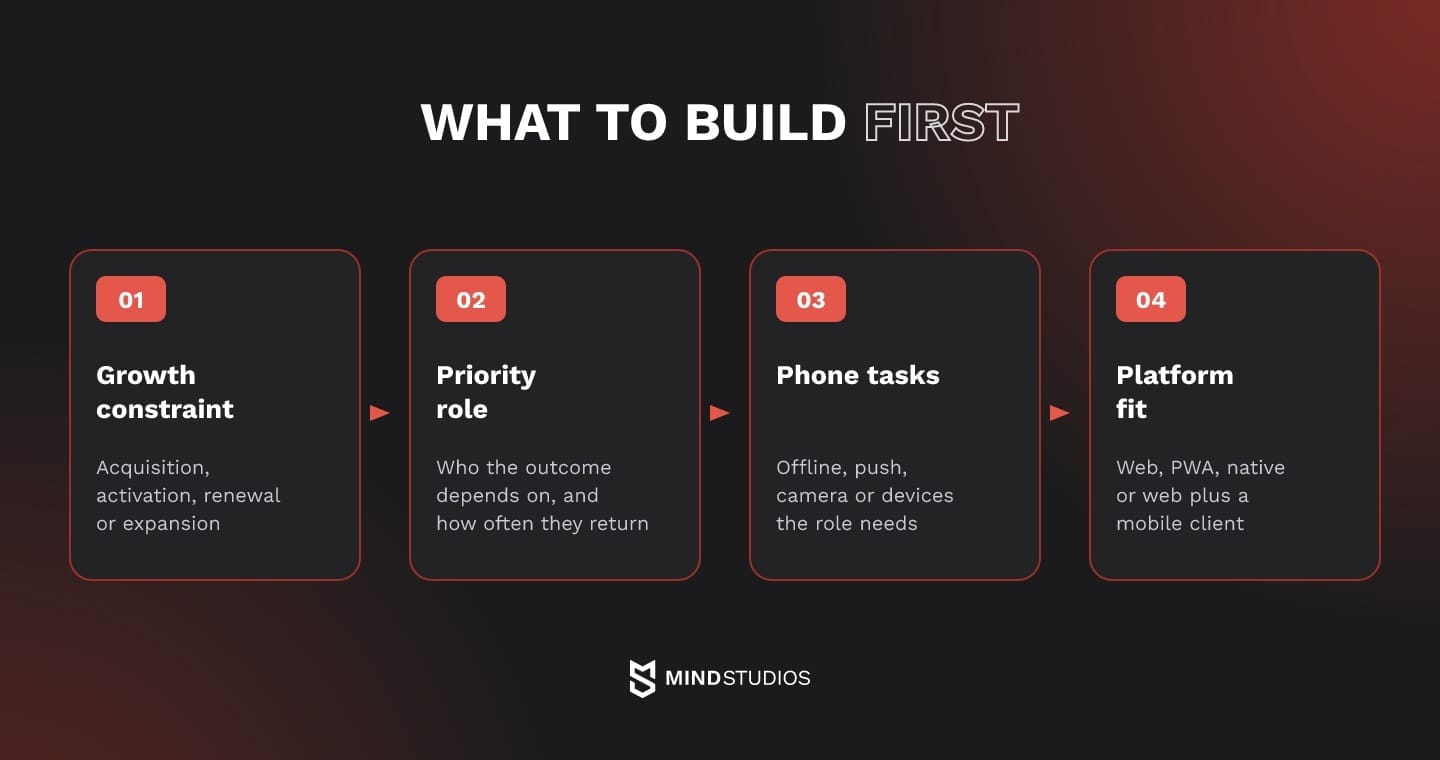
Four questions, in order
Each answer narrows the next:
- Growth constraint: What limits the next stage? Pick one: acquisition, activation, renewal or expansion. The role that pays isn't automatically the answer.
- Priority role: Which role does that outcome depend on? Check where this role arrives today and how often it comes back. Frequent use alone doesn't prove you need an app, because a fast mobile web flow can serve a daily user who only checks status.
- Required phone tasks: What must that role do on the phone? Offline reading and notifications fit a PWA, within the conditions above, and long offline editing calls for a test of local storage and sync. Pairing with devices your target browsers don't support, or work that must continue after the app closes, points to native.
- Platform fit: Which platform covers those must-haves with the least to maintain? Choose web if nothing is phone-specific, a PWA if its conditions fit and native if they don't. When roles split, choose web plus a mobile client.
When the criteria conflict
The order matters most when two answers pull in different directions. Picture an operations manager who pays and logs in from a laptop at month-end, while renewals depend on whether crews complete jobs in the app every day.
The FITR case shows the acquisition side of such a tie. Discovery put the coach side on web first, because acquiring coaches cost less there, and the athletes' mobile app followed.
Dmytro Dobrytskyi, CEO at Mind Studios, explains how to break that tie when the person who pays and the person who uses the product every day are different people:
Founders often assume the user who pays and the user who keeps the account alive are the same person. When they aren't, we ask which of the two the next stage depends on. If you need new accounts, the buyer's path comes first. If you need accounts to stay, start with the people doing the work every day, and keep the buyer's side solid while you do.
Each choice needs a metric you pick before the build, such as the share of field tasks completed in the app or the rate of offline changes that sync without errors.
A few signs show the choice is running on the wrong input:
- A competitor launched an app, and nobody has checked whether your users asked for one
- The plan names one platform for every role
- Nobody has looked at session frequency by role
If you already have a responsive product and need a store app on top of it, our website conversion guide covers the trade-offs of that path.
If your analytics already show which roles live on mobile, the next step is to turn that split into a release plan for each group.
Website vs app for business: cost, launch time and upkeep
A web app usually costs less to own, because you maintain one client and release without store review. A native app adds a second platform build, store accounts, possible commissions on digital sales, review on every release and retesting on new OS versions. In the mobile app vs website trade-off, those running costs matter as much as the first build.
Store fees and commissions
Account fees pay for access to distribution. The Apple Developer Program costs $99 per membership year, while a Google Play developer account carries a $25 one-time registration fee.
Sales commissions depend on the program, the market and the transaction. Apple's Small Business Program sets a 15% commission on paid apps and in-app purchases for enrolled developers whose proceeds, associated accounts included, stay within $1 million in the prior and the current calendar year. Past that limit, the standard 30% rate applies to future sales.
Google's service fee page sets rates by market. In the US, EEA, UK, Australia and Japan, these service fees apply, plus billing fees:
- Auto-renewing subscriptions: 10%
- Other purchases on new installs: 20%
- Other purchases on existing installs: 25%
A 5% billing fee is added when the user pays through Google Play Billing or buys a paid app, and purchases through external web links from the app carry their own fee.
If subscriptions are sold inside the app, model the commission as a margin line for each market, transaction type and program. The table sums up where running costs differ between the two builds.
| Cost line | Web app | Native app |
|---|---|---|
| Developer accounts | None | Apple yearly fee, Google one-time fee |
| Commission on digital sales | Processor fees on direct web sales | Store commission, by program and market |
| Release review | None | Every release, both stores |
| Clients to maintain | One | iOS and Android builds, shared or separate code |
| Operating system updates | Browser testing | Retesting on each major release |
| Versions in use | Central deployment; cached clients may lag | Several, with a backward-compatible API |
Source: Apple and Google Play fee pages.
The last web cell needs a note. MDN's service worker lifecycle guide explains that a new version waits until no open page uses the old one, so a PWA user can briefly run cached code.
What sets the launch timeline
Launch time depends more on scope than on whether you call the build web or native. Four factors sit on the critical path:
- Reuse. Stable API endpoints let a mobile client start right away. Logic buried in the web front end has to move to the backend first.
- Offline logic. Reading cached data is a contained task. Editing offline needs rules for conflicting changes made on two devices.
- Integrations. Payments, single sign-on and hardware SDKs each add their own testing and approval steps.
- Number of clients. Two native apps mean two clients to build and test, plus store review and beta testing. A cross-platform build shares much of its code, while iOS and Android still require separate builds and testing.
What drives the budget is covered in our guide to app development cost, and our timeline breakdown walks through the schedule phase by phase.
How FITR and Pampr chose a platform for each user role
Both cases started from user roles and ended in different places. FITR combined a web platform for coaches with a mobile app for athletes, while Pampr's concierge platform served all three of its roles through one responsive web build. Each time, the platform followed who used the product and where.
FITR: web for coaches, a mobile app for athletes
FITR is a coaching platform that connects personal trainers with their athletes. The first plan was a mobile app. In discovery, the coach side moved to web, since acquiring coaches cost noticeably less for web fitness platforms than for mobile apps.
Athletes preferred to train with a phone in hand, so we built their mobile app after the coach platform. FITR became a web platform for coaches with a companion mobile app for athletes.
The order is the part you can reuse. The first release went to the role FITR had to win, on the platform where winning it cost less, and the mobile build followed for the role that preferred a phone. FITR answered the mobile app vs web app question separately for each role, a sequence worth testing when your buyer and end user work in different places.
The two-platform setup now serves a product of real scale on both sides. Coaches have earned over £10 million on FITR and published over 30,000 personal programs for the athletes who train with them.
Pampr: one responsive web platform for three roles
Pampr made the opposite call. The platform digitized a concierge delivery service with three user types: customers, butlers (the runners) and admins. We built one mobile-responsive web platform for all of them, with no separate store app, and finished all sides within two and a half months.
A role that works on the move doesn't automatically need a store app. What that role must do on its phone, question three above, decides it.
Final thoughts: build for the user who drives your next stage
Go back to the signals from the start: climbing mobile sessions, a field team that needs offline access, a key account that wants an icon on the home screen. Each one tells you something about a specific group of users, but none of them settles the platform by itself.
The app vs website choice gets easier once you make it per role and in order. The constraint of your next stage points to a role, that role's phone tasks set the requirements, and the lightest platform that covers them wins. For a mobile group headed for a PWA, the iOS and Android conditions decide whether it can stay there, and a metric chosen before the build shows whether the release worked.
If you're planning the next stage of the product, start with a release plan that names a platform for each user group.
FAQ
Should I build an app or a website for a B2B product?
In B2B, the web app vs mobile app decision can be different for each role inside one customer account. Before deciding, ask your customers three questions:
- Who evaluates and signs, and from which device?
- Do field staff use company-managed phones, and does IT allow store apps or home-screen web apps on them?
- Which tasks happen away from a desk or without a stable connection?
Why is PWA not popular?
Adoption stalls because users must discover, install and return to a PWA largely on their own. These steps need testing with the audience you already serve:
- Discovery: users who search the App Store won't find a PWA there by default.
- Install: the steps differ by platform and browser, so onboarding has to teach them.
- Awareness: check whether your users know a home-screen web app exists before you rely on it.
Can we distribute a PWA through mobile app stores?
On Google Play, yes. The Android guide to Trusted Web Activity shows how Bubblewrap wraps a PWA in an Android app that can be uploaded to the Play Store. For the App Store, guideline 4.2 of Apple's review guidelines expects features, content and UI that elevate an app beyond a repackaged website, so a thin wrapper risks rejection.
Can we move from a PWA to a native app later without starting over?
Yes, if the backend sits behind a clean API. In that case, the work usually splits like this:
- Reused: the API and backend, business logic, design system, analytics events and content.
- Rewritten: the iOS and Android clients, or one cross-platform codebase with builds for each.
- Revisited: push, offline storage and sign-in flows, which work differently in native code.
App or website: which one is easier for customers to find?
To be found, a website needs public pages that Google indexes, and Google's crawling and indexing documentation states that indexing isn't guaranteed. An app needs a store listing that users find by name or category, plus links from your site. If discovery drives your next stage, the web usually carries most of it, and an app mostly helps bring existing users back.
What happens to our web app when we add a native app?
It keeps serving admins, reporting and desk work, and the new client runs on the same API. What changes is how you operate:
- A parity list: which features mobile gets and which stay web-only
- Two release queues: the web ships on deploy, and the app waits for store review
- One analytics identity across clients, so a user's web and app sessions count as one person