
 ChatGPT
 Perplexity

Your operations have outgrown spreadsheets and a stack of SaaS tools. This guide shows when a custom ERP pays off, when a platform is the smarter buy and what building one involves.
Highlights
- Building pays off when operations are your edge and platforms need constant workarounds.
- Start with the module where your team loses the most time or money.
- Compare every route over 3–5 years using the same cost lines.
A custom ERP is a system a company commissions once planning, people, stock and finance have spread across spreadsheets and SaaS tools that don't share data. It replaces copy-paste between those tools with one data model built around how the business runs.
The hard part is deciding which processes justify ownership and which a configured platform can already support. A wrong call shows up years later as license bills or as a system nobody can change. We've faced this decision ourselves: Mind Studios built our own ERP for planning, HR and asset tracking, and we keep extending it.
The processes that have already outgrown their tools set the scope of your first module, and we can map them with you.
What is a custom ERP system?
A custom ERP system is enterprise resource planning software designed around one company's processes, roles and data, with a roadmap the company controls. It is one of four routes: ready-made SaaS, a customizable ERP platform, a hybrid, or a full build.
Whichever route you take, planning, people, inventory and finance need consistent shared records. The routes differ in who designs the data model and who can change it later, and a hybrid needs explicit rules for exchanging data between the platform and your own modules.
With a build, the contract should assign code and data to the company, though moving to another team still takes documentation and handover work.
The table compares the four routes side by side: an implementation partner usually adapts a configured platform, and a hybrid pairs a platform for finance and accounting with your own operational modules through APIs.
| Path | What you get | When it fits |
|---|---|---|
| Ready-made SaaS ERP | Standard modules, vendor-run updates and a recurring license | Processes follow common industry practice; a fast launch matters most |
| Configured platform | A vendor core adapted with settings, workflows and extensions | Most processes are standard; a few need their own rules |
| Hybrid | A platform plus your own operational modules | Finance is standard; scheduling, dispatch or service delivery set you apart |
| Full build | A custom-built ERP with your own data model and roadmap | Core operations are your advantage; every platform needs heavy workarounds |
The next section shows where your company sits on this table.
Build your own ERP or buy one: when custom pays off
Build when your critical processes would need heavy workarounds on a platform and no extension or hybrid closes the gap. If configuration or a hybrid can support those processes, compare that route with a full build over the same five-year horizon, weighing operating costs, the value of the processes and your capacity to maintain the system.
Decide whether to build your own ERP with three checks, in order:
- Does a platform support your critical processes, or would they need heavy workarounds?
- Can configuration, an extension or a hybrid close the gap?
- Do full five-year costs, weighed against the value of those processes, favor the route?
Whichever route passes also needs an internal owner and a support budget: with a platform, that person manages configuration and vendor changes, and with a build, they own the roadmap and the scope calls.
In practice, the problem shows up as small failures. A dispatcher rebuilds the schedule every morning, a finance lead reconciles three exports and a manager learns about a hire from a chat thread. Each workaround looks cheap alone, but together they cap how fast you can grow.
Your situation likely matches one of four patterns:
- Your processes match your industry, and the pain is volume. A ready-made ERP will absorb the growth once you configure it and adapt a few habits.
- Most processes are standard, but pricing, scheduling or approvals follow your own rules. A configured platform or a hybrid keeps finance on a standard core and moves the unusual rules into an extension or a separate module.
- Operations are your edge, data sits in a growing pile of tools, and every platform demo needs a workaround. This is when it makes sense to build a custom ERP, starting with the module that hurts most.
- You can't yet describe your processes end to end. Any ERP will copy the confusion into software, so mapping the processes comes first.
Subscription costs can also tip the balance. The OÖ Medienlogistik platform we built for an Austrian print media delivery company replaced several third-party software subscriptions and reduced ongoing costs.
Signs a platform will do
A configured platform is the stronger choice when several of these hold:
- Finance, accounting and payroll follow standard practice, and your accountant is comfortable with the tools.
- The processes that hurt (purchase orders, invoicing, stock counts) are ones platforms already model well.
- Your edge sits in the product you sell, and your team can adapt how it works to the software.
Even then, a platform can miss one process that matters. Panorama Consulting Group's ERP report warns that organizations often discover fatal misfits late in a project and then turn to added technology, scope expansion and custom builds. Catching the misfit before signing keeps all those options open.
Our own ERP had to join planning, HR and asset tracking on shared people data. Dmytro Dobrytskyi, CEO at Mind Studios, describes the demo check he suggests to founders who are comparing a platform with a build:
Founders often open with the question of which ERP to buy. I'd start with two scenarios from your own operation: the task your team repeats every day and the exception that costs the most when it goes wrong. Ask each platform to run both in the demo. If you can't describe either one yet, map that process first and compare options afterward.
Custom ERP vs. off-the-shelf ERP: side-by-side comparison
The main differences are the cost model and who controls the roadmap. An off-the-shelf ERP starts faster and charges a recurring license, priced by user, module or tier depending on the product. Your own system costs more upfront. With the right contract, its code, data model and release schedule belong to you. Neither is cheaper by default.
The eight criteria below show where each option carries its cost and its risk.
| Criterion | Your own ERP | Off-the-shelf ERP |
|---|---|---|
| Time to first value | Depends on discovery and the scope of the first module | Fast for standard modules, slower as configuration grows |
| Functionality | Functionality scoped around your processes | A broad module set designed for many industries |
| Integrations | Built to fit your stack | Vendor connectors; gaps need middleware or extensions |
| Scaling | You choose the architecture and hosting | Vendor tiers; cost follows the product's pricing model |
| Updates | Released on your roadmap | Released on the vendor's schedule; customizations need retesting |
| Ownership | Code, data and documentation are yours if the contract assigns them | A license to use; data export follows vendor terms |
| Cost over time | Higher upfront, then hosting, support and new modules | Lower upfront, then licenses that grow with usage |
| Main risk | Dependence on the team that built it | Dependence on the vendor's roadmap and pricing |
Where your operation matches the off-the-shelf column, a platform will serve you well. Where it differs, custom ERP solutions earn their cost, and a mix of both makes the case for a hybrid: a standard core for finance and your own modules for the work that sets you apart.
What we learned building our own ERP
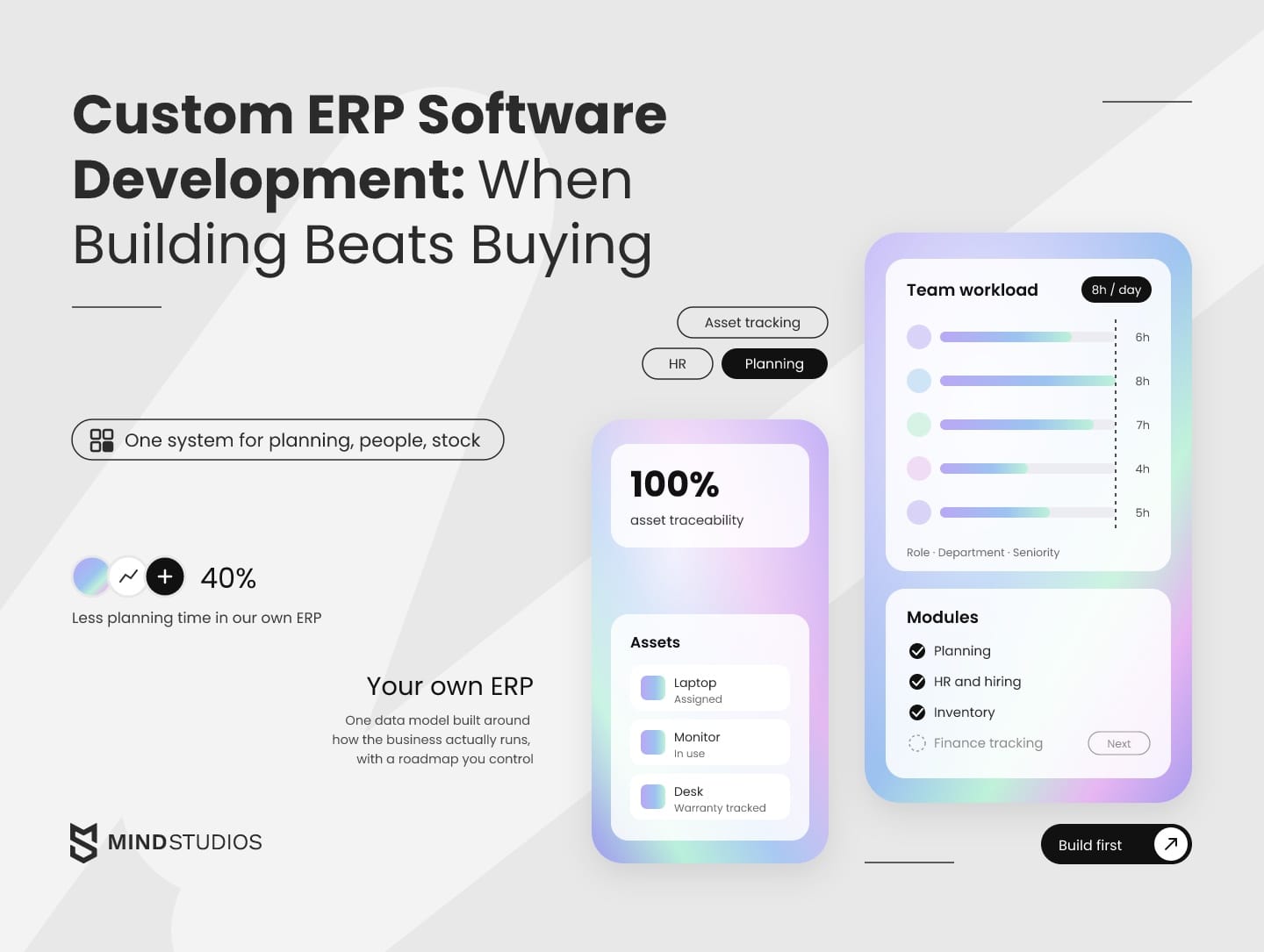
Mind Studios outgrew its boards and spreadsheets as the team grew from about 10 people toward 50, so we built our own ERP for planning, HR and asset tracking.
The build taught us three things:
- Plan around shared data.
- Design for modules you haven't built yet.
- Expect parts of the stack to change.
Why we built it ourselves
One line sums up the problem that started our own ERP software development: "What worked for 10 people no longer worked for 30 or 50." Planning turned chaotic, responsibilities blurred and key information sat in separate places.
All three areas that broke depended on people data. Planning needed roles and seniority, HR owned profiles and hiring history, and equipment had to be assigned to specific people. That made one system with role-based access a better fit than three disconnected tools. It runs on three modules:
- Planning: tasks assigned within 8-hour daily limits, filters by role, department and seniority, workload history and one dashboard for all teams.
- HR: searchable profiles with contracts and job history, a hiring pipeline with interview notes and evaluations, and a log of role changes.
- Inventory: laptops, monitors and furniture with serial numbers, condition, photos, assignment history and warranty tracking.
What changed
In our system, the gains included less time spent coordinating planning and hiring. The results below also cover asset tracking and resource use.
- 40% less planning time: weekly scheduling went from hours to under 30 minutes.
- 100% asset traceability: every device and piece of office equipment has a photo, status and history.
- 30% faster hiring decisions: candidate tracking and interviewer feedback sit in one place.
- 25% less cross-team miscommunication: one dashboard replaced scattered sources of priorities.
- 60% better resource utilization: live workload views show who has capacity.
- 90% less manual data entry: tasks, staff changes and asset movements are logged automatically.
The architecture also leaves room for finance tracking, performance reviews and maintenance requests as new modules, without disrupting the ones already in daily use. Ask for the same property in any ERP you commission.
The stack change we had to make
The frontend started on Google's Polymer and later moved to Vue.js. Polymer had limited community support and slower adoption, and it gave us less flexibility for UI improvements. The backend stayed on Ruby on Rails, which we chose for fast prototyping and easy scaling of internal tools.
An internal system runs for years, and frontend tools can lose community support long before the business logic changes. Budget for interface upgrades and keep the data model and API stable, so the interface layer can be replaced without touching business logic.

ERP modules: what to build first
Build first the module where your team loses the most time or money today, then connect the rest to it as the company grows. In a back office, the usual candidates are planning, HR, asset tracking, finance and inventory, and the right pick is the one whose cost the team feels every week.
Each module is its own piece of ERP application development, with its own screens, roles and rules, but all of them share one data model. The table pairs each back-office module with the symptom that makes it a good first build.
| Module | What it covers | First-build trigger |
|---|---|---|
| Planning and scheduling | Task assignment, workload limits, capacity by role | Managers rebuild schedules by hand every week |
| HR and hiring | Profiles, contracts, hiring pipeline, role history | Hiring stalls because feedback sits in chats and inboxes |
| Asset tracking | Equipment, assignments, condition, warranties | Nobody can quickly say who holds which device |
| Finance and billing | Cost tracking, pricing rules, invoicing, handoff to accounting | Your pricing or billing logic doesn't fit the accounting tool |
| Inventory and warehouse | Stock levels, movements, reorder points | Stock counts disagree between systems |
| CRM | Leads, deals, customer service | Customer-facing work needs its own roadmap |
Customer-facing work usually gets a separate system, and our custom CRM guide covers that build. Industry also changes the order. In transport and delivery, dispatching and route planning usually come first, as our logistics ERP overview explains.
Mind Studios' insight: A module with usable data and limited dependencies gives the team a clearer first-release scope. When it depends on another module or a large migration, that work belongs in the release plan.
ERP mobile application development for field teams
ERP mobile application development pays off when field roles such as drivers, technicians, warehouse staff and site managers need to scan equipment, photograph documents or record work without a reliable connection. Those tasks put offline mode, camera access and push notifications into the module's scope.
Office roles can use a web interface while field staff use a mobile app. Both can share an API and permission model, with access limited to each role's tasks.
NIST's definition of least privilege sets the rule: each user's access stays at the minimum necessary for assigned tasks. On phones this matters even more, because a lost device with full payroll access exposes far more than one person's work.
How to build an ERP system: the custom ERP development process
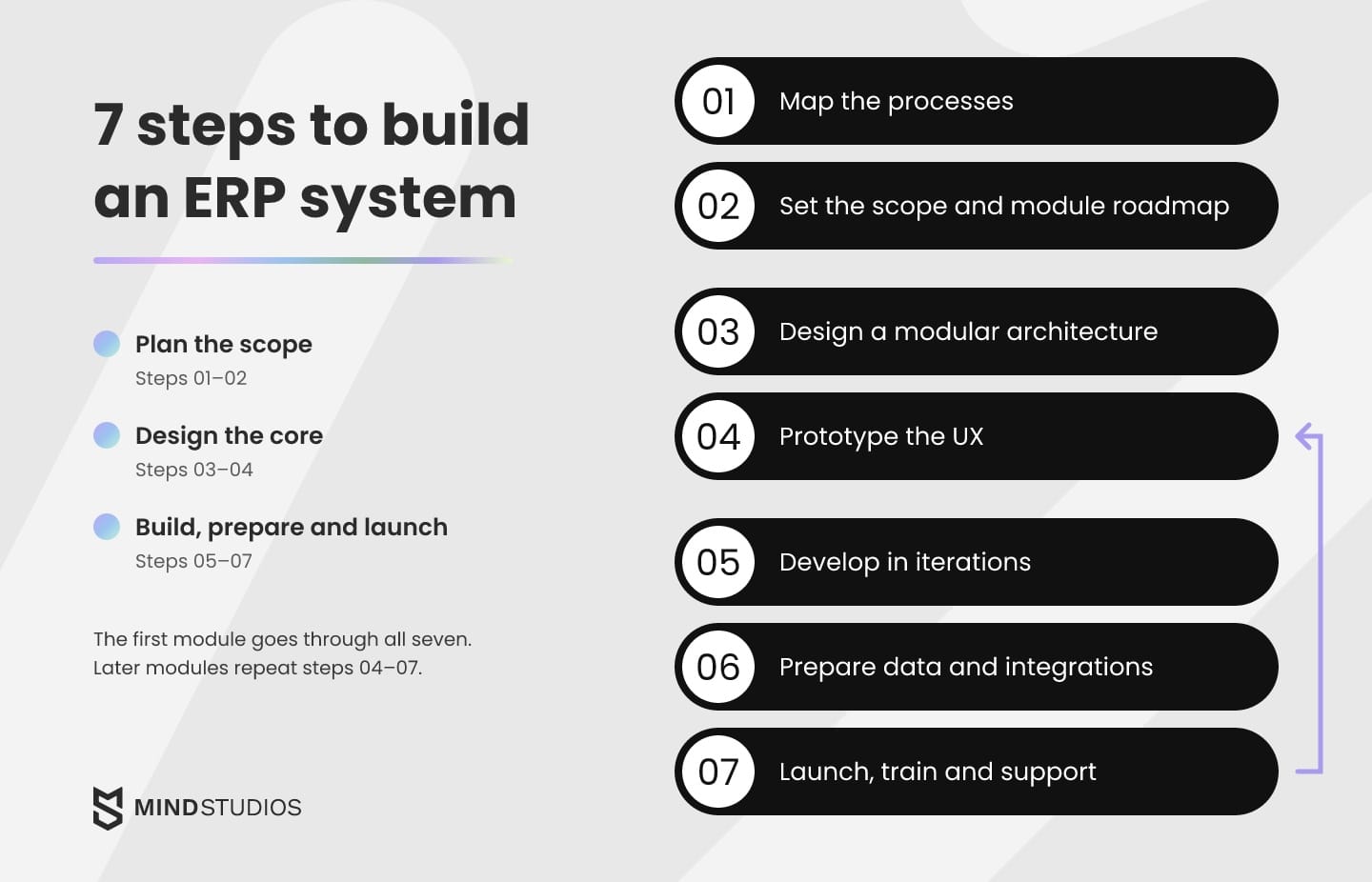
To build an ERP system, a team moves through seven steps: process mapping, scope and module roadmap, architecture, UX and prototype, iterative development, data and integration readiness, then launch and support. The first module goes through all seven and reaches daily use before the rest exists. Later modules repeat the cycle from prototype to launch on the same core.
The ERP system development process is the same whether you replace a platform or start from scratch, but a scratch build puts more weight on steps 1 and 6, because the data usually comes from spreadsheets.
Plan the scope (steps 1–2)
- Map the processes. Discovery starts with the people who do the work: how tasks move, where approvals sit and which exceptions break the rules. The output is a process map for the first module and a list of the systems it touches.
- Set the scope and module roadmap. Pick the first module, define what "done" means for it and order the next ones by the cost of the problem each solves.
Design the core (steps 3–4)
- Design a modular architecture. A shared core holds users, roles, the org structure and an audit log, with the modules on top. Where connected systems expose REST APIs, modules can exchange records with them, and available webhooks can notify other systems of an event such as a timesheet approval. Our architecture advisory work centers on these choices, because they set how cheaply you can add modules later.
- Prototype the UX. Teams use ERP screens all day, so a clickable prototype tested with real users catches slow paths before they are coded.
Build, prepare and launch (steps 5–7)
- Develop in iterations. Each short cycle ends with a working demo on test data, so future users can correct the module while changes are still cheap.
- Prepare data and integrations. Clean, map and load the data, test every integration at realistic volumes and agree on the cutover conditions: which numbers must match, who signs off and how to roll back. A short parallel run of the old and new process shows mismatches before anyone relies on the new figures.
- Launch, train and support. The first module goes into daily use after each role has been trained on its own tasks. Early feedback fixes what slows people down. After that, support covers monitoring, security updates and the next module on the roadmap.
We can use the lessons from running our own ERP to help define your first module and the roadmap behind it.
ERP integrations and data: what to settle before the estimate
Custom ERP integration work and the condition of your data can move timelines and budgets as much as the feature list does, so both belong in the plan before anyone quotes a price. That means a full list of the systems the ERP must exchange data with and a real sample of the records it will inherit.
For each system on the list below, the estimate needs to know whether it has an API, which way data flows, how often it syncs and who owns it on your side:
- Accounting software for taxes, reporting and audits
- Banking and payment providers for statements, payouts and reconciliation
- CRM for customer and deal data
- E-commerce or ordering channels
- WMS or TMS for warehouse and transport operations
- Payroll, time tracking and single sign-on
Integration often means keeping a tool in place. On the Medienlogistik platform, we integrated mileage tracking with the client's CPA software, so payroll data flows there directly while accounting stays where it was.
Mind Studios' insight: A real export of staff, stock or customer records shows the duplicates, empty fields and team-specific formats that requirements miss, and the cleanup belongs in the estimate. A migration line with no data sample behind it is a guess, and the gap tends to surface after the contract is signed.
ERP software development cost and the 5-year bill
Custom ERP development cost depends on seven drivers: modules and their rules, integrations, data condition, roles and compliance, platforms, reporting and rollout. A fair comparison with a ready-made ERP or a hybrid covers three to five years and keeps the same process scope for every route.
Panorama's report also shows how unnamed requirements turn into overruns: more than a quarter of organizations exceeded their ERP project budgets, with additional technology needs as the leading cause. For your own build, requirements named before the estimate get priced in, and the ones found later arrive as extras.
The list shows how each driver moves the budget:
- Modules and their rules: each module adds screens, roles and logic; complex rules such as pricing or scheduling cost more than simple records.
- Integrations: every connected system adds mapping, error handling and testing; systems without an API need workarounds.
- Data condition: clean, consistent data loads quickly; duplicates and mixed formats add cleanup and validation.
- Roles, permissions and compliance: granular access, audit logs and data protection rules in your markets add design and testing time.
- Platforms: a web admin is the base; mobile apps, offline mode and device features add separate work.
- Reporting: standard reports are light; custom dashboards and BI exports add work per report.
- Rollout and training: more teams and sites mean more training, parallel runs and early support.
For EU personal data, GDPR Article 32 lists measures such as encryption and a process for regularly testing security safeguards, applied as appropriate to the risk. HR and payroll modules hold exactly this kind of data, so these measures belong in the estimate from the start.
How to compare five years of costs
These are our working cost lines, and you can adjust them to your company. The Platform column covers a ready-made or configured ERP. Each route gets every line over the same horizon, so no cost drops out of the comparison just because one option hides it:
| Cost line | Your own ERP | Platform |
|---|---|---|
| Upfront | Discovery, design and the first modules | Implementation, configuration and setup |
| Software | Hosting and managed cloud services | Licenses under the product's pricing model, at planned headcount |
| Change | New modules on the roadmap | Customizations and their retesting after vendor upgrades |
| Integrations | Building and maintaining connectors | Connectors, middleware and their upkeep |
| Data migration | Cleanup, mapping and loading | Cleanup, mapping and loading into the vendor's data model |
| Training and transition | Role training, parallel runs, staff time in discovery and testing | The same, plus adapting processes to the platform's workflows |
| Support | Fixes, security updates and monitoring | Vendor support plan plus an internal administrator |
| Remaining workarounds | Processes outside the modules built so far | Processes the platform doesn't model |
A hybrid takes lines from both columns, plus one more for the integration that keeps the platform and your modules in sync and needs retesting whenever the platform ships an upgrade.
A hosting estimate becomes useful once the team has defined workload and availability requirements, because Amazon RDS pricing bills for instance hours, storage, backups and data transfer. That line grows with data and traffic, while per-user license lines grow with headcount.
Mind Studios' recommendation: Keep two totals: cash (licenses, build, hosting and support) and the team time each route removes or adds. Freed hours reduce spending only when they replace hiring, overtime or contractor work. Until then, count them as capacity.
What changes the winner
A five-year comparison usually turns on three assumptions:
- Headcount growth: drives per-user licenses.
- Workarounds: how many processes the platform leaves unmodeled.
- Modules: how many your roadmap really needs.
Each can be checked before you commit, through written pricing at planned headcount, a demo of the costly exception and a data sample for the first module. If one realistic change to an assumption flips the result, the case is too close to call, and the route that is cheaper to reverse is usually the safer start.
How you pay for the build is a separate choice. Fixed price, time and materials, and a dedicated team split scope risk differently between you and the partner, and our engagement models comparison walks through the trade-offs.
Risks of running your own ERP and how to manage them
The main risks of a custom ERP are dependence on one developer or team, scope that keeps growing and support nobody budgeted for. Each needs an owner and a testable condition before development begins: documentation another engineer can deploy from, a frozen first release and a named support contact.
Each item below pairs the habit behind a risk with the practice that counters it:
- Key-person dependence. Don't let one developer hold the architecture in their head. Require documentation and admin access in your company's name, and have a second engineer deploy the system from those documents before sign-off.
- Scope creep. Don't add every request to the first release. Freeze the first module's scope and queue new requests on the roadmap.
- Unbudgeted support. Don't treat launch as the finish line. Name who owns support and how a failure is reported and escalated, and budget security updates and interface upgrades for every year of the plan.
- Big-bang rollout. Don't move every team on the same day. Move team by team, starting with the one whose problem the module solves.
- Weak adoption. Don't leave adoption to chance. Train by role and name an internal owner who collects feedback and sets priorities.
Choosing a custom ERP software development partner
Choose the partner that can show internal systems it has run in production, because ERP work depends on continuity and on how well the team handles your data and integrations. These checks make that concrete, on top of your usual vendor review:
- Operating experience. They have run an internal system in production for years and can show how it evolved.
- Integrations. They can explain the data flow of an accounting, banking or payroll integration they have built.
- Estimate assumptions. Their estimate lists what it assumes about your data, your connected systems and the first module's scope.
- Phased launch. They propose a first module and a roadmap instead of a single big launch.
- Roles and audit logs. They build roles, permissions and audit logs into the core from the start.
- Ownership. The contract assigns you the code, data, documentation and access, and our software outsourcing guide covers what to put in writing.
- Support. They name who supports the system after launch and how change requests are handled.
In bespoke ERP development, the partner gets to know how your operations work in detail, so continuity matters as much as skill. Mind Studios builds internal systems around a client's processes, runs its own ERP every day and has 70% three-year client retention.
An ERP holds payroll, contracts and personal records, so the partner's own security practice matters as much as the one it designs for you. Mind Studios is ISO 27001 certified: the ISO/IEC 27001 standard sets requirements for an information security management system, and a third-party certificate attests that ours meets them.
To compare several teams, our ERP company ranking lists firms that build these systems.
Making the build-or-buy call
Spreadsheets and SaaS tools will keep working a while longer, which makes the decision easy to postpone. The cost of waiting becomes clearer when recurring workarounds and license commitments enter the same comparison as the build.
If the numbers favor a platform, configure it well and keep your edge in the product. If they favor a hybrid or a decision to build your own ERP, start with one module, own its code and data and let the roadmap grow with the company.
Most routes still leave something to build, from a hybrid module to the integrations around a platform, and we can turn yours into a delivery plan with support after launch.
FAQ
Can I create my own ERP?
Yes, and what you bring to the project matters most:
- A product owner who knows the processes and can make scope calls
- A person responsible for data quality and migration
- A budget for support and new modules after launch
Without a development team behind it, a homegrown ERP leaves a growing company dependent on whoever wrote it.
What are the four types of ERP?
The answer depends on the axis you classify by. For this decision, we separate where the ERP runs from how you obtain it:
- Hosting: cloud, on-premise or a mix of both, which sets who maintains servers, how updates ship and where data sits.
- How you get it: the four routes in the first table above.
The word hybrid means something different on each axis: hosting split between cloud and your own servers, or a platform paired with your own modules.
How do we get a reliable cost estimate for an ERP system?
A reliable estimate shows which numbers are firm and which still rest on assumptions. Ranges found online describe someone else's modules and data, so ask the team to show:
- What it can price now, based on your process map, integration list and roles
- What it still assumes, such as data quality before it has seen a sample export
- What would turn each assumption into a firm number
How long does custom ERP development take?
The timeline depends on four ERP-specific factors:
- How many modules go into the first release
- The integrations
- The condition of your data
- How many teams need training
A phased launch keeps that timeline manageable, because the first module goes into daily use while later modules follow on the roadmap.
Can a custom ERP replace our accounting software?
It can. When your accounting software already meets your reporting needs, keeping it lets the ERP project focus on the operational gaps that prompted the build. The ERP then feeds the accounting tool through an integration, and tax rules, statutory reports and the audit trail stay where your accountant already works.
Can we build ERP modules on top of our current system?
Yes, and it is often the safest path. A new module runs next to the old system, the two share data through an API, and old functions are switched off one at a time. This approach breaks down when the old system has no API or export, or when the data can't stay in sync. In those cases, migration comes first.