
 ChatGPT
 Perplexity

Flutter vs. React Native is a decision your product lives with for years, through every upgrade and every hire. Kotlin Multiplatform adds a third route for products that already ship native apps.
Highlights
- Flutter draws its own UI, and React Native renders real native components.
- Kotlin Multiplatform shares business logic and keeps native screens by default.
- Native dependencies, team skills and upgrade load usually decide before benchmarks do.
What your product already ships, and the team that maintains it, set the starting point for this choice. A new product built around one custom design on every platform leans toward Flutter. A company with a React web team that wants over-the-air fixes leans toward React Native.
A product that already ships native iOS and Android apps should look at Kotlin Multiplatform (KMP) first, because KMP shares logic without rewriting the screens users already know. A required SDK, a hardware feature or a change in the team can still overturn any of these starting points.
Maintenance is where hidden costs show up: breaking upgrades, SDKs with no package for your framework, and new hires who have to learn the codebase. We've built native products such as the James delivery service and the Envol wellness app, so this guide judges each framework by how its code ages once real users depend on it.
A mobile build plan holds up best when the roadmap and its native dependencies are mapped before anyone designs the first screen.
How the three frameworks compare at a glance
All three frameworks ship production-grade iOS and Android apps. So a useful Flutter vs. React Native comparison looks at how each one renders, which language your team writes and what upgrades will cost later. Kotlin Multiplatform adds a third model: shared Kotlin code under native screens, or under shared screens if you choose.
The table puts nine criteria side by side:
Criterion |
Flutter |
React Native |
Kotlin Multiplatform |
|---|---|---|---|
Language |
Dart |
JavaScript or TypeScript |
Kotlin, plus Swift for native iOS screens |
Rendering |
Its Impeller engine draws every pixel |
Native platform views through the Fabric renderer |
Native views, or the Compose Multiplatform renderer |
UI model |
One widget tree for all platforms |
React components mapped to native components |
Logic shared, UI native · or shared UI via Compose |
Performance profile |
AOT-compiled Dart, predictable frame pacing |
Hermes V1 by default; the New Architecture is mandatory |
Kotlin compiled to native binaries on iOS |
Platforms |
iOS, Android, web, Windows, macOS, Linux |
iOS, Android; web and Windows through extensions |
Android, iOS, desktop, server; Wasm web target in Beta |
Over-the-air updates |
No first-party option; Shorebird code push is third-party |
EAS Update or a custom updates server via expo-updates |
Through app store releases |
Packages |
pub.dev registry |
npm plus React Native native libraries |
Kotlin libraries with multiplatform targets |
Language share |
Dart, the smallest of the three |
JavaScript and TypeScript, the largest |
Kotlin, overlapping with Android hiring |
Backed by |
React Foundation (Linux Foundation) |
JetBrains |
Every column involves a trade-off: Flutter buys visual consistency with its own engine, React Native reuses web skills and pushes JavaScript fixes over the air, and KMP keeps native fidelity while cutting duplicated logic.
The difference between Flutter and React Native, and where KMP fits
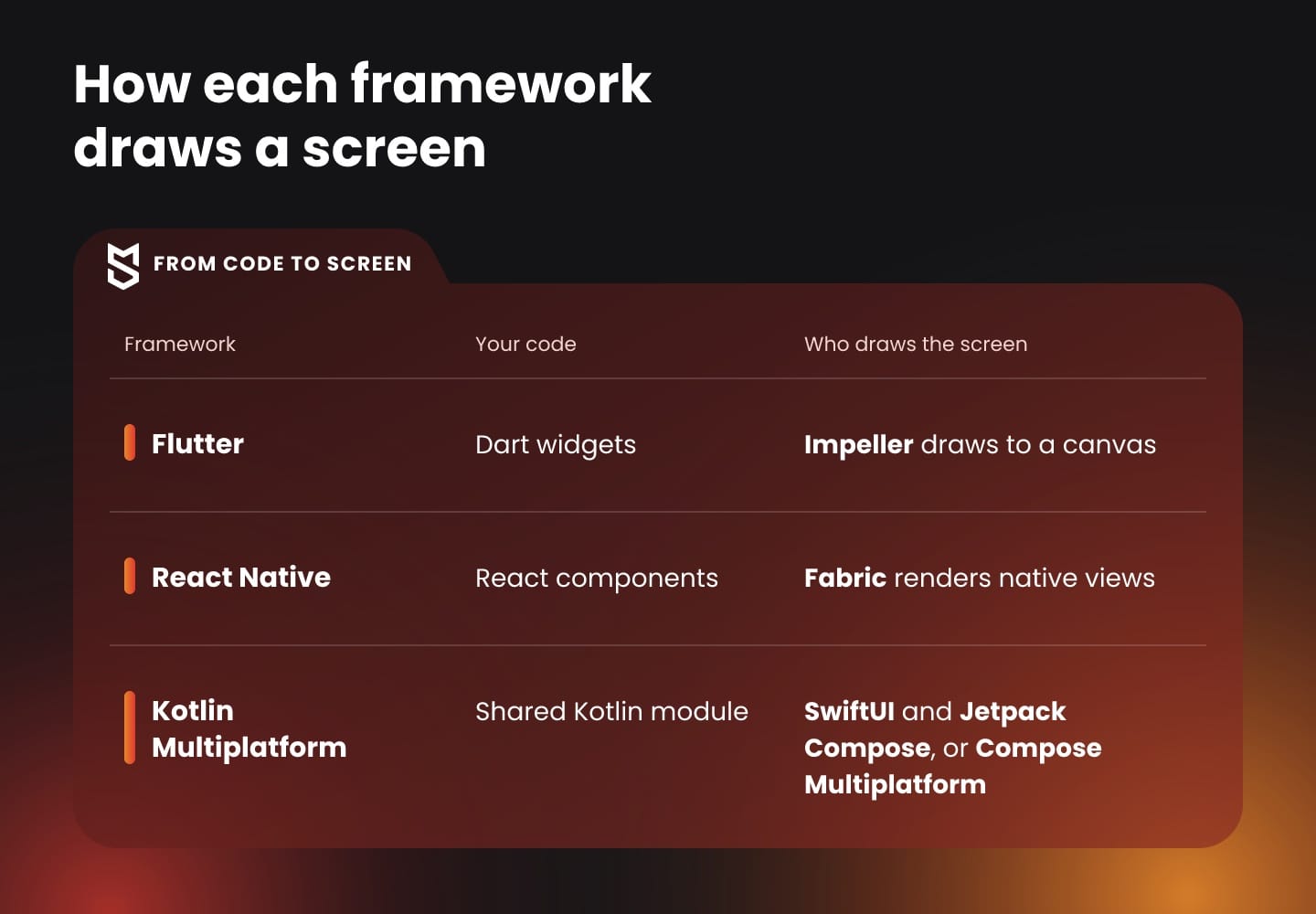
The main difference between Flutter and React Native is who draws the screen. Flutter paints every pixel with its own engine. React Native asks iOS and Android to render their own native components. Kotlin Multiplatform shares the code underneath, and the screens stay native unless you add Compose Multiplatform.
The rendering model shapes three things a product team deals with every week: how much design work repeats across platforms, how the app behaves when Apple or Google ship a new OS, and how much platform knowledge the team still needs.
Flutter draws every pixel itself
Flutter apps are written in Dart. For release builds, the Dart AOT compiler turns Dart into native ARM or x64 machine code. The interface is a tree of Flutter widgets, and the engine draws it straight to a canvas.
On iOS, Impeller is the only supported renderer. On Android it is on by default from API 29, and older devices fall back to OpenGL. Impeller compiles its shaders when the engine is built, so they don't compile while the user scrolls. That keeps frame pacing predictable, which matters for animation-heavy interfaces.
The trade-off shows up in design. A Flutter button looks the same on an iPhone and a Pixel because Flutter draws it, so a brand-led design system ships once.
For iOS-style screens, the Flutter 3.50 release deprecated the bundled Cupertino library in favor of a standalone cupertino_ui package, so a new iOS look reaches a Flutter app only after that package updates its widgets.
React Native maps to native components
React Native apps are written in JavaScript or TypeScript and run on the Hermes engine. Since version 0.82, React Native runs entirely on the New Architecture, so current apps no longer use the old asynchronous bridge.
Rendering goes through the Fabric renderer, which has a C++ core shared across platforms. Fabric reads JavaScript values directly through JavaScript Interfaces (JSI), where the old architecture passed serialized JSON. A React Text component becomes a real native text view, so screens pick up platform behavior such as system fonts and accessibility settings.
For a product team, an iOS update usually reaches React Native screens through the platform's own components. The cost is that one component can render slightly differently on each platform, so QA covers both platforms equally.
Kotlin Multiplatform shares logic and optionally the UI
Kotlin Multiplatform lets you choose how much code to share. By default, a shared module holds business logic, data models and networking. On iOS, the Kotlin/Native compiler turns that module into a native binary that Swift calls directly. Screens stay in SwiftUI and Jetpack Compose.
Compose Multiplatform extends sharing to the UI. On JetBrains' support table, KMP core and Compose Multiplatform are both Stable on Android, iOS and desktop. Because Compose interoperates with native views, a team can share one screen and keep the rest native.
Flutter vs. React Native performance: what changed in 2026
On current releases, neither framework is faster in every case. React Native now runs only on the New Architecture with Hermes V1, and Flutter renders through Impeller. The results depend on how each screen is built, so the only fair verdict comes from measuring your heaviest screens in release builds, on the devices your customers use.
Rendering and frame times
The number that matters is the frame budget. React Native's performance guide explains that a 60 fps screen gives the app at most 16.67 ms to produce each frame. Miss that window and the user sees stutter.
In React Native, a busy JavaScript thread freezes animations driven from JavaScript, while scrolling and native transitions keep running on the main thread. In Flutter, long Dart work on the main isolate causes the same symptom, which is why heavy parsing usually moves to a background isolate.
Both frameworks keep cutting overhead: Flutter 3.50, for example, cut iOS touch input latency by a full frame, about 16 ms on 60 Hz displays. Since results like these change with each release, a React Native vs. Flutter performance test is a snapshot of one implementation on specific devices and framework versions.
App size and startup
Flutter's app size guide warns that debug builds, and even default release builds, don't show what users actually download, because the stores split packages by device. The real figure comes from the Play Console and App Store Connect size reports.
Both frameworks ship a runtime inside the binary: the Flutter engine, or Hermes plus React Native's native core. So measure what that runtime, your own code and your assets add together, and how cold start behaves on a low-end Android phone.
Where KMP lands on performance
With native screens, KMP performance comes down to the shared logic and its boundary with Swift. The overhead worth checking is where Kotlin types pass to Swift through the Objective-C interop layer.
With Compose Multiplatform on iOS, Compose draws the shared UI itself. It behaves more like Flutter than like SwiftUI, so profile it the same way.
How to run a fair comparison
A fair test keeps four conditions the same for every candidate:
- Same scenario and data: one representative flow, such as a long image list, built in each stack against identical API responses.
- Comparable devices and builds: release or profile builds on the slowest supported phone and a current flagship, on both platforms.
- Three measurements: dropped frames in the heaviest interaction, cold start to the first usable screen, and peak memory on the long list.
- Acceptance criteria set in advance: a product threshold for each measurement, so the result shows whether a stack meets your bar.
For a founder, the takeaway is about rewrites. Profiling shows where a slow screen spends its time. If that time goes to the network, the API or image handling, rewriting in a new framework leaves the problem in place.
Development speed, hiring and team fit
Development speed depends mostly on how well the framework matches the team you already have. Engineers who write React and TypeScript usually get productive fastest in React Native, and Android engineers in KMP. Flutter asks a team to invest in Dart, and in return the team gets one shared UI on every platform.
Development speed and time to market
All three have fast edit-and-run cycles. Flutter's hot reload applies code changes while keeping app state. React Native offers Fast Refresh, and Expo handles builds and native configuration. KMP uses Android Studio tooling, with Compose previews for shared screens.
For a team weighing Flutter or React Native, the bigger factor is how much of the product touches native APIs. A content-and-forms app moves at the speed of its UI layer. An app built around Bluetooth devices, payments or background location spends much of its time on native modules, whichever framework sits on top.
Mind Studios' insight: Hot reload, Fast Refresh and Expo shorten the path to a first version. A year later, speed depends on how many custom native modules the app has collected, because each one is code on two platforms that has to survive every framework upgrade. Count them during scoping and give each one an owner.
The hiring pool behind each framework
In the 2025 Stack Overflow survey, the shares of respondents who use each language are:
- JavaScript: 66%
- TypeScript: 43.6%
- Kotlin: 10.8%
- Dart: 5.9%
These shares describe language use among survey respondents, while hiring depends on mobile experience and the candidates available in your market.
A React web developer still needs time to learn native builds, code signing and platform quirks, and a Kotlin backend engineer needs time with iOS. The people you need are the ones who have already shipped mobile apps in the stack.
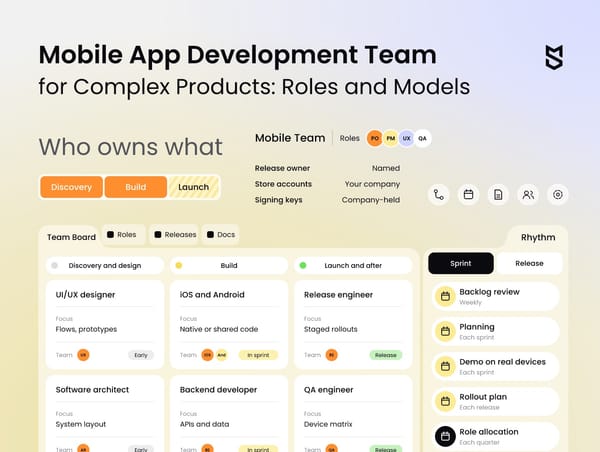
Our guide to mobile team roles covers who belongs around each one.
For a founder, the stack decides which skills the company depends on and how exposed it is if one key person leaves. A company with a React web app can share TypeScript code and some hiring between web and mobile, which favors React Native. A Flutter team usually hires Flutter specialists or retrains engineers, and both take planning time.
Teams that already ship native apps
With existing Swift and Kotlin apps, moving to a cross-platform UI framework means rewriting screens the team already maintains. KMP instead lets Android engineers move business logic into a shared module that iOS engineers call from Swift, and the native UI stays where it is.
Kotlin Multiplatform vs. Flutter: shared logic or shared UI
In a Flutter vs. Kotlin Multiplatform decision, the key question is how platform-specific the interface should feel. Flutter gives you one UI and one language on every platform. KMP shares logic under native screens and can share UI through Compose Multiplatform, so you decide where shared code ends and native code begins.
These points usually decide between the two:
| Criterion | KMP | Flutter |
|---|---|---|
| What is shared | Logic by default, UI optionally | UI and logic together |
| UI on iOS | SwiftUI, or Compose Multiplatform | Flutter widgets drawn by Impeller |
| Languages | Kotlin, plus Swift for native screens | Dart |
| Adoption path | One shared module at a time | New app, or add-to-app modules |
| Platform API access | Direct Kotlin and Swift code | Plugins and direct native interop |
| Best fit | Products with native apps and Android talent | New products with one brand-led design |
The first distinction is whether to share logic alone or share screens too.
When sharing business logic is enough
Sharing logic alone is enough when the screens are simple and the rules behind them are complex. Pricing engines, offline sync, validation and API clients are the code that drifts apart when two teams write it separately, producing bugs on only one platform.
JetBrains' integration tutorial calls business logic "a great candidate for reuse." It walks through moving that logic into a shared module and replacing platform-specific APIs with expect and actual declarations.
Our Kotlin Multiplatform guide covers that setup and its benefits in more depth.
Compose Multiplatform vs. Flutter for shared screens
Once screens are shared too, the two options get closer, and Compose Multiplatform vs. Flutter comes down to language and ecosystem. Compose suits teams that already write Jetpack Compose on Android, because those skills and much of that code carry over to iOS. Flutter was built around shared UI from the start, and pub.dev packages assume it.
For a product that already has native apps, Compose is a gradual path: one shared screen at a time, next to SwiftUI screens that keep working. For a new product with no native code, Flutter and Compose start from a similar place, and team skills decide.
Kotlin Multiplatform vs. React Native for products with native apps
If a product already has native iOS and Android apps, the team can adopt any of the three gradually: KMP as a shared module, React Native by adding it to the existing apps, and Flutter through add-to-app. The real difference is what each one adds to your build and who on the team can maintain it.
What each framework adds to an existing app
JetBrains' tutorial, React Native's integration guide and Flutter's add-to-app documentation describe what each option brings into a native app, and the table sums them up:
| Framework | What you embed | Build additions | Who maintains it |
|---|---|---|---|
| Kotlin Multiplatform | A shared Kotlin module for logic | A Kotlin library and an iOS framework | Android engineers, with iOS calling it |
| React Native | New screens, views or user flows | JavaScript bundle, Hermes, Gradle plugin, CocoaPods setup | Engineers fluent in React and native builds |
| Flutter | A Flutter module rendering screens or views | Flutter engine, as an AAR or Swift package | Dart engineers, plus native host owners |
The table shows where the long-term cost sits: KMP adds Kotlin that an Android team already writes every day, while React Native adds a JavaScript runtime and a second toolchain, and Flutter adds its own engine.
A gradual rollout in four steps
The rollout follows the same four steps whichever framework you pick:
- Feature selection: Pick one feature whose logic or screens are duplicated, and buggy, on both platforms.
- Implementation: Build it in the chosen framework: a shared module with models, validation and the API client in KMP, or one new screen or flow in either cross-platform UI framework.
- Integration testing: Test the riskiest integration in that feature, such as payments, push or sign-in, on both platforms in release builds before any production rollout.
- Controlled rollout: Ship it behind a feature flag and compare defect counts and delivery time with the native version before you extend the shared layer.
If only one native app exists today, the same reasoning applies to building the second one. Our guide on porting iOS apps covers that decision in detail.
Where shared code fits a two-role product
Mind Studios' insight: For James, we built four native apps: buyer and shopper apps on iOS and Android, plus a backend and an admin panel. In a product shaped like this, the first candidates for a shared module are the rules every app applies the same way, such as order states and the API client. Shared UI for the two roles is a separate question.
Shared code pays off only in the right layer of your existing apps, and finding that layer with your engineers comes before any screen is rewritten.
Ecosystem, updates and long-term maintenance
After launch, the frameworks differ most in how they ship updates and how much their upgrades cost. React Native can push JavaScript fixes over the air. Flutter relies on store releases unless you add a third-party service, and KMP ships through the stores like any native app. In all three, upgrade effort grows with the number of native dependencies.
Packages and native integrations
The pub.dev registry lists more than 80,000 Dart and Flutter packages. React Native draws on npm plus its own native libraries, and KMP uses multiplatform Kotlin libraries alongside any Swift or Kotlin native library. What decides integration work is whether each SDK on your list is maintained on both platforms.
If an SDK has no ready package, the team writes the integration itself. For Turbo Native Modules, React Native's Codegen generates native interfaces from a TypeScript or Flow specification, and engineers then implement the platform behavior behind those interfaces. Flutter 3.50 made direct native interop stable. In KMP, native APIs are just Kotlin and Swift code.
Over-the-air updates
On updates, React Native vs. Flutter is the sharpest contrast in this guide. EAS Update ships JavaScript, styling and images without a store release, but native code, permissions and SDK upgrades still need a new binary. The expo-updates library can also run against your own server that implements the Expo Updates protocol, which keeps update hosting in-house.
Microsoft retired App Center, including its hosted CodePush service, on March 31, 2025, and now offers a standalone CodePush server that teams deploy and run themselves.
Shorebird patches Flutter apps through its own fork of the engine and has no plans for self-hosted versions, which matters to companies with strict data policies. Its FAQ notes that store rules allow such updates only when they don't change the app's primary purpose.
Over-the-air delivery also carries a security question, because whoever can publish an update changes production code. Expo supports signed updates that the app checks against a certificate embedded in the build, so the team decides early who holds the private key.
Platform reach
Flutter's supported platforms list covers shared UI on Android, iOS, web, Windows, macOS and Linux. React Native reaches the web through React Native for Web, with Expo web support, and Windows through Microsoft's React Native Windows. For your product, the relevant check is whether the required plugins and SDKs support every target you plan to ship.
Who backs each project and upgrade risk
React Native's governance changed in 2026. The React Foundation launched under the Linux Foundation on February 24, 2026, and now hosts React and React Native.
Upgrades are the cost that shows up in year two. In Flutter's Q2 2026 survey, platform and ecosystem maturity was the largest theme behind dissatisfaction (44%). The Flutter team says it centers on upgrade pain in older projects, especially on Android. React Native ships a new version about every two months, as its release blog shows.
The table is a quick check of the maintenance picture:
| Criterion | Flutter | React Native | KMP |
|---|---|---|---|
| OTA updates | Third-party (Shorebird) | EAS Update or a self-hosted server | Store releases |
| Native code path | FFIgen, JNIgen; Pigeon mode in preview | Turbo Native Modules with Codegen | Kotlin and Swift directly |
| Release rhythm | Regular stable releases from Google | A minor release about every two months | Kotlin and Compose releases from JetBrains |
| Main upgrade risk | Version matrix in older projects | Native libraries trailing new releases | Kotlin version alignment across libraries |
For a founder, this is total cost of ownership: framework upgrades need an owner and room on the roadmap, and over-the-air fixes shorten how long a broken release stays live. Both belong in the budget from the first estimate.
When to choose each framework: a decision path by team and product
The decision path works best in a fixed order: the SDKs and platform features the product can't drop, how much of the existing app you'll change, the team, and finally a test build of one representative feature. Each step narrows the options, so team preference only decides among stacks that passed the first two steps.
Planning for the product you'll have in three years
Dmytro Dobrytskyi, CEO at Mind Studios, draws on products like James, where two user roles meant four apps from the first release, to explain which question to ask before any framework comparison:
Teams tend to compare frameworks against the app they have today. I'd start with a list of what the product will need in three years that it doesn't have now: another user role, a web client, a hardware integration. Each item changes how much code you maintain and who you hire. Pick the stack that absorbs that list with the least rework.
For a founder, the decision path doubles as a hiring plan, because each branch names the skills the company will recruit for and depend on.
The four steps in order
- Required SDKs and platform constraints. A core feature that depends on device hardware, background processing or brand-new platform APIs needs native code. The rest of the app can still be cross-platform, because each framework calls native modules. If most of the product sits on that native path, a native base stays the leading candidate.
- Acceptable scope of change. With native apps in production, KMP shares logic without touching screens, Compose Multiplatform or Flutter add-to-app can take new flows, and a full move to either cross-platform UI framework rewrites the UI layer.
- The team. A React web team that will own mobile work points to React Native, and an Android team points to KMP. A product defined by one custom, animated design across mobile, desktop and web points to Flutter.
- A validation build. Build the riskiest feature in the leading option and run it through the comparison protocol from the performance section before the plan is final.
When conditions overlap
Take a company with native apps, a React web team and a detailed design system. KMP moves to the front only if four checks pass: enough logic is duplicated across the two apps, its dependencies support multiplatform, the existing screens are worth keeping, and someone, usually the Android engineers, owns the shared module.
Each failed check leads to a different next step:
- Little duplicated logic: keep the current setup until a concrete feature makes sharing worth the change.
- Dependencies without multiplatform support: the shared layer shrinks to the code around them, so re-estimate its value at that size.
- Screens that need replacing: compare the shared UI options (Compose Multiplatform, Flutter add-to-app, React Native screens) on the new flows.
- No owner for the shared module: settle that responsibility before any framework work starts.
Between the two cross-platform frameworks, React Native or Flutter usually comes down to steps three and four. The KMP vs. Flutter question is closest for new products that want shared screens, while KMP vs. React Native matters most where native apps already exist.
When native stays the better base
Some products are better off staying native, with or without a shared Kotlin layer. Our native development comparison covers that branch in depth.
Mind Studios' insight: For Envol, we rebuilt the Android app from scratch in Kotlin and built a new iOS app in SwiftUI. For a product running on two native codebases, the existing Kotlin code is a natural starting point for KMP. Before any estimate, check which of its dependencies support multiplatform, because that shows how much can actually move.
Risks to settle before you commit to a framework
Unresolved dependencies and unclear maintenance ownership can undermine a stack choice after launch. The risks to settle are native dependencies, the upgrade plan, the over-the-air policy, what stays native, and who owns the code and signing keys. Scoping brings them to the surface while the team can still compare alternatives.
Questions to answer about your product
Work through these with your product and engineering leads:
- Required SDKs: Which SDKs does the product rely on (payments, maps, analytics, identity, hardware), and does each one support the framework you're considering?
- Native features: Which features must feel fully native, such as home screen widgets, watch apps, CarPlay or Android Auto?
- Upgrade ownership: Who upgrades the framework, how often, and where does that time sit in the roadmap?
- Over-the-air policy: Will you ship fixes over the air, and does your data policy allow a third-party update service?
- Shared code: How much of the code is truly shared across platforms, and what will stay platform-specific?
- Code and keys: Who holds the source code, the store accounts and the signing keys if the team changes?
These answers can narrow the React Native or Flutter question before benchmarking begins. An unsupported payments SDK, for example, adds integration work that belongs in the estimate.
When the current app stops fitting the product
Sometimes the current app is already fighting its framework: slow screens, blocked upgrades, a native module nobody can maintain. In that case, review the code and its dependencies before choosing a new stack, because the review shows whether you can still fix the app in place.
Our guide to legacy modernization strategies covers the fix-or-rebuild decision step by step.
Choosing a stack your product can grow on
This guide began with a stack your product has to live with for years. In Flutter vs. React Native, with KMP as the third route, how well a stack holds up over that time depends on three things: the SDKs the product can't drop, how much change it can absorb and the team that maintains it after launch.
Mind Studios builds and scales mobile products with that horizon in mind, from the first release through the upgrades that follow.
Your roadmap, team skills and native dependencies give us a starting point for scoping the mobile build and its ongoing support.
FAQ
Flutter or React Native for a first version you plan to keep?
Either can carry a first version forward if it's built to last, so choose the one your team will still maintain in a year. A few habits matter more than the framework:
- automated tests around business rules from the first sprint;
- clear module boundaries between UI, logic and native integrations;
- a named owner for framework upgrades and native modules.
Is Flutter better than React Native when an app is already in production?
Only if the current product hits a limit you can name. Switching replaces the whole UI layer, so the expected benefit has to cover the migration and the period of maintaining both versions. Reasons that can qualify:
- a design system the current stack renders poorly;
- a native integration that keeps breaking;
- a team shift toward the other skill set.
Flutter's add-to-app lets a team migrate one flow at a time.
Is Flutter more popular than React Native?
By GitHub stars, yes: the flutter/flutter repository has about 181,000 stars, against about 127,000 for the React Native repository. Stars measure developer interest, though. They don't show how many production apps use each framework.
Will Flutter replace React Native in new projects?
Nothing suggests it will. Replacement would show up as one project slowing its releases or losing its backers, and neither has happened: React Native 0.88 shipped in October 2026 and Flutter 3.50 in November 2026. For a new project, both remain long-term options.
Is Flutter still relevant in 2026?
Yes. The Flutter team's 2026 roadmap plans to finish the Impeller migration on Android and make WebAssembly the default web target, and the team calls it a statement of intent. In the Q2 2026 developer survey, 93% of respondents were positive about Flutter and 58% were very satisfied.
Can Kotlin Multiplatform share code with a web app or a backend?
Yes, though maturity differs by target. KMP compiles to the JVM for server-side Kotlin and to the web through Kotlin/JS (Stable) and Kotlin/Wasm (Beta). Teams usually share:
- data models and serialization;
- validation and business rules;
- the API client and networking layer.
Web screens stay separate unless you adopt Compose on Wasm.