
 ChatGPT
 Perplexity

When a second site leaves your team reconciling maintenance records by hand, custom CMMS software becomes a real option. This guide compares configuring, extending and building one, then covers first-release modules, rollout and ownership costs.
Highlights
- Test each must-have requirement on configure, extend and build before costing anything.
- A first release closes one process, from asset record to measured pilot result.
- Compare feasible paths in money over one horizon, then check who maintains them.
A CMMS (computerized maintenance management system) keeps your equipment, its repair history and its scheduled preventive maintenance in one record. You can get one in three ways: configure an off-the-shelf product, extend it through its API or build your own.
If your subscription leaves requests in chat and repair records in spreadsheets, adding a second site, an ERP or a production line makes those gaps harder to manage.
We've built operational systems on both sides of this problem: our own ERP with an inventory module that tracks every piece of equipment, and an on-premise system for a grain producer and packager, connected to TIKPACK's packaging line.
If your maintenance already spans several sites and tools, the first question is which of the three paths your requirements point to.
What a CMMS does in an operations business
Maintenance management software gives every asset a record and a history, turns requests into work orders, schedules preventive maintenance and spare parts, and shows where equipment time goes. For an operations leader, the main value is a shared record that ties every breakdown to an owner, a cost and a cause.
The cycle is the same for a press, a chiller or a forklift:
- Request. An operator reports a fault and picks the asset from a list.
- Planned job. A planner sets the priority, assigns a technician and attaches the asset's checklist.
- Parts. The technician issues spare parts, and stock updates in the same record.
- Close-out. Time, parts, photos and the cause of failure go into the asset's history.
- Report. Managers see downtime, repeat failures and backlog by site, asset or crew.
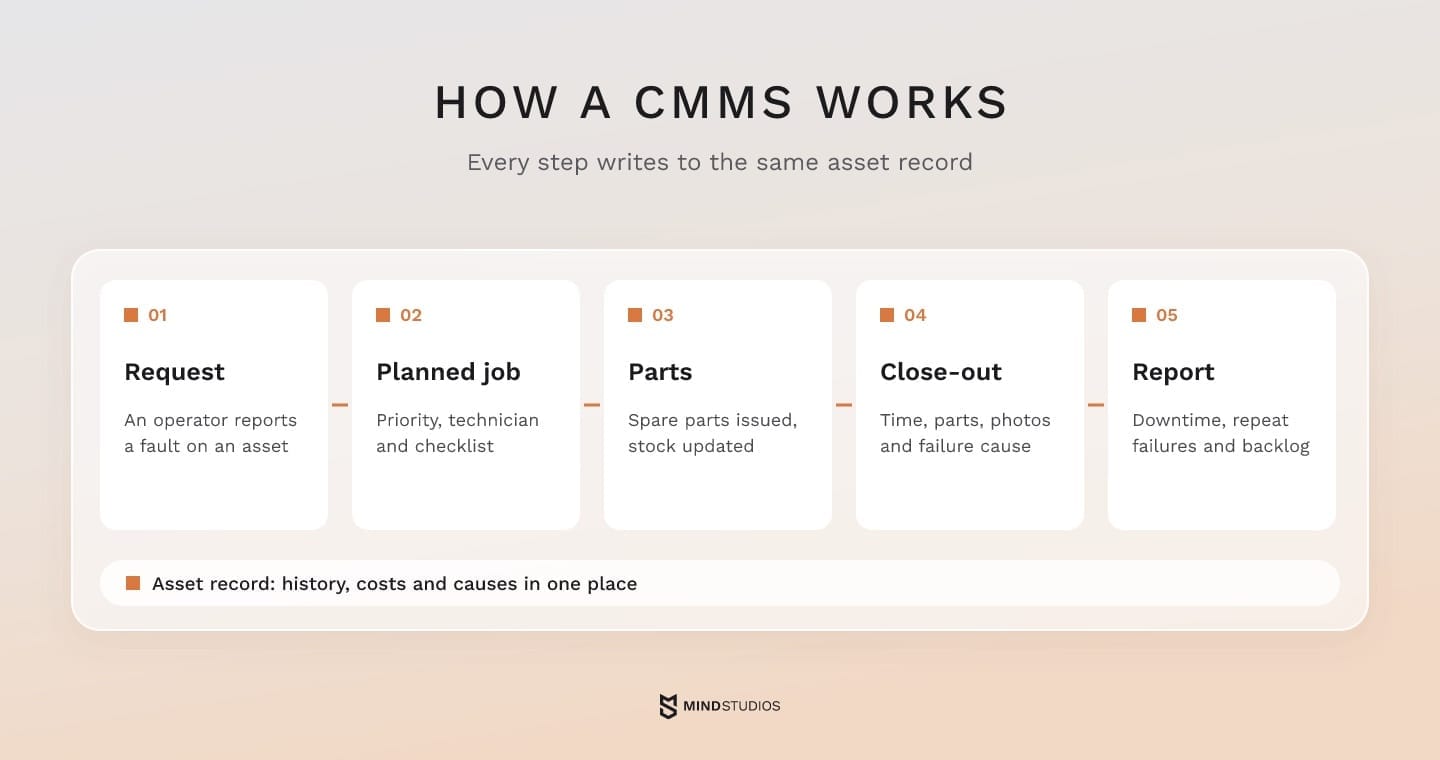
Because every step writes to the same asset record, decisions rest on data instead of anecdotes. If a machine fails every quarter, its history shows whether scheduled servicing would cost less than the next repair. Backlog by site shows where work is piling up, so managers can check whether staffing, unavailable parts or access restrictions are delaying repairs.
Manufacturers run a CMMS on production lines, facility teams on buildings across sites and service operations on the equipment they own.
Vehicles are one more asset class in the same registry, and our guide to fleet management costs covers telematics, fuel and drivers.
Configure, extend or build: choosing your CMMS path
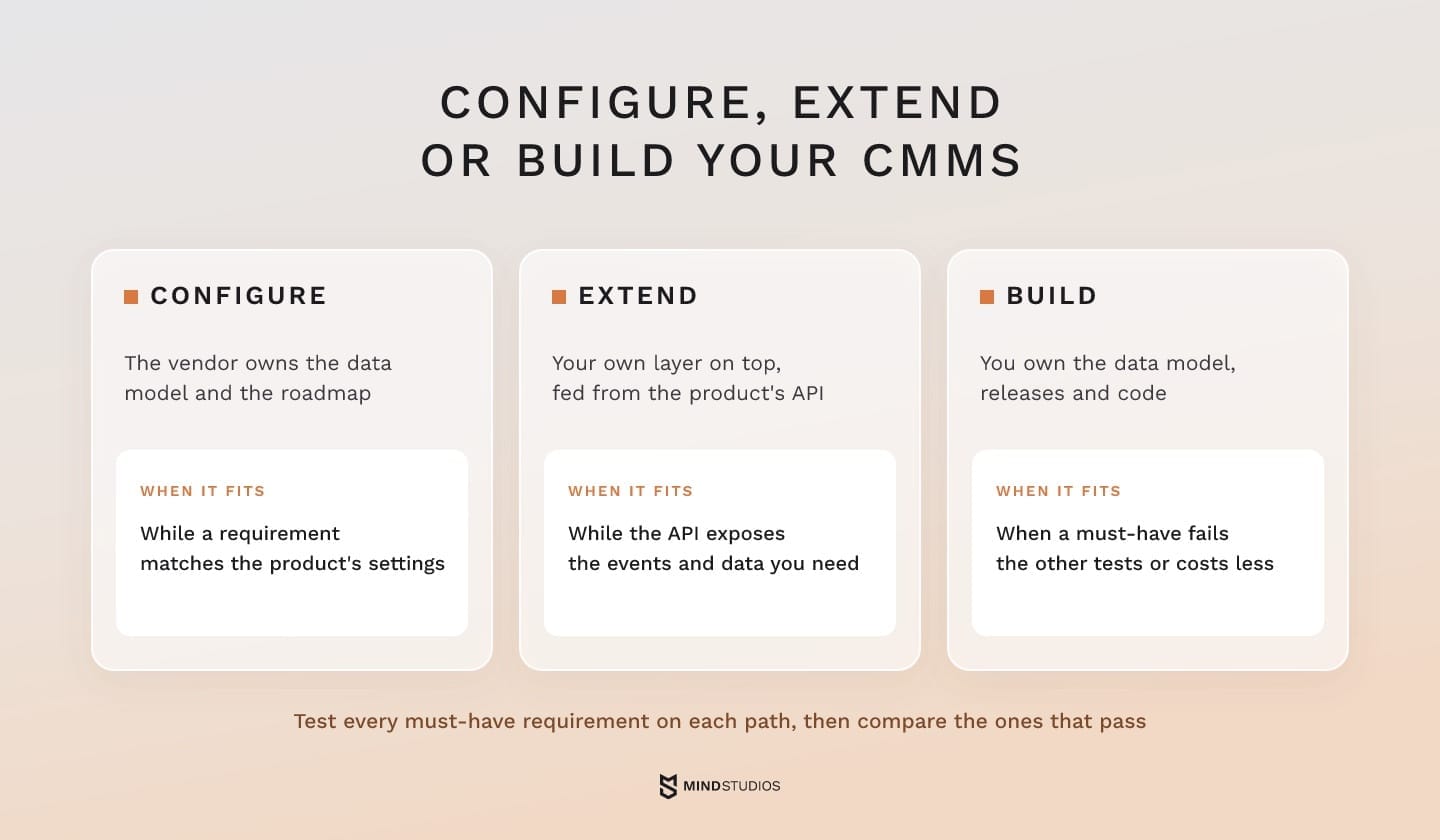
Choose the path in two passes. First, test every must-have requirement to see which paths are feasible: configuring an off-the-shelf CMMS, extending it through its API or building custom maintenance software. Then compare the feasible paths over one horizon and scope. Building wins when it's the only path that passes a must-have test or when it costs less for the same scope.
With configuration, the vendor owns the data model and roadmap. An extension adds your own layer on top, such as an approval service or a mobile app fed from the API. A build gives you the data model, release schedule and code, along with the cost of running them.
The tests start from the maintenance management processes the business can't run without. The cost section then compares the paths that pass, and the last check is who will set priorities, accept releases and fund support for the winner.
Some gaps sit between systems, such as web-form requests that need routing into the CMMS, and a workflow automation layer tested as an extension shows whether the current product can close them.
Who this isn't for: A single site, a standard request-to-repair process and a small crew rarely justify a build. A well-configured off-the-shelf CMMS serves that company better until new sites, connected systems or approval chains change the picture.
Limits to test before you build
Test each suspected limit with your own data, either in a vendor sandbox or in a field trial on site:
- Approvals. Your sign-off chain (cost thresholds, safety permits, contractor jobs) needs manual steps in configuration.
- Events. The API doesn't send the events you need, such as a work order status change or a meter reading crossing a limit.
- Offline work. The vendor app fails a field test in a plant room or cold store, and your own mobile layer can't sync through its API either.
- Data exit. The full history (assets, jobs, parts, attachments) can't be exported in a usable format.
- Scaling cost. Fees and paid customizations grow faster than the value they add with every new site, asset or user.
A requirements template with acceptance tests
Each requirement sits next to the workaround it replaces and the test a path must pass. Candidate paths are hypotheses until those tests run:
| Requirement | Current workaround | Candidate path | Acceptance test |
|---|---|---|---|
| Site manager approves contractor jobs | Phone call, note in the job | Configure | A contractor job can't be released without the logged approval |
| Technicians close jobs with no signal | Paper sheet typed in after the shift | Extend: own mobile layer; build if API sync fails | 20 jobs closed offline sync with photos and parts and no duplicates |
| A line meter reading triggers servicing | Weekly manual reading | Extend or build | Threshold breach creates a work order within the asset's response time |
| Parts stock shared with the ERP | Double entry in two systems | Extend | Issuing a part in the CMMS updates ERP stock the same day |
The failed tests show where custom CMMS software would need capabilities the current product lacks. Whether those changes fit an extension depends on the product's data model and API access: narrow gaps, such as one approval step or an offline sync service, fit a layer on top, while the subscription keeps handling everything else.
When the gaps reach the core record (asset hierarchy, work order lifecycle, offline storage), replacement is the realistic option. Release one then also has to cover the basics the subscription already handles, so the pilot runs from request to report.
Dmytro Dobrytskyi, CEO and Co-Founder at Mind Studios, explains how he decides which workarounds deserve a place in the tests:
Founders usually bring us a long list of workarounds, and not all of them justify code. We weigh each one on three things: how often it happens, what a slip costs and whether changing the process would remove it. If a step runs every shift and a mistake delays a safety sign-off, it becomes an acceptance test. If a simpler process makes it disappear, we fix the process first.
CMMS vs EAM, CAFM and IWMS: what you are actually building
When we scope a build, we use these working boundaries. A CMMS manages maintenance and repair, and EAM covers the whole asset lifecycle, from purchase to disposal. CAFM covers buildings and space, and IWMS adds leases and projects. An ERP maintenance module runs inside the finance system. A custom system can start as a CMMS and grow toward EAM.
Each row is a scope boundary that tells you what the data model has to carry:
| System | What it covers | Scope fits when |
|---|---|---|
| CMMS | Assets, jobs, preventive schedules, parts, maintenance reports | Downtime and repair work are the main problem |
| EAM | Full lifecycle: acquisition, maintenance, cost, depreciation, disposal | Capital planning and asset value matter as much as repairs |
| CAFM | Buildings, rooms, space use, facility services | You manage floors and occupants more than machines |
| IWMS | CAFM plus real estate, leases, projects and energy | You run a property portfolio with leases and capital projects |
| ERP maintenance module | Maintenance orders linked to finance, procurement and stock | Your processes already run in the ERP and fit its model |
The scope shapes the data model. If you expect lifecycle costing within two years, add acquisition and cost fields to the asset record now, even if release one covers only the maintenance management processes in the pilot.
Core modules of a custom CMMS and what to build first
A first version closes one process, from the asset record to a closed work order and a measured pilot result. Asset registry, requests, preventive maintenance scheduling, a technician app and a basic way to measure the pilot belong in nearly every first release. Spare parts and full analytics join when the pilot goal needs them.
Each module enters release one for a specific reason:
| Module | What it does | In release one |
|---|---|---|
| Asset registry and hierarchy | Sites, lines, assets and components with history | Every pilot |
| Requests and work orders | Intake, priority, assignment, close-out | Every pilot |
| Preventive scheduling | Calendar and meter-based jobs | Every pilot with planned servicing |
| Technician app | Jobs, checklists, photos and parts on mobile | Technicians work away from a desk |
| Pilot measurement | A few exportable counts tied to the pilot goal | Every pilot |
| Spare parts and inventory | Stock, reservations, reorder points | The goal involves parts cost or stockouts |
| Analytics and dashboards | Trends by site, asset and crew | Results must be tracked across sites or over time |
The pilot goal determines which modules belong in release one.
Asset registry and hierarchy
Every other module depends on the registry, which makes its structure the hardest decision to reverse. Each asset carries a unique ID, condition, documents and history. A hierarchy of site, line, machine and component lets a job land on the failed part while costs roll up to the plant.
Example: Our own Dashboard ERP has an inventory module that works like a small asset registry for the team's equipment. Each record holds:
- a serial number, condition and photos for laptops, monitors, furniture and peripherals
- a history of who received each item and when it came back
- scheduling and warranty tracking
The published result is 100% asset traceability: every item is tracked with a photo, a status and a history.
Work requests and work orders
Operators submit requests when they spot a problem, and planners turn approved requests into work orders with an owner, a priority, a checklist and a budget. Because these stages are separate, anyone can report a fault while the backlog shows only authorized work.
Preventive maintenance scheduling
Preventive maintenance software triggers jobs by calendar, by meter (hours, cycles, mileage) or by condition. Servicing often depends on several triggers, such as "every 500 running hours or after a pressure alarm, whichever comes first." In that case, the acceptance test should show whether the existing product can combine them correctly.
Spare parts and inventory
Parts belong in release one when stockouts drag out repairs or parts make up a large share of maintenance spend. The module reserves parts against a work order, deducts them on issue and flags reorder points. If the ERP owns stock, the CMMS reads from it and writes to it instead of keeping a second ledger.
Mobile CMMS app for technicians
In a mobile CMMS app, a technician picks up a job, follows the checklist, logs parts and time, adds photos and closes the work order on the spot.
Our guide to field service software covers offline sync and crew adoption in depth.
Reporting and maintenance KPIs
Pilot measurement can start as a few exported counts, but the metrics need to be defined before release one. These are our working definitions, which we adapt to each client's assets and shifts:
- MTBF: operating time divided by the number of failures for an asset or asset class over a period.
- MTTR: total repair time divided by the number of repairs, measured from job start to return to service.
- PM compliance: preventive maintenance jobs completed within their window divided by jobs scheduled in that period.
- Backlog: open approved work orders, expressed in estimated labor hours per crew.
Integrations and architecture decisions to make early
Much of a custom CMMS's value comes from integration with ERP and procurement, sensor and line data, and BI. Some architecture decisions also get expensive to change after launch: cloud or your own servers, offline mode, multi-site structure, roles and an audit trail. These are best settled before the first sprint.
Integrations that make maintenance data useful
Each connection removes a manual handoff:
- ERP and procurement: parts stock, purchase requests, cost centers and asset values stay in one ledger.
- HR and time tracking: technician hours and certifications feed scheduling and labor cost.
- Sensors, SCADA and PLCs: meter readings and alarms create jobs automatically.
- BI: maintenance data appears in production and finance reports.
Sensor data opens two different options. IBM's proactive maintenance overview describes condition-based maintenance as work scheduled when a reading crosses a preset threshold, while predictive maintenance compares historical asset data with live sensor readings to forecast failures. In practice, a pilot can start with an agreed threshold rule, and prediction becomes a separate check of whether your history holds enough recorded failures and causes.
For TIKPACK, we built an on-premise system linked to an industrial camera and the mechanism that rejects defective packs. It processes each item in under 64 ms, because a defective pack has to be rejected before it moves on.
A CMMS that reads PLC data sets its latency budget the same way. If a reading only opens a job, seconds or even minutes may be fine, and local processing becomes a question when a response deadline is tighter than the network can reliably meet. Network and data rules, covered below, are other reasons.
Cloud-based CMMS or on-premise, offline and multi-site
A cloud-based CMMS suits most companies with reliable connectivity and no rule that keeps data on site. On-premise or hybrid setups fit plants with isolated OT networks or customer contracts that restrict where data is stored.
In a multi-site setup, each site has its own assets, crews, stock and calendars, while managers see every site. Roles control who can approve jobs, edit history or see costs. An audit trail logs every change, so you can answer when an auditor or insurer asks who signed off a safety job.
Mind Studios' insight: Offline sync, the asset hierarchy and audit requirements all shape how records are stored. Defining them before development reduces the risk of redesigning storage and migrating history after launch. An audit trail also can't be backfilled for changes that were never logged.
If your system has to exchange data with an ERP and line equipment, it's worth reviewing the map of those connections with an engineering team before the scope is locked.
How custom CMMS software development works
Building your own maintenance management system starts with a process map drawn up with technicians and a check of your asset data. The next stage is a first version on one site. Other modules and sites are added once the pilot crew uses the system for daily work.
Seven steps from process map to pilot
Each step has a result to check and a common mistake to avoid:
- Discovery and process map. Planners and technicians walk through how a request becomes a repair. Result: a process map signed off by the people who do the work. Common mistake: mapping from the office alone.
- Asset data check. The registry is checked for duplicates, missing IDs and retired assets. Result: a cleaned registry with one ID per asset. Common mistake: migrating bad data to fix later.
- First release scope. Template requirements are cut to what the pilot goal needs. Result: a release scope with acceptance tests. Common mistake: scoping by module list instead of by goal.
- UX prototype tested on site. Technicians try the core flows where they work, including with gloves on and poor signal. Result: a prototype corrected with field feedback. Common mistake: testing on office screens only.
- Development in iterations. Each sprint ends with a demo for the pilot crew. Result: working increments the crew has already seen. Common mistake: holding everything back for one big release.
- Data migration and connections. History moves over, and ERP and equipment links are tested first. Result: a reconciliation of migrated history and a rollback plan. Common mistake: switching over with no way back.
- Pilot, training and support. One site runs daily work in the system with direct support. Result: adoption data from real jobs. Common mistake: training once and leaving the crew on its own.
If you're comparing development partners, step 1 is a useful test: a team that asks to see the floor and the data before estimating finds problems early.
Our build and scale work starts there.
CMMS implementation without stopping operations
The rollout runs alongside the old way of working until the new system proves itself on one pilot site. Before switching, the team agrees on four points:
- Record owner. Which system holds the current record of each asset and job during the overlap.
- Cutover condition. A measurable trigger, such as an agreed share of the pilot's jobs closed in the app without paper backup over an agreed period.
- Rollback reason. What sends the site back to the old setup, such as sync failures that lose job data or an ERP link that posts wrong stock.
- Records created after cutover. How jobs and parts issues logged in the new system are carried back on rollback, so no repair history is lost.
The old spreadsheet or subscription stays readable for an agreed period. The share of jobs closed in the app shows adoption at the pilot site, and expansion also depends on whether the next site's data and workflows pass the agreed tests.
CMMS software cost for your own system: modules, sites and integrations
The cost of your own CMMS depends on drivers specific to maintenance management: modules in scope, integrations with ERP and equipment, offline mobile work, the number of sites, the depth of the asset hierarchy, migration of maintenance history and audit requirements. A fair comparison of configure, extend and build uses one model with the same horizon and scope.
Our software development costs guide covers general factors such as team composition, and fixed-price, Time & Materials and dedicated team contracts are all common. The drivers below are specific to a maintenance system:
| Driver | Budget and timeline |
|---|---|
| Modules in release one | Each module adds screens, rules and tests; parts and analytics also add data work |
| Integrations with ERP and equipment | Each connected system adds mapping, error handling and joint testing with its owners |
| Offline mobile work | Sync, conflict rules and field tests add work on the app and backend |
| Sites and asset hierarchy | More sites add roles, calendars and stock locations; deeper hierarchies add cost roll-ups |
| Migration of maintenance history | Effort grows with record volume, the number of formats and the state of the data |
| Audit requirements | Tamper-proof logs, sign-offs and retention rules add backend and testing work |
These drivers compare fairly only when every path is costed over the same five-year horizon and requirements, so no option looks cheaper because something was left out.
How to compare three paths over five years
We use one model for every feasible path. You supply the numbers, and every saving lands in exactly one line:
- Current TCO. What today's setup costs over the horizon: tool spend plus your team's time on workarounds.
- Path TCO = one-time costs (implementation or development, migration, connections, training) + recurring costs (subscription and add-ons, or hosting, support and updates) + your team's time, including workarounds that remain + exit cost.
- Added TCO = path TCO minus current TCO. Cancelled subscriptions and labor the path removes lower this line, so they count here and nowhere else.
- Effect in money. Gains no cost line holds: downtime cost and emergency repair spend avoided, and lower parts carrying cost. Each loss counts once, even when several metrics reflect it.
- ROI = (effect minus added TCO) divided by added TCO, used while added TCO is positive. If a path costs less than the current setup, report effect minus added TCO as the net result. Payback is the month when cumulative effect catches up with cumulative added cost.
Operational KPIs such as PM compliance or MTTR stay outside the money lines until you can show which cost they change. Freed technician hours lower a path's TCO only when they cut overtime, contractor spend or a planned hire; otherwise, they're added capacity, which you report separately.
The same cost items apply to each path, with exit defined as moving to another system at the end of the horizon:
| Cost item | Configure | Extend | Build |
|---|---|---|---|
| Upfront | Setup, configuration, training | Setup, your layer's development, training | Discovery, design, release one, training |
| Recurring | Subscription and add-ons | Subscription, add-ons, support of your layer | Hosting, support, updates |
| Migration and integrations | Vendor import tools and connectors | Connectors you build on the API | Full migration and your own connections |
| Your team's time | Admin, acceptance testing, remaining workarounds | The same, plus coordination across two systems | Product ownership, acceptance testing, remaining workarounds |
| Exit cost | Data export and transfer, retraining | Data export and transfer, retiring your layer, retraining | Data export and transfer, handover of code and documentation, retraining |
The model assumes technicians use the system and close processes inside it. Without adoption, the effect line stays empty on every path.
Mind Studios' recommendation: Fill in the current TCO and losses from the pilot site's records for the past year, then let the pilot test those numbers against actual work before you extend the estimate to other sites.
Choosing your CMMS path with your own numbers
If a second site has made manual reconciliation routine, the maintenance management process behind that extra work is where the decision starts. Its acceptance tests and that site's records give the five-year model real inputs, and your own system earns its place only if the tests or the numbers point to it and someone can own it after launch.
Starting on one site keeps the first decision small: one closed process, measured against your own records.
If you already have a site in mind for the pilot, the next step is scoping a first version that closes one maintenance process there.
FAQ
How much does a CMMS system cost?
A quote for an off-the-shelf CMMS can combine a subscription with one-time fees, so quotes are only comparable on the same basis. The billing unit (user, asset or site) determines how the subscription grows as you add people and sites. A fair comparison also includes the tier required for mobile work and API access, together with any separate charges for implementation, import and training.
Is SAP a CMMS or an ERP?
SAP Cloud ERP is an ERP, and its asset management features include maintenance planning and execution. The choice depends on your acceptance tests:
- Stay in the ERP module when your maintenance requirements pass its tests and planners already work there.
- Add a separate CMMS linked to the ERP when a must-have requirement, such as a sensor trigger, fails in the module and its extension options.
Our custom ERP guide explains how maintenance fits into the wider operational system.
Can a custom CMMS track vehicles as well as plant equipment?
Yes. Vehicles go into the same asset registry as machines. Mileage or engine hours trigger servicing, and repairs follow the same job flow. Telematics, fuel cards and driver management belong to fleet management, which is where a dedicated fleet system or module starts to make sense.
Who uses a CMMS day to day?
Each role sees a different part of the same records:
- Technicians: their jobs, checklists and parts on mobile.
- Planners: the backlog, schedules and crew capacity.
- Storekeepers: reservations, issued parts and reorder alerts.
- Maintenance managers: downtime, KPIs and costs by site.
- Finance: maintenance spend by asset and cost center.
How long does it take to build your own CMMS?
A reliable date comes after discovery, once asset data and connections are known. From there, the critical path can run through dependencies outside the development team: the ERP owner's test windows, API access from the current vendor and time on the floor for field tests. Our article on app development timelines gives general ranges.
Is there free CMMS software?
A free tier is worth judging by the same limits as a paid plan: caps on assets, users and jobs, access to the API and full data export, and support for more than one site. Export rights matter most, because years of history loaded into a free tier are hard to move without them.