
 ChatGPT
 Perplexity

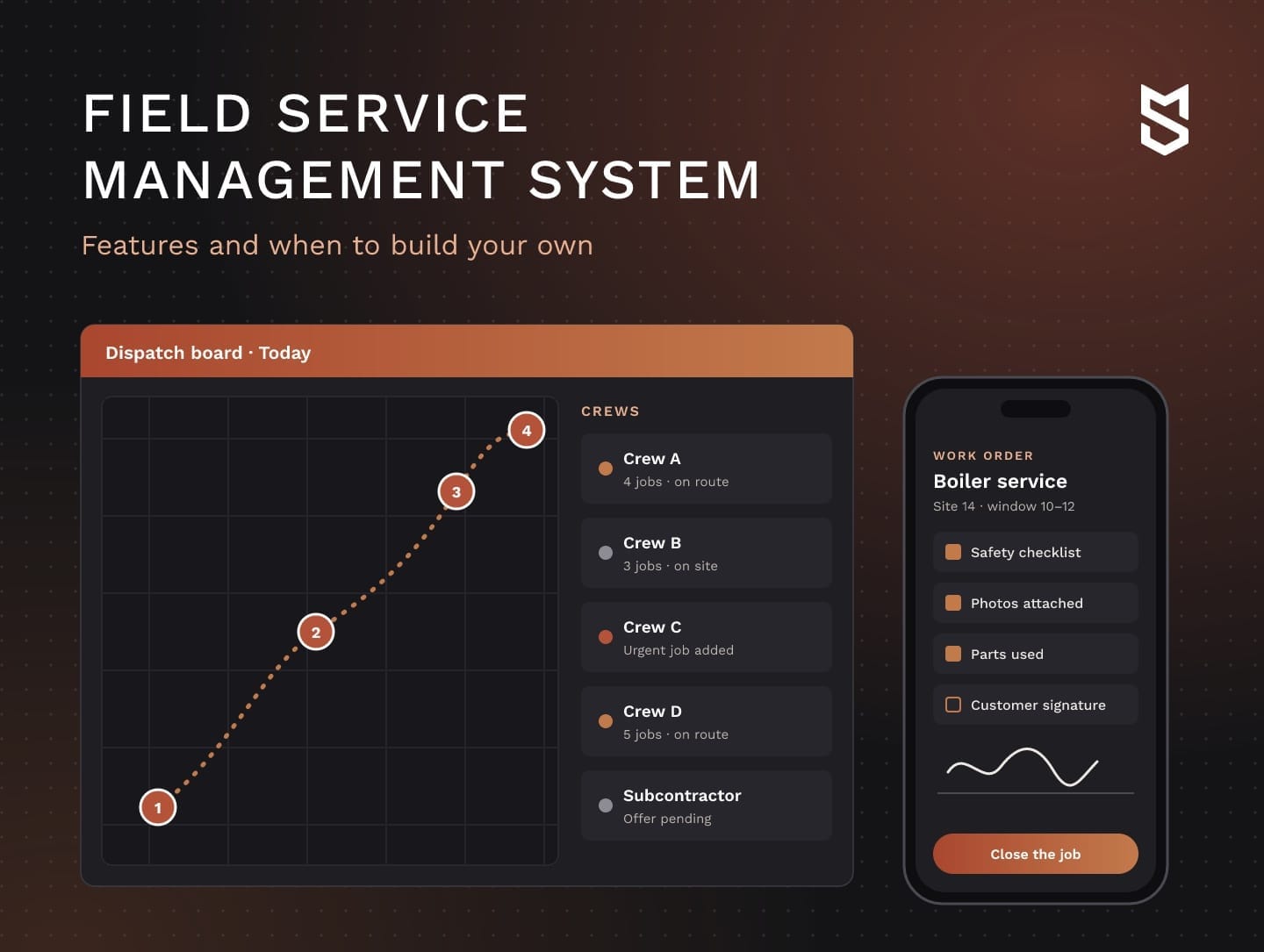
Your field work runs on spreadsheets, chat threads and subscriptions that don't talk to each other. Here's what an FSM should include, when building your own pays off and what drives the budget.
Highlights
- An FSM system connects requests, dispatch, crew apps, work orders and invoices in one record.
- Custom software pays off when a named limit costs more than building around it.
- Crew adoption and a measured pilot decide whether the system pays back its budget.
A field service management system links each request to its assignments, work orders and invoices, so the office and crews follow the same job history. When jobs are tracked across messengers, spreadsheets and separate tools, the choice is between one more tool, a configured platform and a system of your own.
We built the system OÖ Medienlogistik couriers use on the road, which replaced paper logs and manual mileage tracking. We help companies choose a path and build the first release, and this guide follows that order: core modules, the limits of packaged tools, build steps and budget.
If one part of your field work has already outgrown spreadsheets and subscriptions, that's the part worth reviewing with us first.
What is a field service management system?
A field service management system is software that runs the work your people do away from the office. It takes in service requests, schedules and dispatches crews, sends work orders to a mobile app, records proof of work and turns closed jobs into invoices. It sits between your CRM and your accounting.
Field service management solutions are used wherever work happens at the customer's site, from HVAC repairs to utility maintenance, equipment servicing and delivery routes. Each of these businesses has a chain of office-to-field handoffs where hours and margin can slip.
The benefits of field service management software come from closing those gaps. Dispatchers stop rebuilding the day by phone, crews see job details before they arrive and a closed work order can become an invoice without waiting for paperwork.
When we scope a project, we usually split responsibility between neighboring systems this way, though your setup may move some lines:
| System | Usually owns | Usually passes on |
|---|---|---|
| FSM | Requests, scheduling, dispatch, work orders, crew app, proof of work | Closed jobs and invoice lines to accounting, visit history to the CRM |
| CRM | Leads, deals, contracts, customer communication | New accounts, sites and contracts to the field system |
| ERP | Accounting, inventory, purchasing, payroll | Parts stock and prices to the field system |
| Mobile workforce management | Staff location, shifts, time tracking, simple tasks | Hours worked to payroll |
Maintaining equipment your company owns is a separate job for a CMMS platform, while field service software plans visits to customers.
From request to invoice: how field service work flows
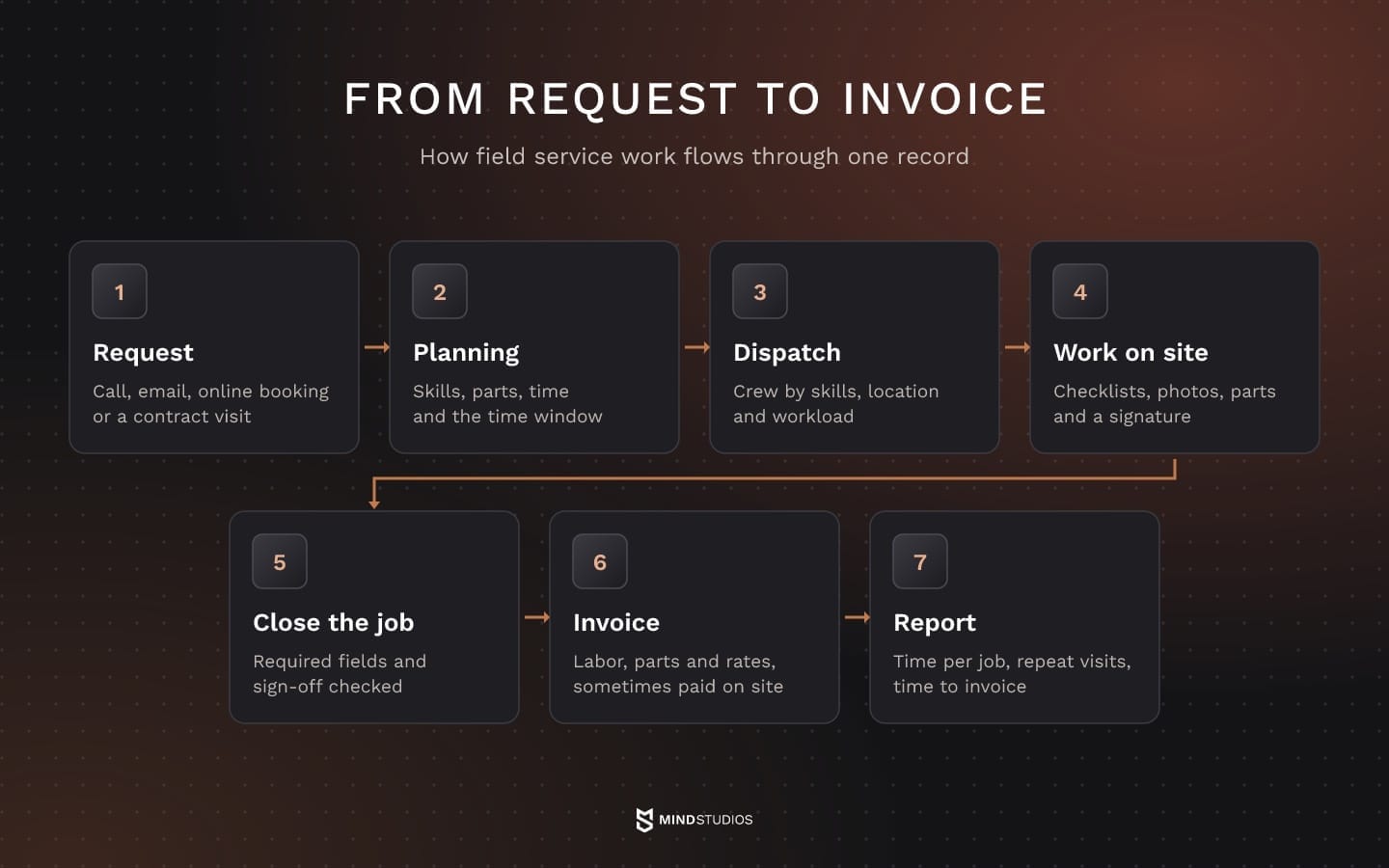
Field service work runs from a request to a report that shows whether the job made money, and each step passes information to the next. The system's job is to keep all of it in one record, so nothing gets retyped between the phone, the van and the invoice.
We use this field service management workflow to map how a request reaches billing. Your operation may add approval steps or repeat visits:
- Request. A customer calls, emails or books online, or a service contract triggers a planned visit. The request becomes a job with a site, an asset and a priority.
- Planning. The office sets the skills, parts and time the job needs and the customer's time window.
- Dispatch. The job goes to a technician or crew based on skills, location and workload, and it moves to someone else when the day changes.
- Work on site. The crew follows checklists, takes photos, records the parts it used and collects the customer's signature.
- Closing the work order. The system checks required fields, photos and sign-off before the job counts as done.
- Invoice and payment. Labor, parts and agreed rates become an invoice, which is sometimes paid on site.
- Report. Time per job, repeat visits and time to invoice show which job types earn money.
When these steps run in disconnected tools, every retyped detail can get lost before billing, which makes the time from closed job to invoice a useful first metric.
Field service management software features: the core modules
The core modules of an FSM are scheduling and dispatch, work orders, a mobile app for crews, customer records with invoicing, parts tracking and reporting. Few companies need every module at full depth on day one, so build or configure first the module where your business loses the most money today.
Here's what each module solves and when it belongs in the first release:
| Module | What it solves | Build first when |
|---|---|---|
| Scheduling and dispatch | Double bookings, idle crews, rescheduling by phone | Dispatchers spend hours a day rebuilding the plan |
| Work orders | Lost job details, unclear completion, disputes | Customers question what was done or billed |
| Mobile app for crews | Paper forms, retyped data, missing photos | Office staff reenter what crews wrote down |
| Customers and invoicing | Slow billing, mismatched records | Invoices lag far behind closed jobs |
| Parts and inventory | Return visits for missing parts, van stock gaps | Repeat visits trace back to parts |
| Reporting | Guesswork about margin per job type | Nobody can say which jobs earn money |
If one row in the last column describes your operation, that module is a candidate for the first release.
Field service scheduling and dispatch
Field service scheduling and dispatch brings assignment rules into conflict. Skills and certifications, crew makeup, the customer's time window and travel between jobs can each point to a different crew, so the system needs an agreed order of priority.
When an urgent job arrives at midday, the system can suggest who takes it and what else has to move, so the dispatcher approves one change. Subcontractors can receive jobs as offers to accept or decline, under the same checklist rules as employees.
Over a longer horizon, demand forecasting and capacity planning use past jobs and contracted visits to show whether next month needs more people.
Our route planning guide covers the related problem of sequencing stops within each crew's day.
Work orders, forms and proof of work
A work order is the agreement between the office and the crew for one visit. It moves through statuses such as scheduled, en route, in progress, on hold and completed, and its link to site and asset history shows the next technician what was done last time.
Closing rules hold the business logic. A job may need photos, a safety checklist, a list of parts used and the customer's signature before it closes.
Pricing rules belong in the same logic. Each invoice line takes its price from a pricebook, so the system has to know which one applies: the contract rate, the standard rate or an approved override. If customers pay on site, the payment stays linked to the work order so finance can reconcile it.
CRM and ERP integration
Field service management CRM integration decides whether sales and service work from the same customer, site and contract. New accounts and contracts usually flow out of the CRM, while visit history and open issues flow back.
Our custom CRM guide explains how customer records and sales workflows shape that scope.
Accounting or the ERP receives closed jobs, parts used and invoice lines. Sending them as an event when a job closes keeps finance current. If invoicing depends on that transfer, a nightly batch can delay billing until the next run.
Customer updates when a visit changes
Customers judge field service by whether the crew arrives in the promised window. The system confirms the window, warns the customer about delays or changes and gives them a way to reach the crew or reschedule. A follow-up visit is booked from the same work order, so the next crew knows what is left.
The mobile app your crews will actually use
A field service management app decides whether the whole system works, because people on a roof or at a loading dock enter most of the records the office relies on. If the app is slow, needs a signal or takes many taps to close a job, crews have every reason to go back to paper.
Crew adoption is the first launch metric to watch, and we set six requirements for mobile field service management software:
- Offline mode. It works offline and syncs when the connection returns, without losing a photo or a signature.
- Fast input. Common actions (start, pause, add a part, close) take two or three taps.
- Proof of work. Photos, forms and signatures attach to the work order on the spot.
- Daily route. The day's jobs appear in route order, with the address, access notes and asset history.
- Delay and parts flags. Crews can flag a delay or a missing part, and the app shows whether the flag has reached the dispatcher or is waiting to sync.
- Devices crews carry. It runs well on the phones and tablets crews already carry.
Mind Studios' insight: Before the office approves the design, give the app to two or three crew members for a real shift. Dispatchers tend to judge screens by completeness and crews by speed. We give the crew's feedback more weight, because they enter the records everyone else depends on.
Where off-the-shelf field service tools stop working
Off-the-shelf FSM handles a standard process well: book, dispatch, complete, invoice. It stops fitting when the business depends on rules, volumes or connections the product wasn't designed around, and the team starts carrying that gap in spreadsheets and side tools.
For a company with a typical process, a packaged tool is a sound first choice. These six signs suggest it no longer fits:
- Pay and billing rules. They live outside the tool: distance-based pay, piece rates or contract-specific pricing get calculated in a spreadsheet after the job.
- Several subscriptions. They cover one process: scheduling, forms, routing and invoicing sit in separate tools, and someone copies data between them.
- Seat costs. They outgrow the value: if the offer is priced per user, every new technician or subcontractor adds a paid seat, even for someone who needs one screen.
- Missing integrations. The one you need isn't in the catalog: a legacy ERP, a client portal or a regional payment provider needs workarounds.
- Workarounds as process. Custom fields, exported files and side chats become the process and carry information the tool can't model.
- Enterprise requirements. Large accounts bring their own: roles, audit trails or data handling that the tool supports only in part.
Property restoration is one trade with a long chain from first call to invoice, and our guide to restoration software walks through it.
When the gaps sit between steps, our article on workflow process automation explains which handoffs to automate first.
How a delivery company moved couriers off paper logs
OÖ Medienlogistik handles thousands of deliveries every week, and courier pay depends on distance. With mileage kept in paper logs and tracked by hand, there was no reliable way to confirm how far each courier had driven, and pay disputes followed.
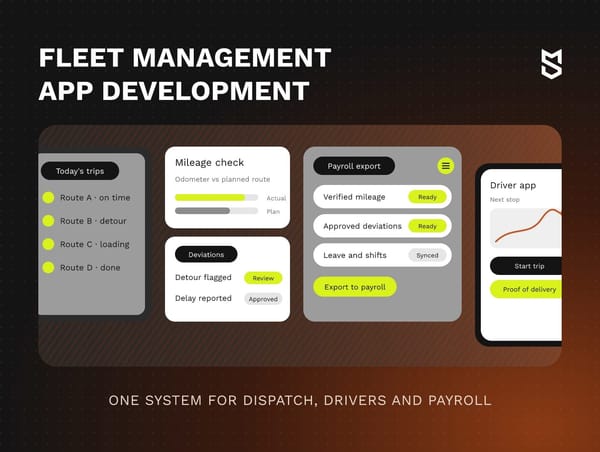
In the system we built, couriers see their assigned route and vehicle as soon as they log in. Mileage is checked against odometer readings, deviations are flagged for a manager to review and dispatching adjusts routes as the day changes.
In the first month after launch, 100% of couriers started working in the system.
The project is part of our logistics experience, and our fleet management guide covers the vehicle side of the same project.
Custom field service software or an off-the-shelf FSM: how to decide
Custom field service software pays off when a specific limit of your current setup costs more than building around it and cheaper fixes have already been tried. The limit can be a rule your tool can't model or a standard step that eats hours at your volume. Otherwise, configuring a platform is the better use of budget.
Three checks before choosing a path
- Name and price the limit. Find the rule or step that breaks, count the jobs it touches each month and price the workaround in hours, errors or delayed invoices. A rare rule that touches a handful of jobs may never earn back its build.
- Try cheaper fixes first. Configuration, a vendor add-on, a small layer on the tool's API or a change to the process itself.
- Compare over one horizon. Weigh what remains using the five-year model in the budget section.
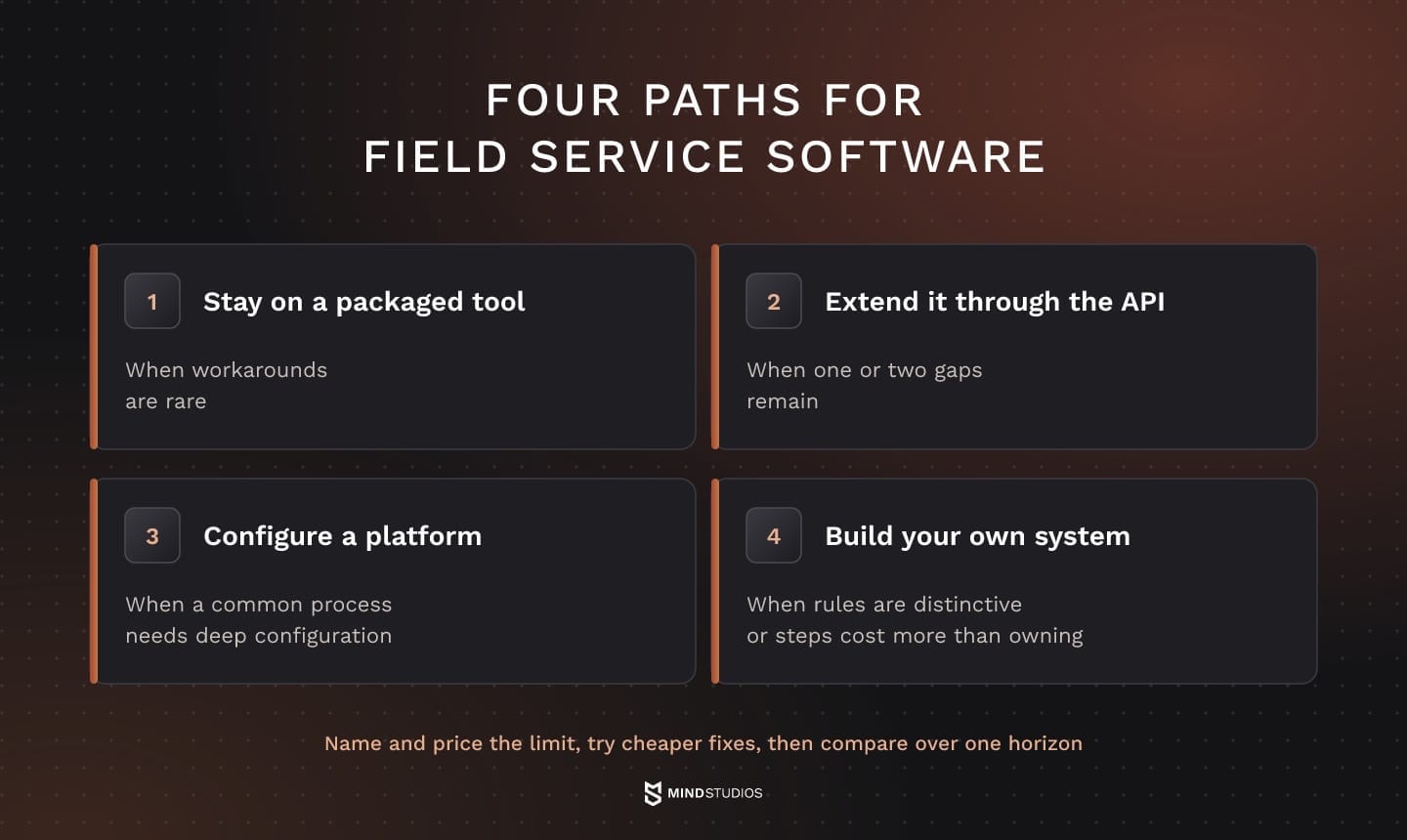
These checks help you choose among four paths:
- Stay on a packaged tool: when workarounds are rare.
- Extend it through the API: when one or two gaps remain, keep the tool and build the missing piece through its API.
- Configure a platform: when a common process needs deep configuration, use customizable field service software or an open source base, if your team will own configuration and upgrades.
- Build your own system: when your rules are distinctive, or when standard steps have a measured cost that exceeds ownership.
How the three paths compare
The table compares the three main paths in practice; extending a tool through its API is covered in the list above:
| Criterion | Off-the-shelf tool | Configured platform | Your own system |
|---|---|---|---|
| Time to first use | Short if your process matches the defaults | Depends on configuration depth and integrations | Depends on first-release scope, integrations and pilot |
| Fit with your rules | Standard rules | Rules supported by configuration and available extensions | Rules agreed in the project scope |
| Cost pattern | Subscription and add-ons on the vendor's terms | License or hosting plus configuration work | Upfront build, then hosting and support |
| Integrations | Vendor catalog and API | Platform API plus custom connectors | Built around your systems |
| Code and data | Vendor code, data export per contract | Your configuration on vendor code | Ownership and data access set in the contract |
| Best fit | Process close to the tool's defaults | Complex but common process | Distinctive rules or costly standard steps with a measured business case |
Before choosing a column, compare both rule fit and the measured cost of standard steps over the same horizon.
Deciding which rules to own
The same reasoning applies beyond classic field service. The Pampr service platform replaced phone orders, handwritten notes and spreadsheets. We built it with three roles (customers, the people doing the work and admins), and admins assign incoming orders in the CRM on their side.
Dmytro Dobrytskyi, CEO and Co-Founder at Mind Studios, explains how to tell a rule worth building from a workaround that only feels essential:
Every operation collects rules, and some of them are just how a spreadsheet grew over the years. Before a rule goes into scope, we ask three things: who uses it, which decision it changes and how we'd measure its effect. If nobody can answer the third question, that rule is a candidate for simplifying. The rules that survive are the ones worth owning.
How to build field service management software step by step
Building field service management software takes seven steps, from mapping the process to supporting the live system. Each step lowers the risk of the next: the rules shape the scope, the scope shapes the architecture and the pilot tests the business case before every crew depends on the system.
- Map the process and its rules. Discovery follows real jobs with dispatchers, crews and finance. It records every assignment, closing and pay rule, including the exceptions people handle from memory.
- Scope the first release. Choose the job types and modules that lose the most money today and schedule the rest for later releases.
- Design the architecture and integrations. Decide which system owns which record and how data moves to the CRM and accounting through REST APIs and webhooks.
- Build the crew app with offline mode. Field service app development starts from the crew's day. Local storage, sync and conflict rules come first, then screens tested with real users.
- Pilot with one crew or region. Record baseline metrics first: time spent on scheduling, time spent calculating crew pay, repeat visits and their causes, and time from closed job to invoice. Compare them after several weeks of real work.
- Migrate data and roll out. Clean customer, site and asset records, move open jobs and train each role on its own tasks.
- Support and extend. Fix what the first months reveal, then add modules in the order your metrics point to.
Scenarios to test before rollout
We use these acceptance scenarios for field systems, because each one checks a different part of the data model and the sync logic:
- An urgent job forces a reassignment while the crew is on its route.
- A crew closes a work order with no connection and syncs hours later.
- Two people edit the same job offline and the sync finds a conflict.
- A job is only partly done and needs a follow-up visit.
- A required part is missing on site.
- An invoice needs a correction after the work order has closed.
Together with the pilot metrics, these results decide whether the rollout goes ahead.
What to ask a development partner
These questions belong in your first conversations with the team that will build the system:
- What does discovery produce, and who from our side needs to take part?
- How do you test offline sync and conflict handling on real devices?
- How will you connect our CRM and accounting, and what happens when their APIs change?
- Which metrics decide whether the pilot moves to full rollout?
- Who owns the code, data and documentation from day one?
- What does support look like after launch, and how are new modules planned?
Our guide to outsourcing software development covers ownership and contract terms in detail.
If you're scoping a first release, we can review your job types and integrations together and define what the pilot must prove.
AI in field service: what to add and when
For a first pilot of AI in field service management, we'd link job history, crew skills and outcomes before testing assignment suggestions, so we can check whether each recommendation respects the constraints of the job. Dispatcher prompts and predictive maintenance from IoT sensor data are other candidates, each worth testing on its own.
Assignment suggestions for urgent jobs can be tested in two stages:
- Shadow mode. The model suggests a technician while the dispatcher assigns as usual. Check whether suggestions respect skills, availability and time windows, and record why the dispatcher chose someone else.
- Limited pilot. In one region or shift, dispatchers approve or reject each suggestion before it goes live. Compare the share of completed jobs that need a repeat visit with a similar region or period and the same job types, and measure decision time separately.
- When to continue. Widen the rollout if dispatchers decide faster and that share stays stable or falls over the same follow-up period. If not, fix the data and rules before tuning the model.
Mind Studios' recommendation: Log every overridden suggestion with a reason. Those overrides show which rules the model is missing, including ones nobody wrote down during discovery.
Where the budget of a custom field service management system goes
The budget depends on how much of your operation the system has to model. The main drivers are roles and rules, the modules in the first release, how much the crew app must do offline, CRM and accounting integrations and the data you migrate.
General cost factors, explained in our breakdown of software development costs, apply on top of the drivers specific to field work:
| Driver | Budget effect |
|---|---|
| Roles and rules | Each role and each assignment, closing or pay rule adds logic, screens and test scenarios |
| Modules in the first release | Scope grows with every module built to full depth at launch |
| Crew app and offline mode | Offline storage and conflict handling add design and testing work |
| Integrations | Each connected system adds data mapping, error handling and upkeep as its API changes |
| Data migration | Messy customer, site and asset records need cleanup before they move |
To estimate field service software cost for a packaged tool, use the terms of the offer you're evaluating. Check how user growth, module access, add-ons and minimum commitments affect the total.
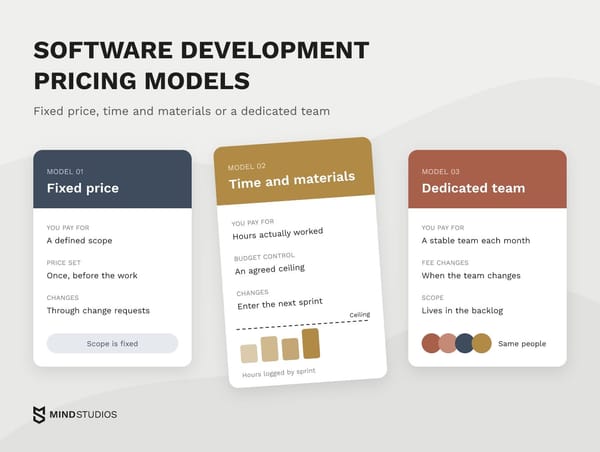
Custom builds are usually contracted in one of three models:
- Fixed-price fits a first release whose scope and integrations were agreed in discovery.
- Time & Materials fits work where pilot results are likely to change priorities.
- Dedicated team fits a system you plan to extend module by module over several years.
How to compare the options over five years
These are the inputs we use as working definitions for comparing the three paths, adapted for each client:
- Horizon and scope. Three to five years, with the same roles, users and processes for each path.
- One-time costs. Setup for a ready-made tool, configuration for a platform or discovery and development for your own system. Integrations, data migration and training apply to all three.
- Recurring costs. Subscriptions as headcount grows, plus add-ons and workaround tools. For a platform, fees and configuration upkeep; for your own system, hosting, support and further development.
- Exit costs. Exporting data and moving to another system if you change course.
- Measured effect. What the pilot showed against the step 5 baseline, converted to money and counted once.
Each metric turns into money differently. Saved hours count only when they're used, for example to absorb growth without a new hire or to cut overtime. An avoided repeat visit saves labor, travel and parts handling, and faster invoicing brings cash in sooner without changing total revenue.
From these inputs, the three measures work out as follows:
- TCO: the sum of items 2, 3 and 4 over the horizon.
- ROI: (effect - TCO) / TCO.
- Payback: the month when cumulative effect catches up with cumulative spending.
Plan for a ramp-up while crews adjust after launch. A path that doesn't pay back within the horizon still gives a useful answer: configure or keep what you have. The projected benefits depend on crews using the system, so adoption belongs in the financial assumptions.
Start with the job type that loses you the most margin
The spreadsheets, chat threads and subscriptions from the start of this guide are easier to untangle one job type at a time. The first candidate is the job type where scheduling, pay calculation or invoicing causes the largest measurable loss.
Comparing the available fixes for that job type over the same horizon gives you a basis for the next investment. When the comparison favors your own logic, a custom FSM is worth scoping, and our product development team can take it from discovery to post-launch support.
If you're deciding between configuring a platform and building your own, we can weigh both paths against the job type that costs you the most.
FAQ
What's the difference between CRM and FSM?
The CRM owns the commercial record: account, deals, contracts and communication. The field system owns the operational record: visit, work order, crew and proof of work. Before connecting them, decide which system is the source for each shared field:
- Customer name and billing details
- Service address and access notes
- Contract terms and service levels
- Service history
What software do field service companies use?
Most use one of four categories, chosen by team size and existing systems:
- Standalone field service platform: for teams without a CRM or ERP
- CRM or ERP field service module: if you already run that system
- Trade-specific tool: when one trade's forms and rules cover most jobs
- Your own system: when rules, volume and integrations outgrow the others
Is there free or open source field service management software?
Yes. A GitHub topic page lists open source projects, from scheduling tools to field service modules for ERP suites. With dozens of people in the field, check each option differently:
- Free vendor plans, where offered: user and job caps, support, API access and full history export
- Open source: the license, project activity and who will host, secure and upgrade it
How long does it take to build a custom FSM system?
The timeline depends on factors specific to field work: how many roles and assignment rules you have, how many offline scenarios crews need, which CRM and accounting integrations must work at launch and how clean your customer and asset data is. A phased launch with a pilot gets a working first release to crews sooner.
Can a custom FSM app work offline in areas without signal?
Yes, if the sync policy is designed up front. We'd start by keeping the day's jobs, forms, checklists and asset history on the device and logging each change locally with a timestamp.
When the signal returns, changes upload in order. Edits to different fields merge automatically, and conflicting edits to the same field go to the dispatcher.
Can we build only the missing part and keep our current FSM tool?
Often, yes. A custom layer can run on your current tool through its API and webhooks, provided you can export all data with history, the tool sends the events you need and its API limits hold at your job volume. The hybrid stops paying off when the layer has to copy most of the tool's logic.