
 ChatGPT
 Perplexity

Fleet management app development gives dispatchers, managers and drivers one shared system in place of spreadsheets and scattered subscriptions. This guide covers modules, integrations, compliance and when to build.
Highlights
- Build when manual work and overlapping tools cost more than owning a system.
- Scope the first release around one workflow that loses money today.
- Launch only after a driver pilot shows payouts and records reconcile.
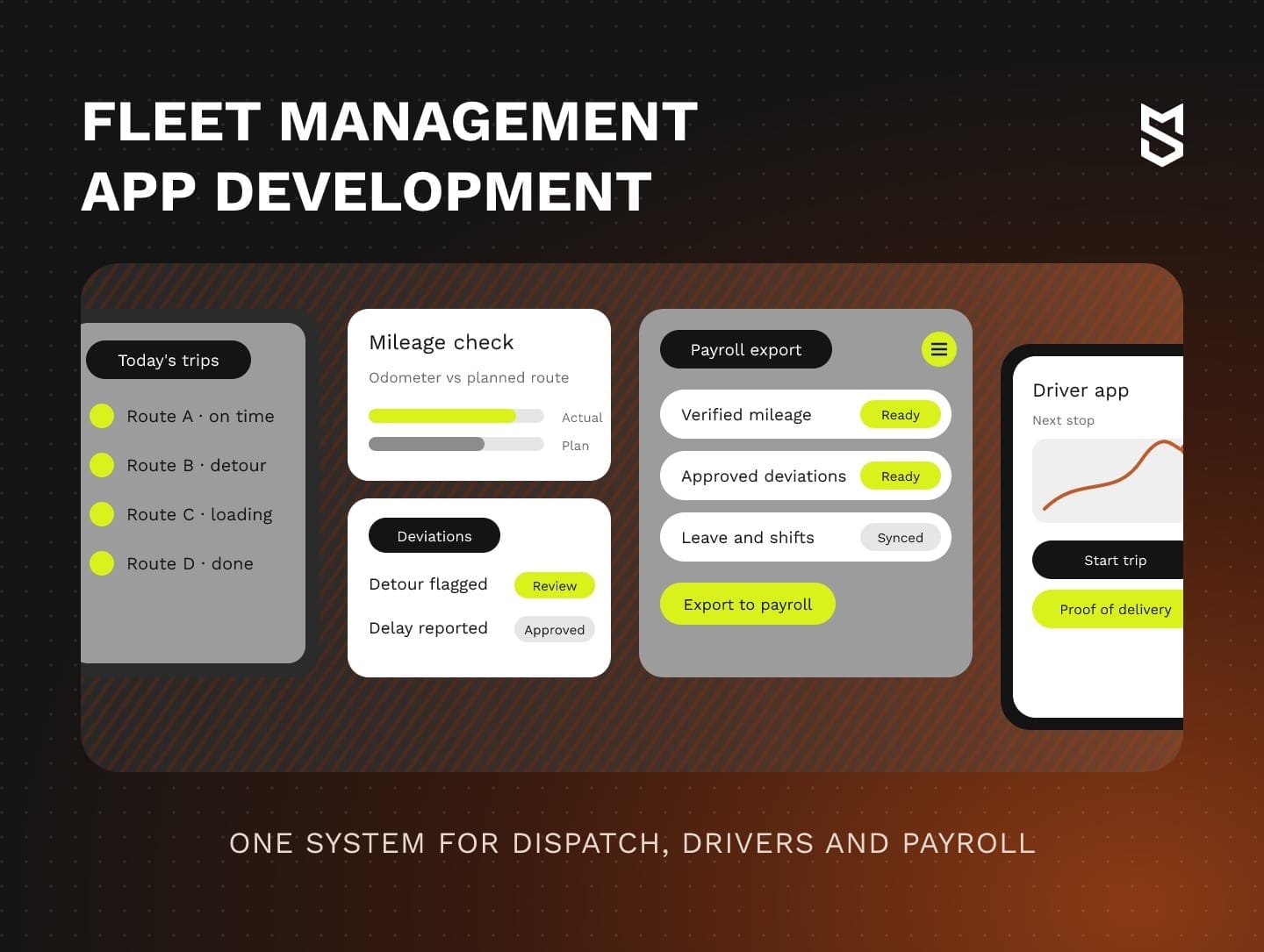
Fleet management app development means building one platform where dispatchers assign jobs, managers approve mileage and drivers log trips, inspections and deliveries from a phone. Fleet management software development makes sense when custom fleet management software costs less to own than the manual work and overlapping tools it replaces.
As a fleet grows, three problems tend to show up together: mileage disputes, payroll that waits on a spreadsheet and route changes passed along by phone. We built a platform that covers all three for OÖ Medienlogistik, an Austrian print media delivery service. In the first month after launch, 100% of its couriers adopted it.
If one of these workflows already costs you money every week, put a number on it before you commit to a full build.
What fleet management app development covers
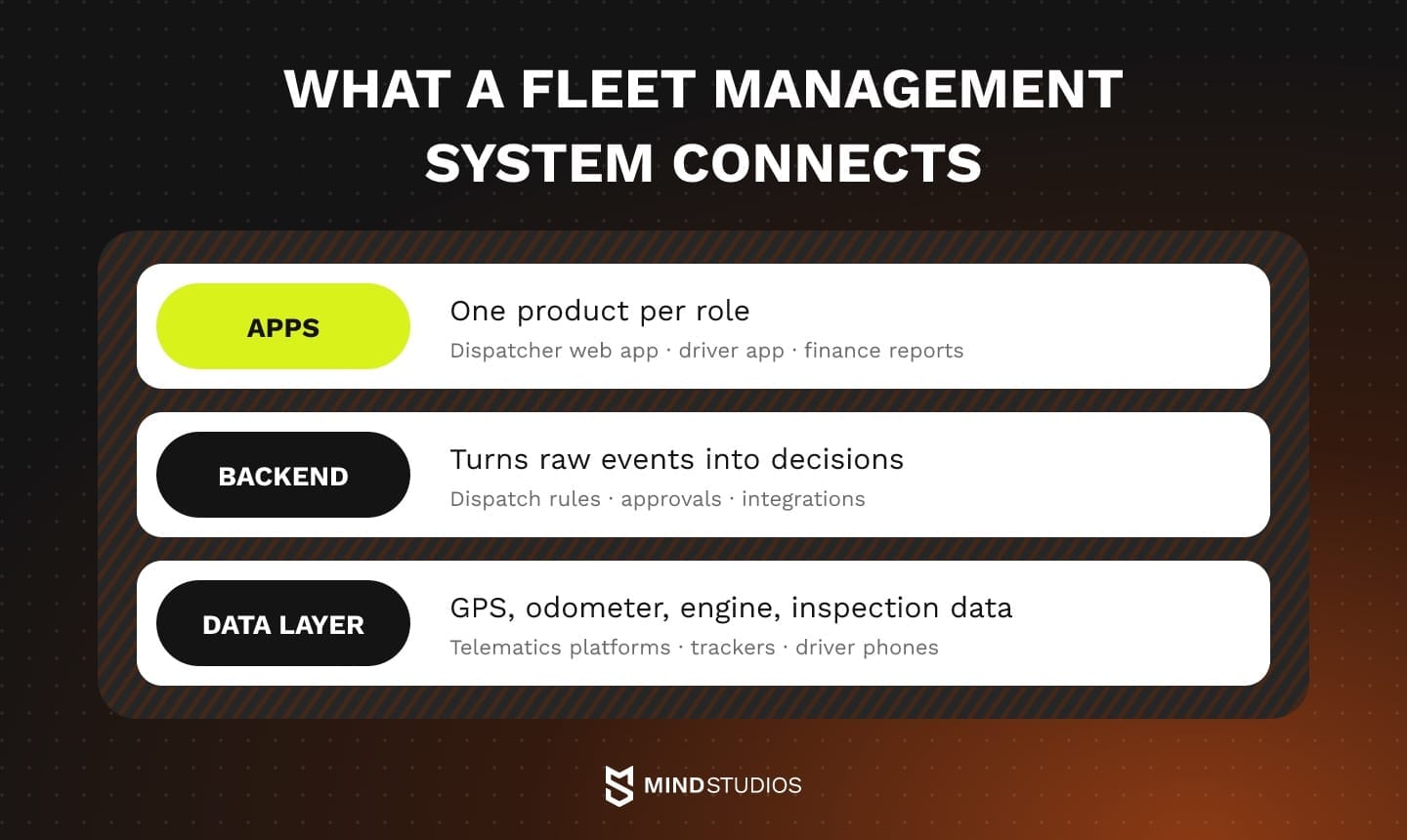
A fleet management system connects the apps used by dispatchers, managers and drivers with backend rules and a shared data layer. In fleet management application development, existing telematics hardware can supply the readings, which cuts collection work. The platform still needs its own data model that links those readings to vehicles, drivers, trips and approvals.
The apps: dispatch, management and the driver's phone
Each role sees a different product:
- Dispatchers need a live map, a job board and a fast way to reassign work when a van breaks down.
- Fleet managers track utilization, maintenance due dates and fuel spend per vehicle, so their screens are mostly reports and approval queues.
- Drivers rely on the app that carries the most risk, because they use it while they work, often in bad light and with a weak signal. It holds the job list, trip start and end, inspections, proof of delivery and messages from dispatch.
- Finance works from exports, so the system has to produce figures that accounting and payroll tools can import without anyone retyping them.
The backend and the data layer
The backend turns raw events into decisions: which driver can take a job, when a trip counts as a deviation and which mileage is approved for payout. It depends on the data layer, which collects GPS positions, odometer readings, engine data and inspection results.
These readings can come from dedicated trackers, OBD-II dongles, CAN bus data read through a telematics unit, ELDs in US trucks or the driver's smartphone. Several sources can coexist, as long as the data model records which one produced each reading.
Software fleets already use
Four classes of software cover most of what fleets already run:
- Telematics platforms that track vehicles and engine data through installed devices
- Maintenance software for service schedules, work orders and parts
- Dispatch and routing tools that assign jobs and plan stops
- ELD apps that record hours of service for US carriers required to keep them
A custom build either replaces some of these tools or sits on top of them. Choosing between the two is the next decision.
Custom fleet management software vs SaaS: when building pays off
Off-the-shelf SaaS is enough when your dispatch, maintenance and reporting workflows fit what the platform already does. A custom layer on your telematics platform fits when tracking works but dispatch or payroll does not. A custom fleet management solution pays off when gaps across several teams cost more than building and running your own system.
The table compares the three paths.
| Option | When it fits | Limits |
|---|---|---|
| SaaS fleet platform (Samsara, Geotab, Fleetio, Motive) | Standard workflows, common vehicle types, a need to go live quickly | Your rules adapt to the product; reports stop at the data the vendor exposes |
| Custom layer on a telematics platform | Tracking and hardware work; the gaps are in dispatch, payroll, driver workflows or reporting | Bound by the platform's API limits and data formats; two systems to keep in sync |
| Full custom system | Company-specific rules, fleet data driving payroll or ERP, overlapping subscriptions, data ownership | Higher upfront investment; needs a long-term owner for maintenance and updates |
Each path has different constraints.
When SaaS is the right call
If your vehicles run standard service routes and nobody re-enters fleet data into payroll, a mature SaaS platform may already cover tracking, maintenance and compliance. Fit depends on device compatibility, configuration and the rules that apply to you, and a build has to reach that baseline first.
Teams also tend to add their own tools around the platform. The pricing model matters as much as the price itself, so check how it scales with vehicles, users and add-ons.
Building on top of a telematics platform
The middle path keeps the hardware and tracking you already pay for and adds your own dispatch, payroll or driver workflows through the platform's API. In that case, the API sets the engineering constraints.
Samsara's rate limits allow 150 requests per second per token and 200 per organization. Some endpoints have stricter limits, and the API returns HTTP 429 once you exceed them. Geotab's GetFeed documentation describes incremental polling with a version token: saving each response's toVersion after the batch is processed lets the integration resume safely after an interruption.
With either platform, the sync service needs checkpoints, retries and backoff from the first release. Without them, a dropped connection can skip trips or count them twice, and the error then reaches payroll.
When a full custom system pays off
A full build earns its place when fleet data drives money in several teams at once and configuration or a single integration can't close the gaps. At Medienlogistik, the platform replaced multiple third-party SaaS subscriptions.
Owning the system also means trip history, rules and reports live in a database you control, which matters once investors, auditors or a new market ask for numbers a SaaS tool never stored.
A quick business case before you decide
Compare all three options on total cost of ownership over the same period, using these cost lines:
- Today's process: hours spent reconciling and re-entering data, corrected payouts, missed service dates, compliance findings
- Subscriptions you can cancel: tools the new system replaces, minus licenses you keep, such as telematics hardware plans
- Build and migration: discovery, the first release, integrations, moving historical data
- Running costs: hosting, map and API usage, maintenance, updates and support after launch
- Internal time: a product owner on your side, plus dispatcher and driver time for testing and training
Anton Baryshevskyi, Head of Business Development and Co-Founder at Mind Studios, explains the test he uses when founders ask whether they need a full platform or a connector:
Founders often arrive with a full platform in mind, so we first ask how many teams depend on the same fleet records. At Medienlogistik, dispatch, HR and finance all worked with the same couriers and routes, so one system made sense. If the gap sits in one team, a telematics-to-payroll sync is usually the smaller, safer project.
Fleet management software features to plan for
A first release should cover one workflow that costs money today, plus the modules it depends on: usually tracking, the driver app and the approvals behind payouts or billing. Other modules come once that workflow runs on clean data.
The table sorts common fleet management system features by role and release stage.
| Module | Purpose and users | Release stage |
|---|---|---|
| Vehicle tracking and geofences | Live positions, arrivals and departures at depots and customer sites; dispatchers and managers | When dispatch, mileage or billing depends on positions |
| Dispatch and job assignment | Assigns and reassigns jobs, shows driver availability; dispatchers | When dispatch is the costly workflow; otherwise integrate the current tool |
| Driver app | Job list, trip start and end, inspections, proof of delivery, messages; drivers | Whenever drivers submit data from the road |
| Mileage and trip verification | Compares planned and actual distance, flags deviations for approval; managers and finance | When pay or client billing depends on distance |
| Maintenance and work orders | Service schedules, defect follow-up, repair history; fleet managers and workshops | When service is tracked on paper; later if a maintenance tool works |
| Fuel tracking | Matches fuel card transactions to vehicles, drivers and trips; managers and finance | Second phase, once vehicle and trip data are reliable |
| Driver behavior and safety | Speeding, harsh braking and idling scores from telematics; safety leads | Later, once the telematics feed is stable |
| Reporting and role dashboards | Utilization, cost per vehicle, on-time delivery, payroll totals; every role | First release covers the chosen workflow only, then grows |
| HR scheduling and leave | Shift plans, leave requests, availability; HR and dispatch | When paper or chat requests disrupt planning |
| Route optimization | Sequences stops by time windows, traffic and capacity; dispatchers | Core when routing is the costly workflow; otherwise later |
| Predictive maintenance and video telematics | Fault prediction from engine history; in-cab and road cameras; fleet and safety leads | Later |
Mind Studios' insight: If a module produces figures that another team pays or invoices from, ship its approval step in the same release. A mileage or hours module without approvals just moves the spreadsheet to a new screen, because finance still has to check every line by hand.
Modules that usually wait
Advanced modules depend on data the core collects:
- Route optimization needs accurate stop times and service durations, which is why our route optimization guide treats it as a layer on top of dispatch.
- Predictive maintenance needs enough engine and repair history before its alerts are worth acting on.
- Video telematics brings cameras, storage costs and privacy questions, so it suits fleets with a clear safety case.
Reporting grows with every module you add, and our logistics dashboards guide explains how to choose KPIs for each role without overloading the screens.
Fleet software integrations: telematics, fuel cards, ERP and payroll
A custom fleet system connects to the tools that already run the business: telematics platforms and ELDs, fuel cards, maps, ERP and accounting, a TMS, and HR and payroll. An integration removes a manual handoff only when the receiving system accepts the data and someone clearly owns the exceptions.
The table lists the usual categories and the data each one exchanges with the fleet platform.
| Category | Typical systems | Data that flows |
|---|---|---|
| Telematics and ELD | Samsara, Geotab, Motive or the device vendor's own API | Positions, odometer, engine faults, hours of service |
| Fuel cards | Card issuer portals and transaction files | Transactions by card, vehicle and driver; volume; location |
| Maps and routing | Google Maps Platform, HERE | Distances, travel times, geocoded addresses |
| ERP and accounting | SAP, NetSuite, QuickBooks, Xero | Cost centers, vehicle costs, invoices |
| TMS and order systems | Your TMS, e-commerce or order platform | Orders, delivery windows, status updates |
| Maintenance and parts | Workshop systems, manufacturer portals | Work orders, parts, service history |
| HR and payroll | ADP, Gusto, DATEV or an accountant's software | Approved mileage, hours, allowances, leave |
Payroll requires additional controls.
Payroll: the integration most guides skip
At Medienlogistik, mileage approvals feed payroll data through CPA software, and verified figures go to the client's existing accounting system. A fleet software integration that carries payout data needs a clear correction trail. For a new build with similar dependencies, we recommend three controls:
- One owner per record. The fleet platform owns trips, deviations and approvals, while payroll owns rates, taxes and payslips. Neither system edits the other's data.
- Versioned exports. Each export carries a batch ID and the approver of every deviation, so a disputed payout traces back to one decision.
- Corrections as new entries. If a trip changes after export, the platform creates an adjustment for the next pay run and leaves the exported batch untouched.
Architecture and tech stack of a fleet management system
For most first releases, a modular monolith is enough: a background job queue, a relational database with geospatial support and a driver app that works offline. The telematics data model is the part to get right from day one, because positions and readings are time series tied to vehicles, drivers and trips.
The table shows a typical stack for a custom fleet management solution, layer by layer.
| Layer | Technologies | Why it matters |
|---|---|---|
| Devices | GPS trackers, OBD-II dongles, CAN bus via telematics units, ELDs, driver smartphones | Sources of position, odometer and engine data |
| Ingestion | MQTT, HTTPS webhooks, vendor feeds such as Geotab's | Receives events at device frequency without slowing the app |
| Queues and jobs | Sidekiq with Redis; Kafka at higher volumes | Processes trips, alerts and exports in the background |
| Storage | PostgreSQL with PostGIS; TimescaleDB for time series | Geofence queries and fast history by vehicle and period |
| Backend | Ruby on Rails, Node.js, Python | Business rules, roles, integrations |
| Web app | Vue.js, React | Dispatch board, maps, approvals, reports |
| Driver app | Swift and Kotlin, or a cross-platform framework, with local storage | Works offline and syncs when the signal returns |
| Maps and routing | Google Maps Platform Routes API | Distances, travel times, route matrices |
Medienlogistik runs on a similar structure: Vue.js, Element Plus, Vite and PostCSS on the frontend, and Ruby on Rails, Sidekiq, PostgreSQL and Redis on the backend. In a stack like this, splitting the monolith into services makes sense only when one part (usually ingestion) has to scale on its own.
Measured, calculated and approved mileage
Mileage is a good test of the data model, because one trip can carry three distances. The odometer or telematics reading is measured, the routing API's figure is calculated, and a person approves the payout figure. Store all three, each with its source and timestamp, and the system can explain any payout later.
Corrections follow the same rule. When a manager changes a figure, the system writes a new version with the reason and the approver and keeps the original, so audits and driver disputes can see both.
Offline mode and duplicate data
Drivers lose signal in basements, tunnels and on rural roads, so the driver app stores trips, inspections and proofs of delivery on the device and syncs them later. A phone may resend an event after an interrupted upload. Every event therefore needs a unique ID and a device timestamp, so the backend can recognize records it has already processed.
Telematics devices can also send buffered data out of order after a coverage gap. Processing late events by their recorded event time helps reconstruct the trip sequence, while a separate rule decides how to recalculate affected mileage and review alerts.
Mind Studios' approach: Before buying trackers, check whether the data you already collect, combined with a routing API, can answer your question. Medienlogistik verifies mileage by comparing odometer-based trip logs with route distances from the Google Maps Distance API. For new builds, Google lists that API as a legacy product and points to Compute Route Matrix in its Routes API.
Compliance requirements in the US, EU and MENA
Compliance shapes the data model and the driver app, so plan for it early in fleet management software development, before design starts. In the US, the main rules cover hours of service records and vehicle inspection reports. In the EU, driving time, tachographs and GDPR apply. In Saudi Arabia, the Personal Data Protection Law applies to the driver data the app collects.
The table separates legal requirements from our design recommendations. Exemptions and national variations exist, so your legal team should work from the linked official texts.
Region and rule |
System impact |
Applies to |
|---|---|---|
US: ELD rule, 49 CFR 395.8 |
Rule: a registered ELD. Our recommendation: import its records and show remaining hours in dispatch |
Motor carriers whose drivers must keep records of duty status, with exceptions below |
US: inspection reports, 49 CFR 396.11 |
Required only for found or reported defects; electronic reports allowed; driver's signature and repair certification |
Motor carriers operating commercial motor vehicles, with exceptions below |
EU: driving time, Regulation (EC) 561/2006 |
Rule: driving, break and rest limits. Our recommendation: dispatch checks them before assigning work |
Drivers of road haulage and passenger transport vehicles in scope; national derogations under Article 13 |
EU: tachographs, Regulation (EU) 165/2014 |
Import vehicle unit and driver card data and archive it for inspections |
Goods vehicles over 3.5 tonnes, plus the cases below |
EU: GDPR |
A lawful basis for tracking, purpose limitation and storage limits; national employment-specific rules may apply |
Controllers or processors with an EU establishment; non-EU companies monitoring drivers' behavior in the EU |
Saudi Arabia: the Saudi PDPL, Personal Data Protection Law |
Treat driver location and identity as personal data; check Article 29 transfers before hosting abroad |
Processing in the Kingdom or of residents' data from abroad (Article 2) |
US exemptions and carrier duties
In the US, drivers who keep records of duty status on no more than 8 days in any 30-day period, certain driveaway-towaway operations and vehicles older than model year 2000 may use methods other than an ELD.
Inspection reports have their own scope: the rule excludes carriers running a single vehicle, driveaway-towaway operations and private nonbusiness passenger carriers. Where it applies, the app records defects in listed parts such as brakes, steering, tires and lights.
For US operations using ELDs, the carrier remains responsible for account management, calibration and six months of backup records on a separate device. The integration plan should assign an owner to each of these tasks, so nothing falls between the fleet platform and the ELD vendor.
EU limits, tachograph dates and driver tracking
In the EU, driving time rules set 9 hours of daily driving (10 hours twice a week), 56 a week, 90 over two weeks and a 45-minute break after 4.5 hours, plus daily and weekly rest.
EU-registered heavy-duty vehicles operating in other EU member states have been required to use smart tachograph version 2 since August 19, 2025. From July 1, 2026, tachograph rules also cover vans of 2.5–3.5 tonnes in international hire-or-reward transport, and integration doesn't replace a required tachograph upgrade.
For EU operations, the tracking design should follow the chosen lawful basis and applicable employment rules. If you rely on legitimate interests, limiting collection to working time, showing drivers what the app records and setting retention per market help keep the processing proportionate, although national law may require more.
Fleet management software development process, step by step
Fleet management system development follows seven steps: map current workflows, define requirements from real delivery conditions, prioritize modules, design for the driver, build the first release, pilot it with real drivers, then roll out with training and support. Each step needs a clear exit criterion, and the pilot needs the strictest one.
The seven steps below are the plan we recommend. At Medienlogistik, the published project steps were three: mapping the company's workflows, defining functional requirements based on real delivery conditions and developing an integrated system covering fleet tracking, dispatching, HR and financial reporting.
- Map the workflows. Follow one vehicle and one driver through a full day, from dispatch to payroll, and note every spreadsheet, phone call and re-entry. Done when each handoff has an owner and an estimate of the weekly hours it takes.
- Define requirements from real conditions. Write rules as situations the system must handle: a detour approved after the trip ends, a road closure mid-route, a driver calling in sick at 5 a.m. Done when every rule has a test case taken from a real week.
- Prioritize modules. Rank modules by the money or hours they touch and by how many others depend on them. Done when the first release covers one workflow and only the modules it needs.
- Design for the driver. Prototype the driver app and test it with drivers in a vehicle and at the depot. Done when drivers can complete a typical trip in the prototype without help.
- Build the first release. Build the core modules and their integrations as one system, and log every manual workaround users still need. Done when the chosen workflow runs end to end on real data in a test environment.
- Pilot with real drivers. Move one depot or team onto the new system while the old process runs in parallel. Move to launch when payouts in both systems match within a tolerance finance has agreed to for at least one full pay cycle, every deviation has an approver, offline trips sync without duplicates and a named person owns support.
- Roll out, train and support. Train dispatchers and managers first, then drivers, in short sessions at the start of a shift. Plan the next releases around the workaround log from step 5.
Because the platform will hold driver identity and location data, the security practices of the team that builds it matter as much as the plan.
Mind Studios is ISO 27001 and ISO 9001 certified, as our development services page lists.
If you already know which workflow should go first, the next questions are which modules it needs and how to pilot it with your drivers.
How we built a fleet and payroll platform for OÖ Medienlogistik
OÖ Medienlogistik is a regional delivery service in Austria. It distributes print media across several delivery zones and handles thousands of deliveries every week. Its core problem was precise: there was no reliable way to calculate the distance couriers actually traveled from the terminal to each delivery point.
That gap caused several others:
- Payment disputes over mileage
- Manual calculations and delayed payroll
- Inefficient route changes and limited visibility into performance
- Paper leave requests that disrupted scheduling
We built one platform around odometer-based mileage verification. Couriers log in and review their routes, and the system calculates expected mileage when a trip starts. It flags detours in real time and calculates the payout when the trip ends, including approved deviations. Managers approve the data with one click and export it to payroll.
Around that core sit dynamic dispatching (couriers can report delays such as traffic or roadwork), digital leave requests and scheduling, and a financial dashboard. Couriers, area managers and admins each get their own dashboard. These are the published results:
- Adoption: 100% of couriers moved to the system in the first month after launch
- Payroll: processing time dropped significantly
- Payouts: reflect the distances actually traveled
- Daily operations: faster through automated dispatching and deviation approvals
- Fuel: optimized route planning cut unnecessary mileage and fuel costs
For founders weighing custom fleet management software, these results show which operational changes to put a cost on in their own business case.
What drives the budget of a fleet build
The budget for fleet management software development depends on scope more than on any single feature. Integration depth affects the estimate because each connection to payroll, ERP or telematics needs data mapping, error handling and testing against real records. Operating needs such as offline sync and compliance records add to it too.
Six factors set the estimate:
- Modules: the number in the first release
- Integrations: depth of connections to payroll, ERP and telematics APIs
- Hardware: reusing existing devices or installing new ones
- Compliance: regions and the records each one requires
- Platforms: web only, or web plus iOS and Android driver apps
- After launch: support and iterations
Our fleet cost breakdown shows how each factor plays out in an estimate.
Mistakes that stall fleet software projects
Fleet projects tend to stall in five places: drivers avoid the app, hardware behaves differently from the spec, the data model can't handle telematics volume, the team rebuilds what an API already provides, or the launch has no adoption plan. Each one is cheaper to catch early in fleet management software development than after rollout.
Each mistake below comes with its warning sign and fix:
- Forgetting the driver. Sign: drivers keep a paper log or a chat thread next to the app. Fix: test inside vehicles and treat taps per trip as a design metric.
- Underestimating hardware integration. Sign: the estimate names device models, but nobody has seen a real data export. Fix: get sample devices and exports during discovery.
- Storing telematics as ordinary records. Sign: history reports slow down as data piles up, or a trip's mileage changes when a report is rerun. Fix: model time series with geospatial indexes and process events by event time.
- Rebuilding maps and geocoding. Sign: backlog items for address matching and distance math. Fix: use a routing API and spend the budget on your own rules.
- Launching without an adoption plan. Sign: the go-live date is set before the pilot criteria exist. Fix: agree on the exit criteria from step 6 before the build starts.
Start with the workflow that costs you the most
Think back to the three problems from the start: mileage disputes, payroll waiting on spreadsheets and dispatch by phone. One of them costs your company the most right now. That workflow, together with the modules it depends on, is the right scope for the first stage of fleet management system development and for a pilot with real drivers.
We've built logistics software for delivery operations, from dispatch to payroll.
If you want an outside view on which workflow to tackle first, the deciding question is whether a custom layer or a full system fits your fleet.
FAQ
What is fleet management app development?
It is the design and build of a fleet platform your company owns. The scope usually covers your rules and data: the web app, the driver app, the backend and the integrations. Devices, maps, payroll calculation and tax logic normally stay with specialist vendors and connect through APIs.
What software is commonly used in fleet management?
Which tools a fleet runs usually depends on the department that bought them:
- Operations: dispatch and routing tools
- Fleet team: telematics platforms and maintenance software
- Compliance: ELD apps in the US, tachograph data tools in the EU
- Finance: fuel card portals, ERP or accounting, payroll
How does a fleet management system work?
Take a driver who detours around a road closure. The device or phone reports positions, the backend links them to the trip and compares actual with expected distance, and the gap becomes a flagged deviation. The manager's decision determines the approved mileage sent to payroll, and the record identifies who approved it.
Do fleet management systems need a mobile app for drivers?
A driver app is useful when inspections, delivery evidence or job updates need to enter the fleet workflow from the road. Without one, those records arrive as paper or chat messages, and someone has to retype them. Fleets that only track vehicles can skip it, but then the driver's side of a dispute lives outside the system.
What are some good apps for fleet management?
Samsara, Geotab, Fleetio and Motive are examples of SaaS fleet platforms. In a demo, ask the vendor to run one of your real weeks and check that:
- A detoured trip reaches an approved payout without a spreadsheet
- Your dispatch rules work through configuration alone
- Exports load into your payroll or ERP as they are
If one check fails, put a cost on the gap before comparing custom options.
What is the difference between fleet management software and telematics?
Telematics is the data source: devices that capture location, speed, odometer and engine data. Fleet management software is what the business does with that data. In a custom system, trips, approvals and history stay in your database, so switching telematics vendors means replacing one integration, as long as the data model avoids vendor-specific formats.
Can custom fleet software work with the telematics devices we already have?
Usually, yes. Telematics platforms commonly expose APIs or data feeds, and many devices send data over protocols such as MQTT or HTTPS. Three answers from discovery decide the design: what each device reports, how often it reports and which limits the vendor's API sets.
What compliance rules should fleet software support in the US and EU?
Work out the requirements in this order, because each answer narrows the next:
- Scope: which vehicles, operations and countries each rule covers; for operations subject to the ELD mandate, hours of service come from a registered ELD
- Required records: defect-based inspection reports, duty status records, driver card and vehicle unit data
- Retention and access: how long each record is kept (three months for US inspection reports with repair certifications) and who retrieves it during a check
- Driver data: the GDPR lawful basis and retention period for each tracking purpose