
 ChatGPT
 Perplexity

What separates restoration companies that grow from those that stall is rarely the field work. It's what happens to data between the first call and the final invoice, and whether property restoration management software holds it together.
Highlights:
- The US damage restoration market reached $7.2 billion in 2025, growing at 4.0% CAGR.
- 65% of restoration jobs start with an insurance call: document well, or lose the referral.
- Water damage accounts for roughly 50% of total restoration industry revenue.
It's 2:47 AM. A pipe has burst in a 40-unit apartment building. The property manager calls the first restoration company on her list. Your phone rings. You answer. That call is yours to win, and then immediately yours to lose.
What happens in the next 90 seconds determines whether you get the project. But what happens in the next 90 hours — documentation, equipment tracking, insurance estimates, stakeholder updates — determines whether it's actually profitable.
This is the handoff problem. Revenue dies at every workflow transition: emergency call to dispatch, assessment to estimate, equipment deployment to billing, and completion to invoice.
Property restoration software development has advanced significantly, but most generic field service tools were not built for these demands, and this article breaks down exactly where they fail.
Mind Studios builds restoration-specific software, from emergency dispatch through final insurance claim, scoped to the workflow gaps that cost you the most.
We can audit your workflow gaps and help you map a path forward. Contact us for a free consultation.
Empower your project
with concrete tech
expertise
Contact Mind Studios

Why restoration workflows break field service software
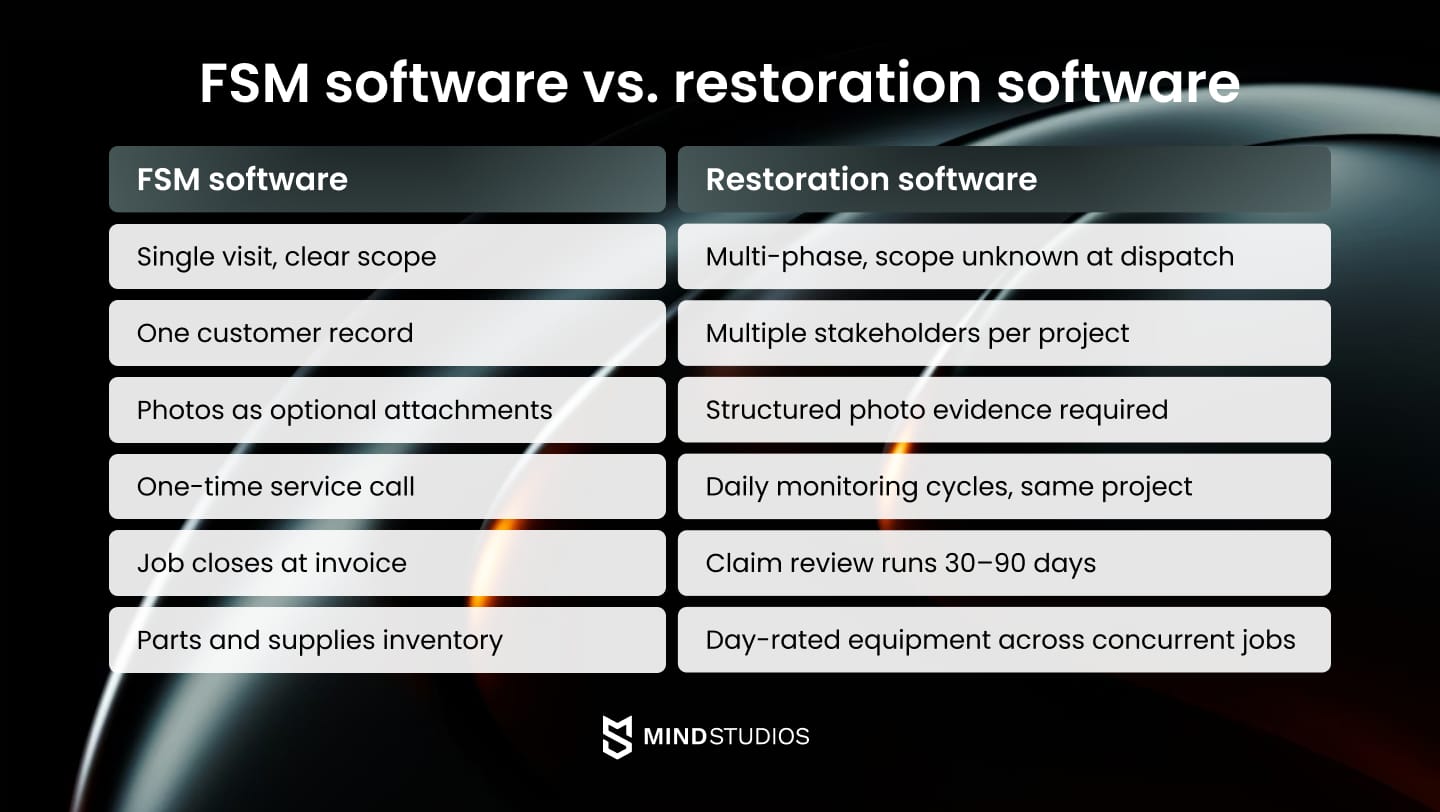
Field service software assumes a job has a clear beginning and end: a service call, a resolution, an invoice. Restoration reality is the opposite: unclear scope at intake, continuous monitoring across weeks, documentation requirements tied to insurance standards, and multi-party approval chains that don't follow any standard timeline. The software gap goes deeper than cosmetic — the entire workflow logic is wrong.
— Dmytro Dobrytskyi, CEO of Mind Studios
Restoration work shares almost none of the characteristics for which Field Service Management (FSM) software was designed.
Emergency scope that expands mid-project
A water damage call begins with "my basement is wet" and ends, potentially, with three weeks of drying, mold assessment, structural repair, and content restoration. No technician walking into that basement can write an accurate estimate before starting.
Generic FSM tools that require scope confirmation before dispatch simply don't fit this reality.
Insurance documentation requirements that are non-negotiable
IICRC S500 standards for water damage require specific documentation: moisture readings at defined intervals, psychrometric data, equipment placement records, and photo evidence at every stage. Missing a single element can trigger a claim reduction or denial.
Most FSM tools treat photos as optional attachments, not structured evidence.
Equipment deployed across overlapping projects
A mid-sized restoration company running eight active water jobs might have 30 dehumidifiers, 40 air movers, and 15 air scrubbers in the field at once. When does a dehumidifier get picked up from Job A and moved to Job B? Which jobs have what equipment?
Generic inventory tools can't track which equipment is on which job, or when it moved. They were built for parts and supplies, not day-rated equipment across concurrent multi-week projects.
Multi-stakeholder approval chains that vary by project type
A residential water claim involves a homeowner and one adjuster. A commercial large-loss project — a flooded hotel, a fire-damaged office building — involves a property manager, a facilities director, a commercial insurance adjuster, a general contractor, and possibly a third-party administrator.
FSM tools built around single customer records don't support this complexity.
Daily monitoring cycles that connect to the same project
Moisture checks happen every day or every other day on an active water job. Each visit generates new readings that need to be linked to the original project record, update the drying log, and potentially trigger equipment changes.
FSM tools designed around one-time service calls treat each visit as a new job, fragmenting data that should be continuous.
60-to-90-day insurance claim deadlines
Documentation submitted late or scattered across email threads and technician phones triggers delays and reductions. Companies living with disconnected documentation lose a measurable percentage of every commercial claim.
FSM tools offer no visibility into claim timelines, so disconnected documentation just ages until it costs you.
Each of these mismatches creates a handoff point. Each handoff point creates a place where data gets lost, re-entered manually, or simply skipped. And each skip costs money.
Learn more about why legacy system modernization matters when generic tools no longer fit your operational reality.
6 key workflow gaps that quietly drain restoration revenue
Revenue leakage in restoration is rarely visible as a single line item. It accumulates across six transition points that most companies have never quantified.
Emergency call → Dispatch
| The gap | Dispatchers manually check availability, location, and skill sets before assigning a crew. |
| What breaks | Manual lookups take 8–15 minutes, long enough for the caller to dial the next company. |
| Lost revenue | Entire projects. Property owners are 3× more likely to hire the first company on-site. |
Assessment → Estimate
| The gap | Field assessment completes, but the Xactimate estimate gets built in the office 3–7 days later. |
| What breaks | Scoping decisions made on-site aren't precise enough to estimate accurately without revision. |
| Lost revenue | 15–25% lower conversion. Customers find alternatives; adjusters move to other files. |
Equipment deployment → Billing
| The gap | Equipment is tracked on paper with no automated link to the project record or billing system. |
| What breaks | Pickup dates go unlogged. Billing runs on estimates, not actuals. |
| Lost revenue | 20–30% of equipment days unbilled. On a $2,000 rental job, that's $400–$600 per project. |
Daily monitoring → Documentation
| The gap | Moisture readings taken on paper or mobile devices never automatically reach the drying log. |
| What breaks | Incomplete readings, photos stuck on technician phones, drying logs rebuilt from memory at claim time. |
| Lost revenue | Incomplete IICRC documentation triggers 10–15% claim reductions — $2,000–$3,000 on a $20,000 job. |
Completion → Invoice submission
| The gap | Documentation takes 7–14 days to compile after project completion. |
| What breaks | Payment terms start from the invoice date. A 10-day delay across 20 monthly projects pushes $200,000+ in receivables back 30+ days. |
Insurance claim → Payment
| The gap | Carrier review runs 30–90 days. Scattered documentation makes it longer |
| What breaks | Missing photos, unlinked readings, and billing mismatches trigger supplement requests — each adding 2–4 weeks. |
| Lost revenue | Clean documentation gets paid. Fragmented documentation gets disputed. |
None of these gaps is caused by bad field work. Each one is a data problem: information that exists somewhere but never reaches where it needs to be.
A technician ran three moisture checks. If the readings never reached the drying log, the insurance claim doesn't know that. A crew picked up equipment on day 11. If nothing is recorded on day 11, billing charges for day 8.
The work happens. The revenue doesn't follow because the handoffs between systems were never built to carry it.
Not sure which gaps apply to your operation? Mind Studios can map your current workflow and identify where revenue is leaking. Book a free consultation today.
How software determines who wins emergency projects
Restoration marketing focuses on speed: "On-site in 60 minutes." But speed-to-site means nothing if a competitor answers faster and dispatches sooner.
The actual competitive variable is speed-to-committed. The moment a caller hears, "we have a crew available, and they can be there in 45 minutes," the decision is made. That moment happens before any technician gets in a van.
First-answer conversion determines market share
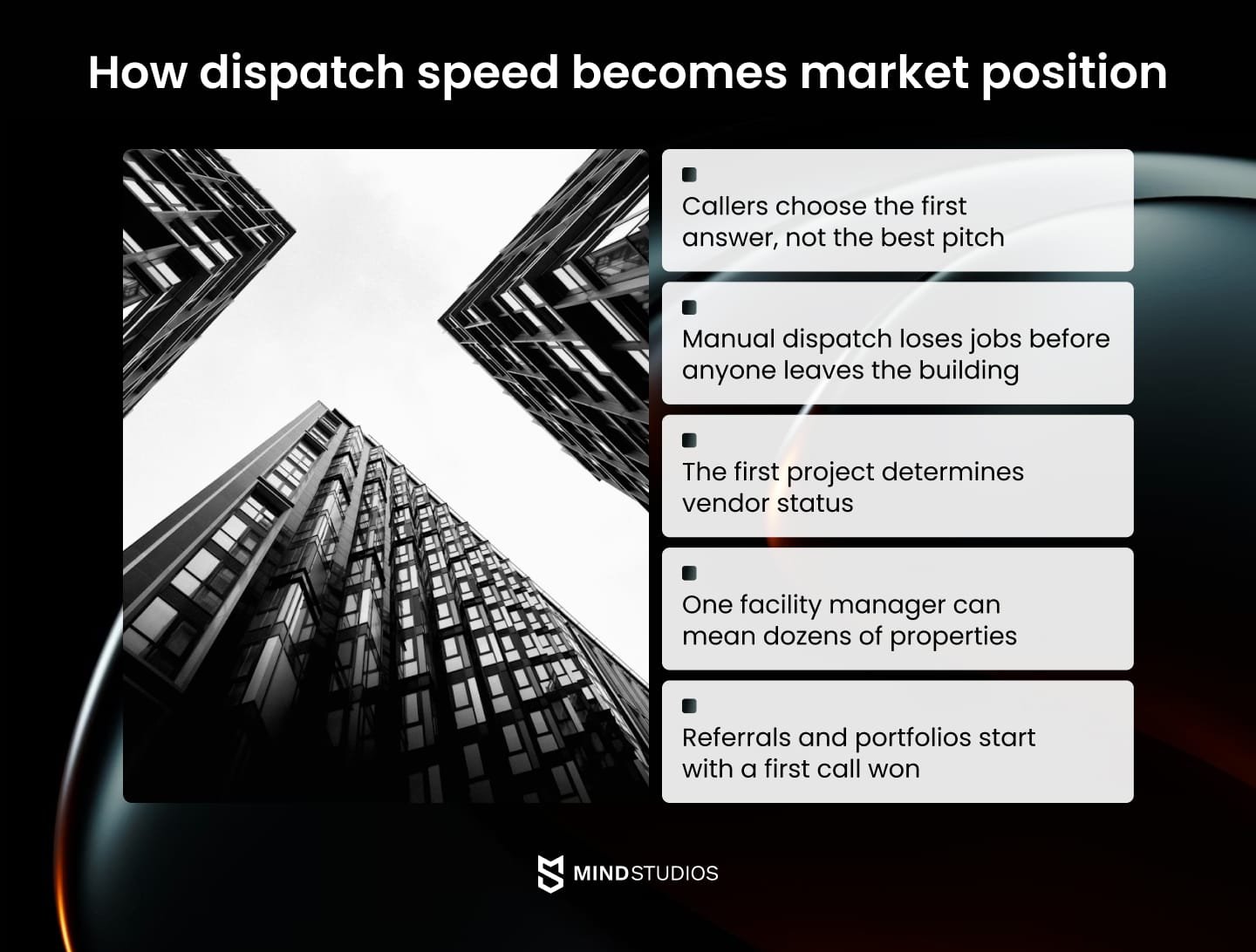
In water damage, callers aren't comparing options but choosing the first viable answer. Mold growth begins within 24–72 hours, secondary damage accelerates, and every minute the property sits wet adds to the loss. The caller who reached you is not waiting to see who else picks up.
Dispatch speed is a software problem
Manual dispatch (checking a whiteboard for crew availability, calling to confirm location, looking up certifications) takes 12–15 minutes at best. Automated systems that show real-time crew location, skill set, and availability can cut that to 60–90 seconds. The gap doesn't feel significant until you calculate how often a competitor answers second and dispatches first.
On-site execution converts calls into relationships
The first project with a property manager, facility director, or HOA manager is an audition. Technicians who capture moisture readings and photos in guided workflows and trigger automatic stakeholder updates look professional in ways that matter to commercial clients. A facility manager overseeing a flooded floor at a 300-room hotel is deciding whether to add this company to a preferred vendor list. That judgment happens during the first project.
Commercial accounts multiply the advantage
One relationship with a regional property management company might represent 20–50 properties. One hotel group might mean 12 locations. The value of winning the first commercial project isn't the project revenue — it's the portfolio access it creates.
First-call advantage compounds over time
Insurance agents refer to companies that document well. Adjusters recommend companies that make their job easier. Property managers consolidate vendors toward companies that perform predictably. Each referral generates more first calls, more commercial portfolios, and more referrals.
Custom development options for restoration companies
Not every restoration company needs to build a restoration management platform from scratch. The right level of investment depends on where the biggest revenue leaks are, how many locations you operate, and what growth you're planning.
Here are four levels of custom restoration software development, from targeted to comprehensive.
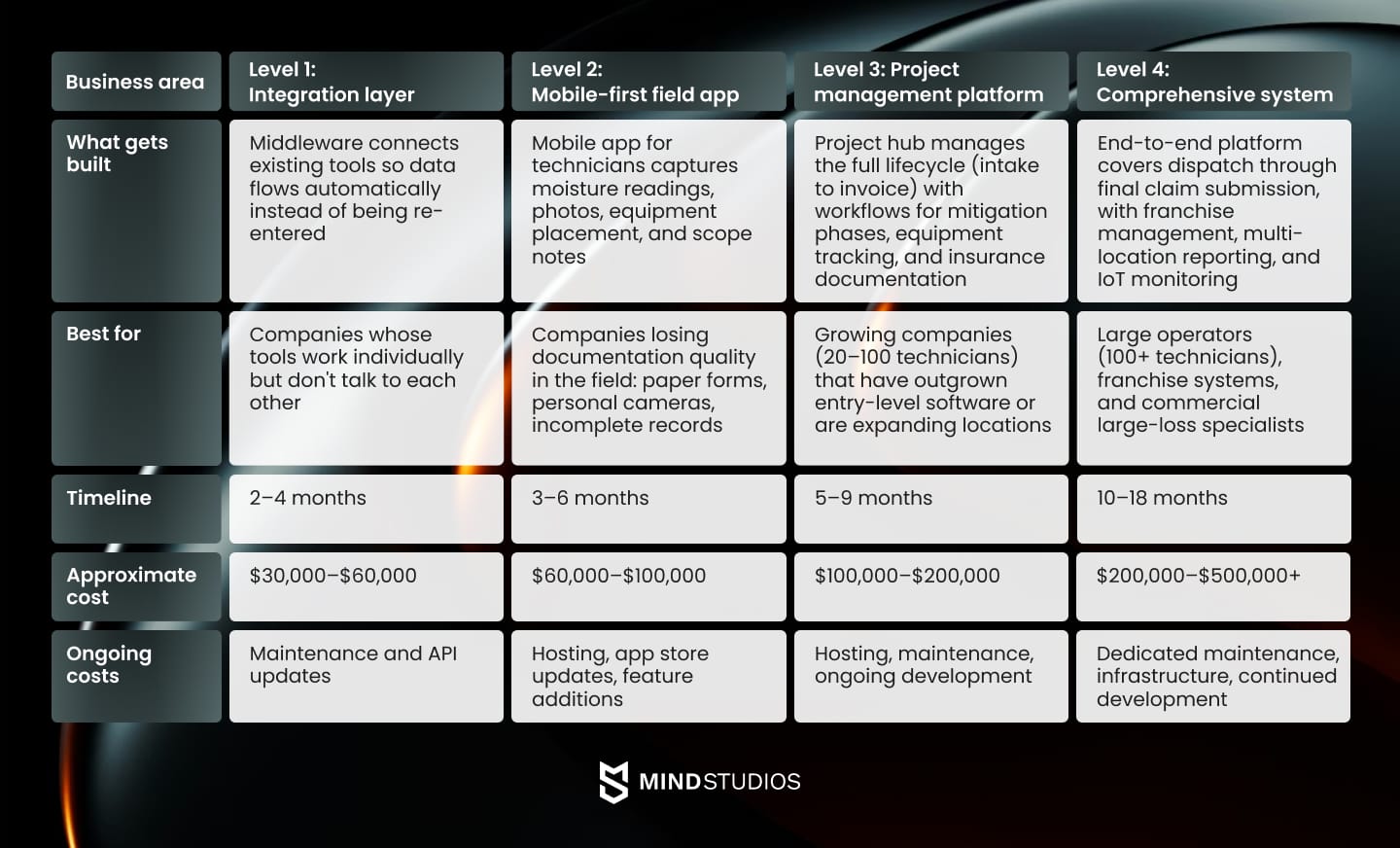
Mind Studios’ recommendation: Most growing restoration companies face a Level 2–3 decision. If your primary pain is field documentation and insurance disputes, a mobile app may deliver better ROI than a full platform. If your pain spans dispatch, documentation, equipment tracking, and invoicing, a project management platform addresses the full problem.
Not sure which level fits your operation? Mind Studios can review your workflows and recommend the right scope. Talk to us.
Let’s discuss
your tech
needs
Contact Mind Studios
Building software that works in flooded basements
There is a standard way to demo field software: a conference room, a clean tablet, a technician with a full signal, and both hands free.
Restoration field reality looks nothing like that.
Technicians work in environments with no cell signal, standing water, temperatures above 100°F in attics, and air quality that requires respirators. Their hands are dirty or gloved. They're managing equipment while explaining the situation to a distressed property owner. A multi-screen workflow does not exist in that environment.
The core features of property restoration software designed for actual field conditions include:
- Offline-first architecture. The app works without a cell signal. Readings, photos, and scope notes are captured locally and sync when connectivity returns. Any system that requires a live connection fails in the conditions most common to water and fire restoration, not occasionally, but routinely.
- 15-second workflows. Every step a technician takes in the field needs to be completed in seconds. Guided photo capture, voice input for notes, and one-tap equipment logging reduce cognitive load during active mitigation. If a workflow takes longer than 15 seconds, it will be skipped under pressure.
- Gloved-operation design. Large tap targets, high contrast for outdoor visibility, and minimal text entry. The interface is built for touchscreen use with work gloves in poor lighting, not optimized for a desktop user in a clean office.
- Guided documentation protocols. Instead of open-ended photo capture, the app prompts for specific evidence at each stage: moisture readings at defined measurement points, photos of equipment placement, and before-and-after shots at each affected area. The structure ensures IICRC compliance without technicians needing to memorize documentation requirements on a job they walked into an hour ago.
- Daily visit linking. Each monitoring visit auto-links to the originating project. Readings populate the drying log automatically. No manual project lookup, no re-entry, no gaps in the log because a technician wasn't sure which project number to use.
- Automated stakeholder updates. When a technician completes a daily visit, the system triggers a customer-facing status update and a project note for the adjuster, without dispatcher involvement. Communication continues without anyone deciding to send it.
Mind Studios’ tip: When evaluating any field software — custom or commercial — test it in the worst conditions it will actually face. Turn off the Wi-Fi. Use it with gloves. Ask a technician who has never seen it to complete a documentation workflow. The results are more informative than any demo.
Designing for the field is half the problem. The other half is making sure that field data reaches every system that needs it.
Critical integration points in restoration operations
Restoration software doesn't operate in isolation. Every serious restoration operation runs within an ecosystem of insurance platforms, estimating tools, communication systems, and field equipment.
Custom software needs to connect with that ecosystem, not replace it. Here are the five integrations that matter most:
| Integration | The challenge | The approach | What to avoid |
|---|---|---|---|
| Xactimate and estimating platforms | Field data needs to flow into Xactimate without manual re-entry (re-entry introduces errors and delays). | Bidirectional integration: scope items captured during assessment auto-populate estimate line items; completed estimates sync back to the project record. | Building a custom estimating tool to replace Xactimate — adjusters use it, carrier portals accept it, and a proprietary format creates friction at the worst moment. |
| Insurance carrier portals | Major carriers use different portals for submission, status updates, and supplement requests. Manual submission to each is slow and error-prone. | Identify the 5–10 portals used most frequently; structure documentation to meet carrier requirements at the point of capture, not submission. | Building against a single portal and treating it as representative of all carriers. |
| After-hours answering services | Intake information arrives as an email or text that someone manually re-enters into the job management system. | Direct API integration so intake data creates a new job record automatically: caller info, damage type, and address pre-populated. | Treating the answering service as a human communication layer only. The intake data is valuable, and losing it to transcription is a preventable handoff failure. |
| Equipment IoT sensors | Knowing where equipment is and whether it's running requires either manual check-ins or automated monitoring (manual tracking fails at scale.) | IoT-enabled dehumidifiers and air movers report runtime, location, and performance directly to the project record; billing updates in real time. | Building a tracking system that depends entirely on technician input. If logging is manual, it will be inconsistent. |
| Moisture meters | Readings captured on stand-alone meters need to reach the drying log. Manual transcription creates errors and takes time. | Bluetooth integration transfers each reading directly to the correct measurement point in the drying log. | Requiring technicians to carry additional devices. Integration should reduce equipment load, not add to it. |
Every integration in this table solves the same underlying problem: data that exists in one place but never reaches another.
The field technician does the work. The moisture meter takes the reading. The answering service captures the call. Without the right connections, none of that feeds the project record.
Incomplete project records mean delayed payments, disputed claims, and unbilled equipment. Integration is where revenue is either protected or lost.
Mind Studios experience: 5 Points you should consider before the development starts
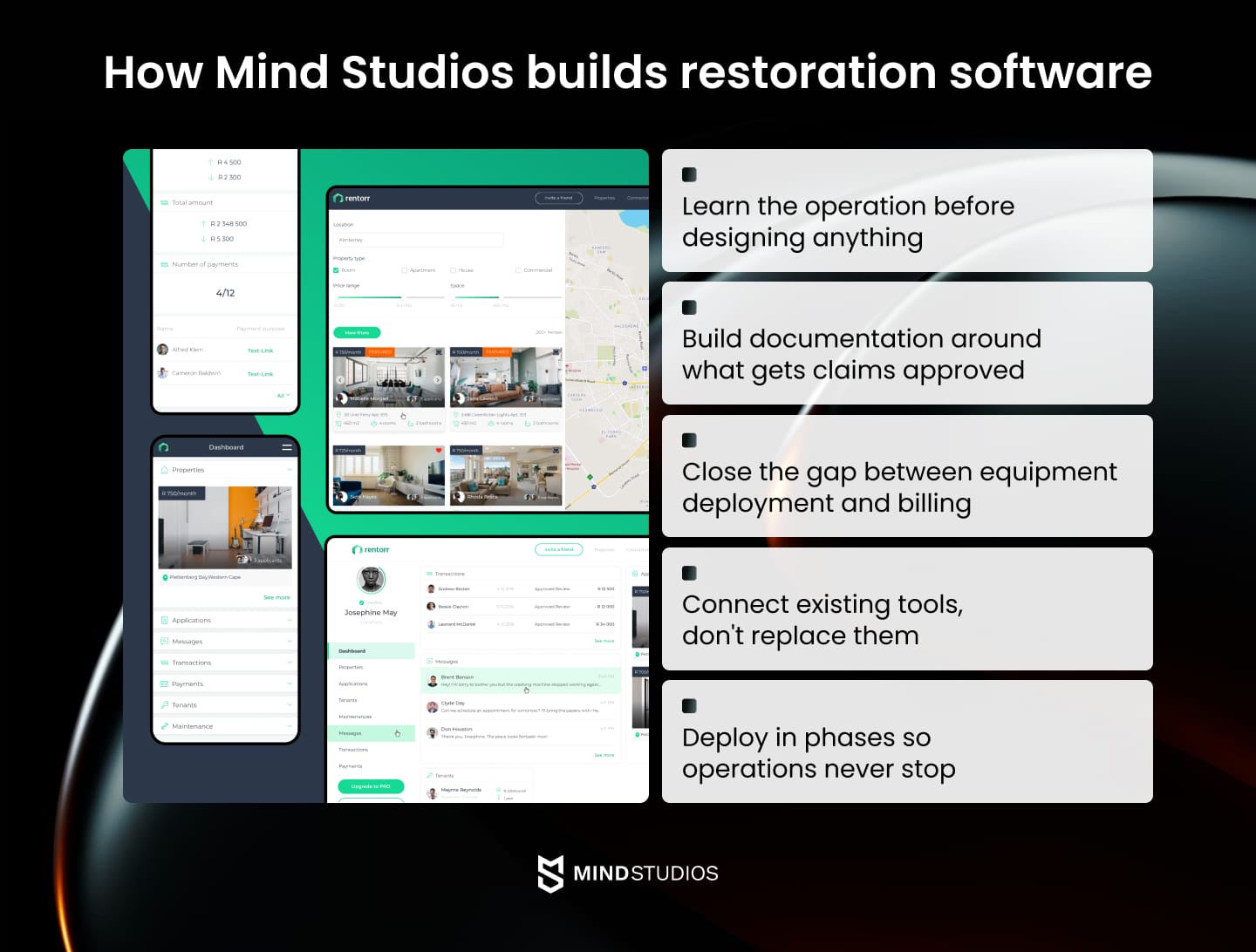
Building restoration software well requires understanding the operation before writing a single specification. Here is how Mind Studios approaches that process.
1. Field immersion before specs
Before designing anything, we need to understand what actually happens when a major commercial loss comes in at midnight.
- What does the dispatcher decide in the first 60 seconds?
- What information is missing at intake that causes problems three weeks later?
This means conversations with dispatchers, technicians, project managers, and insurance adjusters before any requirements are written.
Mind Studios’ tip: If a software vendor can't explain the difference between mitigation and remediation, or doesn't know what psychrometric data is, they haven't done the immersion required to build for restoration. Ask early.
2. Documentation built backward from adjuster requirements
Most documentation workflows are designed around what's convenient to capture in the field. The right approach is the opposite: start with what an adjuster needs to approve a claim without a supplement request, then build the capture workflow backward from that. Documentation that satisfies adjusters the first time gets paid faster and disputed less.
3. Equipment tracking as a billing protection system
The equipment billing gap — days that go unbilled because pickup dates weren't logged — is one of the most consistent revenue leaks in restoration. Equipment tracking is a financial protection system, not a logistics feature.
Mind Studios’ tip: Before building, calculate your current equipment billing gap. Pull three months of completed jobs, compare deployment records against billing, and measure the difference. In our experience, the number is almost always larger than expected, and it becomes the baseline ROI for automated tracking.
4. Integration with the ecosystem, not replacement of it
Xactimate isn't going away. Insurance carrier portals aren't going away. The goal of a custom property restoration management system is to connect those tools so that data flows without manual re-entry, not to replace everything in the tech stack. Integration is a core component of every build, not an afterthought.
5. Phased deployment matching operational calendar
Restoration companies don't have slow seasons. Implementation during peak periods is disruptive; waiting for a slow season means waiting indefinitely. Phased deployments — back-office integrations first, field-facing tools second, with parallel running periods — let teams adopt at their own pace without disrupting active operations.
Mind Studios’ tip: The biggest implementation risk is adoption. Identify internal champions early, schedule training around shift patterns, and build a feedback loop so field teams can flag issues without interrupting operations.
Wrapping up
The companies that win in restoration aren't always the ones with the best crews or the fastest response times. They're the ones where nothing falls through the gap between field and office.
It’s where a moisture reading taken at 11 PM ends up in the drying log, where equipment picked up on day 11 gets billed for day 11, and where an insurance adjuster gets what they need without a phone call.
That level of connection doesn't happen by accident. It requires software built around how restoration actually works, not adapted from tools designed for simpler jobs.
Targeted custom development — an integration layer, a mobile field app, or a full project management platform — addresses the specific points where revenue leaks. The right scope depends on where your gaps are and what growth requires.
If your current software can't support the operation you're building toward, Mind Studios can help figure out what makes sense for your situation. Contact us for a free consultation.