
 ChatGPT
 Perplexity

Build vs buy AI agents means deciding what your company should own. This guide compares SaaS agents, platforms and custom builds through workflow fit, ownership costs and payback.
Highlights
- Test a bought agent first for standard tasks inside one system.
- Build your own layer only where a bought agent leaves a gap.
- Compare cost per accepted result first, then check payback against today's process.
The build vs buy AI agents decision sets what your company will own, maintain and answer for two years from now. You can use an agent inside a SaaS product, assemble one on a platform or build your own. A hybrid of these paths is often worth testing.
The pressure comes from both sides. Your CRM or help desk vendor offers an agent you can switch on this quarter, while your engineering lead says the process is too specific for anything off the shelf. Each option looks cheaper from its own side, because each side counts different costs.
We've built AI products on models licensed through an API, including the Rebind e-reading platform, where our own processing layer labels where each answer comes from. This guide turns that work into criteria, a cost model and a decision process you can run in a few weeks.
If a vendor's agent and an internal build are both on the table, start by deciding which part of the agent you'll be accountable for.
AI agents in SaaS vs custom builds: three ways to get an agent
The build vs buy AI choice places your agent somewhere on a spectrum. It can be a feature of a SaaS product, an agent assembled on an agent-building platform or your own system built around a model. Which point is right depends on what the workflow needs and what each offer includes, so the comparison starts with your requirements.
The paths differ mainly in who decides how the agent behaves: the SaaS vendor, your team on a vendor's engine or your team end to end. The table turns that difference into seven questions for the offer in front of you.
| Criterion | Agent inside SaaS | Platform agent | Your own agent |
|---|---|---|---|
| Work before the first result | Configuration and access setup | Workflow design on ready components | Data layer, logic, integrations and checks |
| Upfront spend | License and setup; ask what implementation is included | Plan, workflow design and any paid connectors | Design and build of every layer |
| Control over data | Set by the vendor's terms | Shared with the platform under its terms | Set by your architecture, hosting and the model vendor's terms |
| Systems it can act in | The parent product and integrations listed in the offer | Supported connector actions, permissions and extension options to verify | Any system you integrate |
| Difference from competitors | The same feature they can buy | Limited by the platform's building blocks | As distinct as your process |
| Who maintains it | Vendor | Vendor runs the engine, you maintain the logic | Your team or a partner |
| Lock-in | Tied to the parent product | Logic lives in the platform's format | Depends on how tightly the model is wired in |
A support triage agent and a pricing agent in the same business can land in different columns, so the decision is made one workflow at a time.
What AI changes in the build vs buy decision
Build vs buy generative AI decisions depend on who will handle variable answers, model changes and running costs. For your workflow, the comparison needs to show how each option detects errors and controls the actions the agent can take.
Ready models let a team assemble a first version without training anything, yet someone still tests, monitors and pays for the agent every month it runs. Five changes matter most:
- Behavior varies. The same input can produce different answers, so you measure quality on test cases after every change.
- Models change underneath you. Vendors update and retire models, so an agent that passed testing last month can behave differently now.
- Each run costs money. OpenAI's API pricing is quoted per million tokens, so cost grows with volume and with the context each run carries.
- Integrations go deeper. An agent writes into systems, so a wrong answer becomes a wrong transaction.
- Data exposure grows. The agent reads customer records and contracts, and you need to know where that data goes.
The market adds noise on top. A Gartner forecast expects over 40% of agentic AI projects to be canceled by the end of 2027 because of escalating costs, unclear business value or inadequate risk controls.
Gartner also warns about "agent washing," which means rebranding assistants, RPA tools and chatbots as agents. It estimates that only about 130 of the thousands of agentic AI vendors are real, so a demo proves little until the agent runs on your own process.
Our guide to AI transformation covers who leads a company-wide AI program, while this guide stays with how to deliver one agent.
When buying an AI agent is the right call
Should I build or buy AI for this workflow? Buy when the task is narrow, lives inside one system you already use and follows a standard process, such as triaging support tickets or summarizing sales calls. Then the comparison focuses on configuration, acceptance testing and who handles model updates, hosting and security patches.
The trade-offs show up where your workflow stops looking like everyone else's. Buying gives you three things:
- Speed: results after configuration and acceptance testing, with no build phase
- Operations: vendor-operated infrastructure, with your team keeping acceptance and quality checks
- Price: a license price known upfront, with implementation and review costs to add
Buying can hit its limits in four places:
- Data and actions: check which data the agent can read and which systems it can act in beyond the parent product
- Fit: the product is designed around needs the vendor's customers share, so check how much of your specific logic it can hold
- Differentiation: competitors can switch on the same feature
- Change: rule changes beyond the configuration depend on the vendor's roadmap
If none of these limits touch the workflow and the agent passes your cost check, buying is the call. If one does, check the signals below.
When a custom AI agent is worth it
Custom AI agents for business are worth considering when the agent runs a process that gives you an edge, depends on data only you hold, acts across several systems or makes decisions where a mistake is costly. These signals justify running the numbers, and the cost comparison below shows which option pays off.
Each signal raises a requirement to check:
- The process is your advantage. Pricing, underwriting, matching or service logic that customers choose you for.
- The data lives only with you. Contract history, case notes or operational records no vendor model has seen.
- Actions span several systems. In one run, the agent reads from the CRM, checks the ERP and writes to a ticketing tool.
- Data has to stay in a set place. Hosting rules, residency requirements or client contracts limit where data is processed.
- Answers must be explainable. Auditors, regulators or your customers ask why the agent decided what it did.
- Errors are expensive. A wrong answer means a refund, a compliance issue or a lost account.
A signal becomes a reason to build only when no ready option meets it, which the seven questions later in this guide test one by one.
The same logic applies outside AI. We built our own internal ERP system, Dashboard, when the team outgrew boards and spreadsheets on its way from 10 people to 50.
What it takes to build custom AI agents
To build custom AI agents today, a company usually licenses a model and builds everything around it: the data it reads, the logic that decides what it may do, the checks on its answers and the monitoring that catches drift.
Should we build or buy our AI infrastructure? Mostly, buy it: cloud, compute and model APIs are rented as services. The work worth building sits in five layers:
- Model access. A licensed model behind an adapter you control, which reduces the changes needed when you replace it.
- Data and retrieval. RAG with vector search over your documents and records.
- Orchestration and tools. Which systems the agent may call, in what order and with what permissions.
- Guardrails. Testable rules that flag or block answers unsupported by your data and actions outside the agent's permissions. They lower risk without making every answer correct.
- Evaluation and monitoring. A test set of real cases that runs on every change, plus reviews of production runs.
Running these layers in production takes retrieval design, evaluation and LLM operations skills that a growing company may not have in one team, and custom AI agent development with a partner can fill that gap.
Mind Studios' insight: We write the evaluation set before the first prompt. With real cases and answers the business has agreed are correct, you can compare models and catch regressions after a vendor update.
The hybrid path: buy the common parts, build what makes the agent yours
A hybrid agent splits the paths by part. The common steps run in a SaaS product or on a platform. The layer that fills your specific gap (your data, rules or checks) is built in-house or with a partner. Any path can include a model licensed through an API, so licensing one doesn't make an agent hybrid by itself.
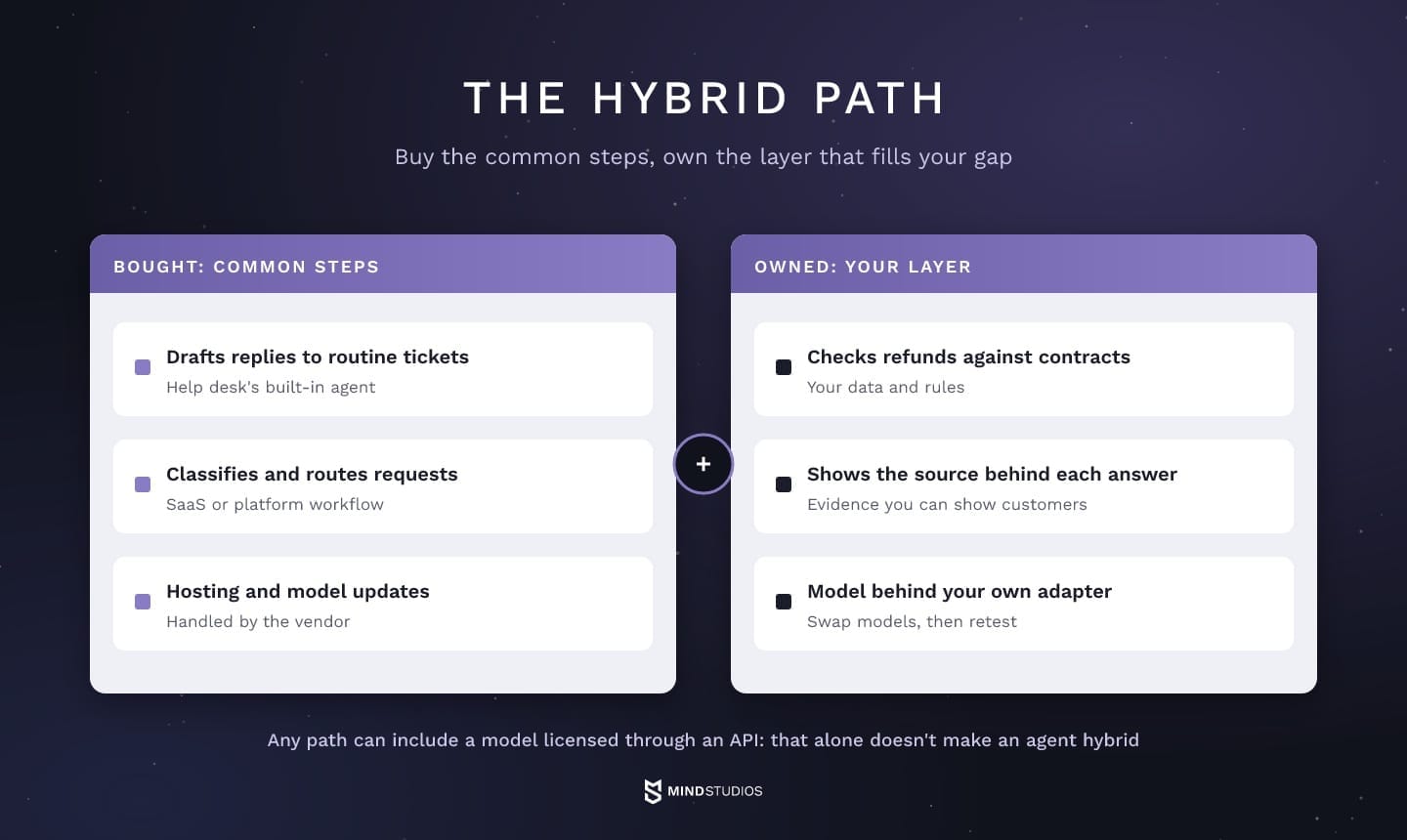
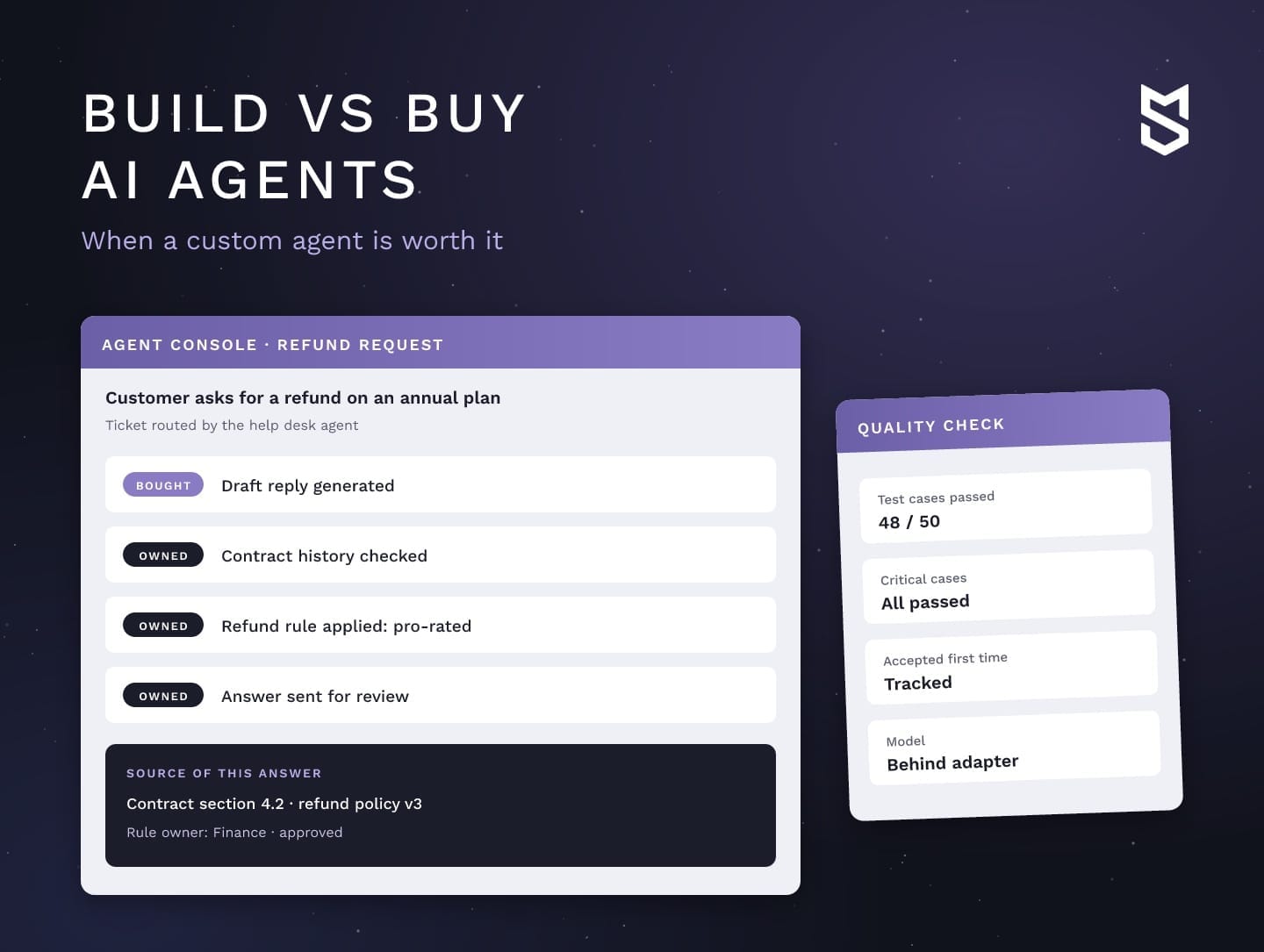
Take a support workflow. The help desk's built-in agent drafts replies to routine tickets, while your own service checks refund requests against contract history before anything reaches the customer. You own the step where a wrong answer costs money.
In build vs buy AI terms, the owned part can take three scopes, and they can be combined:
- Logic on the model. Prompts, rules and tool calls on top of the API.
- Your data. Retrieval over your documents and records, so answers rest on your facts.
- Your own system. Custom orchestration and evaluation for a multistep process where errors are costly.
Start with the narrowest scope that closes your gap. At every scope, design the layer so a model swap doesn't mean rewriting the logic and checks, though prompts and tool calls still need retesting before a new model goes live.
Rebind: our own layer over a licensed model
Rebind, an AI e-reading platform we built, pairs classic books with expert commentary and AI conversations. The model comes through the OpenAI API, and a Python backend adds a custom natural language processing layer on top.
The platform mixes indexed expert commentary with generated responses. Its x-ray mode labels which is which, so readers see whether an expert or the model is speaking. The model is rented, while the rules that separate the two kinds of answers belong to the product. Rebind is a product later recognized by Fast Company and Time.
Anton Baryshevskyi, Head of Business Development and Co-Founder at Mind Studios, explains how the idea behind those x-ray labels shapes his test for splitting an agent into rented and owned parts:
Founders usually open with which model to pick. We ask what they'd show a customer who disputes one of the agent's answers: the source it used, the rule it applied and who signed off on that rule. If a vendor gives you that record and lets you change the rules yourself, renting is fine. Where it can't, that's the piece worth building.
If you're splitting an agent into bought and owned parts, test that split on one workflow before you commit a budget to it.
Total cost of ownership: what you pay for in each option
In a build vs buy AI comparison, the license fee for a bought agent is known upfront. Your own agent's estimate has to include model usage, evaluation, human review and changes after launch, and their share of the total depends on workload and the comparison period. A fair comparison looks at the cost of an accepted result over the same period.
Read the table as a list of questions for each quote.
| Cost driver | Agent inside SaaS | Platform agent | Your own agent |
|---|---|---|---|
| Licenses and subscriptions | Seat or per-use fees | Platform plan | Licenses for any tools you add |
| Implementation and integrations | Configuration, plus any integrations the product lacks | Workflow design and connectors | Full build of data, logic and integrations |
| Model usage and infrastructure | Check what the fees above already include | Usage above the plan, per its terms | Model API and hosting, grows with volume |
| Quality evaluation and monitoring | Vendor's own tests, plus your acceptance checks | Platform tools plus your test cases | Yours to build and run |
| Human review and rework | Yours | Yours | Yours |
| Support | Vendor | Vendor for the engine, you for the logic | Your team or a partner |
| Vendor or partner exit | Rebuild elsewhere, export what the terms allow | Recreate the logic outside the platform | Partner handover; model replacement |
For your own agent, exit means handing over code, access and documentation if a partner built it, and swapping the model through your adapter and retesting.
One cost is easy to miss: the cost of change. When a business rule changes, a bought agent waits for the vendor's roadmap or hits its configuration limits, while your own agent waits in your team's backlog. If your rules change every month, that queue is a recurring cost on either side.
Three checks for comparing the options
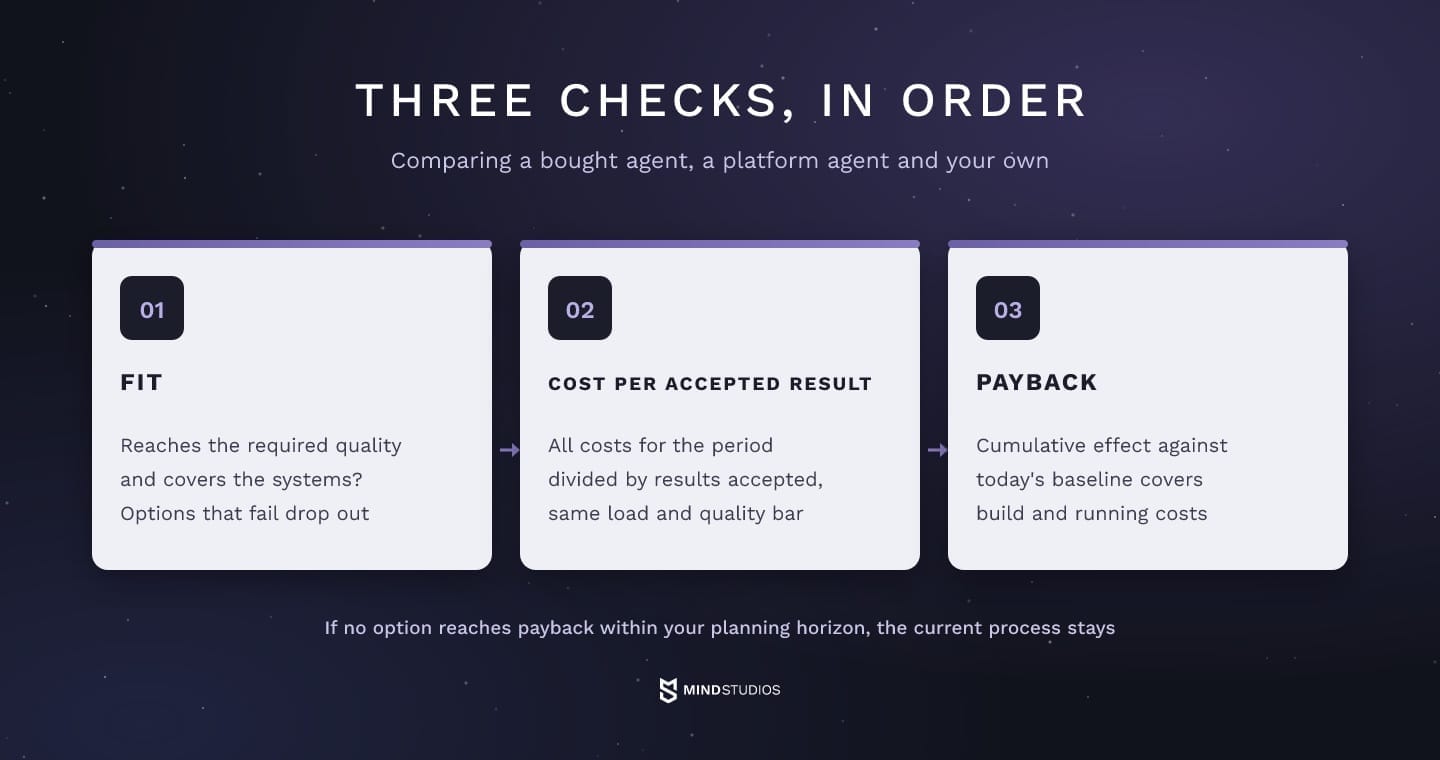
These are Mind Studios' working definitions, which we adapt to each client's process and run in a fixed order:
- Fit. An option that can't reach the required quality or cover the systems involved drops out. Passing earns a place in the comparison and says nothing about payback yet.
- Cost per accepted result. Compare the remaining options over the same period, at the same load (agent runs per month) and against the same quality bar. Divide all costs for the period by the results accepted in the end, with or without rework, and track the first-pass acceptance rate alongside it. Don't count twice what a platform already includes, such as the model or support. The lower figure marks the cheaper option, and payback is a separate check.
- Payback. Apply it to every option that passed the first check, bought ones included, against the baseline: today's staff hours, errors and their cost, and lost revenue. An option pays off when its projected cumulative effect covers the purchase or build and rollout plus all running costs to date.
On a chart, build or rollout costs sit at month zero and running costs add up each month. The effect line combines forecast benefits from staff time, fewer errors and additional revenue, and for the labor part the estimate needs to show how freed hours create measurable value.
The payback month is where the cumulative effect catches up with cumulative costs, and if no option reaches it within your planning horizon, the current process stays.
Mind Studios' recommendation: We pull the baseline from system records for a few recent weeks (ticket timestamps, rework logs, refunds and credits), because estimates from memory are hard to check later. We record it before launch in the units the agent will be measured in.
Who builds the agent may also affect whether it reaches production. In the MIT NANDA report, customized tools built with external partners reached deployment about 67% of the time, compared with about 33% for internally built tools. The data is self-reported from interviews with 52 organizations, and the authors note that correlation doesn't prove causation.
For a founder, the takeaway is to check whether the internal team can carry development through deployment and to bring in a partner where it can't.
Our breakdown of software development costs covers the wider budget drivers behind any build.
A build vs buy AI decision framework: seven questions
A build vs buy AI strategy for one workflow comes down to seven questions to answer before anyone sets a budget. Each answer points to a direction to test (buy, hybrid or your own agent), and the cost checks above then show how expensive each gap is to close.
- Does this process set you apart from competitors? If the process follows a standard pattern, test a vendor's agent first and keep it if it meets your quality, access and cost criteria. If the process sets you apart, the logic behind that advantage is a candidate for a layer you own.
- How accurate must the agent be, and what does an error cost? When a person reviews every draft, a vendor's agent that passes your test cases can do the job. When the agent moves money or changes records and the vendor won't let you add checks before the action, that check is a candidate to build.
- Does the agent need the state of your system on a past date? A bought agent that reads versioned records covers the need. If it sees only the current state, a hybrid can add retrieval over your own history.
- Must the agent explain why it answered as it did? If a vendor logs the sources behind each answer and lets you export that log, buying stays on the table. Without that log, the explanation layer is a candidate to build.
- How often do the rules of the process change? Rare changes within the vendor's configuration favor buying. Frequent changes beyond it point toward owning the rules layer, where your team controls the backlog.
- Which systems does the agent act in, and whose data does it touch? One system points to the agent its vendor sells. Several systems with write access point to a platform or your own orchestration, depending on whether connectors cover the actions and permissions you need.
- What role will you take under the EU AI Act? The EU AI Act defines a provider as whoever develops an AI system, or has it developed, and places it on the market or puts it into service under its own name. A deployer is whoever uses a system under its authority. A company that builds its own agent may become a provider, a role that matters most for high-risk systems, so the specifics belong with legal counsel.
How to make the call: from a short proof to a rollout plan
A build vs buy AI decision holds up when it rests on a few weeks of evidence: a process map, a market check, a short prototype and a decision with a named owner. How do I build a custom AI agent for my workflow? Start with one process and a short proof on real data, then decide how far to build.
The proof follows five steps:
- Map the process and its limits. Steps, systems, data sources, approvals, the cost of an error and today's baseline.
- Check the market. Run your own cases, edge cases included, through shortlisted vendor agents and platforms.
- Build a short prototype. Use real data and the riskiest integration. Its length depends on how quickly you get data access and integrations.
- Measure every option the same way. Record the acceptance rate, error types, cost per run and evaluation set results.
- Decide with an owner. Name who runs the agent after launch, which quality level triggers a rollback and which budget pays for operation.
A prototype shows whether the workflow meets the agreed quality and value thresholds under the conditions tested. The second-year cost comes from the TCO calculation. Another route is to buy first to test the scenario and build once it's proven.
Mind Studios' approach: We grade prototype errors by severity: wording issues a reader shrugs off, errors a reviewer catches in time and errors that reach a customer or change a record. The go or no-go decision rests on the last group, because one costly error can outweigh many harmless ones.
Our guide to agentic AI operations covers rollout and governance once the decision is made.
Red flags: when building or buying becomes a trap
A build vs buy AI decision should pause when an option fails a critical case or leaves essential operating responsibilities unresolved, whichever side you're on. These are the warning signs to clear before you commit:
- Data export. Pause a purchase if the vendor can't export your data, prompts and conversation history, and don't sign on a promise that export can be sorted out later.
- Critical cases. Stop any option that fails a critical case from your evaluation set, and don't let a strong average score hide one failed critical case.
- Daily owner. Hold the launch until one person owns the agent in daily operation, and don't launch first and look for an owner once problems appear.
- Support budget. Hold the build until the support budget after launch is approved, and don't approve the build budget alone.
When no option clears these flags, launch neither: keep the current process and its known costs. The process map, evaluation set and baseline stay useful when a stronger model or vendor appears.
Choosing what to own
The vendor's pitch and your team's proposal from the start of this guide answer the same question: what will your company own two years from now? A sound build vs buy AI decision rents what a ready option covers. It owns only the part you answer for when no vendor can supply it.
Our editorial recommendation comes down to three questions, one for each path:
- Buy. Does a ready agent pass your critical cases inside one system? Buying leads, provided it clears the cost check.
- Hybrid. Does it pass everywhere except one step that needs your data, history or checks? A hybrid is worth evaluating if a custom step can close that gap and pass the same quality and cost checks.
- Your own agent. Do the gaps run across the process and several systems? Your own agent is worth a full technical and payback estimate.
If you already have a vendor quote and an internal proposal for the same workflow, the next step is to compare their cost per accepted result on real cases.
FAQ
How do we keep AI agent costs from running away after launch?
Costs grow with volume and retries, so a few controls set up at launch keep the bill predictable:
- Limits per run and per month, with alerts before they're reached
- A cheaper model for simple steps such as classification
- Caching for repeated requests and shared context
- Regular review of failed runs, since every retry costs money
- One named owner of the agent's budget
Who owns a custom AI agent built by an outside partner?
Your company should, and the contract should say so. Ask to own the code, prompts and business rules, the evaluation set and the data pipelines. Cloud accounts and API keys should be registered in your company's name. The model and any platform stay under their vendors' terms, which is one more reason to keep the model replaceable.
Do we still need AI governance if we buy an agent?
Yes. The vendor takes over hosting, model updates and part of the security work, while access rights, review of the agent's answers and accountability to your customers stay with you. In practice, someone in the company sets what the agent may touch, checks its output on a schedule and answers for its mistakes.
Can we switch from a bought AI agent to our own later?
Yes, if you prepare in the first month after buying. Keep what a move will need:
- Regular exports of your data and conversation history
- Prompts and rules stored in your own repository
- A set of test cases with agreed correct answers
- A log of the agent's errors and how they were fixed
What should a contract for a bought AI agent cover?
Five points matter most: whether the vendor may use your data to train its models, how you export data when you leave, how much notice you get before the underlying model changes, where data is stored and processed, and who is liable when the agent takes a wrong action. Settle each one before signing.