
 ChatGPT
 Perplexity

AI for business automation pays off in some processes and drains budget in others. This guide shows how to tell them apart, which process to automate first and how to get it into daily work.
Highlights
- AI pays off where inputs vary, volume is high and errors cost money.
- Compare processes across six criteria before choosing a platform or custom development.
- Track savings, payback and ROI separately, and measure each one against a baseline.
As a company scales, manual work often grows faster than the team. Invoices, tickets, inspections and contracts pile up, and the rules and no-code flows built early on keep breaking on exceptions. AI pays off here when inputs vary, volume is high and each mistake has a price.
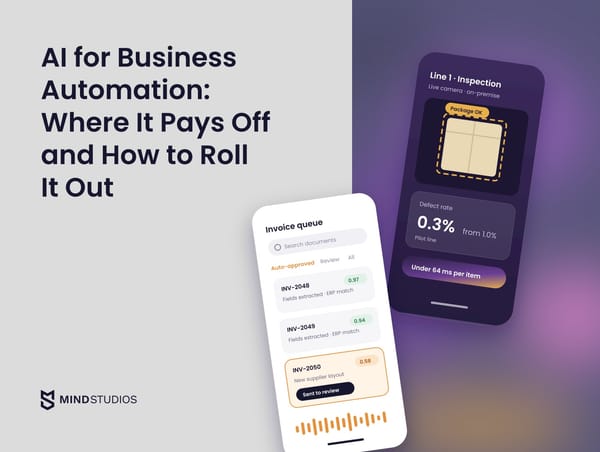
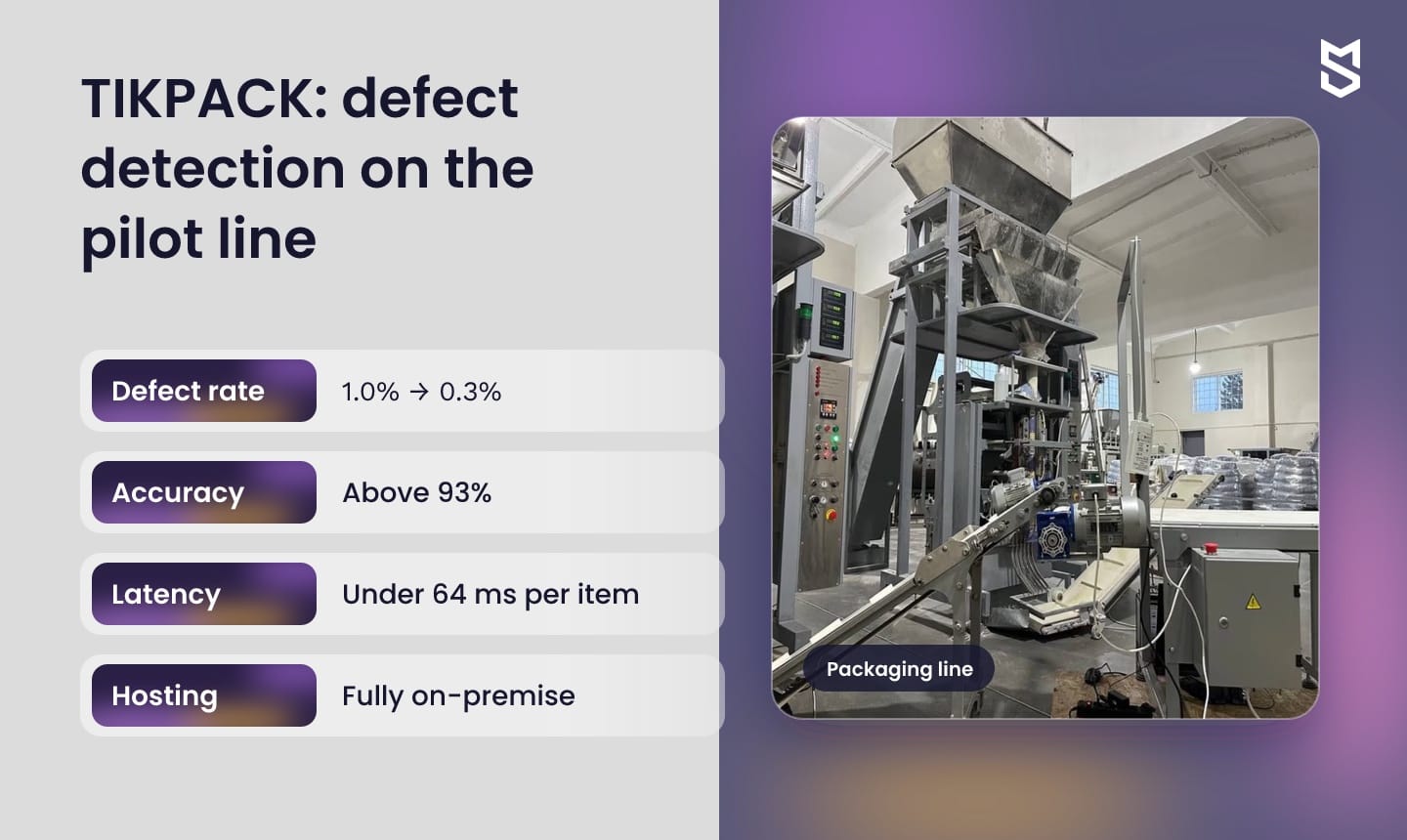
We've seen this on a production floor. For TIKPACK, a European grain packager, we built an on-premise defect detection system that cut the packaging defect rate from 1.0% to 0.3% on the pilot line.
If a process is already on your list, the first question is whether it needs AI or whether rules will do the job.
What AI for business automation means in practice
In practice, a model sits inside a business process and makes the judgment call a person used to make, such as reading an email, classifying a document or spotting a defect. Rules and RPA carry out steps someone has defined. The model decides when inputs vary or outcomes depend on patterns rules can't capture.
The two layers usually work together, which matters when you scope the budget. In a typical AI business automation flow, a rule picks up an invoice, a model extracts its fields, and another rule posts the result to the ERP. Only the middle step needs AI.
Rule-based and AI-driven steps differ in four places:
- Input. Rules need structured fields. A model can work with free text, scans, images and audio.
- Logic. Rules follow if-then paths someone wrote. A trained model learns patterns from examples, while a ready-made LLM follows the instructions and context it's given.
- Exceptions. A rule fails on a case nobody anticipated. A model can signal uncertainty (a classifier returns a confidence score, for example), so unclear cases go to a person.
- Change. Rules change only when someone edits them. Model quality can drift as data shifts, so it needs monitoring and periodic evaluation.
How the automation loop works
We plan each project around the following loop, from new input to human review:
- Data. Inputs such as documents, tickets or camera frames, plus the past decisions or reference content the model learns from or draws on.
- Model. The model classifies, scores or drafts a response for each new input.
- Decision. Where the output meets agreed thresholds, the system acts inside the workflow: it approves, routes or rejects.
- Human on exceptions. Uncertain and high-stakes cases go to a person, whose answer is logged.
- Evaluation and retraining. Reviewed corrections become training data or test cases for the next update.
Steps four and five keep the system working after suppliers, products and document formats change.
Automation technologies at a glance: RPA, BPM, IDP and AI agents
Vendors use these terms loosely, so group them before you compare offers:
- RPA, BPM and workflow tools move work through steps that are already defined.
- IDP, machine learning, NLP and generative AI add judgment to those steps.
- AI agents plan the steps themselves, so they need tight permissions and review points.
Most AI business automation setups combine several rows of the table below, which shows what each technology does and when it fits.
| Technology | Process role | When it fits |
|---|---|---|
| Rule-based workflow automation | Moves data between systems on if-then triggers | Structured inputs, stable logic, standard integrations |
| RPA (robotic process automation) | Software bots repeat clicks and keystrokes in existing interfaces | Legacy systems without an API, or as a temporary bridge |
| BPM (business process management) | Models, orchestrates and tracks multi-step processes with approvals | Long processes that cross teams and need an audit trail |
| IDP (intelligent document processing) | Classifies documents and extracts fields with OCR and ML | Invoices, contracts and forms in many layouts |
| Machine learning (ML) | Predicts or classifies from historical data | Scoring, forecasting, anomaly detection |
| NLP (natural language processing) | Finds intent and entities in text | Ticket triage, email routing |
| Computer vision | Detects objects and defects in images and video | Quality control, inspections |
| Generative AI (LLMs) | Drafts text, summarizes and answers from a knowledge base | Support replies, report drafts, internal search |
| AI agents | Plan and carry out multi-step tasks through tools and APIs | Bounded tasks with clear permissions and review |
Vendors also call RPA combined with AI "intelligent automation," so ask which rows of this table a product with that label covers.
Where AI agents fit
When an agent can act through business tools, its permissions and review points become part of the implementation scope. Before you budget the build, define which systems the agent may change, which actions need a person's approval and how each action is undone.
Our agentic AI guide shows where agents fit in operations.
Where AI automation pays off: examples by business function
AI business process automation pays off when a process combines high volume, varied input and a measurable cost of error. Support queues, document-heavy finance work, operations planning and quality control often fit. The AI automation examples below show, by function, what the model adds and the data it needs.
| Function | What AI adds | Data it needs |
|---|---|---|
| Customer service | Tags tickets by intent and urgency, drafts replies from the knowledge base | Labeled ticket history, help center content |
| Finance and documents | Extracts fields from invoices and contracts, flags mismatches | Sample documents for each layout, ERP master data |
| Operations and supply chain | Forecasts demand, flags shipments likely to run late, suggests reorders | Order, shipment and inventory history |
| Quality control | Detects and classifies defects on the line in real time | Annotated images of good and defective items |
| Sales, marketing and HR | Scores leads, routes inquiries, answers policy questions | CRM history, campaign data, approved HR policies |
Customer service
A model that tags intent and urgency on arrival changes how the queue works: urgent tickets stop waiting behind routine ones, and agents spend their day on cases that need judgment. Replies that touch refunds or contracts still go through an agent before they're sent.
Finance and document processing
Invoices, purchase orders and contracts arrive in many layouts, which is where rules tend to break. A model extracts the fields and checks them against the ERP, so finance staff work on mismatches and stop retyping documents.
For the Mulki property app, built for landlords in the Middle East, we developed machine learning contract scanning for the standardized lease template required in Saudi Arabia. A fixed template narrows the extraction task, although real scans still test how reliably the system reads them.
Operations and supply chain
A model trained on order and shipment history can forecast demand by location and flag orders likely to ship late, while planners keep the final call. Fewer stockouts and rush shipments are the payoff, and both can be priced once you measure today's numbers.
Quality control on the production line
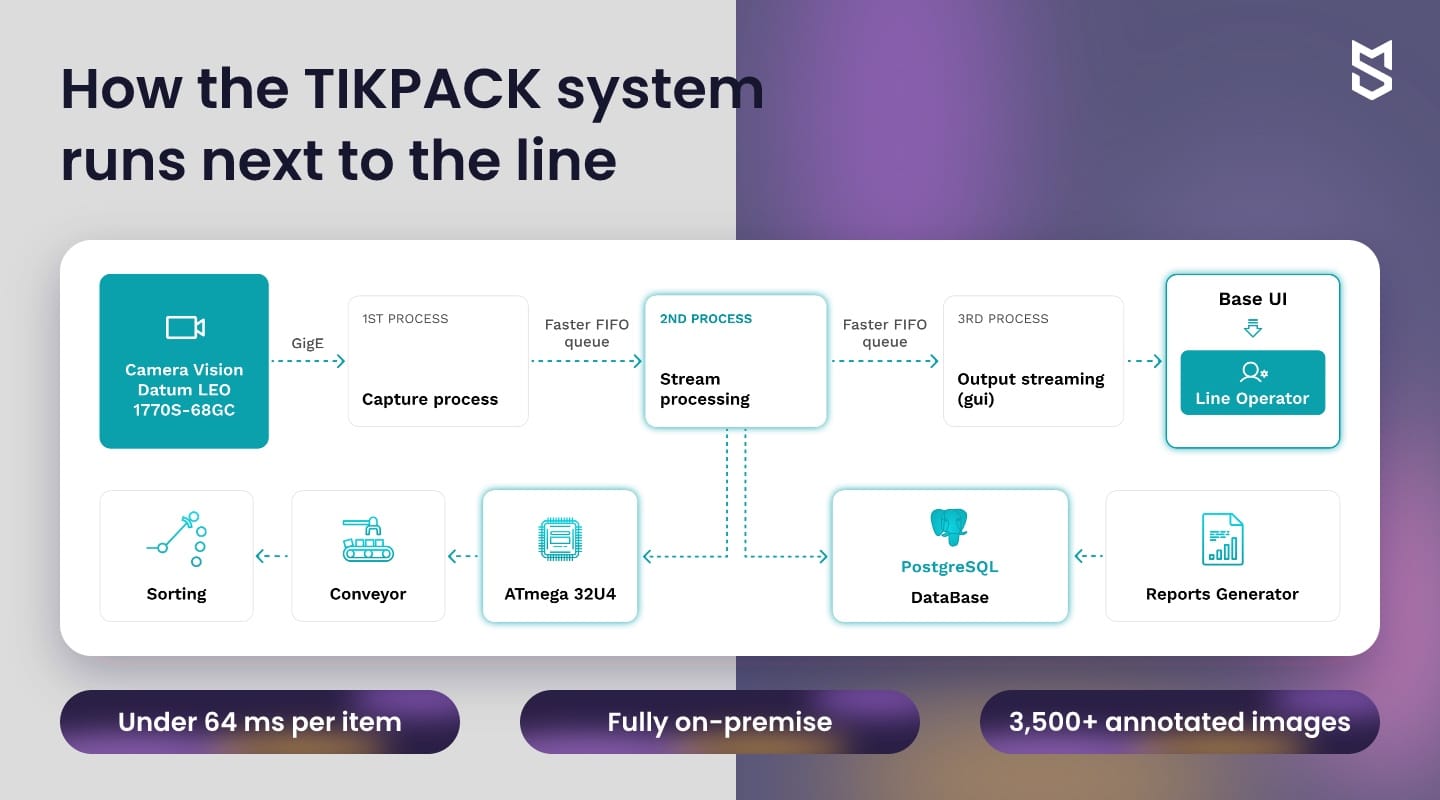
Manual inspection struggles as line speed grows, because people can't check every item at full throughput. In the TIKPACK system, YOLOv8m finds each package in the camera frame and a ResNet50 classifier sorts it into one of six defect types. Results go to PostgreSQL and to the operator's HMI.
The system reaches precision and recall above 93%, and false rejects stay under 0.6%. The false-reject rate matters as much as accuracy, because every false reject removes a good package from the accepted flow.
Sales, marketing and HR
In sales, models score leads from CRM history and route inbound inquiries to the right rep while the lead is still warm. Marketing teams use generative AI to draft campaign variants, with a person approving what goes out.
In HR, a bounded first task is an assistant that answers questions from approved policies and hands personal cases to a specialist. Decisions about candidates and employees fall under stricter rules, covered in the risks section.
When rules are enough and AI is overkill
AI is overkill when the input is structured, the decision fits in a short rule and errors are rare and cheap to fix. There, workflow rules, validations and automatic logging can deliver the gain at a lower cost to build and run, because there's no model to evaluate or retrain.
We learned this on our own operations. When our team outgrew spreadsheets, we built Dashboard, our internal ERP for planning, people and asset tracking.
A noticeable part of the effect came from workload filters and planning rules, which took weekly planning from hours to under 30 minutes, and from automated logging of tasks, employee changes and asset movements, which brought 90% less manual data entry. Both structure decisions the team already knew how to make.
Signs that rules will do the job
A process usually needs no model when it meets all four conditions below:
- Structured inputs: forms, database records or API payloads.
- Explicit rules: the process owner can write the decision down as a short if-then table.
- Reviewable volume: low enough for a person to review every exception.
- Reversible errors: a wrong decision costs little and is easy to reverse.
If that describes your process, our workflow process automation guide covers rule-based options in depth. Keep AI process automation for the cases those rules can't reach.
Mind Studios' recommendation: Before you scope a model, write the decision as rules and run them against last month's cases. The cases those rules can't handle are your real AI scope, which may be smaller than the brief assumed.
How to choose which processes to automate first
Choose the first process by checking six criteria in a set order: regulatory exposure and a named owner, then data history, then the value at stake from volume, input variety and the cost of today's errors. The best first candidate clears the constraints and offers the most value for the effort.
The table summarizes our working criteria for a first AI business process automation project, adapted to each client's operations.
| Criterion | Start now if | Wait if |
|---|---|---|
| Regulatory exposure | Operational decisions about products, documents or routing | People-related decisions without the required controls |
| Owner | One person owns the process and its KPIs | Ownership split across teams, no decision maker |
| Data history | Past cases with recorded outcomes, or reference content | No history, or outcomes nobody recorded |
| Volume | Annual handling cost is meaningful and grows with the business | Handling cost is small next to building and running costs |
| Input variety | Free text, scans, images or many document layouts | Structured fields that rules already handle |
| Cost of error | Today's errors have a known price, and wrong calls can be caught or reversed | One wrong automated call would be costly and hard to undo |
The order of the decision
Run the checks in this order:
- Check the constraints. A process that decides on people's jobs, credit, health or legal rights needs controls before any pilot, and a process without an owner has nobody to review exceptions or sign off results.
- Check data readiness. Missing past outcomes turn data preparation into a separate phase, scoped before the pilot schedule.
- Estimate the value. Multiply annual volume by the handling cost per case and add the cost of current errors the system can realistically reduce.
- Compare cost and complexity. Set that value against build, integration and running costs, then start with the candidate that offers the best ratio.
Our enterprise AI playbook covers the company-wide readiness check on data, skills and governance.
Platform, custom build or both: choosing how to implement
Use an automation platform when it covers your connectors, hosting and model requirements. Consider a custom build when a critical requirement stays out of its reach, such as strict latency, a model trained on your own data or a legacy integration. Both can also run in one process.
Platforms such as Make, Zapier and Flowable connect common business tools through prebuilt connectors. Check how each one's pricing scales (per task, per seat or by plan) and model the cost at the volume you expect in two years.
Evaluate hosting, integrations and the model separately
Each layer can have a different answer, so assess them one at a time:
- Hosting. On-premise or regional requirements don't rule a platform out by themselves, so check whether the product offers a self-hosted edition and connects to your own model.
- Integrations. For a legacy system without an API, RPA can bridge the interface for a while. A custom integration makes sense once that bridge becomes the bottleneck.
- Model. A generic step is enough for summarizing, classifying or extracting from common formats. Your products, documents and edge cases may need a model trained on your data.
A custom build earns its place when a platform misses a critical requirement and closing that gap is worth the upkeep.
Where a custom build closed the gap: TIKPACK
TIKPACK combined three such requirements. The system inspects each package in under 64 ms, runs fully on-premise next to the line and relies on models trained on more than 3,500 annotated images, so a remote call per item would have added a network dependency to a fast line.
Running a platform and a custom model together
In enterprise AI automation, we usually recommend a hybrid split: the platform handles triggers, approvals and notifications, and a custom model handles the step that depends on your data. We design this split in our custom AI solutions projects, because it keeps standard work on standard tools.
Whichever route you choose, ask how the team building it protects the data the model sees. Mind Studios, for example, is ISO 27001 certified for information security management and ISO 9001 certified for quality management.
Mind Studios' insight: Keep orchestration on the platform you already use, and put the model behind its own API. If the platform changes its pricing or you outgrow it, you can replace the workflow layer without retraining anything.
If you're weighing a platform against a custom build for one process, the useful question is which parts of the flow each option should own.
How to roll out AI automation: from pilot to daily operations
Roll out in six steps: measure a baseline, audit the data, run a pilot in shadow mode, set escalation rules, move into production, then monitor and retrain. Each step ends with a result you can check, so a stalled pilot shows up early, while it's still cheap to fix.
A pilot proves that the model works on sample data. Daily use also depends on owners, integrations and review routines, so this sequence for AI process automation projects adds them one step at a time:
- Measure the baseline. Record volume, handling time, error or defect rate and cycle time over several weeks. Done when the process owner signs off these numbers.
- Audit the data. Check what history exists, how outcomes were recorded and what still needs labeling, then assign the labeling work to an owner. Done when a labeled sample passes review.
- Pilot in shadow mode. The model runs on live input while people still make every decision, so you can compare its calls with theirs and tune thresholds. Done when live results meet the agreed task metrics.
- Set escalation rules. Decide which outputs act automatically, which go to review, who reviews them and how fast. Done when reviewers can keep up.
- Move into production. Turn on automatic decisions for clear cases, connect to the systems of record and keep a rollback path. Done when the rollback has been tested.
- Monitor and retrain. Track the task's quality metric, exception rate and business KPIs against the baseline, and evaluate every retrained version before it replaces the live one. A named owner runs this step for as long as the system is live.
Mind Studios' approach: Before the pilot starts, we agree with the client on two thresholds for the task's own quality metric: the level at which the model can act on its own, and the level that sends it back to human review after launch. The first decides the launch, and the second becomes the rollback trigger in production.
If you plan to automate several processes over a year, our AI integration roadmap guide covers how to prioritize and budget them across phases.
What AI automation returns: savings, payback and ROI
Automation returns value through three metrics that budget decisions should keep apart. Savings is how much less the process costs each year than at baseline, after running costs. Payback is how many months accumulated savings take to cover the initial investment. ROI compares the net gain over a set period with that period's total cost.
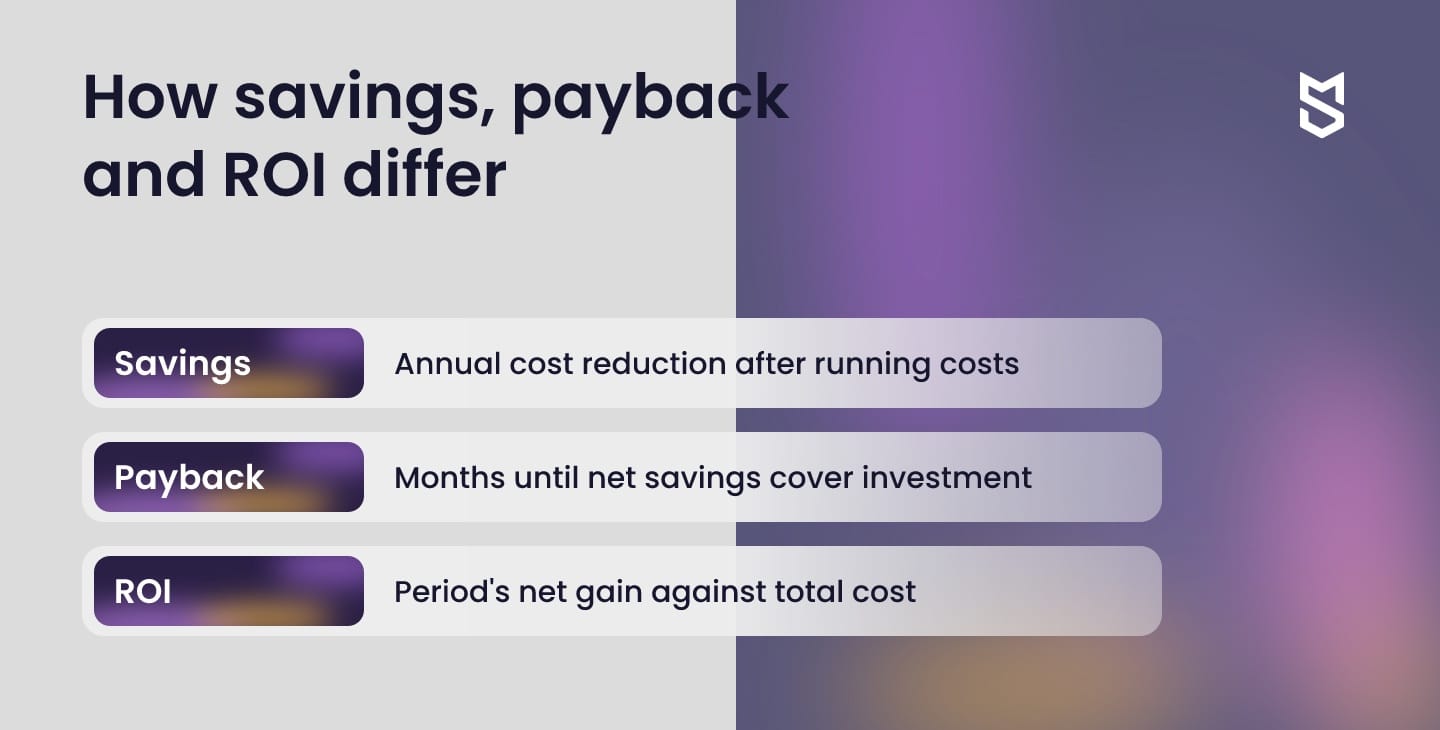
These are our working definitions, adapted to each client's cost structure, and no cost is deducted twice in one calculation:
- Gross annual benefit = baseline annual cost of the process minus its annual cost after automation, counting only costs that actually go down (errors, scrap, delays, labor that turns into money), plus measured extra margin, and leaving out the system's running costs
- Running costs = the yearly cost of operating the system: infrastructure, licenses, monitoring, retraining and support
- Initial investment = build, integration and rollout cost
- Net annual savings = gross annual benefit minus running costs
- Payback period = initial investment ÷ monthly net savings, valid while monthly net savings are stable; during ramp-up, add up monthly net savings until the total covers the investment
- ROI for a period = (gross benefit minus running costs minus initial investment) ÷ (running costs plus initial investment), all for the same period
Freed hours are the hardest input to price, and Dmytro Dobrytskyi, CEO at Mind Studios, explains the test we apply before freed time counts toward the gross benefit:
Founders often want every freed hour in the savings line. We count it only when it changes a cost the finance team can see: overtime that stops, a planned hire that's no longer needed or extra sales with a margin we can measure. Everything else goes into the report as capacity. That keeps payback a figure the board can check later.
TIKPACK: savings and payback on one line
On TIKPACK's pilot line, the lower defect rate brings €39,000 in annual savings, with a payback period of under 12 months. A government grant funded the project, and our team prepared the application that won it.
When a grant is involved, we recommend two views. The system's economics count the full initial investment, while the company's own return subtracts the grant. Both start from the same baseline.
Risks that stall AI automation projects
AI automation projects stall on data that isn't ready, integrations nobody budgeted for, processes without an owner, models that drift after launch and regulations discovered late. Each of these is cheaper to counter before the pilot than after it.
Data is the first of these to check. That's why the data audit comes second in the rollout, before anyone trains a model: a model is only as reliable as the outcomes it learns from.
Each risk below comes with the action that defuses it:
- Data that isn't ready. Outcomes were never recorded, or labels contradict each other. Action: audit and label a sample before you commit the full budget.
- Integration debt. Writing results back into a legacy ERP can take longer than building the model. Action: scope integrations in discovery and budget them as a separate phase.
- No process owner. Exceptions pile up unreviewed. Action: name an owner with authority over the process and its KPIs before the pilot.
- Model drift. New suppliers, products or document layouts quietly lower accuracy. Action: track accuracy and exception rates on a schedule and set a retraining trigger.
- Late regulatory review. Legal finds a problem after launch. Action: check the rules below while you're still choosing the process.
Regulations to check by market
Regulation affects which processes you automate first, because decisions about people come with obligations that operational decisions don't.
- EU, AI Act. The AI Act lists AI used in employment, such as recruitment and worker management, among high-risk uses, with duties on risk management, data quality, logging and human oversight. The Commission's timeline applies these rules to such uses from December 2, 2027.
- EU, GDPR. Under GDPR Article 22, people have the right not to be subject to decisions based solely on automated processing that produce legal or similarly significant effects. Exceptions include contract necessity, legal authorization and explicit consent, with safeguards such as human intervention.
- US. The California Privacy Protection Agency's ADMT regulations require businesses that use automated decisionmaking technology for significant decisions about consumers to comply by January 1, 2027 (§7200(b)), including pre-use notices and opt-out rights. NIST's voluntary AI RMF offers a structure for mapping, measuring and managing these risks.
- Saudi Arabia. Saudi Arabia's data protection law (PDPL), supervised by SDAIA, governs how personal data is processed and transferred outside the Kingdom. If a hosted AI service would process that data abroad, have counsel review the transfer conditions before the pilot.
Operational processes still need this check, because invoices, leases and support tickets carry personal data too.
Start with one process and a baseline
When manual work grows faster than the team, one well-chosen process can provide a manageable starting point. A named owner and a measured baseline make its results easier to assess, and enough history lets the pilot run in shadow mode before it acts on its own.
Once that first AI business automation project shows measured savings, the choice of the next process can rest on your own results.
If you have a candidate process in mind, the next step is scoring it against the six criteria and deciding what a pilot should measure.
FAQ
What is AI automation?
AI automation means using models for steps in a business process that need judgment: classifying, predicting, extracting or generating. A quick test for any tool sold under that label: name what the model outputs, how that output changes the workflow and where uncertain cases go to a person.
How can I automate my business using AI?
Settle five decisions before any budget is committed:
- which single process goes first, and who owns it
- what result ends the pilot successfully, and what result stops it
- which decisions stay with people from the start
- how the output reaches your system of record
- who reviews exceptions once the system is live
How is AI automation different from traditional automation and RPA?
Traditional automation and RPA follow instructions someone wrote, so they're predictable and cheap to run, but they break on inputs nobody anticipated. A model handles variation and needs monitoring in return. When comparing vendor offers, ask which step makes a judgment, what happens on low confidence and who evaluates updates.
Which processes should a company automate with AI first?
When two candidates qualify for a business process automation AI shortlist, start with the one where:
- outcomes are already recorded, so results can be checked against history
- a wrong automated call can be stopped or reversed
- one owner can sign off the pilot
Hiring and other decisions about people can wait until the controls are in place.
What is the best AI tool for business automation?
No single tool fits every process, so compare candidates on the same evidence. Run each one on a sample of your own past cases, including the messy ones, and compare exception rates, the effort to connect your systems and where data is processed. A polished demo on vendor data shows little about your process.
How long does AI for business automation take to pay off?
Payback depends on what the process costs today and what the system costs to build and run. It slips when running costs are left out, when ramp-up is slower than planned or when freed hours count as savings without a cost going down. The system we built for TIKPACK has a payback period of under 12 months.
Does AI automation replace employees?
In the processes this guide covers, the model takes over the repetitive part of a role, such as triage, data entry or first-pass inspection. People keep exceptions, approvals and customer conversations, and their reviewed corrections improve the system. Plan new KPIs and training with the team before launch.
Is AI automation for business expensive to run?
Running costs fall into three groups, and each grows with something different:
- With volume: inference (API usage for hosted models), platform fees per task and storage for logs
- With change: retraining and maintenance of integrations as connected systems change
- Mostly fixed: monitoring and, for on-premise setups, the hardware that runs the model