
 ChatGPT
 Perplexity

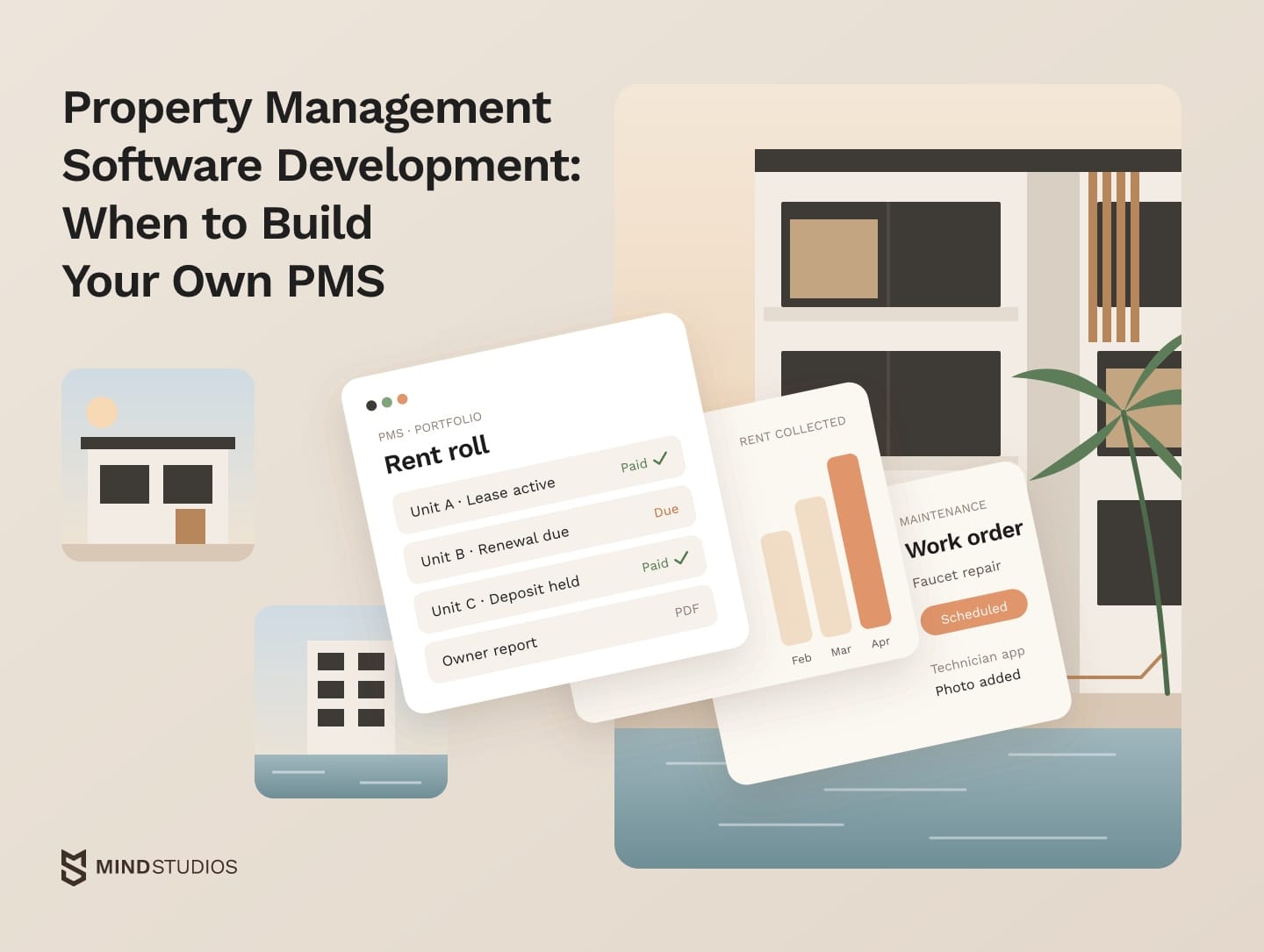
Property management software development connects leases, rent, maintenance and owner reporting around your workflows. The decision is whether your current property management system can support them through an extension or needs replacing.
Highlights
- Small portfolios with standard leases can run well on an off-the-shelf PMS.
- A layer on your current PMS's API can close gaps without a replacement.
- A trial data import in discovery exposes migration problems before launch.
For growing operators, the features of property management software that matter most are the ones the current product handles badly. Those gaps tend to show up in three places: subscription spending as the portfolio grows, local lease and payment rules, and tenant and ledger data split across tools.
We've built real estate products for markets from the US to MENA. They include the Mulki app, a mobile PMS for MENA landlords, and the Rentorr platform, a rental product with bank-based tenant checks.
If you already know where your current system breaks, the next question is what to keep, what to extend and what to build.
What property management software does and who uses it
A PMS runs the operating month of a rental business. It stores leases and tenant records, bills and collects rent, routes maintenance work, keeps the books and reports results to owners. Five roles work in it daily, each needing its own screens and permissions, plus mobile access for field staff.
Each role shapes later design decisions:
- Property managers handle leasing, renewals, tenant issues and the daily request queue.
- Accountants post charges, reconcile bank accounts and close the month.
- Maintenance technicians take work orders in the field, often on a phone with a weak signal.
- Tenants pay rent, submit requests and sign documents through a portal or app.
- Owners and investors read statements and portfolio performance.
Gaps between tools usually surface at month-end, when the accountant matches deposits to the bank and sends owner statements.
One note on scope: real estate management software development is the broader term, covering brokerage CRMs, listing portals, investment analytics and tools for developers. A PMS is the narrower part that runs leased property after the deal closes, and that's the scope of this guide.
Property management software features by module
The features of property management software fall into 11 modules, from leases and rent collection to portfolio analytics. Coverage varies by vendor and market, so check each module in your own system.
The 11 modules and what to check in each
The table maps each module to its key functions and what to check:
| Module | Key functions | What to check |
|---|---|---|
| Tenants and leases | Tenant records, lease terms, renewals, move-in and move-out | Whether lease fields match your local contracts |
| Rent charges and payments | Autopay, late fees, deposits, partial payments | Whether fee and deposit rules follow local law |
| Accounting and owner reports | Ledger, bank reconciliation, owner statements | Whether statements split by owner, entity and fee |
| Maintenance and work orders | Requests, preventive schedules, vendor dispatch | Whether vendors get orders without manual steps |
| Listings and vacancy | Portal syndication, availability, showings | Which portals the vendor feeds |
| Tenant screening | Credit, background and income checks | Which screening partners work in your market |
| Communication and tenant portal | Messages, notices, payments, requests | Whether notices can follow your templates |
| Documents and e-signature | Storage, versions, permissions, change log | How long records are kept and who changed what |
| Roles and access | Permissions by role, property and owner | Whether access can be limited per property and owner |
| Mobile apps | Tenant app, technician app with offline work orders | Whether work orders run without a signal |
| Portfolio analytics | Occupancy, delinquency, income by property | Whether you can build the views investors ask for |
Our guide to AI tenant screening covers the screening module in depth.
Where modules differ and what to build first
Accounting, documents, roles, mobile and analytics depend on how you operate. If investors want returns split by entity, fee and property, standard owner reports turn into a monthly export plus a spreadsheet.
Choose first-version modules by where money and volume move, and leave everything else on the current system until the core runs cleanly.
That usually means rent, ledger and owner reporting first, then maintenance and mobile. Compliance date tracking, virtual tours and utility monitoring can wait until the core data is reliable.
Types of property management systems and what each one needs
Your portfolio type decides which property management system features are mandatory. Residential runs on volume and rent collection, commercial on complex leases and CAM reconciliation, industrial on assets and safety compliance, and co-living on rooms and flexible terms. Hospitality has its own booking and housekeeping logic.
The table pairs each type with what it needs and what to check:
| Type | Must-have functions | What to check |
|---|---|---|
| Residential | Rent collection at volume, renewals, maintenance requests, tenant portal | Whether autopay, deposits and notices follow your local rules |
| Commercial | Long leases, rent escalations, CAM charges, year-end reconciliation | Whether CAM pools are split by each tenant's share |
| Industrial | Space and equipment registers, inspections, utility metering | Whether assets and inspections attach to units and leases |
| Co-living | Room-level leases, roommate matching, shared-area rules | Whether one unit can hold several leases with separate billing |
| Hospitality | Reservations, check-in, housekeeping, channel managers | Whether you need a PMS or a booking platform |
In residential portfolios, rental property management software development tends to center on rent collection at volume and a tenant app, and our guide to multifamily property management software goes deeper into apartment operations.
Short-term rentals work more like hotels than leased housing, and our piece on vacation rental software covers them separately. Once you know which functions your portfolio needs, the next decision is how to get them.
Buy, extend or build: choosing your PMS approach
There are three paths: run an off-the-shelf PMS, keep it and add your own layer through its API, or replace it with custom property management software. A small portfolio with standard leases is usually best served by the first. The other two come into play when a workflow that touches money or leases can't run on the current system without workarounds.
Three paths and where each one stops
The table shows when each path fits and where it stops scaling:
| Path | When it fits | Where it stops |
|---|---|---|
| Off-the-shelf PMS | Standard leases and workflows in markets the vendor supports | Higher tiers at scale, unsupported rules, fixed reports |
| Off-the-shelf PMS plus custom layer | Core ledger works; you need your own billing, reports, apps or integrations | API coverage, the API plan tier, vendor changes |
| Custom system | Local rules, unusual business models, PMS as your product | Build cost, migration effort, owning the roadmap |
A custom layer keeps the vendor's ledger and updates while you own the screens and logic.
Signals that it's time to extend or build
Three signals usually start the conversation:
- Rising spend: subscription spending rises faster than your unit count, for example when growth moves you into a higher plan or paid modules.
- Manual fixes: staff run monthly workarounds on money or leases, such as copying ledgers into spreadsheets for owner reports.
- Split records: the same tenant or payment record lives in three systems that disagree at month-end.
Each signal identifies a workflow to test against the current PMS before you choose an extension or replacement.
Dmytro Dobrytskyi, CEO at Mind Studios, explains how the build decision differs between a PropTech product and an operator:
For Mulki, the PMS was the product itself, so its local rules had to live in its own system from day one. Operators who run their portfolio on a vendor's PMS are in a different position. Our rule for them is to own only the workflows that set the business apart and keep the vendor's ledger underneath for as long as it holds.
A seven-step decision check
Each answer narrows the next question:
- Workflows at risk. List the workflows that touch money, leases or local rules, with the monthly hours of manual work each one takes.
- Data locations. Note which systems hold tenant, ledger and owner data, and where they disagree.
- API coverage. Check whether the vendor's API reads and writes those records and sends webhooks.
- History export. Confirm you can export full history: ledgers, leases, deposits and documents.
- Extension cost. Price the extension: the plan tier with API access, the build and its support.
- Three-year subscription. Model subscription spending at your expected portfolio size in three years.
- Replacement cost. Compare that total with a replacement, including migration.
If the check points to a layer or a build, our build and scale team starts discovery from the same list.
Requirements to verify before extending your PMS
Before you extend your current property management software, test five types of requirements against the vendor's product and API. The answers show whether each one fits a layer on top or needs data your current system can't hold.
Five requirements to test against your PMS
- Local lease templates and calendars: check whether the PMS stores the fields of a mandated contract and schedules payments on a non-Gregorian calendar.
- Billing and owner payouts: splitting rent between owners and handling partial payments in a layer requires an API that writes ledger entries.
- Investor reporting: a reporting layer that reads from the PMS works when the history your investors need can be exported.
- Local banks and payment rails: a layer works if the vendor lets you route payments outside its built-in processor.
- Maintenance for large sites: equipment registers and inspection cycles fit a layer if the API can create work orders.
What to check in the vendor's API
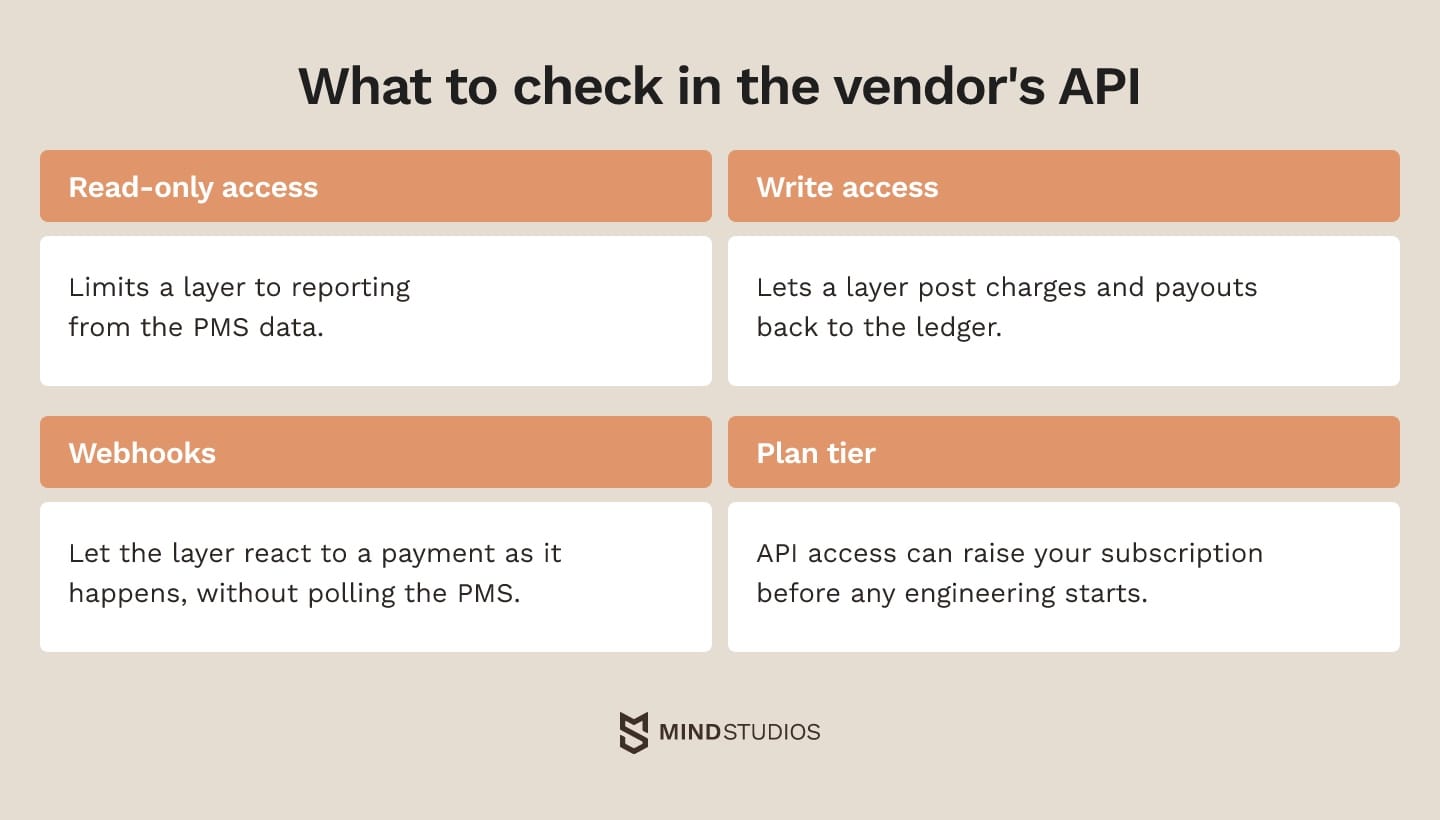
If your layer posts charges or payouts to the PMS ledger, the API must support those writes; with read-only access, that step stays in the original system. Webhooks let the layer react to a payment as it happens without polling the PMS.
If the API operations you need require a higher plan, include that subscription increase in the extension budget before estimating development.
Payment and verification APIs carry a different risk: they may not exist in your market. On Rentorr, tenant fraud checks ran through a bank API that returned a credibility score, and few banks offered the API the platform needed. That's why provider availability belongs in discovery, before the design depends on it.
How Mulki handled local rules
Mulki is a working example of local lease and calendar rules:
- Challenge: Landlords had no single view of contracts and finances. Payment schedules weren't automated, so deadlines slipped. Contracts took a long time to prepare, and data was spread across several apps and spreadsheets.
- What we did: We built a mobile-first PMS. It uses machine learning to scan the lease template mandated in Saudi Arabia, runs payment schedules on the Hijri calendar and has an Arabic right-to-left interface with left-to-right numbers. It also has modules for finances, tenants, contracts and payments, plus a real-time financial dashboard.
- Result: Launched as an MVP, giving landlords one app for contracts, payment schedules and finances.
For an operator with an existing PMS, the test is whether it can exchange the lease fields and payment schedules the market requires, and if not, whether a separate module can own that data without breaking reconciliation.
Before you commit to a path, check what your PMS API could carry for the workflows that matter most.
Property management software development process, step by step
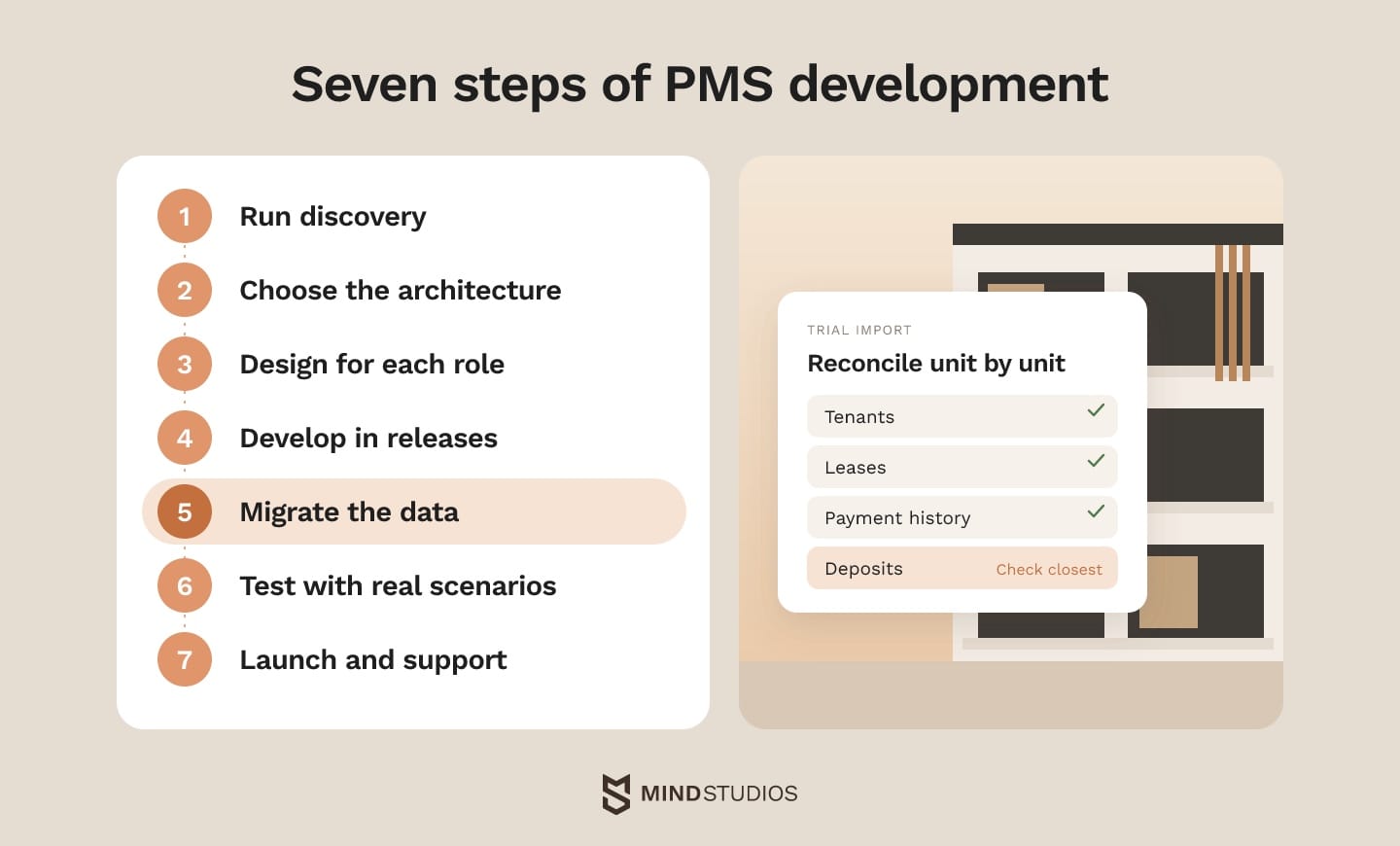
A PMS build has seven steps: discovery, architecture, UX, development, data migration, testing and launch. Migration needs attention earliest, because years of leases, ledgers and deposits often need cleanup before they can move. A trial import during discovery shows missing records and unresolved balances while they can still shape the launch plan.
What each step involves
Follow this sequence:
- Run discovery. Map how money, leases and work orders move today, list every workaround and rank modules by risk and volume.
- Choose the architecture. Decide between a layer on the existing PMS and your own system, then fix the data model for units, leases, ledgers and owners.
- Design for each role. Managers need dense desktop views, while tenants and technicians work on phones, so property management app development for those two roles is usually mobile-first, with offline work orders for technicians.
- Develop in releases. For an extension, ship the priority workflow against the existing ledger. For a replacement, validate leases, ledger entries and basic owner statements together, then add maintenance, apps and advanced analytics.
- Migrate the data. Import tenants, leases, payment history and deposits, then reconcile balances against the old system unit by unit. Deposits need the closest check, because a wrong balance surfaces at move-out.
- Test with real scenarios. Late and partial payments, deposit returns, role permissions, imports and a restore from backup reveal more than screen-by-screen checks.
- Launch and support. During parallel running, one system owns new charges and payment runs. Agree upfront who can call a rollback, on what conditions and how new entries return to the old system, then stay on hand through the first month-end close.
What changes an estimate most
Provider limits like Rentorr's bank API are one source of estimate risk. Anton Baryshevskyi, Head of Business Development and Co-Founder at Mind Studios, explains what he asks before estimating a PMS project:
The biggest swings in a PMS estimate come from the history that has to come across and the providers that sit on the money path. Clean ledgers in one system are a different project from deposits split across spreadsheets. That's why we ask for a sample export on the first call. It shows the real migration work before anyone prices a feature.
The providers on the money path lead straight into the integration plan.
Property management software integrations that make the system work
A PMS usually connects to accounting, payments, bank feeds, listing portals, screening, CRM, smart locks and e-signature. Connections on the money path need the most testing, because every charge, payout and deposit has to reconcile to the ledger.
Here's what each integration gives you and what sets its pace:
Integration |
What it gives |
What sets timing |
|---|---|---|
Accounting and ERP |
Synced ledgers and owner statements without double entry |
Chart of accounts mapping, as our ERP integration guide explains |
Payment processing |
Card, ACH and local rails for rent and deposits |
Payout rules, fees and chargeback handling |
Bank feeds |
Automatic matching of deposits to charges |
Whether your banks offer an API |
Listing portals |
Vacancies published from one place |
Each portal's feed format and approval process |
Tenant screening |
Credit and background checks inside the application flow |
Provider contracts and notice workflows |
CRM |
Leads and tenant history in one view |
Clear rules on which system owns which record in a real estate CRM |
IoT and smart locks |
Remote access and sensors for preventive maintenance |
Device vendors and on-site installs, as our IoT use cases show |
E-signature |
Leases signed inside the flow with an audit trail |
Template management |
Technicians and accountants notice sync failures first, so test every integration with them on real data before launch.

Security and compliance requirements by market
Tenant data falls under different rules in each market, and no PMS makes you compliant automatically. In the US, fair housing, screening and state privacy laws apply. The EU has GDPR, Saudi Arabia and the UAE have their own data protection laws, and card payments in every market fall under PCI DSS.
Here is what each market's main rule means for a PMS:
- US, listings and leasing: the Fair Housing Act, in Section 3604, bars discriminatory ads and rental decisions and requires reasonable accommodations for disabilities, so screening needs nondiscriminatory criteria and a path for accommodation requests.
- US, screening reports: under FCRA Section 1681m, any adverse decision based even partly on a consumer report, such as a denied application, requires a notice to the applicant that the flow should send.
- California: CCPA, as amended by CPRA and explained on the CPPA FAQ page, covers businesses that meet its thresholds and gives rights to know, delete, correct and opt out, so tenant records must be findable per person.
- EU: GDPR Article 32 requires security measures appropriate to the risk, such as encryption, access control and tested recovery.
- Saudi Arabia: as the Saudi PDPL summary sets out, PDPL requires a lawful basis for processing and limits transfers abroad, which affects where tenant data is hosted.
- UAE: Federal Decree-Law No. 45 of 2021, outlined in the UAE PDPL summary, makes consent the default basis for processing, while free zones such as DIFC and ADGM run their own regimes.
- Card payments, all markets: the PCI DSS standard covers systems that store, process or transmit card data or can affect its security, so check how each payment integration touches the card flow.
Inside a property management system, these rules usually turn into role-based access, MFA for staff, encryption in transit and at rest, and an audit log on leases and ledgers. A vendor can supply the controls, but how you collect, use and keep tenant data stays your responsibility.
Your development partner also handles tenant data during the build and the migration, so its own processes count. Mind Studios is ISO 27001 and ISO 9001 certified, as our company page shows.
How much does property management software cost: subscription vs custom
A PMS costs either a subscription that grows with your unit count or plan tier, or a build plus ongoing support. A custom layer adds build cost on top of the subscription, while a full custom system moves the spend into development, hosting and maintenance, which still grow with volume.
What a subscription price depends on
When you compare subscription quotes, check three things:
- Pricing model: whether the fee is per unit or a plan tier that covers a range of units.
- Minimums: whether the plan sets a minimum unit count or monthly fee.
- Add-ons: which modules, such as screening, payments and e-signature, are billed separately.
Three cost models compared
The table compares the three models:
| Cost model | What's included | How costs grow |
|---|---|---|
| Off-the-shelf subscription | Hosting, updates, standard modules, vendor support | Per unit or plan tier, for as long as you use it |
| Off-the-shelf PMS plus custom layer | Subscription (possibly higher API tier), module build and support | Subscription by units or tier; layer by features |
| Custom system | Build, hosting, support and a roadmap you own | Development, then hosting, support and transaction fees by volume |
The cheapest option at today's unit count can change as you grow, so compare the models over three years.
What a three-year comparison should include
Put the same cost lines on each option:
- Subscription fees, including any tier needed for API access
- Implementation, data migration and staff training
- Build and support for any custom module or system
- Hosting, payment and transaction fees
- Staff hours spent on manual workarounds
What drives the build budget
Five factors shape a build budget:
- The number of modules and how deep each one goes.
- Integrations, especially those on the money path.
- Platforms (web, iOS, Android) and offline requirements.
- The volume and quality of the data to migrate.
- Compliance requirements in each market you serve.
Build work is usually contracted as fixed price for a scoped release, time and materials for changing scope, or a dedicated team for long-running products. The right choice depends on how certain the scope is, so it usually follows discovery.
Mind Studios' recommendation: Write down the assumptions behind each three-year figure: unit count, added modules, transaction volume and API access. Comparing every option on the same assumptions shows which change would flip the decision.
Tech stack for a custom property management system
A custom PMS runs on a standard web and mobile stack. The choices that matter most are the database, the payment layer and how the mobile apps handle offline work. Ledgers usually sit in a relational database next to a mature backend framework and a cloud provider with managed backups.
The table lists each layer and the usual options:
| Layer | Common options |
|---|---|
| Web front end | React, Vue.js |
| Mobile apps | Native Swift and Kotlin, or React Native and Flutter |
| Backend | Ruby on Rails, Node.js |
| Background jobs and cache | Sidekiq, Redis |
| Database | PostgreSQL |
| Cloud | AWS |
| Payments | Stripe, ACH through a processor, local gateways |
| Documents | OCR and machine learning models for lease data |
Rentorr, for example, ran on Ruby with PostgreSQL, Redis and Sidekiq. A relational database suits a PMS because every payment, fee and deposit has to reconcile against a lease.
Mobile is often the open question for CTOs. If technicians need offline work orders and frequent camera use, prototype those flows in native and cross-platform builds before the team commits to a framework.
AI features in a PMS: what pays off and what to skip
AI is worth piloting in property management software where volume is high and the input repeats. On a small portfolio that signs a handful of leases a month, build and review costs may outweigh the savings, and simple rules can do the job.
AI tends to be worth a pilot in four areas:
- Lease and document reading: pulls dates, rent and parties from contracts into the lease record.
- Request sorting: groups tenant requests by type and urgency and asks for photos, using only your own policy data.
- Predictive maintenance: flags equipment likely to fail, based on work order history and sensor data.
- Scoring: ranks leads, renewals or properties when there is enough clean history.
Scoring depends on its data sources. For the AnyCurb platform, a US real estate marketplace with MLS integration, we built a likely-to-sell model that weighs 300+ metrics per home and reached 85% prediction accuracy, verified by a third party. That model predicts home sales, but renewal scoring starts with the same check: which data sources exist and how clean they are.
Predictive models need enough relevant outcomes to evaluate, so a pilot should first test whether your records support the task. For chatbots that answer from general knowledge instead of your policy data, a wrong deposit answer means disputes and manual follow-up, so measure that cost alongside time saved.
Mind Studios' insight: Mulki's contract scanning reads one lease template mandated in Saudi Arabia. Before you budget for machine learning on documents, pilot it on the lease layouts you actually receive and track errors on key fields, the share of documents that need manual review and the cost per document.
When building your own PMS is worth it
Building your own PMS is worth it when one of the gaps from the start of this guide (subscription spending, local rules or split data) touches money or leases, and an API layer can't handle it at a lower three-year cost.
When you compare property management software development service proposals, look for a migration plan and a three-year cost view before anyone shows you screens. Those documents show whether a proposal accounts for your existing data, operating costs and migration risks.
If you want a second opinion on your setup, a discovery session is the place to review how your PMS, accounting and payment tools fit together and where a custom layer would pay off.
FAQ
How much does property management software cost?
The price depends on the cost model, so compare quotes on the same terms. Ask each vendor or partner:
- What happens to the price as we add units?
- Is API access in our plan or a higher tier?
- Which payment, screening and signing fees apply per transaction?
- What does support cover after launch, and how are changes billed?
What software do property management companies use?
Companies run an off-the-shelf PMS, extend one with a custom layer or operate their own system. Which setup fits depends on:
- Portfolio type and how complex the leases are.
- The markets you operate in and their lease and payment rules.
- Whether the software is part of the product you sell.
When does custom property management software make sense instead of an off-the-shelf PMS?
Check in this order. First, does a workflow that touches money or leases run on workarounds? Second, can the current PMS and its API handle it? Third, what does extending cost over three years? Custom makes sense when the first answer is yes and the next two rule out extending at a lower total cost.
Can we extend our current PMS instead of replacing it?
Often, yes. The practical test is a demo of the workflow that hurts most, such as owner payouts, run through the vendor's API on test data. Any step that still needs manual work shows what your layer would have to cover or whether replacing the PMS makes more sense.
How long does it take to build a custom PMS?
Timelines in property management software development depend on the modules in the first release, the integrations on the money path and how much data has to be migrated. For reference, work on Mulki started in October 2021, and the MVP launched in September 2022. A layer on an existing PMS can ship sooner, because the ledger already exists.
How do we migrate tenant and lease data from our current system?
Migration is done when the people who own the data sign it off:
- The accountant signs off balances, deposits and open charges unit by unit.
- Property managers confirm lease terms and renewal dates.
- Owners or asset managers review the first statement from the new system.
- After cutover, the old system stays read-only until the new one closes a full month.
What does property management software do?
It runs the lease cycle from application to move-out: screening, leases, rent, maintenance, books and owner reports. Lead management, short-term bookings and corporate ERP usually sit in separate systems connected to it. That's why integrations shape the project as much as the feature list does.