 ChatGPT
 Perplexity

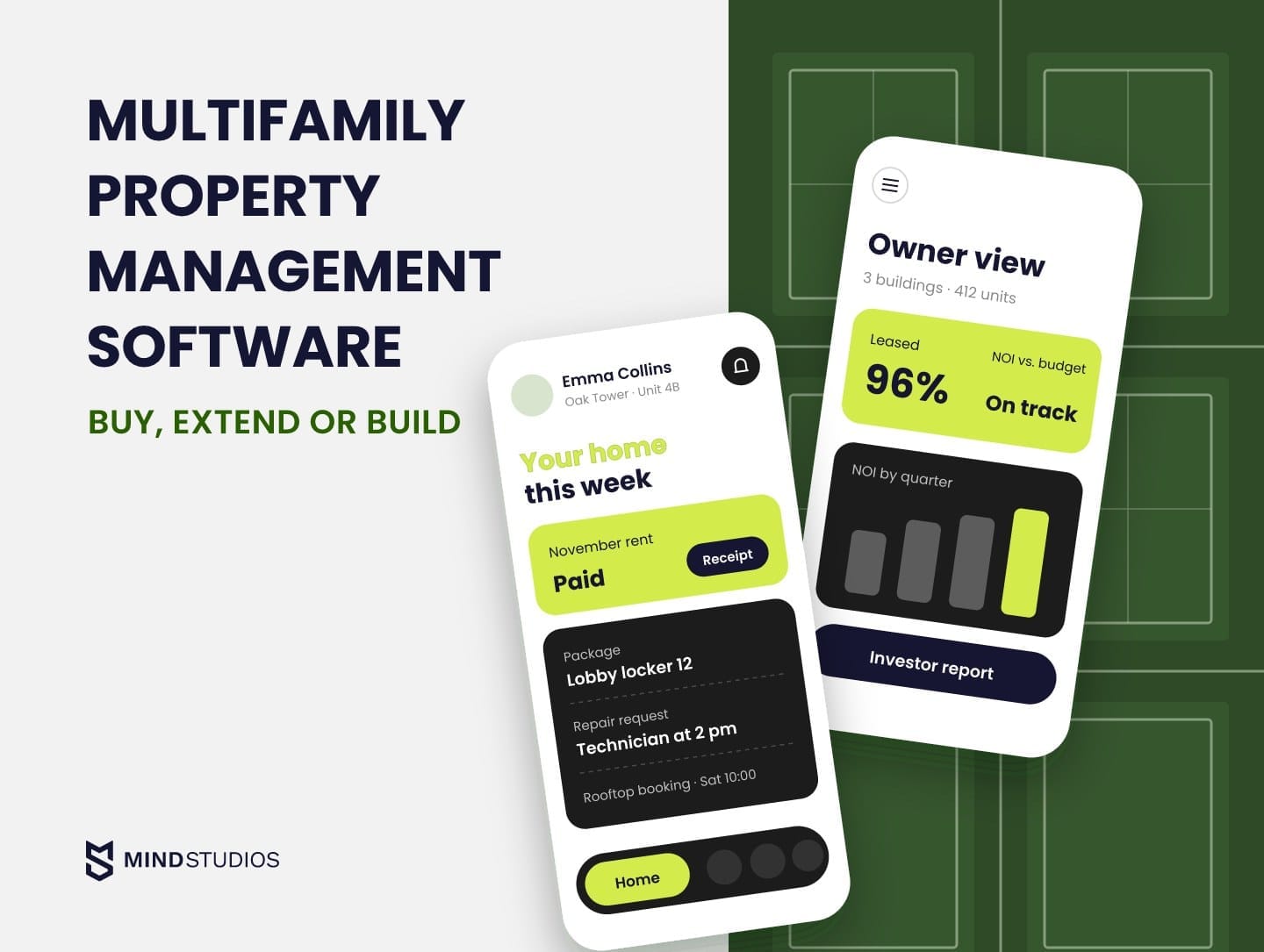
Multifamily property management software usually handles leases and rent well, while the costly gaps open between systems as a portfolio grows. This guide helps you decide whether to stay, extend or build.
Highlights
- If leases and ledgers run well, extend the platform before replacing it.
- Check API scope, read and write rights and data export before any extension.
- Prepare a one-property pilot with a trial export, then expand in waves.
Multifamily property management software runs an apartment portfolio day to day. It is one platform for leasing, rent collection, maintenance, resident communication, accounting and owner reporting, organized by unit, building and portfolio.
As the portfolio grows, resident data can end up in the platform, maintenance in a vendor tool and investor numbers in spreadsheets, so someone builds every owner report by hand. At that point there are three options: stay, extend the platform through its API or build your own system.
We've built real estate products, including Mulki, a property management app for MENA landlords, and AnyCurb, a US real estate marketplace with a sale-prediction model. If you can't yet tell where your current systems slow you down, our team can help you trace it.
What multifamily property management software is and how it differs from general PMS
Multifamily property software manages many units under shared roofs. It tracks each lease and ledger by unit, rolls them up by building and portfolio, and handles what shared buildings add: amenities, package rooms, utility splits and building-wide notices.
Many general platforms now serve multifamily operators too and use similar labels. For a shared building, the practical test of property management software for multifamily is whether unit records support building-wide services and portfolio reporting. The table compares those needs with scattered single-family homes.
| Requirement | Scattered single-family homes | Multi-building portfolio |
|---|---|---|
| Record structure | Each home is its own record with its own owner statement | Units roll up into buildings, communities and portfolios |
| Resident services | Online payments and repair requests | Portal and app with requests, amenity bookings and building notices |
| Shared spaces and access | Rarely needed | Amenity booking, access control and guest passes |
| Utilities | Often paid by the resident directly | Submetering or ratio utility billing (RUBS) per unit |
| Pricing | Rent set per home | Unit-level pricing by floor plan, lease term and availability |
| Owner reporting | A statement per owner | Building and portfolio reports for owners and investors |
Our PMS development guide covers the build path for every property type.
What operators gain from one integrated multifamily platform
One integrated platform helps when every module reads and writes the same unit, lease and ledger records. When the records are shared and metric definitions match, staff stop re-keying data, owners get NOI and occupancy from one source and residents follow one path for payments and requests.
When multifamily management software is split across disconnected tools, these risks get harder to manage:
- Resident turnover. Residents who chase repairs across email and phone have a reason to leave at renewal.
- Maintenance escalation. Without one work order history per unit, repeat issues go unnoticed until a small fix becomes a capital repair.
- Compliance gaps. Screening records, notices and income certifications spread across tools slow audits down.
- Staff burnout. Site teams spend their day copying data between systems.
- Decision latency. Portfolio decisions wait for someone to reconcile separate exports.
Each risk starts at a handoff between tools, so the modules below are worth judging by how well they connect.
Core features: what each module must do for a multi-building portfolio
A multi-building portfolio needs two groups of modules. Daily operations depend on rent collection, leases, work orders, the resident portal and accounting, so every platform must handle them well. Utility billing, revenue management, affordable compliance and access control depend on your asset mix and markets.
If inquiries stall between listing sites and signed leases, leasing deserves an early review. Multifamily CRM software should make the next action and its owner visible throughout that handoff, and our real estate CRM guide covers when a custom CRM pays off.
The table lists 14 modules, what each gives the business and one practical tip.
| Feature | Business impact | Tip |
|---|---|---|
| Online rent collection and payments | Faster collections, fewer manual reconciliations | Keep card data with the processor and confirm which PCI DSS duties stay with you. |
| Lease management and e-signing | Shorter lease cycles, one record per unit and resident | Store renewals as new terms on the same unit record. |
| Tenant screening | Consistent, documented approvals | Apply one written set of criteria and log it with each decision. |
| Maintenance work orders | Faster response, full history per unit | Involve technicians in design and support offline use. |
| Resident portal and mobile app | Self-service payments, requests and bookings | Test with residents of one building before the portfolio rollout. |
| Listing syndication and lead management | Wider reach, every lead traced to its source | Judge each channel by the signed leases it produces. |
| Leasing CRM | Shorter vacancies, consistent follow-ups | Automate follow-ups and log an AI leasing assistant's answers for review. |
| Utility billing | Recovered utility costs through submetering or RUBS | Confirm local rules on ratio billing before entering a new market. |
| Revenue management | Unit-level rent recommendations | Check pricing data sources first (see the regulatory section). |
| Access control and smart locks | Self-guided tours, fewer key handovers | Revoke resident access through a verified move-out workflow, with checks for renewals and continued occupancy. |
| Financial management and reporting | Real-time financial visibility, automated reconciliations, investor-ready reports | Sync the ledger with tools such as QuickBooks or Xero. |
| Executive analytics dashboard | Portfolio benchmarking and early warnings | Start with the KPIs leadership reviews weekly, with drill-down to unit. |
| Compliance management | Audit-ready records, fewer missed deadlines | Put deadlines and document checks inside daily workflows. |
| Integration framework | Clean data flow to accounting, banking, IoT and third-party tools | Plan the API layer from day one, even if only two systems connect at first. |
Your priority workflows should determine how you score the demo. If owner reporting is the bottleneck, ask the vendor to produce a report from your sample records.
How to choose multifamily software: portfolio size, asset types, integrations, total cost
Compare platforms on four points, in this order: portfolio size, asset types, integrations and total cost. Size and asset mix narrow the field. Integrations decide whether your multi family software stack can grow around the core, and total cost shows what the subscription price leaves out.
Portfolio size and asset types
Tools for small landlords keep setup light, while enterprise suites carry the depth that thousands of units across regions require. Buy above your scale and you pay for configuration nobody uses; buy below it and you outgrow the tool after a few acquisitions.
Asset mix matters as much as size, because affordable units need income certifications, student housing needs by-the-bed leases and mixed-use floors need commercial leases. If you hold several types, confirm that one platform handles all of them.
The table shows how six established platforms describe their focus and integration routes, in no ranked order.
| Platform | Positioned for | Integration route |
|---|---|---|
| Yardi (Voyager, Breeze) | Voyager for large, mixed portfolios; Breeze for smaller operators | Interface partner program for Voyager and RentCafe |
| RealPage (OneSite) | Conventional, affordable and student multifamily | Exchange AppPartner program for partner integrations |
| Entrata | Multifamily operators, including student and affordable housing | API use under an agreement with Entrata |
| AppFolio | Residential portfolios, including multifamily, plus other property types | AppFolio Stack marketplace for partner integrations |
| MRI Software | Residential and commercial owners and operators | MRI Information Exchange (MIX) for partner and in-house apps, including custom APIs |
| Buildium | Residential, mixed-use and multifamily portfolios, including enterprise operations | Open API for custom integrations |
Integrations and security
Integration terms and total cost each get their own section below. Security needs the same precision: when a vendor cites a SOC 2 report or ISO 27001 certificate, ask which services it covers, because add-on products may sit outside that scope.
Questions to ask on the demo
Asking every vendor the same questions makes their answers comparable:
- Fit and pricing:
- Can you configure our structure (entities, buildings, units) live, with one of our asset types?
- Which modules come with the base subscription, and which are paid add-ons?
- APIs and data:
- Which APIs are available on our plan, and do they allow writes?
- Can we export all data, including lease and payment history, in a usable format?
- How do syncs perform under load, such as at month-end close?
- When a sync fails, who is alerted and how are records retried?
- Security and controls:
- Which security reports can you share, and how often are they renewed?
- How do screening criteria, audit logs and role permissions work?
Off-the-shelf platform, add-ons or a custom layer: how operators decide
Keep your core multifamily property software when leases, ledgers and accounting run well on it, and look at what surrounds it. Reporting and the resident experience are where a custom layer can close gaps while the platform keeps the records. A fully custom system fits an unusual operating model, and only after the other paths are ruled out.
Which path fits which operator
The four paths differ in who owns the data model and who decides when it changes.
| Path | Who it fits | Limits |
|---|---|---|
| All-in-one platform | Operators whose processes match the platform's standard workflows | The vendor sets the roadmap, and you can only differentiate through configuration |
| Platform plus SaaS add-ons | Teams that need a few extra functions, such as tours or package lockers | Each add-on brings a subscription, a login and a sync to maintain |
| Platform plus a custom layer via API | Portfolios that need their own resident app, unified data or investor reporting | Needs the right API access, partner terms and an owner for the layer |
| Fully custom system | Operators combining services no platform supports | Highest upfront cost, plus ownership of accounting, compliance and every update |
The third path suits the operator from the introduction: the platform keeps leases and money, while your layer shapes what residents and investors see.
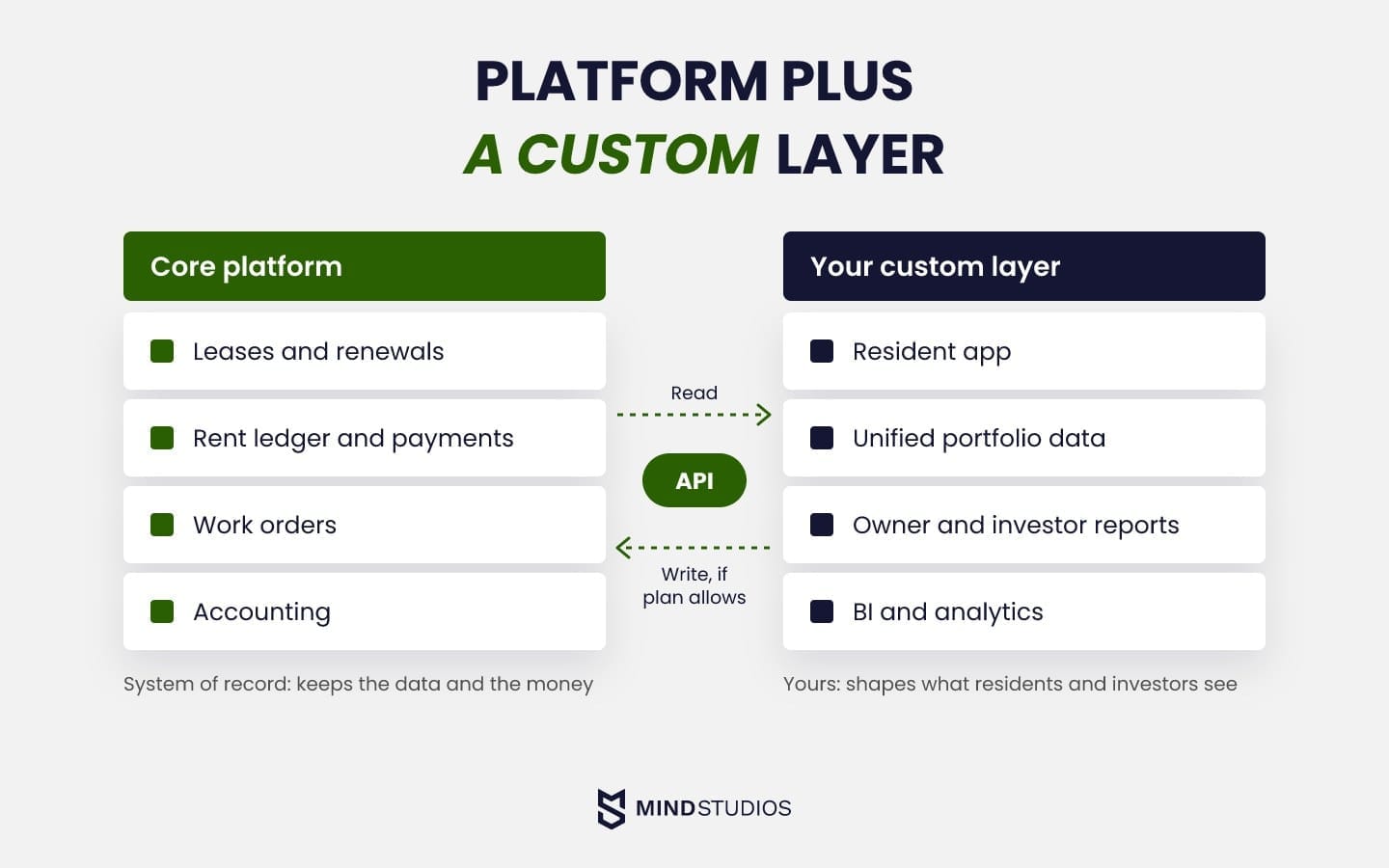
A custom layer on a platform you don't own
The same approach works outside real estate. For Wise Up, built for WKO, the Austrian Chamber of Commerce, we added an account management module and a billing layer on top of the EdCast LMS. Single sign-on connects the two systems, and two custom admin panels separate the owner, administrator and manager roles.
Stripe became uneconomical for enterprise clients, so the layer added progressive volume pricing and direct invoicing. The industry is different, and the mechanics match a resident or investor layer built over a property platform.
Dmytro Dobrytskyi, CEO at Mind Studios, explains the first decision behind any layer built on someone else's platform:
When we extend a product the client doesn't own, as with Wise Up, the first decision is which system owns each record. Accounts, roles and invoices live either in your layer or in the platform, and that choice shapes every sync after it. If nobody can name the owner of a record, the layer isn't ready to estimate.
What to verify before you extend a platform
Before any API work, confirm what your contract and plan allow:
- API scope on your plan. Some vendors include API access, or write access, only in higher plans, so list the endpoints your plan includes.
- Partner program terms. If integration runs through a vendor program, ask who signs, who pays any interface fee and which products it covers.
- Read and write rights. A reporting layer can often work with read access, while a resident app that creates work orders or payments needs write rights.
- Sync ownership. Agree who fixes a broken sync when the vendor changes an endpoint, and how fast.
- Data export. Confirm you can export full history in a usable format, since every later migration depends on it.
If you're unsure what your plan allows, our engineers can review your API terms and data rights before any estimate.
Multifamily asset management software: reporting for owners and investors
Multifamily asset management software gives owners and investors the portfolio view: NOI, occupancy, budget vs. actual, capital spending and debt in one place, refreshed from the operating platform. It answers an owner's monthly questions at property and portfolio level, with every figure traceable to its source.
An owner or investor report should show these metrics:
- Net operating income by property and portfolio, against budget.
- Occupancy and leased percentage by floor plan, alongside delinquency.
- Budget vs. actual for income and expense lines, with variance notes.
- Capital expenditures by project, against plan and reserves.
- Debt metrics such as debt service coverage and loan maturities.
An investor portal can distribute statements and documents from the same reconciled records used in operating reports, and an audit trail of each change keeps every figure defensible.
Multifamily investment software also needs that history for acquisition models and forecasts, which makes traceable data useful across both workflows. Our article on predictive analytics covers where prediction models help investors.
For AnyCurb, the US marketplace from the introduction, our likely-to-sell model evaluates 300+ key metrics per home and reached 85% prediction accuracy, verified by a third party. The lesson carries over to investor reporting:
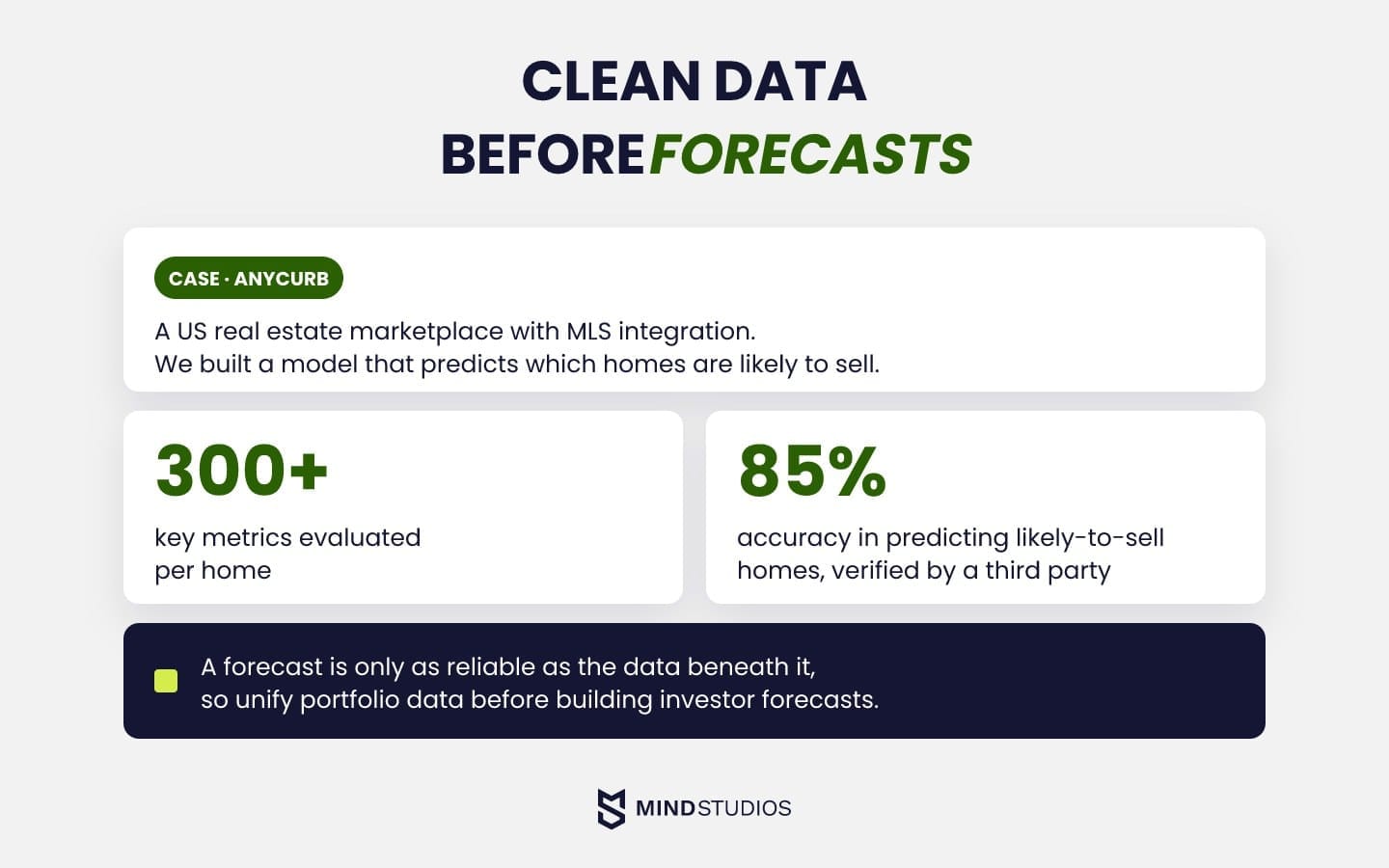
Revenue management software and the regulatory line
Multifamily revenue management software recommends unit-level rents from demand and market data. Its regulatory risk sits in the data that feeds the model and in how recommended prices get accepted. Both sit at the center of the US case against RealPage over the sharing of nonpublic landlord data through its software.
The DOJ's announcement of a proposed settlement said its terms would limit RealPage's use of competitors' nonpublic data, restrict geographic detail in its models and change features tied to accepting recommended prices.
A September 2026 court filing records final judgment on the United States' claims against RealPage in May 2026, while the states' claims continued. All but one named landlord has also settled or proposed a settlement with the DOJ, with terms that bar algorithms fed by competitors' sensitive data. The final judgments, not the proposed terms, are the binding text for anyone configuring a pricing tool.
Mind Studios' recommendation: If you build or configure pricing tools, base recommendations on your own operating data and public market data, leave the final price to a person and log every decision with its inputs. Human sign-off alone doesn't settle questions about data sources, so have counsel review them before launch.
Compliance and data requirements multifamily software must meet
Depending on your markets, multifamily software has to support fair housing rules in screening and advertising, card security for payments, income and rent rules for affordable units, and data protection where GDPR applies. With the right configuration, the compliant path becomes the staff default and every decision leaves an audit trail.
Key requirements by area:
- US fair housing. The Fair Housing Act bars discrimination in renting and rental advertising based on race, color, religion, sex, handicap, familial status or national origin, so screening criteria and listing copy both need controls.
- Payments. The PCI DSS standard applies to anyone who stores, processes or transmits cardholder data. A hosted payment page or tokenization can shrink that scope, though the PCI Council's guidance makes clear that outsourcing still leaves duties with the merchant.
- Affordable housing. Section 42 of the Internal Revenue Code sets income and rent limits for tax-credit units, and under federal reporting rules state agencies send HUD yearly household data such as income, family composition and monthly rent, so the platform must track those fields.
- EU data. GDPR Article 3 covers operators established in the EU and those outside it that offer services to people in the EU. Where it applies, GDPR principles such as data minimization and storage limitation decide which resident data you keep, and for how long.
- MENA. Data protection and tenancy rules vary by country, so map them with local counsel before rollout.
Whoever builds your custom layer will handle resident and payment data too, so ask how the team protects it and controls delivery quality. Mind Studios, for example, is ISO 27001 certified for information security and ISO 9001 certified for quality management.
How to roll out a multifamily platform in phases
Roll out in six phases: prepare one property, run it through a full cycle, then expand in waves once data and people are ready. The sequence is the same for new multifamily management software and for a custom layer, and the pilot exposes migration problems while they are still cheap to fix.
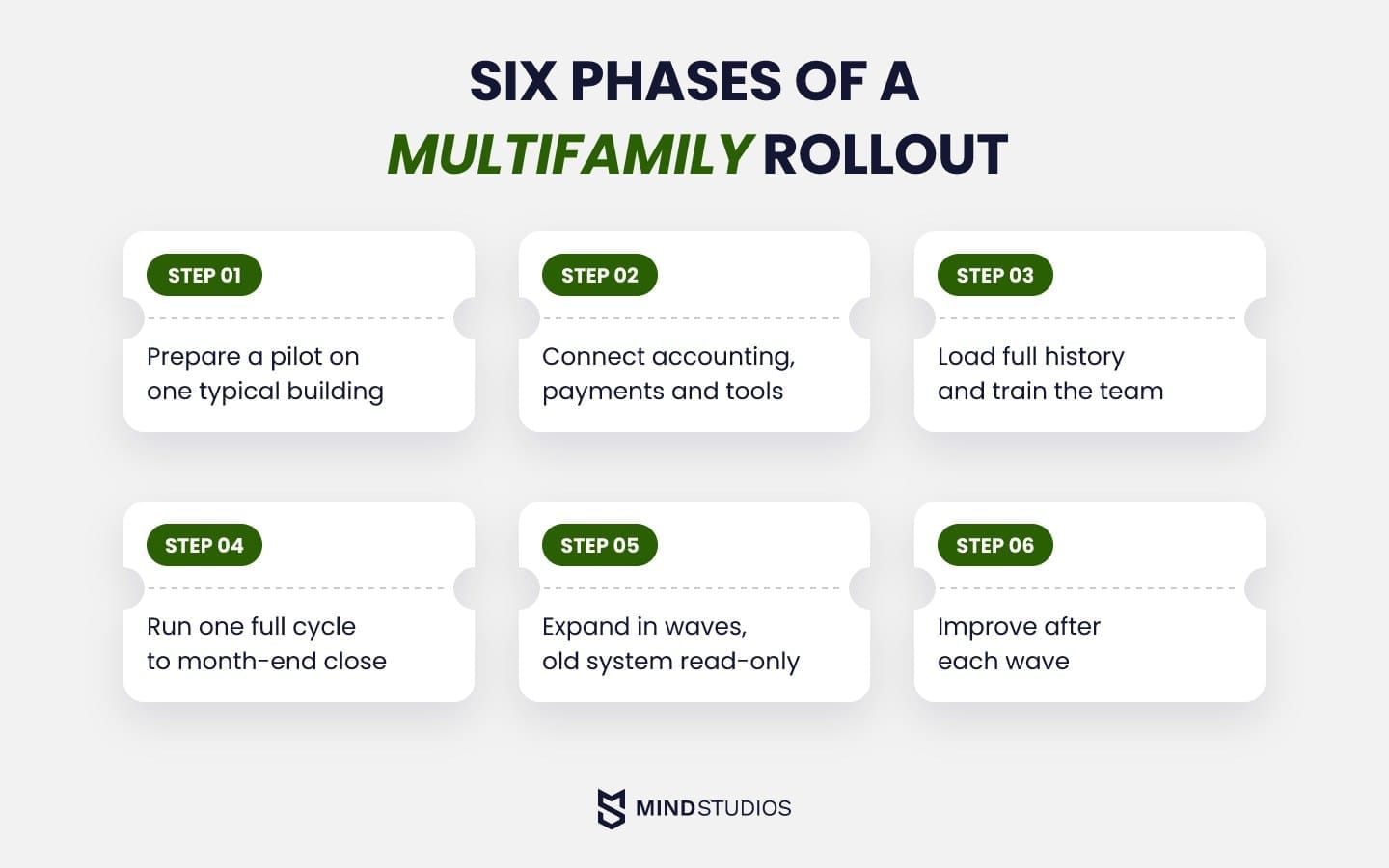
What each phase involves:
- Prepare the pilot. Pick a typical building, run a trial export of its resident, lease and payment history, and agree on acceptance criteria such as reconciled balances and matching open work orders.
- Connect integrations. Link accounting, payments and the tools you keep, and test each sync with real transactions.
- Load data and train the pilot team. Migrate the property with full history, reconcile balances against the old system and give site staff role-based training.
- Run a full cycle. Take the property through leasing, payments, maintenance and month-end close, and collect feedback from staff and residents.
- Expand in waves. Before each wave, check the acceptance criteria, train new teams and give residents a cutover date. Keep the old system read-only for reconciliation, agree who can authorize a rollback and test how transactions created after cutover would be preserved and reconciled.
- Improve continuously. Review usage and support tickets after each wave and feed the findings into the next release.
Mapping local rules before launch: Mulki
For Mulki, we built machine learning contract scanning for Saudi Arabia's standardized lease template, payment schedules on the Hijri calendar and an Arabic right-to-left interface that keeps numbers left to right. It launched as an MVP, giving landlords a working app built around those local rules.
Anton Baryshevskyi, Head of Business Development and Co-Founder at Mind Studios, explains how local rules shape the first step of a rollout:
Projects like Mulki show that local rules decide what each record has to hold, long before anyone talks about screens. That's why we'd begin a rollout with a trial export of resident, lease and payment history, checked against each market's rules. The gaps it reveals help us estimate migration work and identify what still needs testing.
How much it costs: platform subscriptions vs. custom development
Platforms charge a subscription, often tied to unit count or plan, while custom development is priced by scope. When you compare multi family property management software, price the modules and integration access your workflows require, because that figure says more than the advertised rate.
Subscription terms vary with unit minimums, included modules, API access by tier and whether enterprise pricing is quoted only on request. Custom work has its own drivers, and the table shows the typical scopes behind a budget.
| Scope | What it includes | Budget drivers |
|---|---|---|
| Single module or integration | One feature added to an existing system, such as a work order sync | API limits, data mapping, testing against the live platform |
| Custom layer over a platform | Resident app, unified portfolio data or investor reporting via API | Number of systems, read or write access, real-time vs. batch sync |
| Core operations platform | Maintenance, resident portal and basic reporting | Roles, workflows, mobile apps |
| Enhanced platform | Core modules plus leasing, financial management and analytics | Accounting integration, leasing workflows, reporting depth |
| Enterprise system | All modules plus advanced integrations and predictive analytics | Compliance scope, number of regions and entities |
| System migration | Moving data from legacy systems | Data quality, depth of history, number of source systems |
Discovery tests these drivers against your actual systems and data, so the estimate can separate confirmed scope from work that still depends on vendor access. Our guide to software development costs covers the general factors behind any estimate.
Conclusion: fix the most expensive gap first
When an owner report still has to be rebuilt by hand, start by identifying which handoff creates the work. That gives you a specific gap to test before committing to a wider rebuild.
If your core handles leases and money well, keep it and extend from the gap that costs the most staff time or owner trust. If the platform has run out of room, multifamily management software built to scale around your workflows may be the answer.
Either way, the work starts with an accurate picture of how your systems connect today. Our engineers can map it with you and run discovery before you commit to a path.
FAQ
What is multifamily property management software?
It is the system of record for an apartment portfolio, organized from unit to building to portfolio. Most platforms cover the same core modules, so the useful distinction for a buyer is depth for your asset types and how openly the platform shares data.
What is multifamily housing software, and how does it differ from single-family tools?
Multifamily housing software is another name for multifamily property software, built for what shared buildings add. To test it, ask a vendor to load one of your buildings and show a unit-to-building rollup and a RUBS utility split.
What property management software do most multifamily operators use?
There's no single standard. Established options include Yardi (Voyager and Breeze), RealPage, Entrata, AppFolio, MRI and Buildium. Narrow them by:
- unit count and growth plans
- asset mix, such as affordable or student housing
- integration terms on the plan you'd buy, which decide what you can connect later
How do I compare multifamily platforms for a growing portfolio?
After the demo, ask each shortlisted vendor to import one of your properties and check the result against your current system:
- lease and payment history arrives complete
- balances reconcile to the cent
- charge codes and custom fields map cleanly
- a full export back out works in a usable format
What should a resident app for apartments include?
Residents should be able to pay rent, track repair requests with photos, book amenities and get package and guest alerts. On the operator side, ask what a resident sees when a payment sync to the ledger is delayed: a clear pending status helps avoid duplicate payments and support calls.
How do you automate multifamily property management?
A process is ready to automate when:
- the rule is written down and stable
- each type of data has a named owner system
- data moves between systems on a reliable, monitored schedule
- exceptions are rare and have a named owner
Rent reminders and work order routing often pass this test inside the platform. Investor reporting crosses systems, so it needs a tested integration or custom layer first.
When does a custom multifamily platform make sense instead of an off-the-shelf one?
Treat these as reasons to evaluate a custom platform:
- your operating model combines services no platform supports
- API terms block integrations your business depends on
- you need full data ownership and control of the roadmap
Choose it only after ruling out a higher tier or another platform and confirming you can fund and staff long-term support.