
 ChatGPT
 Perplexity

Mobile app backend development starts with a choice: rent a backend, build your own or split the work. Here is how to decide and how to leave Firebase when it stops fitting.
Highlights
- Managed services simplify initial delivery, while usage patterns determine later costs.
- Own core logic where provider limits block the product; rent shared functions.
- Pick any provider by how you would leave it, starting with user sign-in.
Mobile app backend development offers a product with live users three paths: stay on a managed platform, build your own backend or keep a custom core and rent the commodity parts. The trigger is usually a bill that outgrows revenue, a report the data model can't answer or a market the provider doesn't serve.
We've met two of these triggers in our own projects. On secure messenger Chapp we chose Elixir over our usual Ruby on Rails, and for the Unight platform we built around a market where Google services are unavailable.
Deciding which backend layers stay rented and which become yours is work we do with product teams before any code is written.
What mobile app backend development covers
The backend is the server-side system behind the app: it stores data, authenticates users, syncs state between devices, sends push notifications and runs business logic. The app reaches it through an API, so every screen that shows personal or shared data depends on this layer.
Whatever runs the backend server for mobile apps also exposes the backend API for mobile apps, normally over HTTPS. The same API can later serve a web client, an admin panel or partner integrations, so the choice reaches well beyond the app itself.
Mobile app backend architecture: the layers you build or rent
Four layers appear in almost every mobile backend server, and each one can be rented from a provider or built by your team. A custom build can still use managed pieces, a database for example:
| Layer | What it does | Rented (BaaS) | Built (custom) |
|---|---|---|---|
| API and business logic | Validates requests, applies rules, runs workflows | Serverless functions | Custom Rails, Node.js or Elixir API |
| Data | Stores users, content and transactions | A managed document or SQL database | Your choice of database, self-run or managed |
| Authentication | Signs users in, issues tokens, applies roles | The provider's auth service | Your own auth service or an identity provider |
| Mobile app backend hosting | Runs code, queues, files and push | The provider's cloud | Your own cloud account, such as AWS |
Clear boundaries between these layers make a rented service easier to replace later.
How to build an app without a backend server
An app can skip the backend when everything it needs lives on the device: local data, no shared state, no accounts that follow the user. Four questions show where that stops being true:
- Does any data need to reach a second device or another user?
- Does the app need server-side logic, such as payments, a third-party API with secret keys or push messages to specific users?
- Do people need accounts that persist across devices?
- Do you need to change behavior without waiting for an app-store release?
A yes to any of them means something server-side has to exist, rented or built, and the rest of this guide covers that case.
What is backend as a service, and how does it compare with a custom backend?
Backend as a service (BaaS) is a ready-made backend you rent: the provider supplies the database, authentication, file storage, serverless functions and push messaging through an SDK, and bills by subscription or usage. With a custom backend, your team controls the application code, business rules and deployment choices, and managed infrastructure can still sit underneath.
Your data, users and business rules belong to you either way, but on a BaaS they live in the provider's model and format, which is where lock-in starts. Third-party APIs such as a headless CMS or a payment gateway sit on top of both options.
The table compares the two on the criteria that decide the choice, using Firebase as the BaaS example and an API backend on Ruby on Rails as the custom one:
| Criterion | BaaS (Firebase) | Custom (Rails) |
|---|---|---|
| Time to first release | Sign-in, data and push SDKs ready on day one | The team builds the API, auth and deployment first |
| Pricing model | Pay as you go, metered by usage | Infrastructure you choose, self-run or managed, plus the skills that run it |
| Data model | Document database by default, managed PostgreSQL as an option | Any database you choose, relational by default with PostgreSQL |
| Control and lock-in | Provider SDKs and rules shape your code | You own code, schema and deployment |
| Compliance and regions | The provider's regions and certifications | Regions and controls that fit your contracts |
| Load and concurrency | Provider quotas apply | Tuned to your workload and stack choice |
The choice depends on your data model, workload and deployment requirements.
How mobile backend as a service works
MBaaS puts an SDK and a console on top of the provider's cloud, so sign-in, data, file storage and push work without a server you manage. You pay for what the app consumes, such as reads, writes, storage, traffic or monthly active users, depending on the provider.
Backend as a service examples include Firebase, the Supabase platform, AWS Amplify and Parse Server. Firebase centers on Google's document database and Supabase on PostgreSQL. AWS Amplify layers backend tooling over AWS services, and Parse Server is open source and self-hosted.
Firebase as a backend for mobile apps
The Firebase backend as a service from Google bundles:
- Firebase Authentication for sign-in
- Cloud Firestore for document data
- Cloud Functions for server-side code
- Cloud Messaging for push
- Firebase Crashlytics for crash reports
It works as a backend for mobile apps because the SDKs handle sign-in and sync, real-time listeners keep screens current, and offline caching is built in. For relational data, Firebase SQL Connect runs on managed PostgreSQL with a GraphQL schema.
The Blaze plan is pay as you go: usage beyond the no-cost allowance is billed at the underlying Google Cloud rates. The bill therefore follows usage, including reads by users who never pay you.
Firebase's billing guide states that budget alerts do not pause services. It also says spend caps are available only for Firebase AI Logic, Firebase App Hosting, Cloud Functions for Firebase and Firebase Extensions. Cloud Firestore isn't on that list, so a surge in reads keeps being billed until someone acts.
Open source backend as a service: Supabase and Parse
Open source platforms publish their code, so you can run them on your own infrastructure if the hosted option stops fitting. Supabase provides a Postgres database for each project and documents self-hosting, which gives teams another deployment option. Parse Server is an open source backend that runs on any infrastructure that can run Node.js, with MongoDB or PostgreSQL underneath.
Either one can serve as an open source mobile app backend you are able to move. Self-hosting then hands your team the servers, backups and upgrades.
When custom backend app development pays off
Custom backend app development pays off when your logic, data or market no longer fit a provider's rules and cheaper fixes have run out. Several signs below can be met with a smaller step than a full rebuild, so the order of options matters.
Signs that a custom backend is justified
These symptoms affect different backend layers. Identifying the affected layer helps narrow the change before the team considers a rebuild:
- Complex logic and reporting. Multi-step transactions, pricing rules and reports that join many entities strain a model built around fast document lookups.
- Relational data. Orders, accounts, subscriptions and permissions reference each other. A managed PostgreSQL such as Firebase SQL Connect or Supabase can cover this alone, so it points to the data layer first.
- Integrations. Banks, ERP and CRM systems need server-side code with retries, audit trails and credentials you control.
- Residency and compliance. A contract can require data in a specific region or controls the provider doesn't offer.
- Concurrency. Chat, live tracking and collaboration keep many connections open at once.
- Closed markets. Where Google services are unavailable, the provider's building blocks have to be replaced.
The order to try before a full rebuild
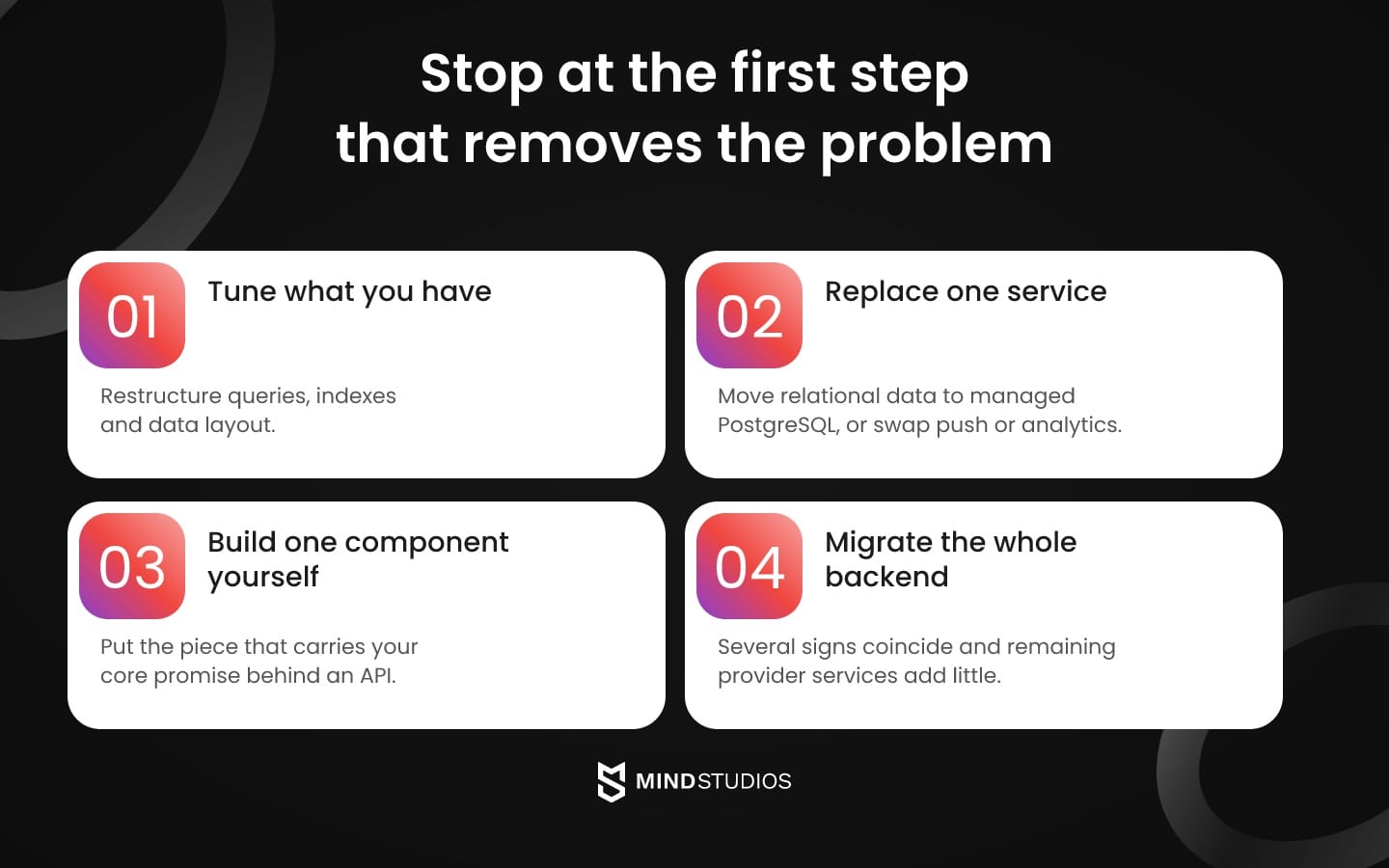
Work through four steps in sequence, and stop at the first one that removes the problem:
- Tune what you have. Restructure queries, indexes and data layout, and check which reads the app really needs.
- Replace one service. Move relational data to managed PostgreSQL, or swap the push or analytics provider, and keep the rest.
- Build one component yourself. Take the piece that carries your core promise and put it behind an API.
- Migrate the whole backend. Choose this when several signs appear together and the remaining provider services add little.
Choosing a stack, and why we usually start with Rails
Ruby on Rails is the framework we usually employ for backend mobile app development: it has a mature gem ecosystem, built-in testing and the freedom to pair with PostgreSQL or another database. For products with related records shared across mobile and web clients, we evaluate Rails against the workload and maintenance requirements.
Our starting criteria for when each stack fits:
- Ruby on Rails. Web and mobile clients share one API over relational data, the setup the Rails API guide describes.
- Node.js. The API handles many concurrent connections and the team already writes JavaScript, and the Node.js overview covers the runtime itself.
- Python with Django. The team has Python skills and wants fast iteration, and the Django framework site covers the stack itself.
- Elixir. The product holds very large numbers of persistent connections, as chat does, and the Elixir language site covers the language itself.
When the standard stack is not enough: Chapp and Unight
In Chapp's case, the load of simultaneously open connections led us away from our usual stack. Ruby on Rails couldn't maintain that huge influx, so we chose Elixir for the backend, with PostgreSQL, Redis and Protobuf around it. Mastering a new language was one of the project's challenges, and our guide to Elixir explains the choice in more depth.
Mind Studios' insight: Estimate the peak number of simultaneous connections before choosing a framework, and load-test it early. Chat and live tracking hold connections open, so that limit can decide the stack before any feature does.
Unight, a nightlife platform, shows the other trigger: the market. Google services are unavailable in mainland China, so the team replaced them piece by piece:
- Push: the Baidu notification service on Android.
- Sign-in: WeChat login.
- Cloud hosting: Aliyun.
- Maps: AMAP on Android.
- Payments: Alipay and WeChat Pay, aggregated through Ping++.
A provider built on services your target market blocks leaves you rebuilding those parts anyway, and that is where custom backend design should start.
The hybrid setup: a custom core with managed services
A hybrid backend keeps business logic and core data in a backend you own and hands commodity functions to managed services. You control what differentiates the product, and your team doesn't rebuild push delivery, crash reporting or analytics, which look much the same in every app.
The split works because managed mobile backend services are strongest where requirements are generic, while a custom backend for mobile applications is strongest where they are specific. In practice the line falls like this:
- Core: business rules and transactional data. Pricing, approvals, permissions, orders, accounts and payment records stay in a database you control.
- Core: the identity model. User IDs, roles and provider links stay yours.
- Services: push, crash reports and analytics. Firebase Cloud Messaging, Crashlytics and product analytics tools handle them.
Dmytro Dobrytskyi, CEO at Mind Studios, explains how the Chapp experience shapes his advice on which component to own first:
Founders often ask what to take over first, and I give them one test. Find the single limit that would break the product if the provider never raised it. Build only that piece, put it behind a clean API and leave the generic parts where they are. Everything you take over later should pass the same test.
A defined API boundary lets the team replace a managed service while keeping product rules in the core. A growth-ready architecture makes that boundary explicit.
How to evaluate backend as a service providers
Choose a provider by how you would leave it. Start with data export and the data model, then test how pricing behaves at your projected growth, check regions and compliance, and confirm that users can be migrated out with their sign-in intact.
If one backend serves several client companies, each client's data and roles must be isolated in the data model before you commit to a provider. The checklist below tests current fit and a future exit:
- Data model and export. Can you export all data in a documented format, and does the model fit your queries and reports?
- Pricing at your growth. Model the bill at several times your current usage using the provider's own meters: reads, writes, active users, storage and egress.
- Spend controls. Can you cap spending on the services you use, or only receive alerts?
- Self-hosting. Is there an open source edition you could run yourself if you had to?
Check market, platform and sign-in requirements:
- Regions and residency. Are the regions your customers and contracts require available?
- Compliance. Does the provider hold the certifications your buyers ask for?
- SDKs and platforms. Are iOS, Android, your cross-platform framework and your server language supported?
- Authentication and user migration. Can you export password hashes, keep social sign-in links and carry multi-factor settings over?
Mind Studios' approach: We keep the identity model in the core even when a managed service handles sign-in, so a later change of sign-in provider is a contained task instead of an account-by-account project.
We use the same list in our software architecture advisory work.
Signs you've outgrown Firebase and how to migrate users and sign-in
A Firebase alternative is worth evaluating when the bill grows faster than revenue or queries keep fighting the document model. Migration then runs in stages: old and new backends in parallel, users carried over with a plan for their sign-in, and a rollback path ready.
Three Firebase-specific signs show up first:
- The bill outruns revenue. Review cost per active user, including free ones.
- One report needs many reads. You copy the same data into several documents to answer a single question.
- A deal needs a region the platform doesn't offer. Residency questions arrive in procurement.
For the wider list, see our piece on architecture warning signs.
Planning user accounts and sessions during migration
Moving sign-in is several separate jobs, and the target system's capabilities decide how much carries over. Data and API can move first while Firebase Authentication keeps handling sign-in: your backend then verifies Firebase ID tokens, and replacing sign-in becomes a separate project. If you do replace it, each of these needs its own plan:
- Identifiers. The Firebase CLI reference shows that
firebase auth:exportwrites accounts to JSON or CSV. Load them into the new system with the same UIDs, so every reference in your data still resolves. - Passwords. The export includes hashes only for accounts hashed with Firebase's scrypt variant, and other accounts come out with empty
passwordHashandsaltfields. The same reference says Firebase re-hashes imported passwords with scrypt at a user's first sign-in, so a transition window on Firebase Authentication lets a later export include those accounts. Accounts with no usable hash or agreed migration path at cutover may need a password reset. - Password verification. If password sign-in moves into your own system, it has to verify Firebase's modified scrypt hash and re-hash it itself. The import documentation shows Firebase doing this for imports into Firebase. Confirm your target can do the same before you promise users they keep their passwords.
- Sessions. They don't carry over by themselves. Per the session management guide, Firebase ID tokens last about an hour and refresh tokens belong to Firebase. Decide whether the new backend accepts Firebase-issued tokens during a transition window or asks users to sign in once.
- Social sign-in and multi-factor. Check that the target supports the same providers and maps each one to the same user. Confirm whether second-factor enrollments can move, and plan re-enrollment if they can't.
Running two backends and keeping a rollback
Data and users move on separate tracks, so the plan has to say where the current truth lives at every moment. For the backend itself, the sequence is:
- Map the data. The Firestore export guide describes a LevelDB-based format that imports into another Firestore database, so landing in PostgreSQL needs a transformation from documents to your schema.
- Name the source of truth. For each data type, one backend holds the current record while the other reads or mirrors it.
- Move a small cohort. Ship an app version that talks to the new backend for a small share of users. Older versions stay in the field, so their writes must also reach the source of truth.
- Rehearse the rollback. A rollback works only if the old backend receives the writes made on the new one, so replay or mirror them back and test that with the cohort.
- Cut over in stages. Move traffic gradually and keep Firebase live until the new backend has handled real load.
For whole-system moves, see our cloud migration guide.
Where mobile backend costs grow after launch
A fair cost comparison for a mobile app backend models the same projected load on both options. On a BaaS the bill follows reads, writes, storage and traffic. On a custom backend it follows hosting, the skills that run it, support and DevOps.
The BaaS column below follows the Firestore pricing page, which bills document reads, writes and deletes, index entry reads, storage and network bandwidth:
| Cost factor | BaaS (Firebase) | Custom backend |
|---|---|---|
| Usage meter | Document reads, writes and deletes, plus index reads | Compute and database capacity you provision |
| Storage and traffic | Storage per GiB-month and bandwidth by response size and destination | Cloud storage and bandwidth in your own account |
| Free users | Their reads, writes and deletes count like any others | Their load consumes capacity you already sized |
| Skills needed | Client development plus design of security rules, the data model and server functions | Backend engineering, QA, security and DevOps, in-house or with a partner |
| Operations | The provider runs servers and scaling | Your team or partner owns the application and the components it runs |
| Cost control | Budget alerts, plus spend caps on selected Firebase services (not Firestore) | Your own cost monitoring and capacity planning |
A custom backend that uses managed services, a database for example, shifts part of the operations row to the provider.
Ongoing costs are one part of the decision. Any change also requires implementation and transition work, and the three realistic scenarios differ in what that includes:
- Stay and tune. Engineering time to restructure queries and indexes, with no migration.
- Replace one service. Integrating the new service, moving its data and updating app clients, while the rest stays in place.
- Move the core. Building the backend, migrating data and users, running both systems in parallel and delaying the features the team would otherwise ship.
A move is justified when the cost it removes or the capability it unlocks outweighs build time, operations and delayed features over the life of the product. If a cheaper step removes the problem, take that step first.
For the cost of the app as a whole, see our breakdown of app development cost.
How to build a backend for a mobile app, step by step
Building a backend for a mobile app takes six steps: define data, logic and markets, choose BaaS, custom or hybrid, fix the API contract and authentication, build and integrate, test load and security, then launch with monitoring and support. Each step ends with a result the next one depends on.
- Define requirements. Result: a data map listing what you store, which rules apply, which integrations you need and which markets you serve, including regions, languages, sign-in options and payment methods.
- Choose BaaS, custom or hybrid. Result: a written decision based on the comparison table and the provider checklist above, including the exit path.
- Fix the API contract and authentication. Result: agreed endpoints, versioning, roles and token handling, signed off by every client team.
- Build and integrate. Result: working services with payments, ERP and push connected and secrets kept out of the app binary.
- Test load and security. Result: load-test results against agreed peak-load scenarios, including connection counts and acceptable response times, plus an access-control review and explicit launch criteria.
- Launch, monitor and support. Result: dashboards, alerts, a release process and named owners for operations.
At Mind Studios, the first three steps make up the business analysis phase before development, and our Build & Scale Software work follows that order.
How to choose your mobile app backend
Choose by what your data, logic and markets demand, and treat speed to first release as one factor among several. A rented backend is a sound start while requirements are generic, and the answer changes when the product's own rules begin to outgrow the provider's.
The next step is to find the constraint that affects your product most and test the smallest change that could remove it.
A migration plan for users, data and sign-in starts with an inventory of what your current backend already carries.
FAQ
Do iOS and Android apps need separate backends?
No. One backend serves both platforms through the same API. Only the platform-specific parts differ: push tokens, purchase verification in each store and sign-in. Apple's review guidelines require an equivalent login option when a third-party or social login sets up the primary account, with exemptions for apps that use only their own account system.
Can one backend serve a mobile app and a web app?
Yes, if the API is designed for both clients from the start. Three things need attention:
- Authentication: tokens for mobile, sessions or cookies for web, and one shared role model.
- API versioning: old app versions stay in the field after a release, so the API can't change underneath them.
- One entry point: a web admin that bypasses the shared API can also bypass rules enforced there, leaving inconsistent records for the mobile app.
How many users can Firebase handle?
Firestore's quotas page lists limits on documents (1 MiB), index entries (40,000 per document) and transaction time (270 seconds), but sets no user-count threshold. What grows with users is the usage-based bill, so model your data and traffic first.
How do you secure the backend of a mobile app?
Layer controls at the data, client and API levels:
- Data rules: Firestore Security Rules evaluate every client request before data is read or written.
- Client attestation: App Check rejects requests without valid attestation once enforcement is on, and it can protect custom backends too.
- Authorization: a custom API checks ownership and roles on every request.
- Secrets and limits: keep secrets on the server, outside the app binary, and add rate limiting and access logs.
OWASP's Mobile Top 10 lists insecure authentication and authorization among its categories.
How do mobile apps connect to a backend?
Most apps send requests over HTTPS using REST or GraphQL, and apps that need live updates add a persistent connection such as WebSocket. Firestore's offline persistence is on by default on Android and Apple platforms and syncs queued writes on reconnect. On a custom backend, your team writes that queue and conflict rule.
What is the most popular backend for mobile apps?
No single answer exists, and popularity doesn't settle the choice. In the Stack Overflow survey for 2025, 55.6% of respondents to the database question (26,083 people) reported extensive development work in PostgreSQL over the past year, which says something about the data layer only. For a backend for mobile apps, the comparison table and provider checklist above cover what does decide it.