
 ChatGPT
 Perplexity

Company accounts, invoices and reporting can decide whether an existing learning platform still fits your business. Here's how to plan an e-learning platform around them.
Highlights
- Pick the platform type by who learns, who pays and who reads reports.
- Extending a ready-made platform can beat a rebuild when the gaps are in billing.
- Plan integrations, accessibility and support before code: they shape scope and budget.
To create an e-learning platform for a company, settle four things in roughly this order: the platform type, the path (build, extend or assemble), the features each role needs and the integrations they depend on. E-learning website development then runs in six steps, from discovery to support after launch.
Online learning platform development often starts when a course tool strains on company accounts, invoices, roles or reports. We worked on those gaps in the Wise Up project for WKO, the Austrian Chamber of Commerce. There we added account management and billing on top of EdCast, the learning platform WKO already used.
If your course tool already struggles with company accounts or invoices, the first question to work through with us is which of the three paths fits your platform.
Types of e-learning platforms and which one fits your business
Most company use cases fall into five categories: a learning management system, a learning experience platform, a course marketplace, a virtual classroom and a custom platform. Three facts about your business point to the right one: who learns, who pays and who reads the reports. Each answer adds its own screens, billing rules and permissions.
For example, an employee academy where the employer pays and HR reads completion reports needs seat management and exports. A marketplace where learners pay instructors needs payouts, reviews and refunds. The table maps each category to its usual starting point.
| Type | Fits | Who pays | Usual starting point |
|---|---|---|---|
| Learning management system (LMS) | Onboarding, compliance and partner training | The employer or partner program | Buy; extend when billing or roles outgrow it |
| Learning experience platform (LXP) | Large workforces with self-directed, skills-based learning | The employer | Buy; customize integrations and content sources |
| Course marketplace or MOOC | Many instructors selling to many learners | Learners, with revenue shared with instructors | Extend or build, depending on payout and review needs |
| Virtual classroom | Live cohorts, tutoring, instructor-led sessions | Learners or their employers | Integrate a video tool; add scheduling and payments |
| Custom platform | Pricing, roles or content that vendors don't support | Individuals, companies or sponsors | Build after checking extension options |
The categories overlap, so read each row as a typical profile rather than a strict label. The next section covers how to put one in place.
Build a custom platform, extend a ready-made LMS, or assemble on WordPress
The right path depends on four constraints: requirements a ready-made product can't meet, how far that product can be extended, who controls the learner data and what each option costs to run over several years. A custom e-learning platform is justified when those constraints rule out both buying a product and extending one.
Three paths and when each one fits
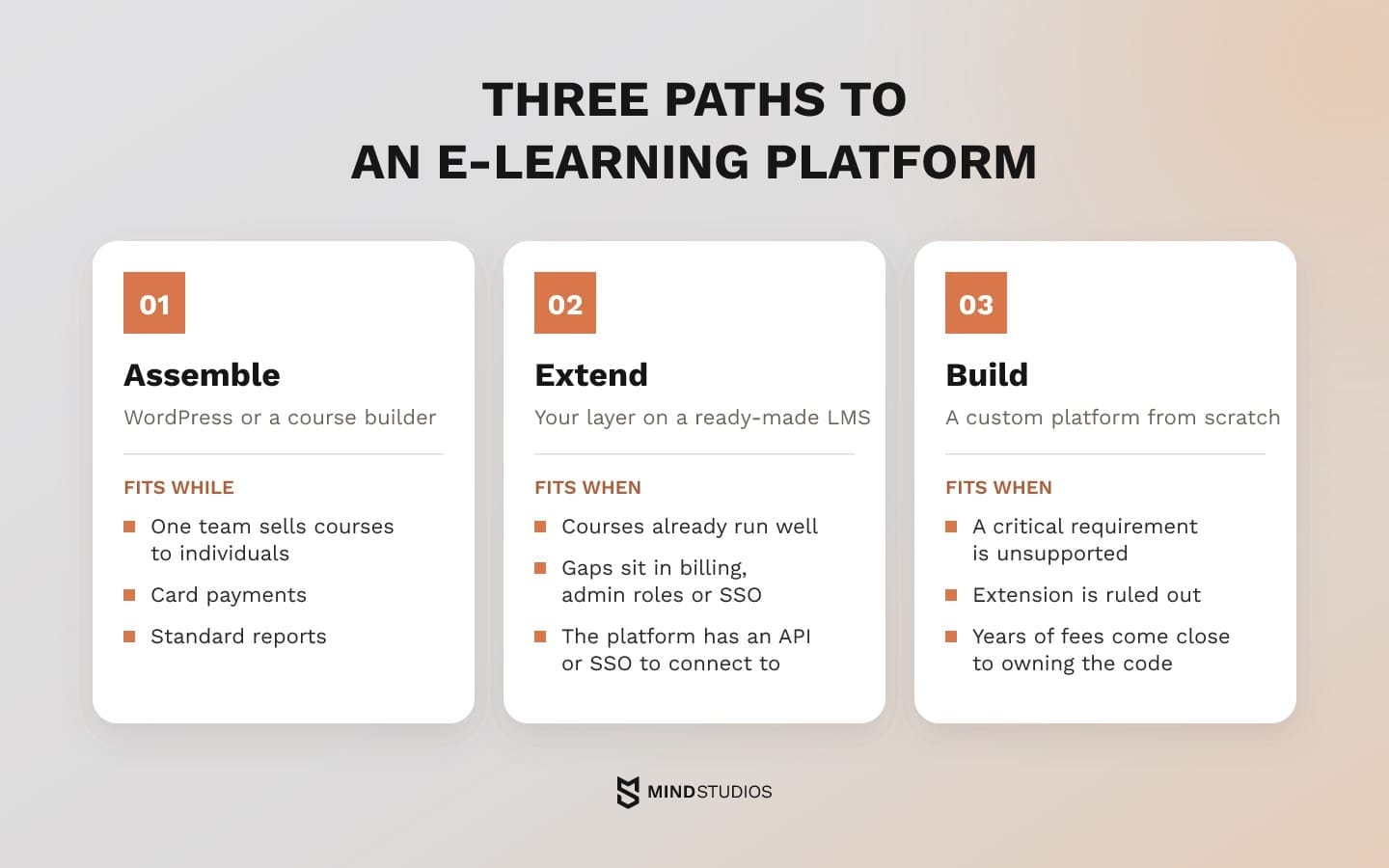
The choice comes down to which parts of the platform have to be yours.
- Assemble: on WordPress or a course builder while one team sells courses to individuals, with card payments and standard reports. A course plugin or hosted builder is a common way to create your own e-learning website for a first program, as long as its roles and exports match what buyers ask for.
- Extend: a ready-made platform when the courses run well and the gaps sit in the business around them: seat-based or invoiced billing, several admin roles or SSO with clients' systems. This path only works if the platform has an API or SSO your layer can rely on, and lets you export user and progress data.
- Build: from scratch when a critical requirement (a pricing model, a content type, control over learner data) is something vendors don't support or let you extend. It also needs a cost case that weighs several years of fees and workarounds against the full cost of ownership: the build itself, migrating users and content, hosting and the team that maintains the code.
Selling learning as your product is a reason to weigh the build option early, because a third-party platform would then sit at the center of your revenue.
If your team is weighing a builder against code for the first version, our comparison of AI app builders and custom coding shows where builder limits tend to appear.
How we extended EdCast for WKO
WKO used EdCast, a SaaS learning management system, to store and deliver training materials, and needed invoicing on top of it. Its users came in three types (individuals, small and medium businesses and enterprises), and each type bought and managed access in its own way.
We combined billing and CRM into one Account Management Module that works as a shell around EdCast, plus a marketing website integrated with it. Users sign in once in the module and single sign-on registers them in EdCast, so learners don't need a separate EdCast registration.
The module has two custom admin panels. In the first, company representatives manage their employees. In the second, WKO staff handle sales, billing and support, with a financial dashboard and invoice history. Both use owner, administrator and manager roles, while EdCast kept its own admin area for instructors.
Anton Baryshevskyi, Head of Business Development and Co-Founder at Mind Studios, explains why testing with real learners comes first:
The fastest way to find out what your platform needs is to put a small group of real learners on a first version. A month of watching where they get stuck tells you more than a long list of features agreed in a meeting room.
Website or mobile app: where to start
Start with a responsive e-learning website when users need to create courses, manage groups or review reports, because authors and admins need a large screen and a full editor. A mobile app pays off later, for learners who study on the move, need offline lessons or rely on push reminders to finish a course.
The comparison below uses the same criteria for both options.
| Criterion | Web first | Mobile app first |
|---|---|---|
| Main users | Authors, managers, company admins | Learners on the move |
| Course creation | Full editor, bulk uploads, test builder | Viewing and light edits |
| Offline access | Limited | Downloaded lessons |
| Reminders | Email and browser notifications | Push notifications |
| Updates | Ship any time | Go through app store releases |
A responsive site also serves learners on phones in the first release, so the app can wait for usage data and later reuse the same back end and API.
Must-have features of an e-learning platform by role
Must-have features split across three roles (learners, instructors or authors, and company administrators) on top of a shared foundation every user touches. Mapping each feature to a role keeps the first version small, because it shows early which permissions, admin screens and reports the release needs and which features can wait for usage data.
Shared foundation
Accounts and access management serve every role. Payments and public reviews belong in scope only when the business model calls for them, so the foundation has two parts.
Every platform needs sign-up, login and profiles; course pages and a library; search across courses and lessons; a video and audio player with speed control; and notifications by email, browser or push.
The rest depends on the business model: a payment gateway when individuals buy courses, invoices and seat billing when companies buy access for teams, and reviews and ratings when learners choose between courses.
Learners
Learners need a clear route to the next lesson and visible proof of progress:
- Dashboard with progress tracking
- Personal notes and a study planner
- Certificates on completion
- Forums, chat and file sharing for group work
- Quick review screens with key points before a test
Instructors and authors
If outside instructors publish on your platform, map how they create, revise and release a course. That walkthrough defines the authoring tools below:
- Course builder with text, video, files and quizzes
- Class scheduling and study groups
- Learner progress and test results per group
- Feedback on assignments
Company administrators
Admins buy access, assign it and prove it was used, so their screens carry the business logic:
- Admin panel with user and seat management
- Roles and permissions, for example owner, administrator and manager
- Reports on completion, time spent and drop-off
- Billing history and exports
Advanced features
Advanced features earn their place once the core works and you have usage data. AI personalization can suggest the next lesson from a learner's results. AI quiz generation can draft questions from course material for an instructor to review before publishing. Both need clean content and progress data.
Gamification (points, progress bars, leagues and rewards) is worth testing with a pilot group first. If you add rewards, tie them to the outcome you want, such as passing an assessment, and compare completion and test results with a group that learns without them. AR and VR fit narrow cases such as medical or equipment simulations, where practicing in a real setting is risky or expensive.
Integrations, standards and compliance
A company platform needs a plan for sign-in, payments, content standards, accessibility, data protection and video delivery before design starts, because each one changes the data model and the admin flows. Which laws apply depends on where your learners are and what you sell them. The checklist links each source for your counsel to review.
Sign-in, payments and content
The first group covers how users sign in, how they pay and how course content moves between systems:
- Single sign-on and HR systems. If learners work for your clients, they expect to sign in with their company account. Syncing users from the HR system keeps access in line with hires and departures, with fewer manual updates.
- Payments and invoicing. Individual buyers pay by card. Companies often need seat-based pricing, tax handling and invoices paid by bank transfer, so decide which buyers you serve before you choose a payment provider.
- Course packages. SCORM is a mature specification for delivering course content and tracking each learner's progress inside an LMS. If you plan to import existing SCORM courses, the player has to support that format from the first release.
- Learning records. The xAPI standard is an active IEEE standard that defines a JSON data model and an API for sending learning activity to a Learning Record Store. It matters when you track learning outside courses, such as simulations or on-the-job tasks.
- External tools. LTI from 1EdTech connects third-party learning tools to an LMS or similar learning environment without separate sign-ins. The current version is LTI 1.3, and LTI Advantage adds grade posting, user and role data, and content selection.
Accessibility
The accessibility checks below cover the technical standard and the rules for EU and US buyers:
- Accessibility standard. WCAG 2.2 is the current W3C Recommendation, with three conformance levels: A, AA and AAA.
- EU accessibility. The European Accessibility Act lists the products and services it covers, including e-commerce and e-books. The EAA application date was June 28, 2025, so its requirements now apply to covered services. If EU consumers buy courses or subscriptions on your platform, ask your counsel whether your sales flow counts as an e-commerce service.
- US private businesses. Under ADA Title III, businesses open to the public must give people with disabilities an equal opportunity to access their goods and services. How it applies to your platform is a question for your counsel, so agree on an explicit WCAG target with them during discovery.
- US public buyers. If you sell to public universities or state agencies, the 2026 Title II rule keeps WCAG 2.1 Level AA and moves the compliance dates. Public entities with a population of 50,000 or more have until April 26, 2027. Smaller entities and special district governments have until April 26, 2028.
Data protection
The privacy checks below cover learners in the EU, California and Saudi Arabia:
- EU personal data. Under GDPR Article 3, the regulation also covers companies outside the EU that process personal data of people in the EU when offering them services, even free ones.
- California personal data. California's Consumer Privacy Act covers for-profit businesses that do business in California and meet at least one statutory threshold. Covered businesses must let residents learn about, delete, correct and opt out of the sale or sharing of their data. The thresholds are:
- Annual gross revenue over $25 million (adjusted for inflation) in the preceding year
- Buying, selling or sharing personal information of 100,000 or more consumers or households annually
- Deriving 50% or more of annual revenue from selling or sharing consumers' personal information
- Saudi Arabia. If your platform enrolls learners in Saudi Arabia, map which learner data you collect, where it is stored and where it travels. Review that map against Saudi Arabia's data protection law in discovery, and run the same review for other MENA markets you serve.
Mind Studios' approach: We list each integration and standard in the discovery document with an owner on the client side: the HR system admin for SSO, finance for invoicing, legal for accessibility and privacy. An integration without an owner tends to surface late, as a blocker during testing.
Video delivery
Store lessons in object storage and serve them through a CDN. For learners on weak connections, plan adaptive playback and test on representative devices.
UI/UX design that keeps learners on task
Good UI/UX on an e-learning platform gets a learner from login to the next lesson in as few steps as possible and keeps the rest out of the way. Each screen should help someone learn, teach or manage. Anything that serves none of those jobs competes with the course for attention.
The pairs below turn that rule into screen-level decisions.
| Do | Don't |
|---|---|
| Put "Continue lesson" at the top of the dashboard | Make learners search the catalog to resume a course |
| Split lessons into short sections with descriptive titles | Publish long pages with generic headings like "Module 3" |
| Use calm colors, readable fonts and enough white space | Fill the screen with banners, badges and promos |
| Add quizzes, dialogue simulations and checkpoints inside lessons | Leave video as the only format for an entire course |
| Build responsive layouts for laptops and phones | Ship a desktop layout that breaks on small screens |
| Use clear calls to action such as "Take the test" | Hide the next step behind unlabeled icons |
For company buyers, the admin side deserves the same care. On Wise Up, the interface was designed for companies with more than 500 employees, which meant large tables and a full payment history for the people managing access.
The homepage has a job too. Real reviews, a short demo of how the platform works and a sample lesson help buyers assess the learning experience before a sales conversation. Company buyers will still ask about security, contracts and procurement, so keep those answers easy to find.
How to create an e-learning platform in six steps: the e-learning website development process
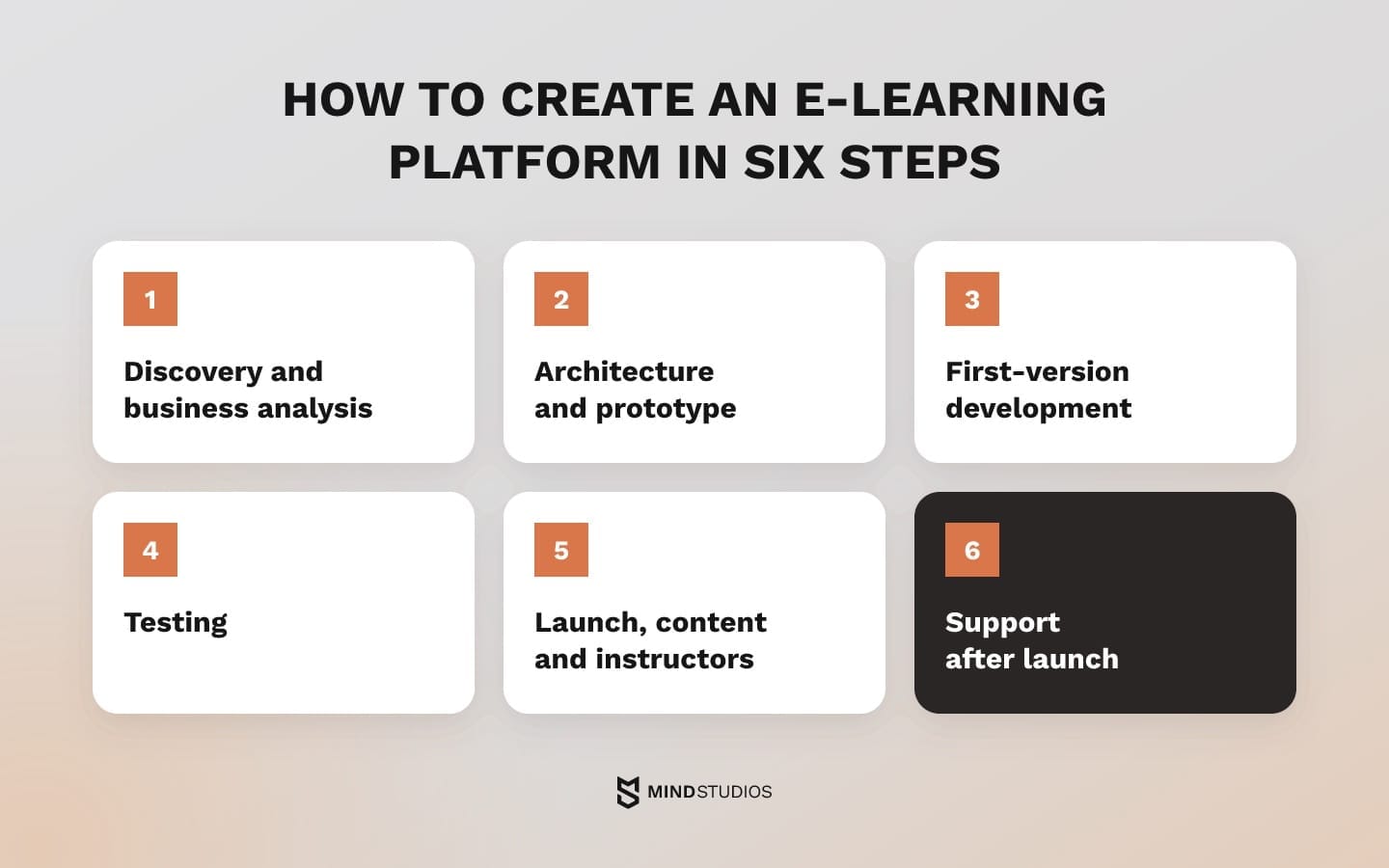
E-learning platform development runs in six steps: discovery and business analysis, architecture and prototype, first-version development, testing, launch with content and instructors, and support after launch. The first two steps bring roles and integrations to the surface while they are still cheap to change.
Step 1. Discovery and business analysis
Discovery turns what you know about learners, buyers and existing systems into requirements both sides sign off. A useful discovery document also lists the assumptions still open, for example whether the current platform's API allows the integration you need.
Discovery also sets the acceptance criteria each feature must meet before release. Short interviews with a few learners, instructors and admins belong in this step too, because they show which features people will actually use.
Our guide on why requirements matter explains what a solid specification covers.
Step 2. Architecture and prototype
Architecture covers the roles and permissions model, the integrations and the expected load, such as a large cohort starting the same course on one morning.
Our piece on scalable software architecture covers the trade-offs.
Company accounts with their own admins push the data model toward multi-tenancy early, and that is cheaper to plan than to retrofit. On Wise Up, the team mapped the data in an entity-relationship diagram and user flows before design started.
A clickable prototype at this stage lets stakeholders approve flows before anyone writes code.
Step 3. First-version development
The first version ships the shared foundation, the main roles, one payment flow if the model needs it and the integrations the launch can't work without. Everything else waits for usage data.
A practical test for the boundary: if a feature serves a role that won't use the platform in the first months, or replaces a step your team can run by hand during the pilot, it belongs in a later release. Advanced features, extra report types and the mobile app often land there.
Step 4. Testing
QA should cover permissions, payment failures and peak load such as a cohort start, alongside screen behavior. If the launch includes imported courses or an accessibility target, those requirements also need acceptance tests using representative content and user flows.
Step 5. Launch, content and instructors
Treat content migration and production as a workstream with its own release criteria: accurate material, complete lessons, working media and quizzes. Mix formats (text, video, audio, graphics and quizzes), and keep each lesson short enough to finish in one sitting.
Outside instructors join in this step, with publishing rules agreed before their first course goes live. A pilot cohort before full launch shows where learners get stuck.
Step 6. Support after launch
After launch, the platform needs updates, hotfixes and someone watching completion and drop-off metrics to decide what to build next. Make sure documentation, repository access and admin credentials stay with your company, so you keep control of the product whichever team maintains it.
If your roles, integrations or first-version scope are still open, those are the questions a discovery session with our team is built to settle.
E-learning platform tech stack
The stack below groups the main technical jobs of a learning platform: interface, business logic, background work, data, payments and video. It uses technologies from the Wise Up stack as examples, plus a video layer for platforms that host their own lessons.
| Layer | Technologies | Typical role |
|---|---|---|
| Front end | Vue.js, Bootstrap | Dashboards and admin panels built from reusable components |
| Front-end testing | Vitest | Unit tests for interface logic |
| Back end | Ruby on Rails | Business rules for accounts, roles, pricing and SSO |
| Background jobs | Sidekiq, Redis | Invoices, emails and syncs outside user requests |
| Database | PostgreSQL | Relational data for users, companies, seats and payments |
| Payments | Stripe, direct invoicing | Card payments for individuals, invoices for enterprises |
| Video delivery | Object storage, CDN, adaptive streaming | Lesson playback that holds up on weak connections |
Whatever you choose, pick technologies your engineers can maintain after handover.
How much does it cost to create an e-learning platform
The cost depends on five factors: the platform type, the number of roles and features, integrations and standards, content migration, and support after launch. The engagement model then decides how that budget is controlled.
What drives the budget
Each factor adds work to the scope in its own way:
- Platform type. Extending an existing system touches fewer parts than building a marketplace or a custom platform with its own content engine.
- Roles and features. Each role adds screens, permissions and test cases, so three admin levels cost more than one.
- Integrations and standards. SSO, HR sync, invoicing, SCORM import, xAPI tracking and an accessibility target each add design, build and testing work.
- Content migration. Moving existing courses, users and progress history needs mapping and checks, and the work grows with the volume of legacy content.
- Support after launch. Updates, hosting, monitoring and new features form a running cost that belongs in the plan from day one.
Our breakdown of software development costs shows how these factors turn into an estimate.
Engagement models
Three engagement models are common on the market, and each suits a different level of certainty about scope:
- Fixed price fits a well-defined scope, such as an extension module with signed-off requirements.
- Time and materials fits work where priorities shift as usage data comes in.
- Dedicated team fits long-running platforms that need a stable team for new features and support.
Mind Studios' recommendation: Ask for an estimate where SSO, invoicing, content import and accessibility appear as separate lines. That lets you phase or cut an item without reopening the whole budget, and it shows which discovery decisions carry the most cost.
Who works on the platform
A typical team includes a project manager, a business analyst, a UI/UX designer, front-end and back-end developers and QA engineers, with DevOps support for hosting and video delivery. Team size and mix follow the scope that discovery defines.

E-learning platform development mistakes to avoid
The expensive mistakes share one pattern: a decision about content, data or ownership gets postponed until real learners and contracts depend on it. Fixing it then means migrating data or reworking flows people already use.
- Content without an owner. Outdated or unverified courses weaken even a well-designed platform. Name a content owner in discovery who approves each course and checks that migrated progress matches the old system.
- Navigation untested by learners. The team that built the menus knows where everything is, and a new learner doesn't. Before launch, ask a few pilot learners to resume a course and find a test, then fix the steps where they hesitate.
- No feedback channel. When instructors can't comment, learners can't rate courses and nobody can report a bug, your team hears about problems late, often after learners have already dropped out. Decide in discovery where each type of feedback lands and who answers it.
- Unchecked course quality. On a marketplace, one weak course lowers the value of the catalog. Review instructor credentials before they publish, and if buyers need to judge quality before paying, give them a sample lesson that shows what they're paying for.
- Unplanned integrations and standards. SSO, invoicing, SCORM or accessibility requirements that appear after design often force rework of the data model and admin flows. Confirm API access or a file format for every integration before the prototype is approved.
- No owner after launch. Without a named team and an update budget, fixes wait and the platform falls behind what buyers ask for. Put both in the launch plan, next to the go-live date.
What to prepare before you start
An e-learning platform project usually starts with facts your team already holds. Writing these facts down makes discovery faster and the estimate sharper, and three inputs matter most:
- Your constraints. The systems learners already use, the markets you sell in and the deadlines your buyers have set.
- Your working assumptions. A first view of the platform type and the path, even if it's provisional.
- Your open questions. Whether the current platform can be extended, which standards apply and which content has to move.
Discovery tests these inputs and returns a verified path, an agreed first-version scope and an estimate tied to both.
Our build and scale team runs that work with companies whose training has become part of the product.
If your list of constraints and open questions is ready, a discovery call is the place to work through it with us.
FAQ
How do I create an e-learning platform?
Begin with an inventory of what you already run: courses, user lists, payment flows and the reports buyers ask for. That inventory shows whether to build, extend or assemble. The six steps follow from there, and much of the rework traces back to gaps left in the first two, discovery and architecture.
How much does it cost to create an online learning platform?
Cost depends on scope, so a reliable figure comes only after discovery. A partner can only price what you describe, so prepare these inputs before you ask for an estimate:
- Roles and admin levels, with sample permissions
- Systems to integrate, with access to their API documentation
- Volume and formats of existing content
- Markets you sell in, for accessibility and privacy
- Expected learners at peak, such as a cohort start
Can we build our own LMS instead of buying one?
Yes, though building is one of three options. If your current platform offers SSO, an enrollment API and a progress export, a layer on top keeps learners on a tool they know. If those interfaces are unavailable, compare moving to another ready-made platform with building what you need to control, weighing data portability, migration effort and total cost of ownership.
What are some examples of e-learning platforms?
Most examples map to one category from the types table, but a company program can combine two. Take an academy with mandatory compliance courses and self-chosen skills courses. The mandatory track needs assignments, deadlines and completion reports, which points to a learning management system as the core. The self-chosen track can add LXP-style recommendations on that core, so learners keep one account.
Should we start with a website or a mobile app?
Start with a responsive website when authors and admins drive the first release. Add the app when usage points to it: learners asking for offline lessons, a growing share of sessions on phones or frontline staff who rarely sit at a desk.
How long does it take to build an e-learning platform?
A timeline is only as reliable as the discovery behind it. Before a forecast, you need signed-off requirements, a list of integrations with confirmed API access, the volume of content to migrate and acceptance criteria. As a reference, our extension of EdCast for WKO reached its first version three months after the project started.
How do you create your own e-learning website on top of an existing LMS?
Keep the existing platform for content delivery and build a layer for what it lacks. Before scoping that layer, settle where the boundary sits:
- Does the platform support SSO or an API your layer can rely on?
- Which data does each side own?
- Which system keeps the master user record?