
 ChatGPT
 Perplexity

When spreadsheets and SaaS subscriptions stop holding operations together, enterprise application development becomes a business decision. This guide covers what changes, how to pick a path and where these projects break.
Highlights
- Roles, integrations and data ownership set the scope and cost of enterprise software.
- Test SaaS, low-code and custom options against one real workflow first.
- Start with a process that has a clear owner and a testable workflow.
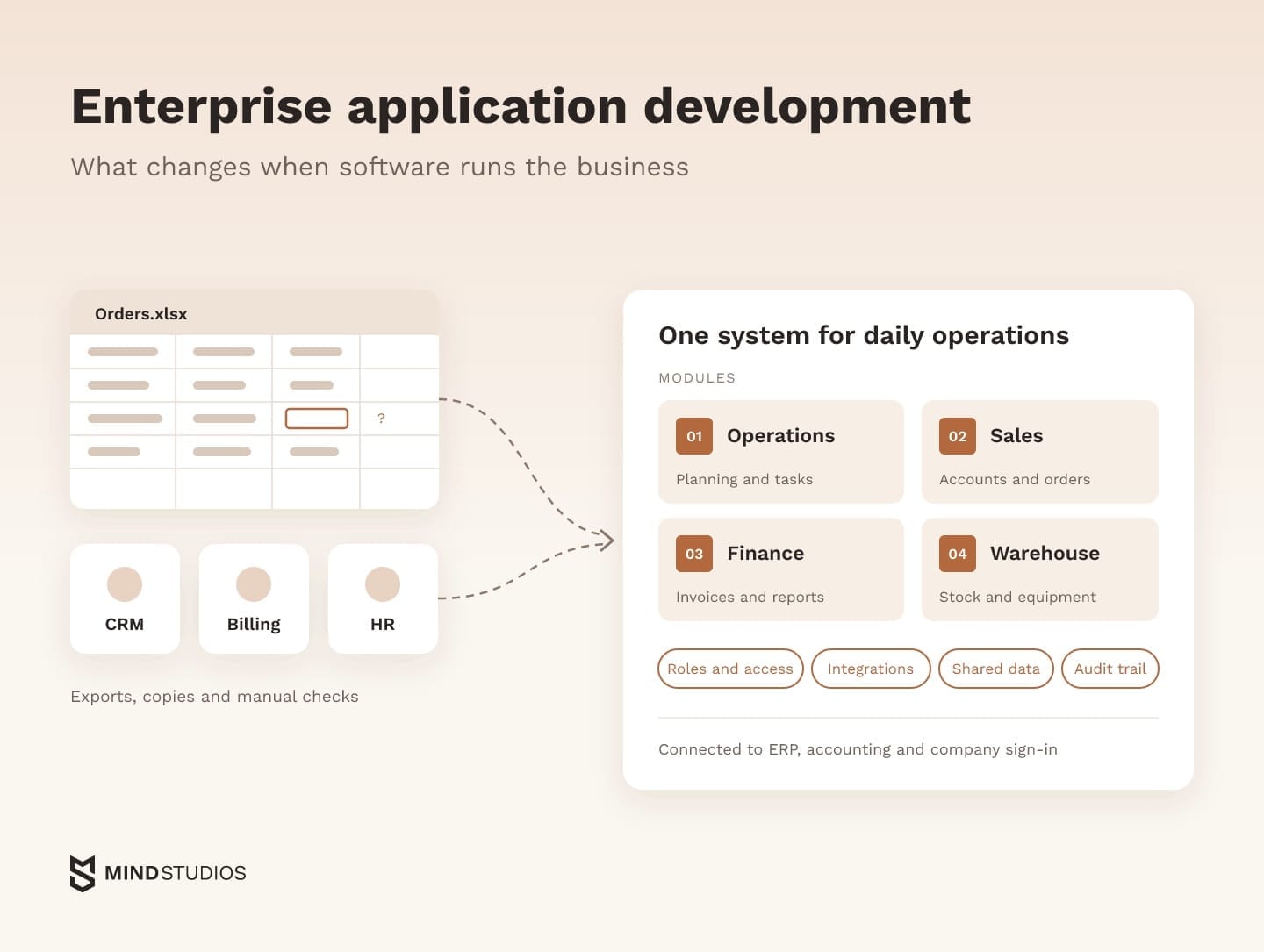
Enterprise application development means designing, building and running software that several departments rely on for daily work, connected to the systems the company already uses. The need usually appears when spreadsheets and SaaS tools can no longer keep shared records in sync.
If your team reconciles the same records by hand, growth turns that routine into a bottleneck. Each workaround adds another seat, export or manual check, so the hours spent keeping tools aligned start to compete with the hours spent serving customers.
We've built systems that teams across departments use every day, including our own internal operations platform and an account management module that extends a SaaS learning platform for an enterprise client.
If you suspect your current setup has a ceiling, the useful first question is which process will hit it first.
What is enterprise application development?
In practice, enterprise application development means planning software around the people, systems and records of the whole organization. Before the first screen, the team decides who can see and change what, which systems exchange data, where the official record lives and how the system will be supported for years.
If you're asking "What is enterprise application development?" because your tools no longer fit the workflow, three signs show your project already belongs in this category:
- Other teams depend on its records. Finance reports or payroll runs pull data the app holds.
- It writes to company systems. Orders, invoices or staff changes flow into ERP, accounting or payroll.
- Every sensitive change is traceable. Access is granted by role, and each edit is linked to a person and a time.
Three groups usually do the building: an in-house engineering team, a development partner or business teams on a low-code platform with IT oversight. Many companies combine them, so ownership of code, data and documentation needs settling from the first module.
Enterprise application development examples: the four main types and the systems around them
The four main types of enterprise applications are ERP for resources and finance, CRM for customers and sales, SCM for the supply chain and HRM for people and payroll. Companies often buy these as products and build systems around them: operations platforms, partner portals, billing layers, reporting and mobile apps for field teams.
The table shows what each type runs and where custom work tends to begin:
| Type | What it runs | Typical custom additions |
|---|---|---|
| ERP | Finance, HR, procurement, manufacturing | Planning and operations modules for processes the suite doesn't model |
| CRM | Customers, sales pipeline, service | Partner portals, quoting tools, customer self-service |
| SCM | Procurement, logistics, distribution | Dispatching, courier apps, warehouse scanning |
| HRM | Staff records, hiring, payroll | Hiring pipelines, shift planning, equipment tracking |
If a packaged product covers your accounting or payroll requirements in every market you serve, it belongs on the shortlist. The last column then helps define the custom scope around it: processes such as dispatching or partner onboarding, where the way you work wins business and a product's limits tend to show first.
If ERP is the system you're weighing, our guide to custom ERP helps you decide whether to build or extend it.
Standard vs enterprise software development: what changes when software runs the business
What changes most is the cost of a mistake. When software runs several departments, a wrong call on roles, integrations, data or support interrupts work across the company, so these decisions are made before coding starts. Enterprise software product development plans for the people and systems that will depend on the product from its first release.
The table compares an application built for one team with a system that several departments run on:
| Factor | Single-team application | Cross-functional operations system |
|---|---|---|
| Users and roles | A few user types with a simple permission model | Many roles, single sign-on (SSO), role-based access control (RBAC) |
| Integrations | Selected APIs that support the product's workflow | ERP, CRM, accounting, identity provider, legacy databases |
| Data | Owned within the product | Shared record for other systems and reports, migrated from existing tools |
| Security and audit | Authentication, encryption and logging sized to the product's risk | Audit trails, access reviews, data protection rules that differ by market |
| Availability | Recovery targets set for one workflow | Recovery time and acceptable data loss agreed with each department |
| Change management | Release notes and in-product guidance | Training, rollout by department, internal champions |
| Lifespan | Evolves with the product roadmap | Maintained and extended alongside other company systems for years |
| Decision-makers | Founder and product owner | Department heads, IT, security and finance |
These enterprise software development considerations become concrete when several roles share one order. A field worker, a dispatcher and a finance manager may each need different fields, actions and approvals, and every combination needs its own test case.
Decision-making changes too. In enterprise level application development, finance, operations and IT each own part of the requirements, so agreeing on them becomes a workstream with its own owner and schedule.
Enterprise application development platform, SaaS or custom build: how to choose
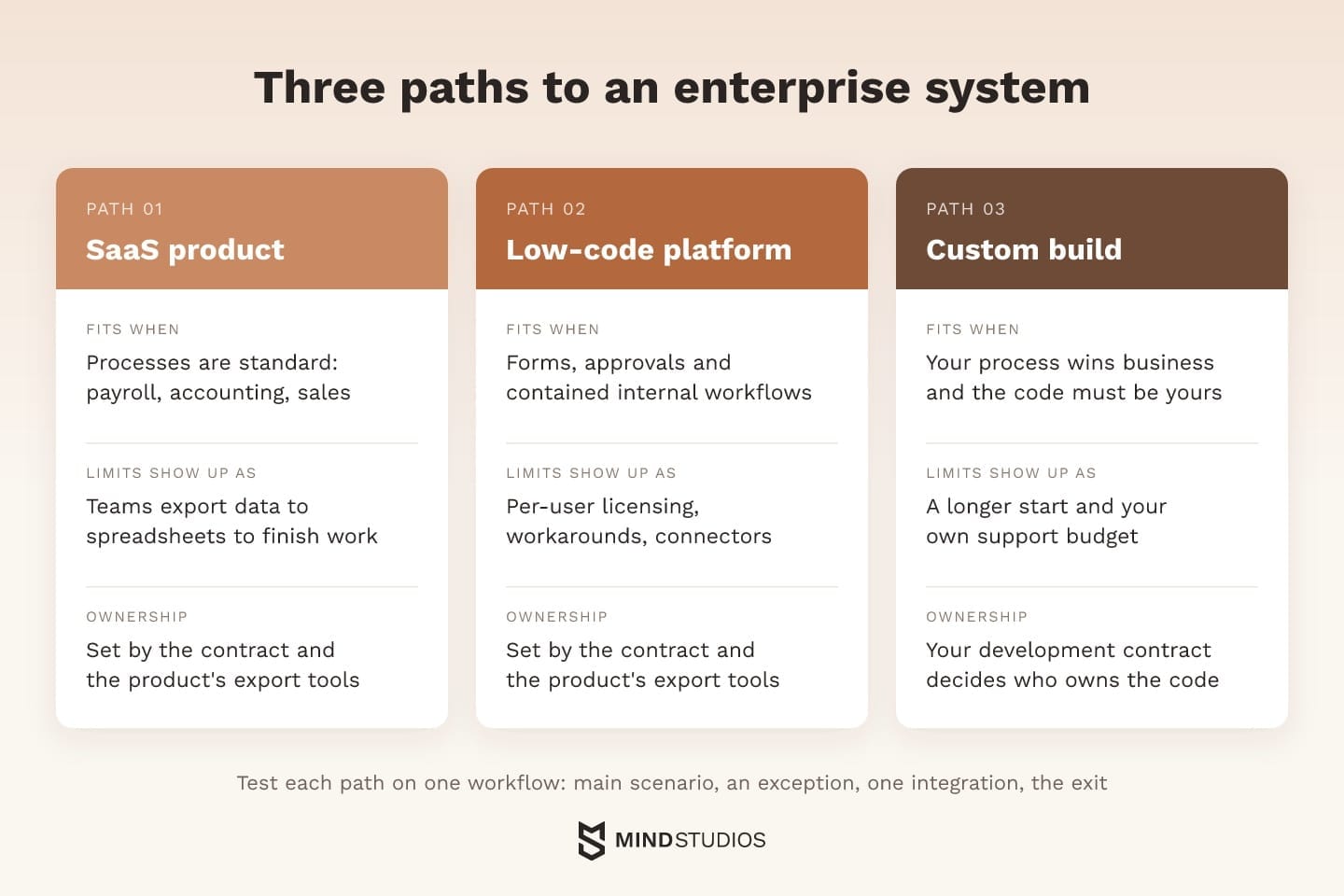
There are three paths: configure a SaaS product, assemble the system on an enterprise application development platform (low-code) or commission custom enterprise application development. The right one depends on how specific your process is, whether available connectors cover your integrations and what you need to own.
SaaS fits standard processes
If your process works the way the product expects (payroll, accounting, a typical sales pipeline), buying is the sensible choice: configuration replaces much of the custom work and the vendor handles upgrades. You've hit the ceiling once the team exports data to spreadsheets to do what the product can't.
Low-code fits contained internal workflows
A platform handles forms, approvals and workflows that business teams can maintain with IT oversight, and an enterprise mobile app development platform suits inspection or approval apps with standard screens. Limits tend to appear as usage grows: user-based licensing, workarounds for complex logic and integrations that depend on the vendor's connectors.
Custom fits when the process is the advantage
Custom enterprise app development pays off when the way you dispatch, price or serve customers wins business and that edge outweighs the cost of building and supporting the system. It also fits when the code has to be yours, with a longer start as the trade-off for control.
How to test the paths against one workflow
Ownership comes first: who holds rights to the data and the source code, and whether another team could take over with your documentation. With SaaS and low-code, the contract and export tools answer this; with a custom build, the contract decides who owns the code.
Once ownership terms check out, the same workflow helps you compare the viable options. Pick one process and run four checks on every candidate:
- The main scenario. Can a real user complete the everyday version of the process from start to finish?
- An exception. What happens with a refund, a partial delivery or a rejected approval?
- One integration. Does a record reach the connected system, accounting for example, correctly and on time?
- The exit. Can you export the data and rules you entered and read them outside the product?
An option that stumbles on the exception or the exit check will need workarounds later, and those workarounds belong in the cost comparison.
Mind Studios' insight: A custom build can sit alongside the SaaS you keep. For Wise Up, the Austrian Chamber of Commerce kept EdCast, its SaaS learning platform, and we built an account management module around it. The first version went live three months after the project started. If a product does its core job well, build only the layer your process needs around it.
Questions to answer before you choose
Your answers to these questions shape which path fits:
- Which process costs the most manual hours or reconciliation today?
- Which systems will the new one read from and write to?
- How many users and roles will it serve as the company grows?
- Where must the data be stored, and who can access it?
- How do licensing costs change as headcount grows?
- Who owns the process and can approve its rules?
Enterprise web application development vs enterprise mobile app development
Most back-office enterprise systems belong in the browser, because that's where desk-based teams already work. Mobile earns its place when people work away from a desk (in warehouses, in vans or at client sites) and need device features, managed devices or reliable work without signal. Many companies run both on one backend.
The table compares both formats on the same criteria:
| Criterion | Web application | Mobile app |
|---|---|---|
| Typical users | Office teams, managers, admins | Couriers, technicians, warehouse staff, sales reps |
| Offline work | PWA with a service worker and cached data | Local storage and sync built into the app |
| Device features | Whatever browser APIs the target devices support | Native access to camera, barcode scanning, GPS, push notifications |
| Releases | One deployment, available immediately | Store review or private distribution, staged updates |
| Device control | Browser and SSO policies | Mobile device management (MDM): enrollment, app delivery, remote wipe |
Background work has limits in both formats. In a mobile app it follows OS rules, while MDN's PWA offline guide notes that browsers limit how often and how long background sync can run. So if field staff will use a web app without signal, test its sync rules on the devices they carry.
Where enterprise web application development fits
Admin panels, approval flows, dashboards and reporting fit the web because they involve dense tables, side-by-side comparison and exports, which a large screen and keyboard handle best. Enterprise web software development is also the practical choice for partner and customer portals, where external users won't install an app or enroll a device.
When mobile enterprise application development pays off
Mobile enterprise app development pays off when the work happens away from a laptop. A courier confirming a delivery with a photo and location, or a technician closing a job in a basement with no signal, needs an app that stores data locally and syncs once the connection returns.
Custom enterprise mobile app development makes sense when that workflow is specific to your business: scanning your labels, following your routing rules or capturing your inspection checklist. Off-the-shelf field apps handle generic forms well, so the case for custom rests on how closely the app has to fit the workflow.
Enterprise mobile app development also brings sign-in on shared devices and rules for conflicting offline edits, and both belong in the pilot scope from the start.
Architecture, integration and security decisions you can't reverse cheaply
Three decisions are hard to reverse once departments depend on the system: how it exchanges data with other tools, where module boundaries sit and how access and audit work. Changing any of them after launch affects the workflows built on top, so each change needs retesting across every department that relies on them.
Integration comes first
Integration scope is hard to estimate until it's mapped, because companies tend to run more systems than they've connected. Salesforce's 2026 Connectivity Benchmark Report surveyed 1,050 IT leaders at organizations with at least 1,000 employees and found that the number of apps in these enterprises grew from 897 to 957 in a year, with only 27% of them integrated.
For your company, the useful question is which tools already exchange data and which connections the new system will need. An integration map answers three questions for each connection: which system owns the record, which direction the data flows and how quickly the other side needs it. SSO through the company's identity provider belongs on the same map, because role mapping and access rules start from it.
What happens when an exchange fails
Picture an order approved in the new system that has to create an invoice in accounting. The connection drops, the system retries and accounting receives the same request twice.
With record ownership already on the map, three more design decisions determine whether that's a minor event or a month-end problem:
- Alerting. A named person or team gets notified when an exchange fails or stalls, with enough detail to act.
- Duplicate protection. Each request carries a unique key, so accounting recognizes a retried message and doesn't create a second invoice.
- Reconciliation. A scheduled comparison flags records that differ between systems, and someone owns resolving them.
These decisions belong in the initial scope because they determine how failed exchanges are detected and corrected. Testing them before launch lets the team rehearse recovery before customer invoices depend on it.
Modular architecture that adds functions without stopping operations
Clear module boundaries help contain the impact of a new workflow: a new department's rules live in their own module and reach the rest through defined interfaces. Whether those modules can also be released independently is a separate decision about deployment.
A modular monolith keeps clean boundaries but ships as one unit. Separate services can be released on their own, at the cost of more infrastructure and monitoring. For a single product team, a well-structured monolith is often the simpler start, and services become worthwhile when parts of the system scale or change at different speeds.
Even a single deployment can go live without stopping work if releases are rehearsed, database changes stay backward compatible and a rollback path exists.
Our guide to scalable software architecture covers these trade-offs in more depth.
Security, access and compliance
Security matters more here because one system holds data from every department. The 2026 IBM breach report puts the global average cost of a data breach at $4.99 million, a record high and 12% more than a year earlier.
That makes access design a financial decision as much as a technical one. The baseline includes role-based access with least privilege, audit trails for sensitive records, encryption in transit and at rest, regular access reviews and data residency rules for each market you serve.
Mind Studios holds ISO 27001 certification. On a client system, each control is written into the requirements and tested like a feature.
Mind Studios' recommendation: Test the role matrix as three separate permissions for each record: view, edit and approve. Then run it against exceptions, such as a manager approving their own request or a contractor opening payroll fields, because gaps in access rules tend to surface there.
Enterprise application development technologies
The right stack depends on your team and the systems you already run, so the table pairs common options in each layer with what to validate before choosing:
| Layer | Typical options | What to validate |
|---|---|---|
| Backend | Java, .NET, Node.js, Python, Ruby on Rails | Existing systems, integration libraries, long-term support |
| Frontend | React, Vue.js | Dense tables, many screen states, accessibility requirements |
| Mobile | Swift, Kotlin, cross-platform frameworks | SDKs, background work, offline storage, OS updates |
| Data | PostgreSQL | Reporting load, consistency needs, and backup and restore time |
| Integrations | REST APIs, message queues | Expected volume, retry and duplicate handling, monitoring of failed messages |
| Identity | SAML, OpenID Connect | Protocols your identity provider supports, role mapping |
| Cloud | AWS, Azure, Google Cloud | Existing contracts, data residency regions and your team's operations experience |
Use the validation criteria to assess each option against your existing systems and team. For the backend, long-term support means your team or partner can maintain the stack for years. On mobile, the SDKs, background work, offline storage and OS updates have to behave as needed on target devices.
How the enterprise software development process differs: governance, integration and rollout
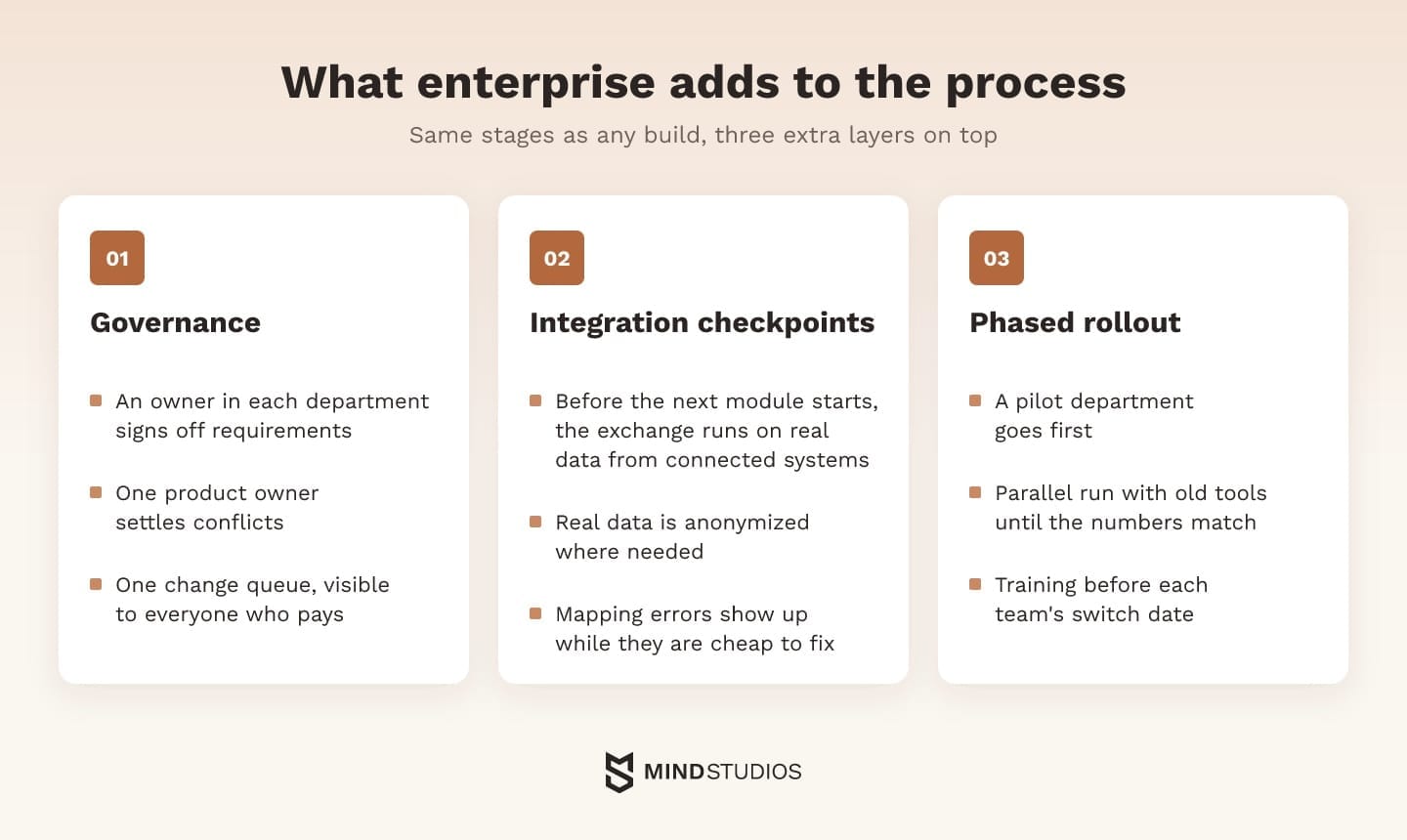
The enterprise software development process goes through the same stages as any build, which our overview of SDLC models covers. Enterprise work adds three layers on top: governance across departments, integration checkpoints tested on real data and a phased rollout with a pilot team, parallel running and training.
These layers connect decisions made during discovery with the evidence needed before rollout:
- Governance. Each department names an owner who signs off on requirements in their area. One product owner settles conflicts, and change requests go through a single queue visible to everyone who pays for them.
- Integration checkpoints. Before the next module starts, the data exchange from the previous one runs on real data from the connected systems (anonymized where needed). This catches mapping errors while they're still cheap to fix.
- Phased rollout. A pilot department goes first. The new system then runs in parallel with the old tools until the numbers match, and each team gets training before its switch date.
The enterprise mobile app development process adds two steps: testing on the devices staff use and private distribution through MDM before the pilot starts.
When we build enterprise systems, planning these layers from discovery onward makes sign-offs and checkpoints visible in the first estimate.
Before go-live, every requirement needs evidence and an owner. Use the table as a starting point and adapt it to your own sign-off process:
| Requirement | Proof before launch | Who signs off |
|---|---|---|
| Integrations | Full exchange scenario on real data, including a failed exchange | IT owner of each connected system |
| Access | Role matrix tested with a real account for each role | Security lead and department heads |
| Recovery | Timed backup restore meeting agreed recovery-time and data-loss targets | IT operations |
| Load | A test at the expected peak | CTO or engineering lead |
| Cutover | An agreed transition plan with a rollback path | Product owner and operations |
| Readiness | Pilot team completes its daily tasks in the new system | Pilot department head |
Named owners make unresolved launch risks visible while there's still time to close them.
If you're about to scope the first module, draw the integration map before anyone puts a number on the estimate.
What are the challenges of enterprise application development?
The enterprise application development challenges that derail projects tend to sit around the code: requirements that shift between departments, legacy interfaces, data quality, adoption and dependence on one vendor. Each affects both implementation and rollout, so each needs an owner and a way to verify readiness.
The enterprise software development best practices below pair each challenge with what tends to work and what tends to backfire:
- Shifting requirements between departments. Do: agree in writing what the first release covers and move new requests to later releases. Avoid: promising every department's wish list in the first release.
- Integration with legacy systems. Do: map data flows early and build the hardest integration first. Avoid: trusting old documentation before the interface has been tested.
- Data migration. Do: profile and clean the data, then run a trial migration. Avoid: moving everything as-is over the cutover weekend.
- Adoption and shadow IT. Do: involve pilot users in design and retire the old tool once the new one holds up. Avoid: launching to everyone at once while spreadsheets keep running.
- Dependence on one vendor. Do: keep the repository, documentation, infrastructure accounts and admin access in the company's name, and check that another team could deploy from them. Avoid: letting one developer or vendor hold the only working knowledge of the system.
Sometimes the old system can't be connected at all. In that case, one of the legacy modernization strategies becomes part of the project plan.
Enterprise app development cost: roles, integrations and data set the budget
The budget for an enterprise system grows with the number of roles and integrations, the volume and quality of data to migrate, security and compliance requirements, the mobile layer and support after launch. Each of these adds work that a simpler app rarely needs, so scoping them early matters more than counting screens.
The table shows why each driver grows the budget and how to keep it in proportion:
| Driver | Added work | Cost control |
|---|---|---|
| Roles and permissions | Each added role adds screens, rules and test cases | Start with the roles the first module needs |
| Integrations | Each connection needs mapping, error handling and monitoring | Rank connections by business value; add middleware as the count grows |
| Data migration | Old data has duplicates, gaps and mixed formats | Clean and migrate in stages |
| Security and compliance | Audit trails, encryption, reviews and documentation | Define requirements per market before design |
| Mobile apps | A second client, offline sync, device testing, MDM | Add mobile when field work justifies it |
| Support after launch | Updates, security patches, new requests | Plan a support budget from the start |
These drivers come on top of the general factors behind any software budget, which our breakdown of software development costs covers.
The contract model affects cost too: fixed-price, Time & Materials and a dedicated team are all common, and each suits a different level of certainty about scope.
A total cost of ownership comparison with platforms holds only when every option carries the same cost lines over the same period:
- Implementation and configuration
- Licenses, subscriptions or hosting
- Integrations and their monitoring
- Internal administration of users, roles and settings
- Support, updates and new modules
- Exit: moving data and logic to whatever comes next
Mobile app development for enterprise teams adds its own recurring lines to this list, such as device testing for new OS versions and changes to MDM policies.
What we learned building systems that run operations
Our experience points to growing a system that runs operations one module at a time, each drawn around a single process and connected through a shared data model. Some of our most practical lessons come from a system we run ourselves: Dashboard ERP, the modular platform Mind Studios uses for internal operations.
Dashboard ERP connects the original need, implementation and result:
- Challenge: As the team grew, the company needed one shared view of workloads, hiring and equipment, something boards and spreadsheets couldn't provide.
- What we did: We built one platform with three modules. Planning assigns work with a daily workload cap and filters by role, department and seniority. HR keeps employee profiles and the hiring pipeline. Inventory records equipment and who holds it.
- Result: Every department works in the platform daily. The modules run as one system, and the architecture is designed so new modules and workflows can be added without interrupting the ones in use.
For a first project in custom enterprise app development, this structure keeps the first release small enough to finish and test end to end. The shared data model then lets the next module reuse what the first one already stores.
The Wise Up module described earlier follows the same logic on a client project: one bounded layer added for what the existing product wasn't built to cover.
Dmytro Dobrytskyi, CEO and Co-Founder at Mind Studios, explains how he judges whether a process is ready to become the first module:
When clients ask which module to build first, we look for two things. The process needs one person who owns it and can say yes or no to its rules. And the team must be able to run the whole scenario on real data, from the first input to the report finance reads. If either is missing, that module isn't ready to go first, however urgent it feels.
Where to start with your first enterprise system
The spreadsheets and SaaS subscriptions from the start of this guide rarely fail all at once. One process usually breaks first, often where several teams touch the same record, and it's ready to lead once someone owns its rules and the team can test it end to end.
Describe that process in plain terms: who works on it, which systems it touches and what happens in the exceptions. That scenario becomes the common test for a platform, SaaS and a custom build.
If you're weighing those three paths, we can use that scenario to compare their limits and define the first module.
FAQ
What is an enterprise application?
What makes software an enterprise application is its role in operations, whatever its size. A scheduling tool used by one department qualifies once other teams depend on its records, it exchanges data with company systems such as payroll or ERP and access to it is managed by role. A standalone team tracker usually stays outside that category.
What is an enterprise application developer?
An enterprise application developer is an engineer who builds and maintains business systems for organizations. Alongside coding, the role covers integrations with ERP, CRM and identity systems, data modeling, access design and turning requirements from several departments into one consistent system.
What does an enterprise application need after launch?
An enterprise system keeps changing after go-live, so support needs a budget and an owner from day one. The usual scope includes:
- security updates and dependency patches
- monitoring and incident response under an agreed SLA
- role and access changes as people join, move or leave
- onboarding and training for new employees
- new modules and integrations as the business grows
What is enterprise application integration?
Enterprise application integration (EAI) is the practice of connecting business systems so data moves between them without anyone re-entering it. Three patterns cover most cases:
- Point-to-point APIs for a few systems with simple exchanges
- Middleware or an integration platform when connections multiply and need central mapping and monitoring
- Event-driven messaging when several systems react to the same event independently, such as an approved order that updates accounting, the warehouse and reporting. Microsoft's event-driven architecture guide recommends this style when multiple subsystems process the same events and the sender should stay decoupled from them.
How are internal apps distributed without the public App Store?
Distribution belongs in enterprise mobile application development planning because the team must choose a private channel before rollout:
- iOS: Apple's custom apps program shows the app only to organizations you name in Apple Business, which deliver it through MDM or redemption codes.
- Android: managed Google Play private apps reach only the organizations you select, which distribute them through their EMM console.
What is the difference between a web application and an enterprise application?
"Web application" names the delivery format: software that runs in a browser. "Enterprise application" names the role: software that teams across departments use to run operations, connected to other company systems. Many enterprise applications are web applications, while a public web app for consumers falls outside the enterprise category.
How long does it take to develop an enterprise application?
The timeline depends less on screen count and more on what has to be known before the first module can be estimated:
- the boundaries of the process the module covers
- the systems it exchanges data with
- the volume and quality of data to migrate
- the roles involved and who signs off on each
- the length of the pilot and parallel running
Who should own an enterprise application inside the company?
In enterprise application development, the business owns the decisions and the development team owns delivery. The company side usually includes a product owner who sets priorities and settles conflicts, process owners in each department who define rules and accept their part and an administrator who manages roles and access. Support also needs an approved operating budget.