
 ChatGPT
 Perplexity

AI agent cost keeps running after launch, because every task an agent performs is billed again. Here is how to price the build and the run before you commit.
Highlights
- Write access to your systems adds build work and new budget lines.
- Model calls consume tokens, so budget for the calls each task requires.
- A pilot with one metric and human approval protects the budget.
AI agent development cost depends on what the agent may do on its own, how many systems it touches and how strictly its work is tested. An agent calls the model several times in one task, and each call is billed by the tokens it uses. That gives the budget two lines: the build and the ongoing spend that follows task volume.
This guide covers both lines, from build components to a working formula for one task and an estimate you can defend to a board. The examples draw on the LLM layer we built for Unight AI, a conversational concierge that answers only from verified venue data.
The first workflow you hand to an agent shapes every budget line after it, so it pays to choose it with a team that has built these layers.
How much does it cost to build an AI agent
AI agent development cost has no single figure. Ask "How much does an AI agent cost?" and you will get ranges for very different builds, from a read-only assistant to a system that writes to your ERP. AI agent cost combines the build with each task after launch, and both grow with autonomy, connected systems and the strictness of testing.
The four profiles below help scope an estimate. Each describes what the agent does and which lines that adds. They can also combine: a multi-agent system may stay read-only, while a single-task agent may write to a CRM.
| Agent type | What it does | Beyond baseline |
|---|---|---|
| Assistant over your data (RAG, read-only) | Finds and summarizes answers from your documents and databases | Baseline: data preparation, retrieval, answer checks |
| Single-task agent with tools | Calls a few tools (lookup, search, calculation) to finish one defined task | Tool integrations, error handling, tests for every tool call |
| Multi-step workflow agent with write access | Plans steps, updates CRM or ERP records, waits for approval on risky actions | Permissions, rollback, approval flow, action log, scenario tests |
| Multi-agent system | Several agents split a task and pass results to each other | Coordination logic, higher token use per task, evaluation of each agent and of the whole |
Our agentic workflows guide explains where an agent ends and a chatbot or rule-based automation begins. For budgeting, the useful comparison is how many model and tool calls each workflow needs and which actions require review, because those inputs set the running cost of each approach.
Operating cost is an early budgeting concern for agents. A Gartner forecast reported by Reuters expects more than 40% of agentic AI projects to be canceled by the end of 2027, citing escalating costs and unclear business value.
The practical answer for a founder is to price each task while the scope is still cheap to change.
In our custom AI solutions work, scoping starts by matching the workflow to one of these profiles. When it needs write access, extra tools or several cooperating agents, each of those adds lines to the build and to the monthly bill.
AI agent development cost breakdown
AI agent development covers eight components: discovery, data and knowledge base, the agent core, tools and integrations, guardrails and human approval, evaluation, observability and deployment. Connecting the model is one part of the agent core. Each component needs a defined scope and an owner after launch, and several keep costing money every month.
The table lists each component, what goes into it and whether you pay for it once or every month:
| Component | Includes | Once or monthly |
|---|---|---|
| Discovery and task selection | Choosing the workflow, mapping steps and exceptions, setting a success metric | Once, then again for each new task |
| Data and knowledge base | Cleaning sources, chunking, embeddings, vector store setup | Once to build, monthly to refresh and host |
| Agent core | Model selection and connection, prompts, step orchestration, state between steps | Once to build, monthly in model usage |
| Tools and integrations | API connectors, MCP servers, authentication, error handling | Once to build, monthly when connected systems change |
| Guardrails and human approval | Action limits, approval screens, input and output checks | Once to build, monthly in reviewer time |
| Evaluation | Test sets of real tasks, multi-step scenario checks, regression runs | Once to build, monthly on every prompt or model change |
| Admin panel and observability | Logs, decision traces, cost dashboards, alerts | Once to build, monthly in tooling and storage |
| Deployment | Hosting, secrets, environments, rollback path | Once to set up, monthly in cloud spend |
Two rows deserve a closer look in any estimate. Evaluation is easy to trim when a budget is tight, yet it is the line that tells you whether a prompt change or a new model version broke a flow that used to work.
Observability plays the same role in production. Without decision traces, the team fixing a wrong action has no clear way to see why the agent took it, so every incident takes longer to resolve.
Our guide to production-grade AI systems compares the four ways to integrate a model, from plain API calls to agents, if you are still choosing the pattern.
How the Unight AI concierge maps to estimate lines
The components above stay abstract until you see them in a running system. Unight AI shows what sits underneath an LLM layer that answers from a company's own data.
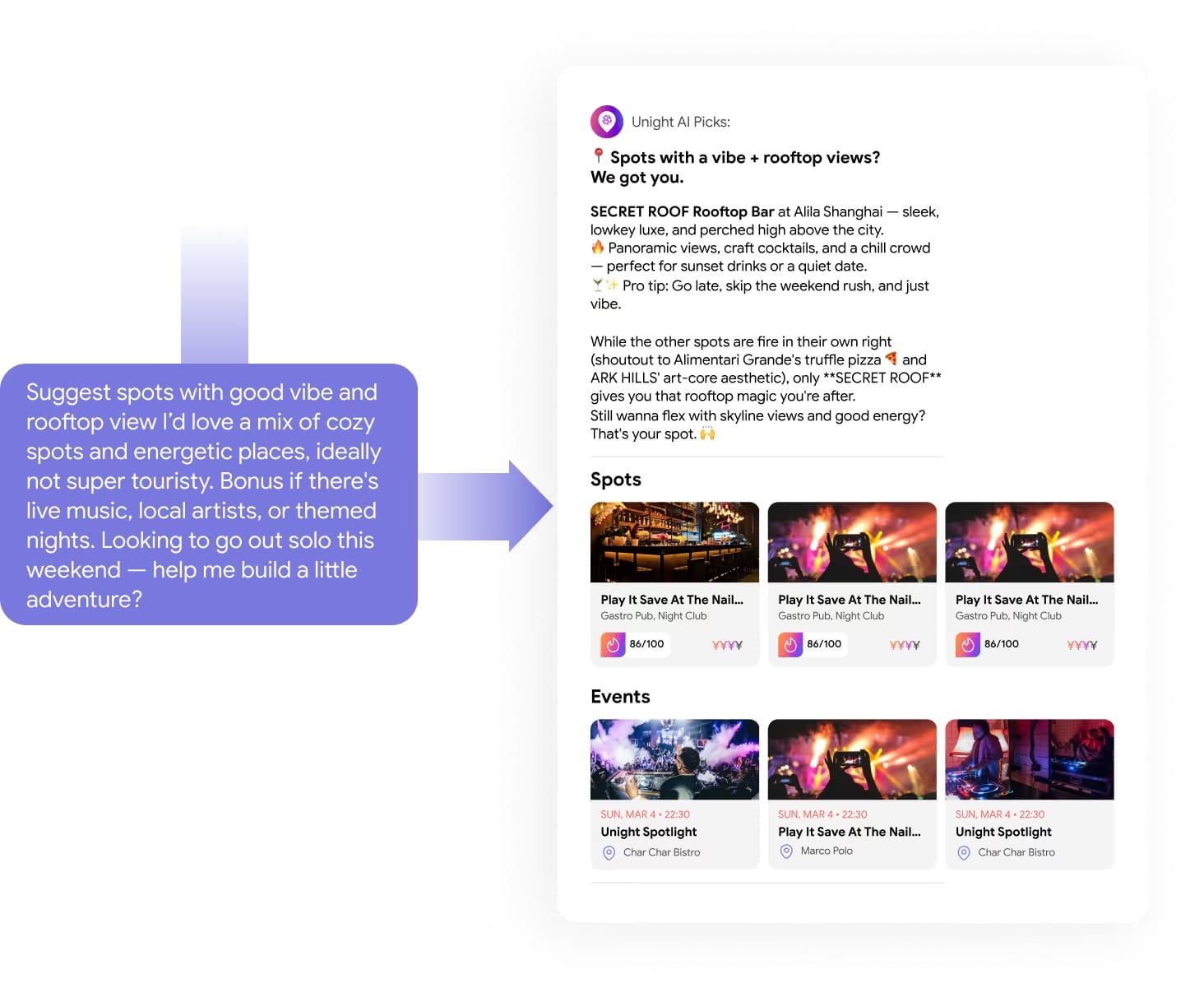
Unight AI answers questions about venues for a nightlife platform serving 200,000+ users. Its data layer combines TripAdvisor reviews, SmartShanghai editorial content, internal user reviews and community commentary, tagged by a custom ML system. Search runs on PostgreSQL with pgvector, LLM re-ranking orders the results, and responses use only verified database entities.
The published timings show where an answer spends its time:
- Intent classification: about 150 ms
- Vector search: 1.2 s
- Re-ranking: 150 ms
- Guardrailed response: 650 ms
Together they come to roughly 3 seconds end to end.
For your estimate, the lesson is to list the data layer, retrieval and response checks as separate lines and to write the target response time into the requirements. In Unight AI, vector search was the longest published step, so a latency target also shapes the retrieval design.
What drives agentic AI development cost
AI agent development gets more expensive along five factors: autonomy and write access, tools and integrations, model choice and reasoning depth, memory and data, and compliance with human oversight. Each one adds build work up front and a line in the monthly bill. The table below pairs each factor with a way to contain it.
| Factor | Cost driver | Cost control |
|---|---|---|
| Autonomy and write access | Permissions, rollback, approvals, action logs | Start with drafts that a person approves |
| Tools and integrations | Authentication, data mapping, error handling and tests for each system | Limit the first version to one or two systems |
| Model and reasoning depth | Each call is priced by the model's rate and the tokens it uses, across many calls per task | Compare rates and token use per step, route simple steps to a smaller model |
| Memory, knowledge and data | Preparation, vector search, refresh cycles | Index only the sources the task needs |
| Compliance and human oversight | Risk assessment, logging, documentation, reviewer time | Map obligations during discovery |
Autonomy and write access
Adding write access to a workflow creates extra work around permissions, approvals and recovery. Once the agent can change records in a CRM or a payment system, it needs scoped permissions, a way to undo an action, an approval step for risky changes and a log of what changed and why.
Each of these is a feature with its own design, build and tests. Write access is also where a mistake costs real money, which is why the approval step is worth building before you need it.
Mind Studios' insight: In the first version, the agent prepares the action and a person approves the write. You keep the speed gain on research and drafting, and the approval data you collect shows which actions are safe to automate next.
Tools and integrations
Every connected system brings its own authentication, data schema, rate limits and failure modes. Each one needs tests for the moments when it times out or returns something unexpected, so the integration line grows with every system the agent touches.
The Model Context Protocol is an open-source standard for connecting AI applications to external systems, so a team writes fewer one-off connectors. Mapping your data and handling your edge cases is still project work, though, so count integrations per system even when an MCP server already exists.
Model choice and reasoning depth
The cost of a model call depends on the provider's rate for that model and on how many input and output tokens the call uses. An agent makes many calls in one task, so comparing those inputs for each step shows where model choice changes the task budget. Classification and extraction can often run on a smaller model, while planning stays on a stronger one. Routing is covered with the other cost levers below.
Memory, knowledge and data
A knowledge base and memory between sessions bring three kinds of work: data preparation, vector search and a refresh process for when sources change. If your knowledge sits in raw form, such as recordings, scanned contracts or scattered wikis, preparing it is a separate budget line.
On Rebind's e-reading platform, hundreds of hours of expert commentary had to be organized and indexed before the product could blend it with AI-generated responses.
When an agent relies on company documents, the estimate needs to cover source preparation and updates, and the refresh process should match how often those documents change.
Compliance and human oversight
For high-risk systems, the EU AI Act turns compliance into build work. The European Commission's summary lists the obligations: risk assessment and mitigation, activity logging for traceability, appropriate human oversight, and a high level of robustness, cybersecurity and accuracy.
Those rules apply from December 2, 2027, for high-risk areas such as employment, and from August 2, 2028, for AI built into regulated products. Each obligation becomes something you build or staff: logs need storage and retention, and oversight needs review screens and reviewer hours.
In the US, the sector usually sets the bar. When an agent handles electronic protected health information for a covered entity or its business associate, the HIPAA Security Rule's technical safeguards require access control and audit controls. Those map onto agent permissions and action logs, so they belong in the build estimate.
AI agent cost per month: what it takes to run an agent
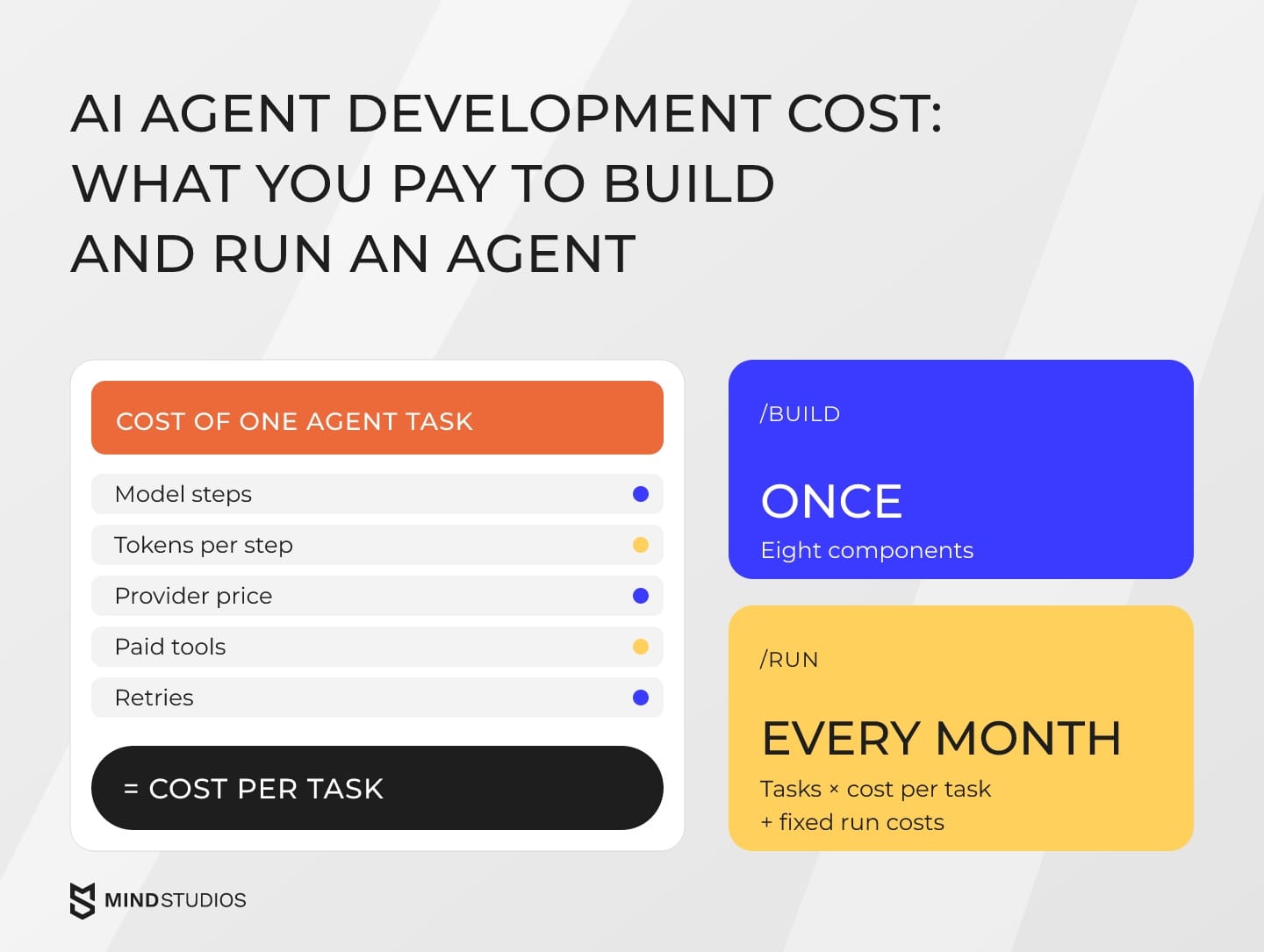
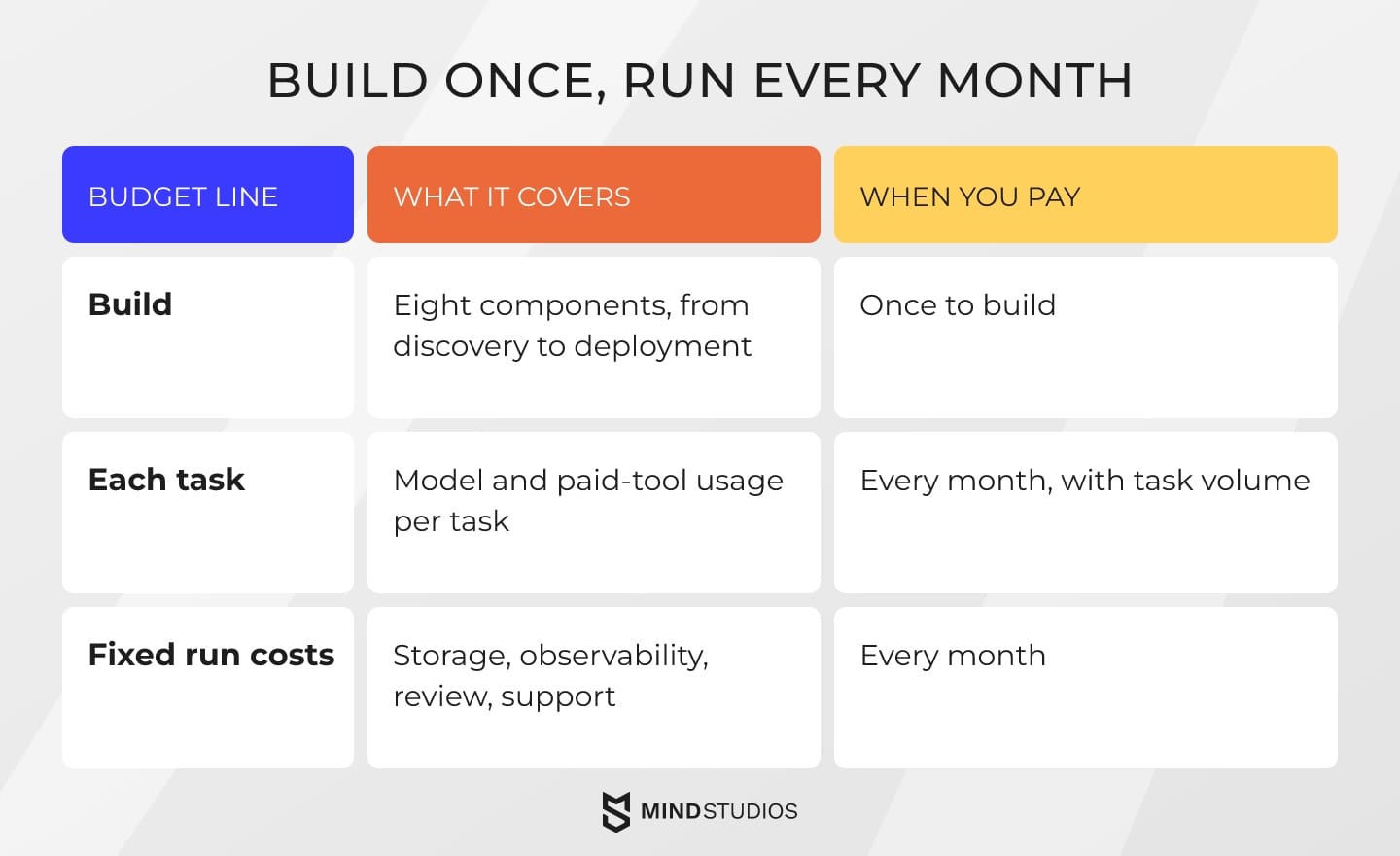
The monthly cost of an agent is the number of tasks times the cost of one task, plus recurring costs for storage, observability, review and support. The AI agent cloud cost (compute, storage, network) sits apart from token spend, so an estimate that shows only model usage leaves out lines you pay every month.
For token-priced APIs like the one in the example below, each model call is billed by the tokens it sends and receives. An agent task combines several such calls with tool calls that may be charged separately, and this section prices that combination. The diagram below separates what you build once from what you pay every month.
Cost per task: the unit to budget
An agent task is a chain of model calls and tool calls, so its cost is the sum of every paid call, retries included. Anthropic's multi-agent research data shows that agents typically use about 4× more tokens than chat interactions, and multi-agent systems use about 15× more.
For your budget, this means a forecast based on chat-style token counts is likely to come in low from the first month. Tool definitions add to the bill as well. The Anthropic pricing page states that tool names, descriptions and schemas are billed as input tokens, and that the API adds its own tool-use system prompt.
The working formula for a task and a month
Our working formula first estimates dollars per task, then combines monthly task volume with recurring monthly costs. You plug in your own volumes and your provider's published prices:
Cost of one task:
C_task = Σ over steps s [q_s × (1 + r_s) × (T_in × P_in + T_cw × P_cw + T_cr × P_cr + T_out × P_out) / 1,000,000] + Σ over paid tools t [(1 + r_t) × n_t × p_t]
Monthly run cost:
R = N × C_task + S + Mon + H × C + M
Cost per accepted result:
R / N_accepted, where N_accepted > 0
The terms are defined as follows, with every count taken over the same month:
N: tasks the agent runs in the monthN_accepted: tasks whose result passed an acceptance criterion agreed before the pilotq_s: original calls of stepsdivided byN; it equals 1 on a fixed route where every step runs once per task and rises above 1 when a loop sends a task through the step again, since each pass counts as a separate callr_s: repeated paid calls of steps(retries, regenerations) divided by its original calls; on a fixed route, that equals repeats divided byNT_in,T_cw,T_cr,T_out: average regular input tokens (tool definitions and tool results included), cache-write, cache-read and output tokens per paid call of steps, retries included; a forecast can assume retries have the same profile as original callsP_in,P_cw,P_cr,P_out: the provider's price in dollars per million tokens of each kindn_t,p_t,r_t: original calls of paid tooltper task, the price of one call, and repeated calls divided by original calls
The other four terms cover the monthly costs that sit outside per-task usage:
S: infrastructure only (vector database, compute, storage, network) in dollars per monthMon: observability and logging tools in dollars per monthH × C: hours people spend checking and correcting agent output, times the cost of a reviewer hourM: engineering upkeep in dollars per month: prompt and test updates, moves to new model versions, integration changes
Each kind of work sits in one term only, so nothing is counted twice. To check the formula against reality, divide the month's actual token and tool bill by N, because repeats are already in that figure.
If a whole task sometimes reruns from scratch, treat that as a separate assumption and apply (1 + r) to the whole sum instead of to each step.
A worked example on published prices
Here is the formula on Claude Sonnet 4.6, which Anthropic lists at $3 per million input tokens, $3.75 for five-minute cache writes, $0.30 for cache reads and $15 for output. The assumptions are chosen for illustration:
- a fixed route of six steps with no loops, so
q_s = 1for every step - each step sends 2,000 fresh input tokens plus a 6,000-token shared prefix (system prompt, tool definitions) and returns 500 output tokens
- the step that runs the web search counts the returned results inside its 2,000 fresh input tokens, since Anthropic bills search content as input tokens
- step one writes the prefix to cache, and steps two to six run inside the five-minute cache window, so each reads it
r_s = 0.1on every step, with each retry billed like the original call (a conservative choice, since a retry of step one would usually read the cache it just wrote)- one web search per task at Anthropic's $10 per 1,000 searches, with no search retries
Step one costs $0.036 and each later step $0.0153, so model usage comes to about $0.124 per task with retries. The search adds $0.01 and brings C_task to about $0.134. At 10,000 tasks a month, N × C_task is roughly $1,340 before S, Mon, H × C and M.
Cost per accepted result includes operating overhead and unsuccessful attempts, which makes it useful when comparing the agent with the current workflow. When some tasks fail the quality bar, it rises above R / N. That gap shows how unsuccessful tasks raise the operating cost allocated to each accepted result.
What else runs every month
Model and paid-tool usage is the most visible monthly line. The table lists the rest, what makes each grow and where it shows up:
| Monthly line | Grows with | Shows up in |
|---|---|---|
Model and paid-tool usage (N × C_task) |
Task volume, model calls per task, retries, model choice, paid tool calls | Provider invoices |
Vector storage and search (part of S) |
Index size, query volume | Cloud or database invoice |
Hosting and compute (part of S) |
Traffic, number of environments, hosting region | Cloud invoice |
Observability and logs (Mon) |
Trace volume, retention period | Tool subscription or cloud invoice |
Human review (H × C) |
Share of tasks a person checks, cost of a reviewer hour | Your team's time |
Maintenance (M) |
Prompt and test updates, changes in connected systems, model retirements | Support contract or partner invoice |
Model retirements are predictable enough to budget for inside M. OpenAI's deprecations page lists retired models with recommended replacements and gives at least six months' notice for generally available models, unless safety or compliance concerns require a faster timeline. Each switch means rerunning your test set, adjusting prompts and recalculating C_task.
Agentic AI cost control: keeping run costs predictable
Two sets of levers keep run costs predictable. Provider levers lower the price of the tokens you send: caching the repeated part of the prompt and batching tasks that can wait. Architecture levers cut the number of tokens and model calls through routing, step and budget limits, stop conditions, a narrow scope and approval only where errors are expensive.
Provider discounts are published, so you can build them into the forecast. On Anthropic's pricing, a cache read costs 0.1× the base input price on most models, and the Batch API gives a 50 percent discount on input and output tokens for asynchronous work. In the example above, removing the cache would raise the task from about $0.134 to about $0.218.
The six levers below work together. Most of them have to be designed in during the build, because adding them after launch means reworking flows that already run:
- Cache the stable prefix: system prompt, tool definitions, policies.
- Batch work: send work that can wait, such as nightly reconciliation or document backlogs, through batch processing.
- Route simple steps: run classification and extraction steps on a smaller model.
- Cap steps and spend: set a limit per task and stop the run when it hits the cap.
- Keep the scope narrow: one workflow and a short list of tools.
- Require human approval: only for actions where a mistake is expensive.
Measure three numbers from the first day of the pilot: the cost of each task, the share of model calls that are retried and the share of tasks escalated to a person. Together they show whether spend is rising because volume grew or because the agent became less efficient.
A cost model built from your own workflow's samples, before anyone writes code, gives the build estimate a solid basis.
Custom agent, platform agent or framework build
Custom AI agent development cost sits in the build and in support, with the model paid by usage. A custom build often runs on an open-source framework, which carries no license fee. A platform agent moves the spend into a subscription or usage fee plus setup and integrations with your systems.
LangGraph and CrewAI use the MIT license, as the LangGraph repository and the CrewAI repository show, so their source code is free to use. Engineering, infrastructure and model usage still need a budget.
Because a framework can sit under a custom agent, the paths differ in the base you start from and in who does which work. The table shows how each splits the spend:
| Path | Paid once | Paid every month |
|---|---|---|
| Custom agent on its own orchestration code | Discovery, agent logic and orchestration, integrations, evaluation | Model usage, hosting, observability, support of the codebase |
| Custom agent on a framework (LangGraph, CrewAI) | Discovery, development on the framework, integrations, evaluation | Model usage, hosting, observability, support, framework upgrades |
| Platform agent | Setup, configuration, integrations with your systems | Subscription or usage fee, paid add-ons, model usage if billed separately |
A platform agent's price depends on the vendor's billing unit (seats, conversations or resolved tasks), tier limits and add-ons, so compare the paths at your projected volume. When your workflow matches what a product already does, a platform agent is a sound choice.
AI agent pricing models and what they mean for your budget
AI agent development pricing has two layers: what an agent product charges you and what a development partner charges to build one. Each pricing model puts budget risk on a different party. The question to ask is who pays when volume grows or when the task turns out more complex than it looked.
How agent products charge
Agent products charge by one of four units. The unit decides whose bill grows as your volume does:
| Pricing model | You pay for | Budget risk |
|---|---|---|
| Per seat | Each user with access | Predictable, though you pay for seats that rarely use the agent |
| Per conversation or task | Each session or completed task | Your bill grows in step with volume |
| Per outcome | Each resolved ticket or finished result | You pay for success, so the definition of "resolved" carries the risk |
| Usage-based | Tokens, API calls, compute | The bill follows agent efficiency, so long tasks and retries land on you |
Per-outcome pricing looks safest on paper. In practice, it protects you only when the contract defines a resolved case precisely and caps the monthly total.
How development partners charge
Development partners work under three common models, and each suits a different level of certainty about the task:
- Fixed price: scope and price are agreed up front. This works when the task, the systems and the quality bar are already clear, and changes go through change requests.
- Time and materials: you pay for the hours actually spent. This stays flexible while steps and exceptions are still unknown, and the budget needs a cap and regular reviews.
- Dedicated team: a stable team works on a monthly basis. This fits a roadmap of several agents and continuous improvement, with your side setting priorities.
For an agent, the big unknown before a pilot is the number of steps and exceptions in a real task. Pricing the pilot and the production build separately handles that uncertainty under any of the three models.
Our comparison of software pricing models covers the contract mechanics of each.
AI agent implementation cost by stage
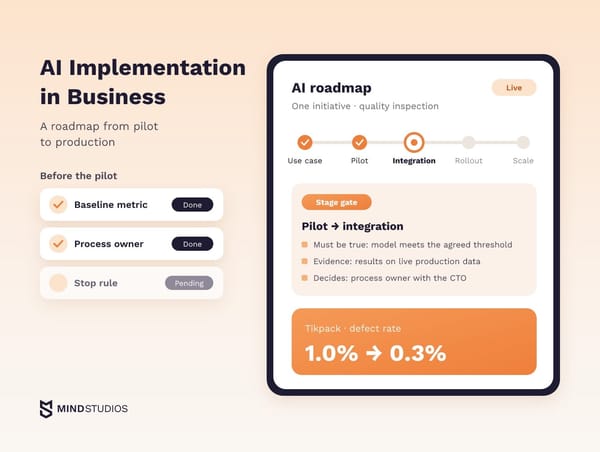
The cost of AI agents is paid in stages. First comes a proof of concept on one task, then a pilot on live data with human approval. Production follows, with observability, permissions and rollback, and after that come new tasks on the same foundation.
Each stage has its own budget, and the decision to move on rests on the pilot metric you agreed beforehand. Staging the budget this way puts the largest spend behind evidence.
The proof of concept shows whether the model can do the task at all. The pilot gives you the real call count, retry share and review hours to feed the monthly formula. In later stages of AI agent development, new tasks reuse the knowledge base, integrations and test harness, so part of their build is already paid for.
How to get an AI agent development cost estimate
An accurate estimate starts with the task and its numbers. A partner needs to know how many tasks run per month, how many steps and systems each one involves, which actions the agent takes on its own, what error rate is acceptable and who approves risky actions. With those five inputs, they can price both the build and the month.
Before any AI agent development starts, five steps turn those inputs into an estimate you can compare across partners:
- Describe the task: what it costs today, who does it, how long it takes and how often errors happen.
- Collect real examples: gather cases of the task, including the awkward ones, to use as test cases.
- List the systems: name those the agent reads from and writes to, and the permissions each action needs.
- Calculate task cost: use the formula above with your volumes and the provider's published prices.
- Split the quote: ask partners to price the build and the monthly run cost as separate lines.
What a checkable estimate states
An estimate is only as useful as the assumptions under its numbers. Each line should arrive with the inputs that produced it, so you can rerun it when the workflow or the provider's prices change:
- Build, by component: scope assumptions, the exceptions included and excluded, the acceptance criterion, the owner after launch
- Evaluation: size and source of the test set, the pass threshold, how often it reruns
- Cost of one task: model and published price used, model calls per task, cache assumption, retry rates, paid tools
- Monthly run cost: task volume
N, values forS,Mon,H × CandM, and how each changes if volume doubles - Cost per accepted result: the acceptance criterion and the expected share of tasks that pass it
With those lines in hand, payback is the build cost divided by the net monthly saving (what the task costs today minus R), and it exists only when that saving is positive.
The quote itself deserves the same scrutiny, and five gaps in it point to cost that will show up later:
- No line for work after launch
- No evaluation plan or test scenarios
- No limit on steps or spend per task
- No plan for when the model version is retired
- No clear ownership of prompts, test sets and code
Dmytro Dobrytskyi, CEO at Mind Studios, explains which cases decide whether a per-task estimate holds up:
An average cost per task hides the cases that sink a budget: the ones that retry, call extra tools or end up with a person. In a system like Unight AI, an answer passes intent classification, vector search, re-ranking and a guardrailed response, so the questions that strain search or trip the guardrail are the ones to test. Put your messiest real cases in the sample and ask for their cost next to the average.
Budget for the agent you will run
AI agent development cost becomes easier to plan once you define the first workflow and the actions it may take without approval. A frequent workflow gives more chances to save when each accepted result costs less than the current process, and the monthly comparison still has to include shared operating costs. A workflow with few systems and a single risky step a person can approve keeps the integration work small.
The budget stays manageable when the cost of each task, its quality and its limits are measured from the pilot onward. Autonomy then grows as fast as the pilot metric allows, and those numbers show when the next workflow is worth building.
A two-line estimate for that first workflow, with the build and the run priced separately, turns this decision into a number your board can approve.
FAQ
Can we take an AI agent in-house after launch?
Yes, if the handover covers more than the code. Ask your AI agent development partner for:
- source code and infrastructure configuration
- prompts and test sets of real tasks
- access to observability and logs
- a runbook for failures and model changes
On your side, you need an engineer to own the integrations and someone to review quality.
How much would it cost to run five AI agents?
The total depends on each agent's workload and on which operating costs the agents share. Shared services enter the budget once, while usage is calculated for each agent:
- each agent's monthly task volume times its own cost of one task
- shared costs, such as observability, knowledge base and hosting, counted once and split across agents
- support for all five, which grows with the number of integrations
Can I build an AI agent on a small budget?
Yes, if you spend the budget in stages and fund the proof of concept first. Two groups of lines behave differently:
- can wait for later stages: a polished admin panel, extra integrations, autonomous writes, a second agent
- stay at any budget: a test set of real tasks, observability and support after launch
Cutting the second group pushes the cost into production incidents.
What does AI agent deployment cost?
Deployment is part one-time setup and part monthly spend. Once: cloud or on-premise environments, access rights and secrets management, a tested rollback path and load testing. Every month: hosting, log storage, monitoring and on-call support. An agent that writes to core systems needs its rollback path rehearsed before go-live.
How much does agentic AI cost compared with a chatbot?
An agent usually costs more per task than a chatbot costs per conversation. One task takes several model calls to plan, use tools and read their results, and each call is billed by its tokens. It also takes more to build, since the right to act needs permissions, approvals and action logs. The token multipliers are in the monthly cost section above.
How long does it take to build an AI agent?
AI agent development timelines follow the same drivers as the budget: how many systems need integrating, how ready the data is and how long the agent takes to reach the quality bar on your test scenarios. A read-only assistant over clean data moves faster than an agent writing to an ERP, so ask for a timeline for each stage.