
 ChatGPT
 Perplexity

Enterprise EHR/EMR systems often deliver clunky interfaces that don't match your workflows. This guide covers custom EHR/EMR development: essential features, compliance requirements, costs, and implementation strategies.
Highlights:
- Over 70% of physicians report that EHR systems contribute to burnout, according to research.
- Basic EMR development starts at $120,000, which is often 3–5 times less than annual licensing fees for enterprise solutions.
- Properly designed EMR systems reduce documentation time by up to 40% compared to standard platforms.
Most practices assume Epic or Oracle Health represents the only path to comprehensive EHR functionality. They invest hundreds of thousands in licensing, then discover these systems require extensive customization, dedicated IT staff, and ongoing training programs to handle basic tasks.
Custom EHR/EMR development offers an alternative. Instead of adapting your practice to software designed for 500-bed hospitals, you build systems that match how your team actually works.
Mind Studios develops custom healthcare software for practices that need EHR/EMR systems tailored to their specific workflows.
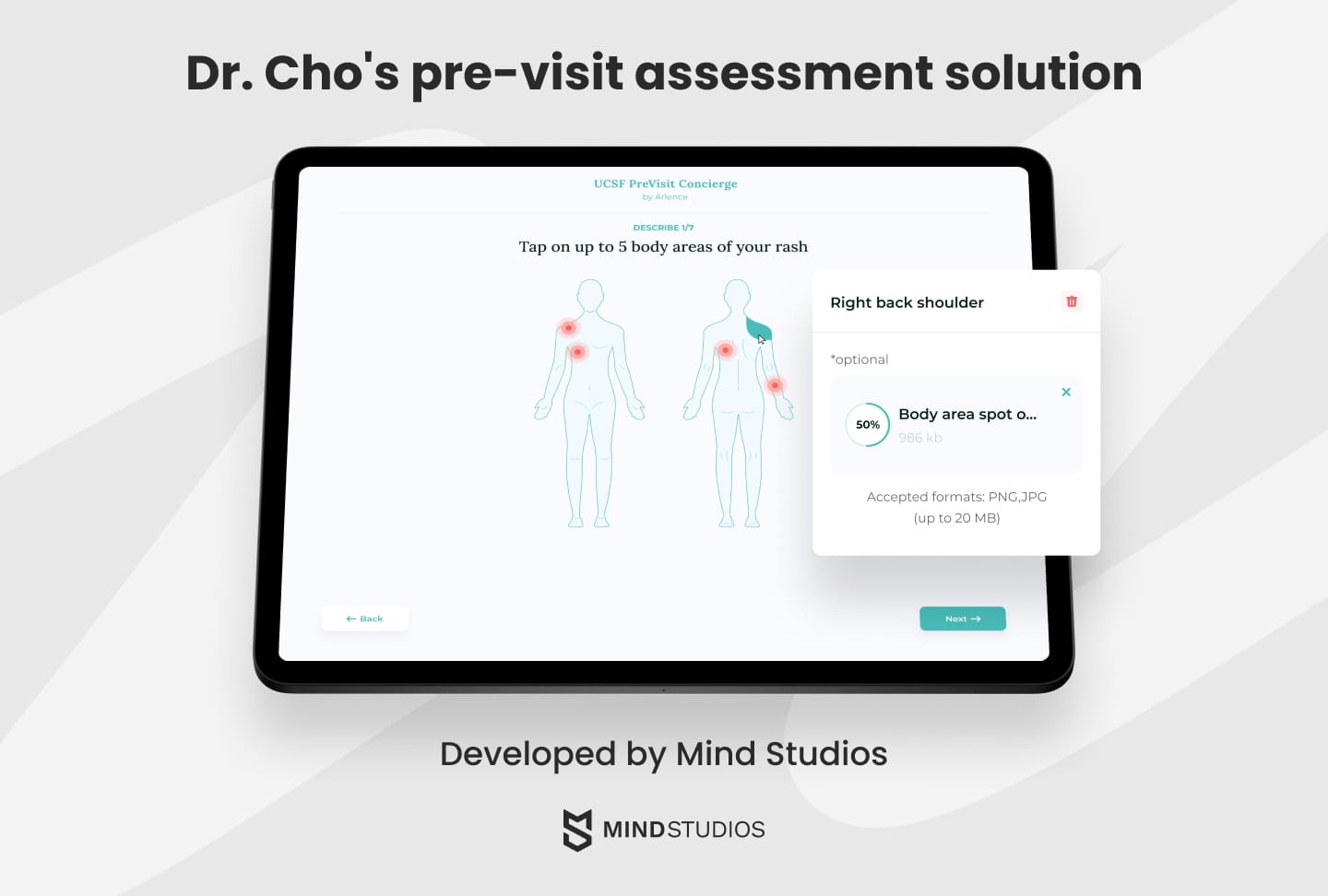
For instance, we've built solutions like a pre-visit medical platform, which uses intelligent algorithms to adapt interview questions based on patient responses while maintaining strict HIPAA compliance.
Contact our team to discuss building an electronic medical records system that fits your practice instead of the other way around.
What is an EMR/EHR system, and what tasks does it handle?
Before exploring development costs and technical requirements, understanding what these systems actually do helps clarify what you need to build.
- An Electronic Medical Record (EMR) system is a medical software platform that allows for the electronic recording, storage, and maintenance of information that’s typically collected in a healthcare provider’s paper charts. This includes medical histories, diagnoses, test results, allergies, treatment contraindications, doctor’s notes, and more.
- Electronic Health Record (EHR) systems extend EMR functionality by enabling data sharing across multiple healthcare facilities. While EMRs typically stay within a single practice, EHRs are designed for interoperability, allowing hospitals, specialists, labs, and pharmacies to access and exchange patient information.
Mind Studios' insight: Most practices confuse EMR and EHR terminology, but the distinction matters less than understanding whether you need internal-only records or multi-facility data sharing. We've worked with clinics that spent months debating EMR vs. EHR when they actually needed to decide between standalone practice software and systems that connect with external labs, hospitals, and specialists. Start by mapping your actual data flows rather than getting stuck on definitions.
Signs your practice needs a custom EHR/EMR system
Paper-based processes and generic practice management software work until they don't. Several clear indicators show when your current approach actively hurts clinical operations and patient care.
Practices typically wait until their EHR system is completely broken before exploring custom development. By then, they've already paid years of enterprise licensing fees and lost their most efficient staff to documentation burnout. The real cost isn't the software but the productivity you lose while waiting.
— says Dmytro Dobrytskyi, CEO of Mind Studios.
Your staff spends hours searching for patient records
When nurses can't locate test results during patient consultations or physicians waste time tracking down previous visit notes, you're losing billable hours and risking care quality.
Documentation takes longer than patient interactions
Physicians who spend 2–3 hours after shifts completing charts aren't dealing with the necessary administrative work. They're fighting poorly designed systems that make simple tasks complicated.
Your current software doesn't talk to labs or pharmacies
Manual data entry between systems creates transcription errors, delays treatment decisions, and duplicates work across your team.
Patient scheduling requires phone calls and paper calendars
Practices that can't offer online booking lose patients to competitors with modern systems. Manual scheduling also creates gaps in your calendar that reduce revenue.
You can't generate reports your practice actually needs
Generic EHR systems produce standard reports that don't match your specific workflows, specialties, or compliance requirements.
These problems don't fix themselves. They compound as your practice grows, eventually requiring either expensive workarounds or complete system replacement.
Contact our team to discuss building an EHR/EMR system that eliminates these bottlenecks.
Must-have features of a good EMR/EHR system that save time and improve care
Medical centers want tailored medical record software in order to have a reporting system that will be beneficial for the facility and its staff in all spheres they cover. Custom software solutions differ from hospital to hospital, but they have a common core functionality.
Let’s consider the most important aspects of an electronic medical records system for a hospital.
| Feature | Description |
|---|---|
| Patient page | Central hub containing personal data (age, gender, address, allergies, current medications, and medical condition overview). |
| Medical history | Complete record of illnesses, treatments, medications, and contraindications for accurate diagnosis and decision-making. |
| E-prescriptions | Tracking system for current and past treatments, medication history, and prescription management. |
| Charting | Streamlined documentation with customizable templates, voice recognition, and machine learning for autofilling and prompts. Reduces after-hours charting that physicians typically complete at home or on days off. |
| Lab integration | Real-time tracking of test sample delivery and results, seamless data integration with patient charts. |
| Reminders | Automated appointment notifications via email or SMS to reduce no-shows and save administrative time. |
| Patient portal | Self-service access to visit history, discharge reports, prescriptions, immunizations, allergies, lab results, and billing information with online payments. |
Mind Studios’ recommendation: Start with features that eliminate immediate pain points rather than building everything at once. We typically prioritize charting improvements and lab integration first because these directly reduce physician burnout and documentation errors. Patient portals and automated reminders come next, adding value without overwhelming your team during implementation.
In addition to these useful tools and data, you can enrich a web-based patient portal with convenient features such as:
- a built-in secure messenger for chatting with healthcare providers;
- an appointment scheduler for easy and convenient online booking of doctors’ appointments;
- e-prescriptions for requesting and renewing prescriptions online;
- an educational forum containing a wide range of educational materials and professional tips;
- the possibility of downloading and filling out forms.
Need help determining which features your practice needs first? Contact our team to discuss building a custom EHR/EMR system with the right features in the right order.
Let’s discuss
your tech
needs
Contact Mind Studios

Steps to develop your custom EHR/EMR system
Building a custom EHR/EMR system requires strategic planning beyond technical implementation. Healthcare software faces unique market dynamics, regulatory requirements, and adoption challenges that generic development approaches miss.
The following steps help you validate market fit, allocate resources effectively, and position your system for successful adoption.
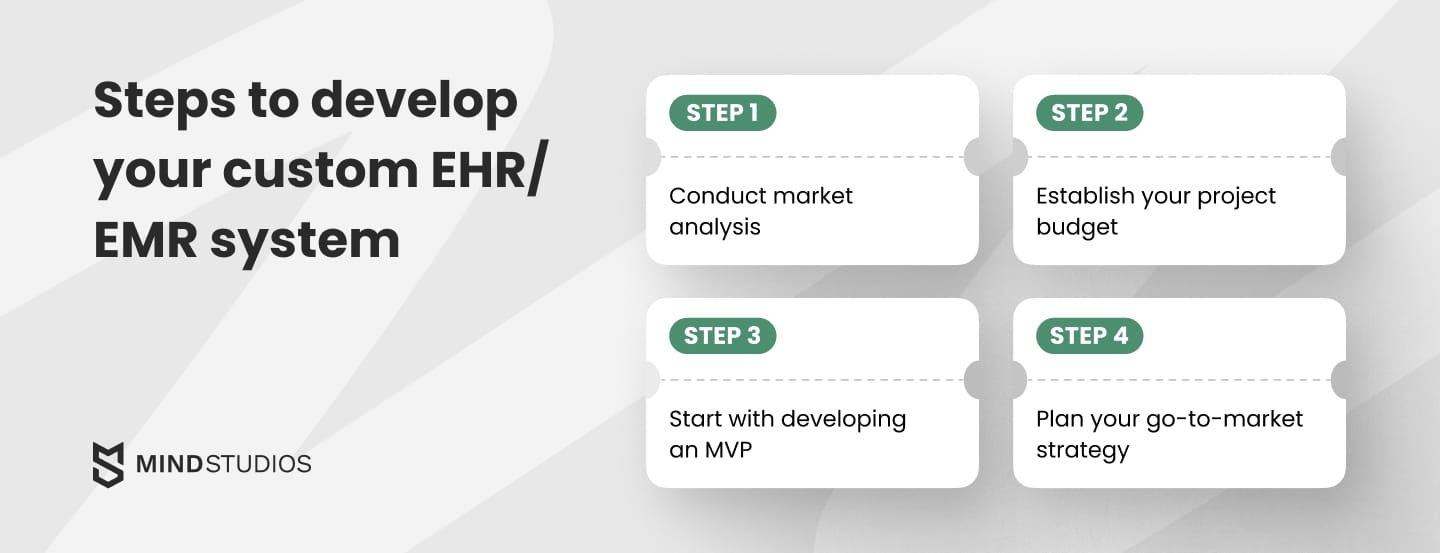
#1: Conduct market analysis
Before plunging into your own EMR/EHR software development, it’s vital to understand the market — what great and not-so-great solutions are currently offered, what they’re good at and what they lack, what users are seeking in new systems.
Analyzing your competitors and researching or surveying your target audience will give you a clearer picture of what your product needs to be to find its market fit.
For this:
- Find out what EHR/EMR systems are widely used and popular across a given state or across the whole country;
- Pick up to five different platforms and start researching them. Pick 3–5 widely-used platforms in your target market segment;
- Read detailed user reviews focusing on complaints rather than praise;
- Then request product demos from vendors to examine functionality firsthand.
This research reveals which features users actually need versus what vendors promote, helping you compile a focused feature list for your own system.
Research pricing and establish the budget for your project
We always emphasize that your budget will dictate how robust, far-reaching, and sophisticated your ERM/EHR suite will be.
We suggest creating a highly customizable software solution. The more specifically your system addresses your target audience's workflows, the more time and resources it saves them long-term.
If you need help establishing a realistic budget, contact our team for a custom quote on an electronic medical records system that fits market needs and follows current healthcare technology trends.
Start by developing an MVP
A minimum viable product (MVP) is a solution that has long since become a staple in EHR software development.
Launching an MVP makes it possible to test your product before you spend all of your money on full development.
MVP will provide you with:
- Initial analysis of performance;
- Feedback from users;
- Opportunity to catch bugs that slipped through the cracks;
- Possibly your first loyal users who will stick with the app;
- Possibly your first revenue stream from the app.
An MVP makes sense for new entrants to the healthcare software market. Established providers with existing user bases can move directly to full development.
Mind Studios’ recommendation: Your MVP should solve one complete workflow end-to-end, not provide partial functionality across multiple areas. Perfect charting with basic scheduling beats mediocre versions of eight features. A physician who completes documentation in half the time becomes your champion. Pick your MVP focus based on the workflow causing the most daily frustration.
Plan your go-to-market strategy
Healthcare software requires focused marketing that reaches decision-makers at medical practices and hospital systems rather than general consumers.
Direct outreach often works better than broad social media campaigns. Consider contacting hospitals directly, engaging in healthcare IT forums, reaching out to medical news outlets, and building referral networks through early adopters.
Professional marketing teams can research and test channels to identify what actually generates qualified leads for healthcare software.
How much does EHR/EMR development cost? Key factors that influence pricing
It’s difficult to estimate the minimum price of an online medical record system because of the many factors that impact the total cost.
Here are some of the factors that affect pricing.
- Complexity of the project;
- Platform — iOS, Android, web;
- UI/UX design — simple, average, or rich;
- Features and functionality;
- Integration with medical devices;
- Third-party SDKs and APIs;
- Compliance with Medicare and Medicaid standards;
- Medical workflow automation — medication tracking, drug management, accidents and incidents, etc.;
- Implementation of machine learning, AI, voice recognition and dictation, and scanning technologies.
Approximate cost breakdown for custom EHR/EMR systems
| Solution type | Features included | Estimated cost |
|---|---|---|
| MVP | Core charting, basic patient records, simple scheduling, essential HIPAA compliance. | $90,000–$120,000 |
| Basic EMR | Complete charting with templates, patient portal, e-prescriptions, appointment management, lab integration. | $120,000–$190,000 |
| Basic EHR | All EMR features plus multi-facility data sharing, external system interoperability, advanced security protocols. | $190,000–$250,000 |
| Advanced EHR/EMR | Full feature set with AI-powered charting, voice recognition, multiple third-party integrations (billing, imaging, pharmacy), custom workflows, advanced analytics. | $300,000–$500,000+ |
Conclusion
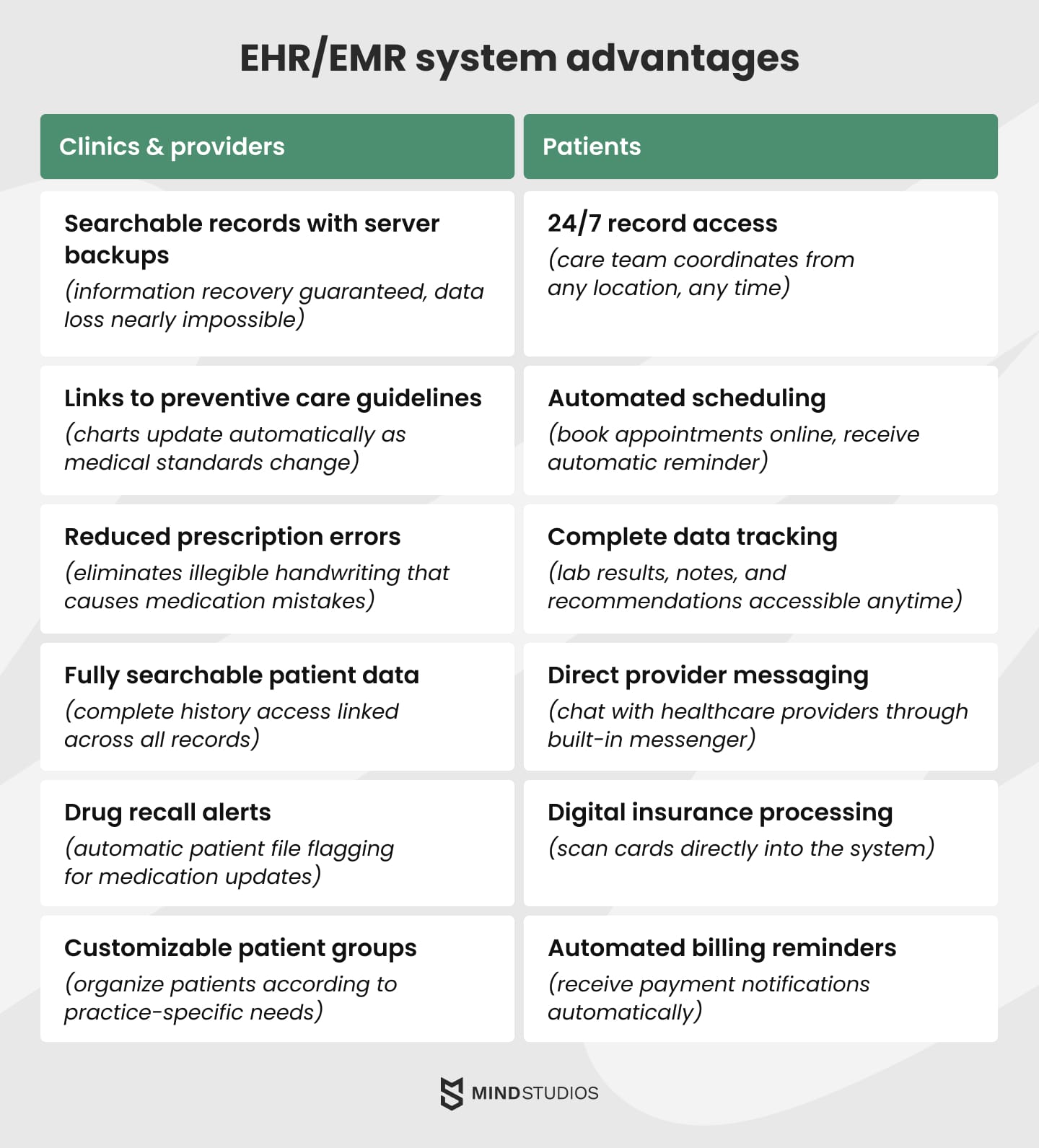
EHR/EMR systems solve critical operational problems that plague healthcare practices: lost patient records, illegible handwriting that causes prescription errors, hours spent searching for test results, and documentation that keeps physicians working long after their shifts end.
They also deliver measurable benefits: reduce documentation time by up to 40%, eliminate manual data entry between lab systems and pharmacy integrations, provide instant access to complete patient histories, and create automated workflows that free staff from repetitive administrative tasks.
Mind Studios has built custom EHR solutions for healthcare practices for years. We understand the technical requirements, HIPAA compliance considerations, and real-world constraints that determine whether healthcare software actually gets adopted by physicians and staff.
Schedule a free consultation to discuss building an EHR/EMR system that fits your practice workflows instead of forcing your team to adapt to generic enterprise software.