
 ChatGPT
 Perplexity

The wrong website migration approach could cost you months of lost rankings and thousands in recovery efforts. Discover the proven methodology successful businesses use to migrate a website to Webflow without losing traffic or performance.
Highlights:
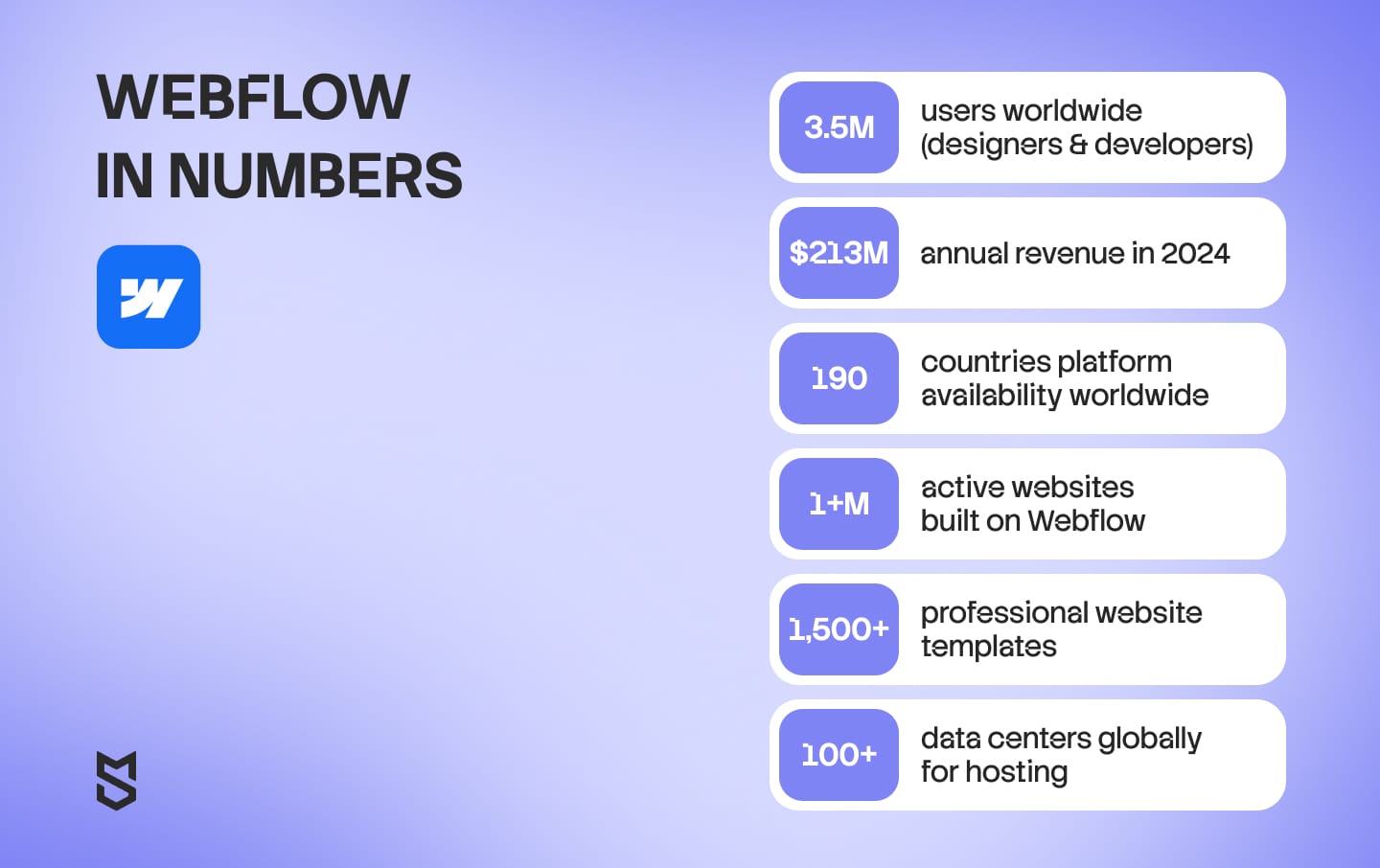
- Webflow's user base surpassed 3.5 million worldwide, with $213 million in revenue generated in 2024.
- Businesses consistently report significant increases in site sessions and organic search traffic after Webflow migration.
- Migration projects with proper planning show significant ROI increases within 12 months.
Website migration to Webflow has become one of the most strategic decisions growing businesses face today.
Companies now choose between maintaining legacy platforms with mounting technical debt or migrating to modern, performance-optimized solutions that accelerate content operations.
Mind Studios recently completed our own website migration from a traditional platform to Webflow, achieving dramatic performance improvements.
Just have a look at the results of one of our pages:
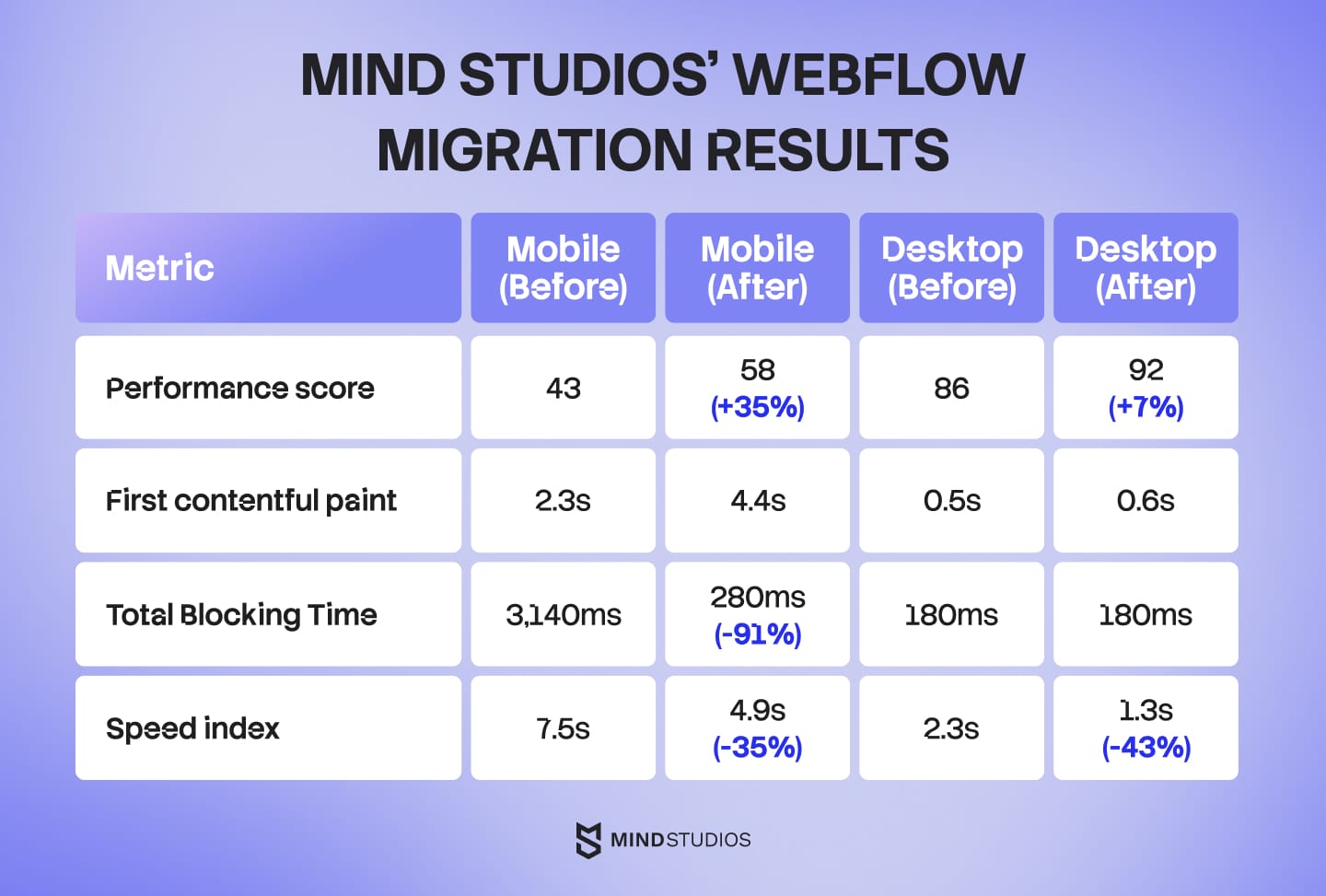
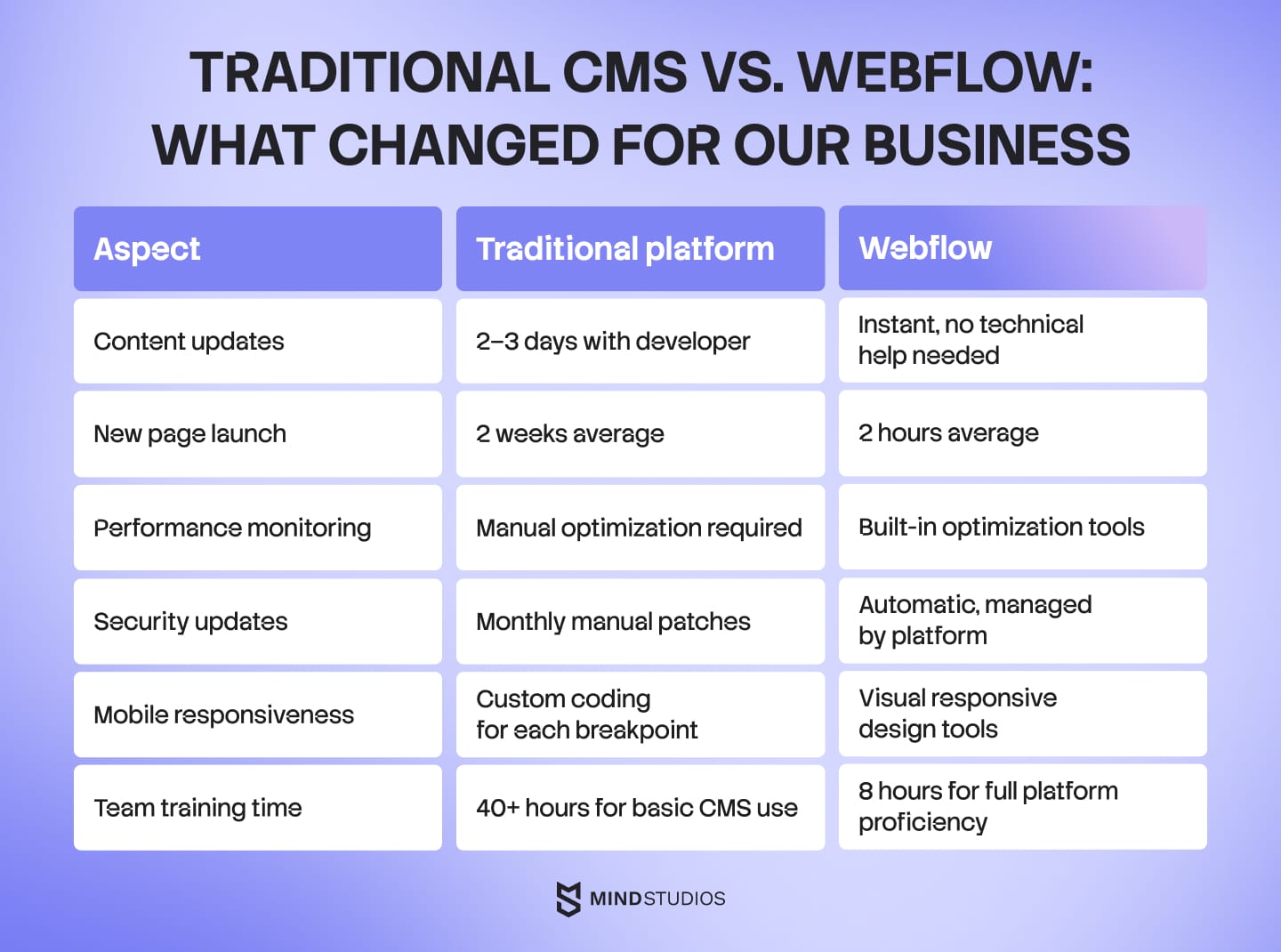
But the real transformation went beyond these numbers. Our marketing team went from waiting weeks for developer assistance to launching new pages in hours.
At Mind Studios, we help businesses navigate both complex migrations and custom development, allowing us to recommend the optimal approach based on your specific requirements, timeline, and business objectives.
Ready to explore how Webflow migration could transform your business operations? Schedule a free consultation with Mind Studios' migration specialists to get personalized recommendations for your specific needs.
After completing our own Webflow site migration process six months ago, we learned valuable lessons about how to migrate to Webflow, what works, what costs more than expected, and how to avoid common pitfalls that can derail your project timeline.
This guide shares our complete migration experience, from initial planning to post-launch optimization, giving you a proven roadmap for your own website migration to Webflow.
Why we chose Webflow (and why it might be right for you)
Typically, the decision to migrate from any platform to Webflow comes down to three core business needs:
- Content velocity;
- Performance requirements;
- Long-term scalability.
Our migration decision started when our marketing team calculated that launching a simple landing page required 2 weeks of developer time. After migrating to Webflow, the same task takes several hours.
The business case for Webflow migration has never been stronger than it is today. Developer costs continue rising while qualified talent becomes increasingly scarce, making traditional website management unsustainable for growing companies.
Remote teams need content autonomy that doesn't require technical handoffs, and search engines now prioritize page performance as a ranking factor. Webflow solves these challenges simultaneously while reducing long-term operational overhead. Companies still dependent on developer queues for basic updates are operating with a competitive disadvantage that compounds monthly.
— Dmytro Dobrytskyi, CEO at Mind Studios
Solving content bottlenecks
Traditional content management systems create bottlenecks that slow business growth. Before our migration, every website update required developer involvement, creating a queue system that frustrated our marketing initiatives.
Content updates that previously took our development team 3–4 days now happen instantly through Webflow's visual editor. This independence allows our marketing team to respond quickly to market opportunities without technical constraints.
Meeting Google's performance standards
Core Web Vitals have become critical ranking factors. Our migration achieved substantial improvements, with the most dramatic being the 91% reduction in Total Blocking Time on mobile devices.
These improvements translate directly to business value. Migrating to Webflow has been shown to be more cost-effective compared to traditional web development methods, and faster loading times correlate with improved conversion rates and reduced bounce rates.
Real cost savings beyond subscription fees
Traditional CMS platforms require ongoing maintenance costs that compound over time. WordPress sites need regular plugin updates, security patches, and developer intervention for customizations.
Webflow's hosted solution eliminates these hidden costs while providing enterprise-grade security and automatic updates.
1-year total cost of ownership: WordPress vs. Webflow
One of the biggest surprises when evaluating Webflow migration is discovering the true cost of your current WordPress setup.
While WordPress software is free, running a professional website requires multiple paid plugins, ongoing maintenance, and developer support that can cost thousands annually.
Cost category |
WordPress (self-hosted) |
Webflow CMS |
|---|---|---|
Platform & hosting |
$60–240/year |
$276/year |
Domain name |
$12–20/year |
$12–20/year |
Essential plugins
|
$400–800/year |
Included |
Security & maintenance |
$1,500–3,000/year |
Included |
TOTAL (Low end) |
$1,972–4,060/year |
$288–296/year |
TOTAL (Realistic) |
$3,500–4,500/year |
$288–296/year |
Security and maintenance include: Developer time for updates, troubleshooting, performance optimization, and emergency fixes (12-30 hours annually at $100/hour)
Pre-migration planning: What we did right
Successful website migration to Webflow begins months before any code is written. Our planning phase took 6 weeks and prevented costly mistakes that could have added months to our timeline.
Discovering what you actually have
We cataloged every page, asset, and functionality on our existing site. This process revealed 85+ pages across our main website and game development subdomain, including multiple outdated blog posts and service pages that could be consolidated during migration.
The audit identified:
- 20 main website pages requiring direct migration;
- 28 blog articles needing content updates during transfer;
- 180+ images requiring optimization and WebP conversion;
- 3 contact and lead capture forms to recreate in Webflow;
- 8 third-party integrations to maintain (analytics, CRM, chat tools).
Mind Studios’ insight: The content audit always surprises clients. They think they know their site, but we regularly find 20–30% of pages that serve no business purpose or duplicate existing content. One client had 47 outdated service pages, confusing both users and search engines. The migration becomes an opportunity to declutter your digital presence, not just move it.
Protecting your search rankings during the switch
Maintaining search rankings during migration requires meticulous URL mapping and redirect planning.
We documented every URL that generated organic traffic in the past 12 months using Google Search Console data.
Our SEO preservation checklist included:
- Complete URL mapping for 301 redirects;
- Metadata transfer for all indexed pages;
- Internal linking structure analysis;
- Sitemap creation for old and new sites;
- Google Analytics goal URL updates.
If your migration produces negative results, this will trickle down into your business. You'll see consistent declines in your conversion rate. Proper SEO planning prevents these revenue-damaging scenarios.
Learning from migration failures: what to watch for
Migration projects face predictable challenges. Based on industry research and our experience, we identified potential risks:
High-risk areas:
- Custom functionality recreation (8 weeks instead of planned 4 weeks);
- Third-party integration compatibility (3 integrations required custom solutions);
- Content formatting during transfer (15% of content needed manual adjustment);
- Team training on a new platform (doubled from the estimated 20 hours to 40 hours).
To address these challenges, we built a 30% time buffer into our project timeline, recognizing that migration projects consistently take longer than initial estimates.
We also created a comprehensive rollback plan with complete site backups, ensuring we could quickly revert if critical issues emerged.
Plus, we established a thorough staging environment for extensive testing and scheduled team training sessions well before launch to prevent last-minute knowledge gaps.
Building realistic timelines that actually work
Understanding realistic migration timelines is crucial for project planning and budget allocation. Timeline expectations vary dramatically based on your website's complexity, content volume, and technical requirements.
Approximate Webflow migration timeline by business type
| Business type | Website complexity | Typical timeline | Key factors |
|---|---|---|---|
| Small | 5–20 pages, basic CMS | 4–6 weeks | Simple content structure, minimal integrations |
| Medium | 21–100 pages, moderate CMS | 6–10 weeks | Multiple content types, CRM integrations, forms |
| Large enterprise | 100+ pages, complex CMS | 3–6 months | Custom functionality, multiple integrations, compliance requirements |
| E-commerce | Product catalog, checkout | 8–12 weeks | Payment gateways, inventory systems, user accounts |
Our Webflow migration timeline
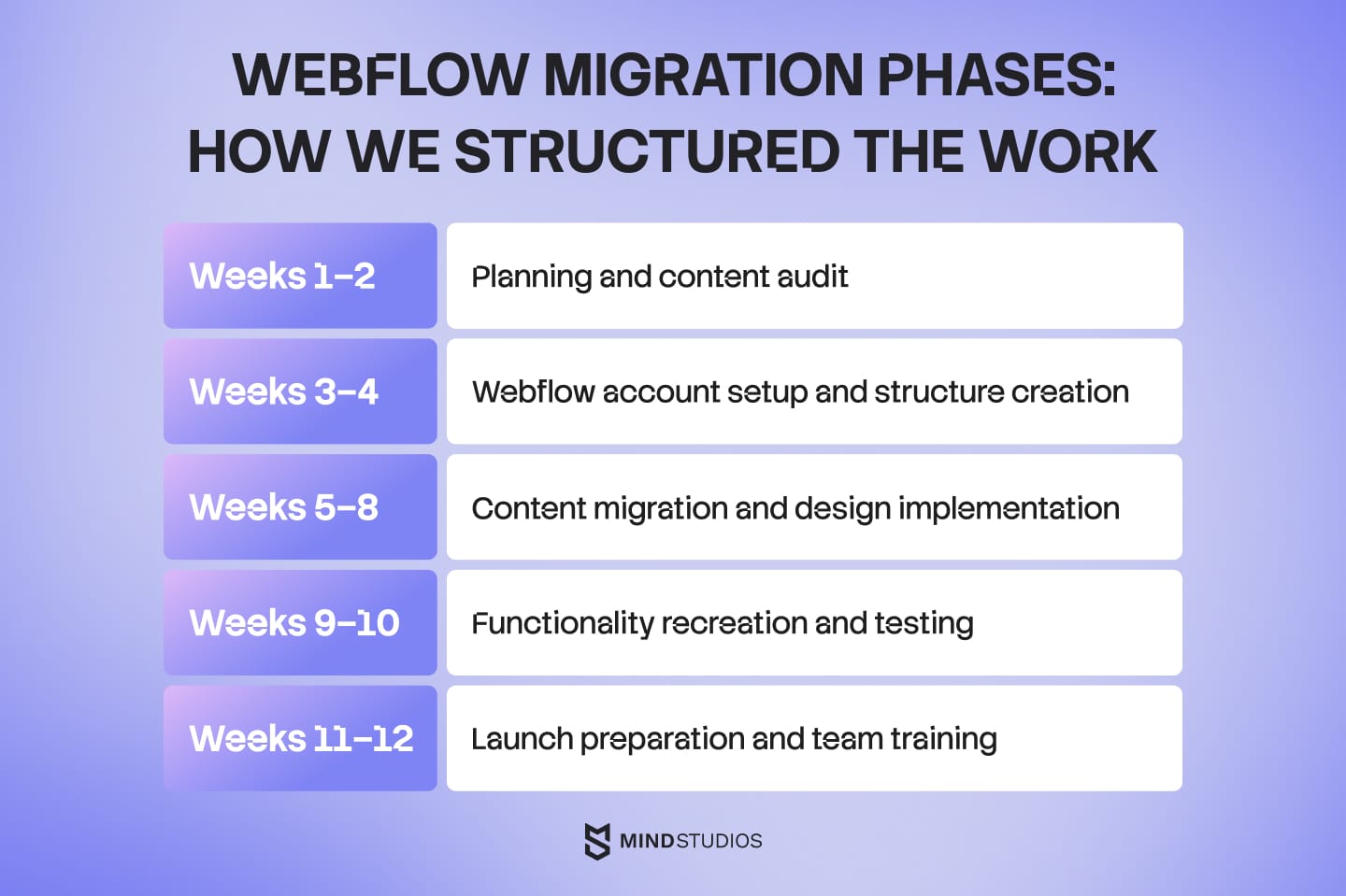
Our project timeline spanned 12 weeks, carefully structured to minimize risks while maintaining business continuity.
Unlike overly optimistic estimates that often lead to rushed launches and compromised quality, we designed this timeline with built-in buffers and logical phase progression.
Each phase has specific deliverables and success criteria, ensuring steady progress while allowing time for thorough testing and team adaptation.
Mind Studios’ insight: Every client wants their migration done faster, but rushed migrations create technical debt that haunts you for years. The extra weeks of careful planning and testing aren't delays but investments in long-term success.
Need help developing a risk-free migration strategy? Schedule a consultation with our experienced migration team to create a detailed action plan tailored to your website.
The technical migration process: Our step-by-step approach
Our technical migration followed a systematic five-phase approach that minimized risks and ensured quality at each stage.
This methodology prevented the common mistakes that cause SEO drops and functionality loss.
Phase 1: Foundation setup (Week 3–4)
Domain configuration and hosting setup
We configured our Webflow account and established the basic site structure before any content migration. This included:
- Custom domain connection and SSL certificate setup;
- Basic site settings and favicon configuration;
- Global typography and color palette establishment;
- Responsive breakpoint planning.
Project structure creation
Building the information architecture first prevented restructuring later. We created the main navigation structure, planned the CMS collections for dynamic content, and established the design system components we'd use throughout the site.
Phase 2: Content migration (Week 5–6)
Systematic content transfer
Moving numerous pages of content requires organization to maintain quality. We used a spreadsheet to track migration status for each page and identified content that needed updates during the transfer process.
Content migration priorities:
- High-traffic pages (20 pages generating 60% of organic traffic);
- Conversion-critical pages (landing pages, service pages, contact forms);
- Supporting content (blog posts, case studies, resource pages;)
- Administrative pages (privacy policy, terms of service).
Content optimization during migration
Rather than simply copying existing content, we improved it during the transfer. This included updating outdated information, improving readability, and optimizing for current SEO best practices.
Phase 3: Design implementation (Week 7–8)
Converting our existing design to Webflow's visual editor required understanding how design elements map to Webflow's structure. We recreated complex layouts using Webflow's grid and flexbox capabilities.
Phase 4: Functionality recreation (Week 9–10)
Forms and lead capture
Our site included different forms. Webflow's native form functionality handled most requirements, though some needed custom JavaScript solutions.
Third-party integrations
Maintaining connections to our CRM, analytics platforms, and marketing tools required careful integration planning:
- Google Analytics 4 and Google Tag Manager setup;
- CRM integration for lead tracking;
- Calendly scheduling widget integration;
- Custom chat widget implementation.
Phase 5: Testing and optimization (Week 11–12)
Performance testing across devices
We tested the new site on multiple devices and browsers to ensure consistent performance. This revealed several optimization opportunities that improved our Core Web Vitals scores.
Cross-browser validation
Testing included verification across Chrome, Safari, Firefox, and Edge on both desktop and mobile devices. We identified and fixed three browser-specific styling issues during this phase.
Mind Studios' recommendation: Use Webflow's staging environment extensively before launching. We caught 12 potential issues during staging that would have caused problems post-launch, including broken forms and missing analytics tracking.
Looking for expert technical migration support? Book a free consultation with our development team to avoid costly mistakes and get a detailed action plan tailored to your website.
Empower your project
with concrete tech
expertise
Contact Mind Studios

Connecting your business tools: what works and what needs workarounds
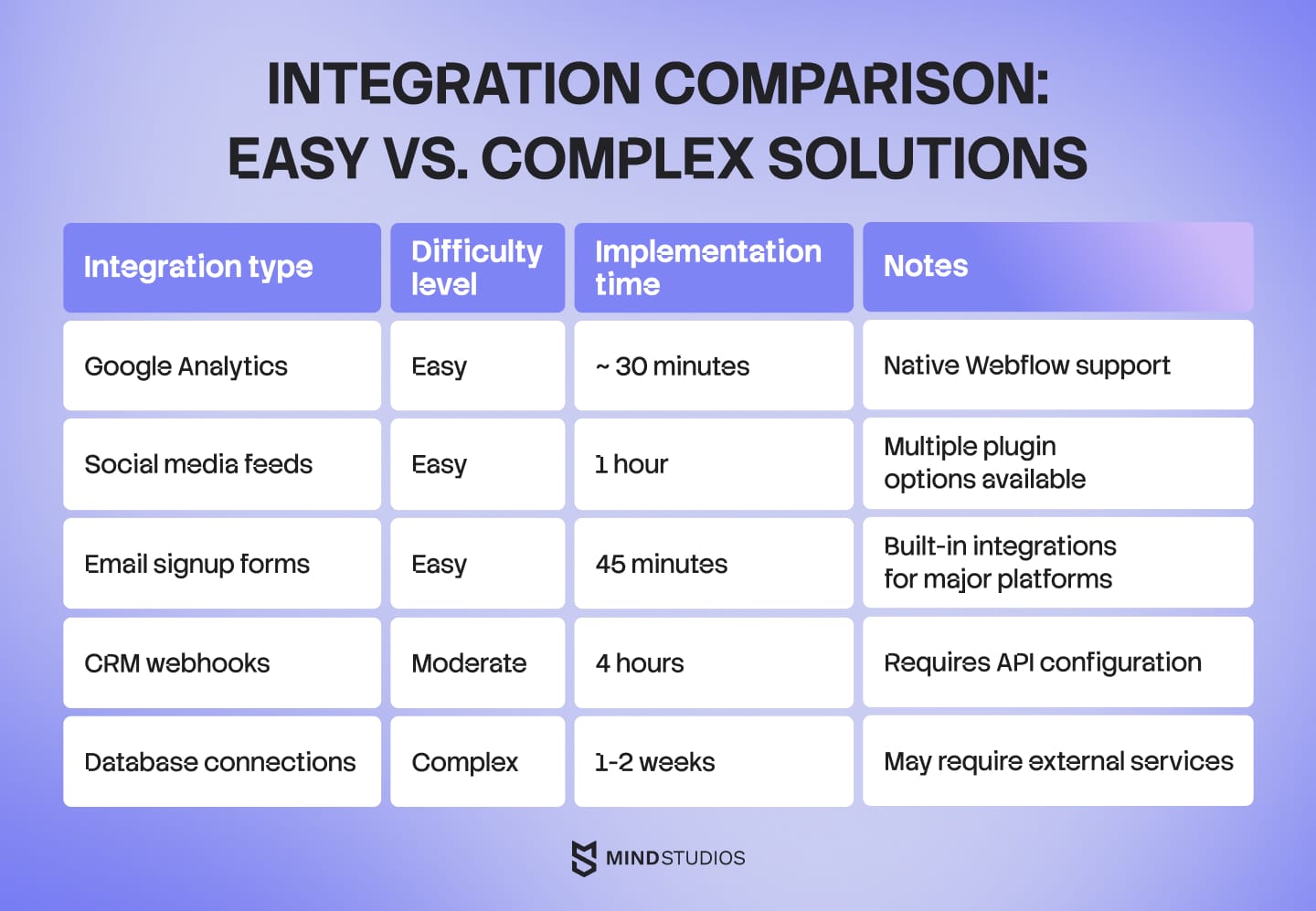
Moving a website to Webflow often requires recreating or optimizing integrations that connect your site to business-critical tools.
Our experience revealed which integrations transfer easily and which require creative solutions.
Analytics and marketing
- Google Analytics and tracking. Google Analytics 4 integration proved straightforward through Webflow's built-in Google Tag Manager support. We maintained all existing conversion tracking and established enhanced e-commerce tracking for better visitor behavior insights.
- CRM and lead management. Connecting Webflow forms to our CRM required custom webhook configuration, but the process was well-documented. Form submissions now automatically create leads with proper attribution data.
- Email marketing platforms. Our Mailchimp integration transferred seamlessly using Webflow's native integration options. Newsletter signup forms maintained the same functionality while gaining improved mobile responsiveness.
Mind Studios' recommendation: Budget extra time for integration testing. While Webflow supports most common business tools, the integration process often reveals edge cases that require additional configuration time.
Results and ROI: What we actually achieved
Six months after our website migration to Webflow launch, we can measure concrete improvements across performance, operational efficiency, and business impact metrics.
Performance gains delivered real business value
Our website performance transformation exceeded expectations, with the most significant improvements occurring on our industry-focused pages. The 91% reduction in Total Blocking Time represents a dramatic enhancement in user experience, directly correlating with improved user engagement and reduced bounce rates.
Team productivity transformed daily operations
The migration fundamentally changed how our team works. Content updates that previously required 2–3 days of developer time now happen immediately through Webflow's visual editor. Marketing campaign launches accelerated from 10 days to just 3 days, enabling faster response to market opportunities.
Most significantly, our marketing team gained 95% independence for website tasks, compared to just 20% before migration. This shift eliminated the bottleneck of developer dependencies and freed our technical team to focus on core product development rather than routine website maintenance.
Cost savings exceeded initial projections
Our 6-month cost analysis revealed substantial savings across multiple areas. We eliminated significant annual costs through reduced plugin licensing, simplified hosting, and eliminated security monitoring services. Developer time spent on website updates decreased by 85%, delivering considerable savings in maintenance costs.
Beyond direct savings, operational improvements delivered significant value. Faster marketing campaign deployment saved substantial opportunity costs, while eliminating emergency developer calls avoided overtime expenses. The total first-year ROI exceeded expectations, validating our migration investment.
Long-term business impact
The migration created lasting competitive advantages beyond immediate cost savings. Our marketing team now publishes 3x more content, accelerating our thought leadership and SEO efforts. Campaign deployment speed improved by 70%, enabling more agile marketing responses.
Perhaps most importantly, the platform's scalability means these benefits compound over time. As our team grows, Webflow's visual editing capabilities prevent the need for proportional increases in technical resources, ensuring sustainable operational efficiency.
Wrapping up
Our Webflow migration experience demonstrates that with proper planning and execution, businesses can achieve substantial improvements in website performance, team productivity, and operational efficiency.
The most important lesson we learnt from our migration: invest time in comprehensive planning rather than rushing to launch. The several weeks we spent in preparation prevented months of post-launch fixes and protected our search rankings throughout the transition.
Migration projects involve hundreds of technical decisions that impact long-term success. Working with teams who have completed similar migrations provides access to proven methodologies and helps avoid common pitfalls that can derail timelines and budgets.
Ready to migrate your website to Webflow? Learn from our experience and schedule a migration strategy consultation with our team and get a detailed roadmap based on real project successes, not theoretical frameworks.